Google Workspace can host the email for a domain you registered with Domain India, while your website stays on your hosting. Making it work is a DNS job: you prove to Google that you own the domain, then point mail at Google and publish the records that stop your mail looking forged. This guide covers each record, where to add it, and the hosting settings people forget.
You subscribe to Google Workspace with Google, and Google supports your Workspace account. Domain India provides the domain and the hosting or DNS where you add Google's records. This guide does not apply to Domain India Business Email; see Business Email vs the email included with your hosting.
Add Google's verification TXT record, then set the MX record to smtp.google.com with priority 1 (the older five aspmx.l.google.com records still work). Publish one SPF record containing include:_spf.google.com, the DKIM TXT record that the Admin console generates for you, and a DMARC record at _dmarc. Add them wherever your domain's DNS is actually managed. If your website is on cPanel hosting, set Email Routing to Remote Mail Exchanger so website mail goes to Google.
1. Before you change anything
- Find out where your DNS is managed.If the domain uses your hosting nameservers, you edit records in your hosting control panel. If it uses another DNS provider, such as Cloudflare, you edit them there. Records added anywhere else have no effect. How to change your domain DNS settings shows how to check.
- Copy out mail you want to keep.Once MX points to Google, your hosting mailboxes stop receiving new mail. Google's data migration tool in the Admin console can import mail from an IMAP mailbox, or you can export it from your mail app.
- Create the users in Google Workspacebefore you switch MX, so mail has somewhere to land.
- Pick a quiet timeto switch MX, and tell your team.
2. Verify your domain with Google
During sign-up, Google asks you to prove you own the domain. The usual method is a TXT record on the root of the domain (the name is @ or left blank) with a value that starts google-site-verification=. Copy the exact value from the Admin console, add it, then click Verify in the Admin console. If verification fails, wait a while and try again; DNS changes can take time to be seen everywhere. The verification record does no harm if you leave it in place.
3. Point mail to Google: the MX record
Google's current instruction for new setups is a single MX record:
| Type | Name | Priority | Value |
|---|---|---|---|
| MX | @ (the root of the domain) | 1 | smtp.google.com |
Domains set up before Google made that change use a set of five records: aspmx.l.google.com (priority 1), alt1.aspmx.l.google.com and alt2.aspmx.l.google.com (5), and alt3.aspmx.l.google.com and alt4.aspmx.l.google.com (10). They still work, so you do not need to change an existing setup. Follow whatever your Admin console shows.
Delete every other MX record for the domain, such as the one pointing to your hosting server. Mixed MX records send some mail to Google and some to your old mailboxes.
4. SPF: which servers may send as you
SPF is a TXT record on the root of the domain. For Google Workspace alone:
v=spf1 include:_spf.google.com ~allA domain may have only one SPF record. If one already exists, add include:_spf.google.com to it rather than creating a second record; two SPF records make both invalid. If your website also sends mail from your hosting server, such as contact-form messages or order emails, that server must stay in the same record. In cPanel, Email Deliverability shows the SPF value for your server, and you can merge Google's include into it.
5. DKIM: a signature Google adds to your mail
Google's DKIM record is a TXT record containing a public key that is generated for your domain. It is not a CNAME, and it cannot be copied from a guide.
- Generate the key.In the Google Admin console, open Apps › Google Workspace › Gmail › Authenticate email, choose your domain and click Generate new record. Choose 2048-bit unless your DNS host cannot store long TXT values, in which case choose 1024-bit.
- Publish it.Create a TXT record with the name Google shows, usually
google._domainkey, and paste the whole value, which startsv=DKIM1; k=rsa; p=. - Turn it on.Back in the Admin console, click Start authentication. If it says the record cannot be found, wait for DNS to update and try again.
If your website sends mail from your hosting server, keep your hosting's own DKIM record as well. It uses a different name, so the two do not clash.
6. DMARC: what to do with mail that fails
DMARC is a TXT record at _dmarc that tells receiving servers what to do when a message fails SPF and DKIM, and where to send reports. Start by monitoring:
v=DMARC1; p=none; rua=mailto:[email protected]Read the reports for a few weeks. Once every service that sends as your domain passes, move to p=quarantine, then p=reject. Gmail and other large mailbox providers require SPF, DKIM and DMARC from bulk senders, so set all three even if you send little mail.
7. Adding the records in your control panel
| Where your DNS is managed | Where to add the records |
|---|---|
| cPanel hosting nameservers | cPanel, Domains › Zone Editor, then Manage for your domain |
| DirectAdmin hosting nameservers | DirectAdmin, Account Manager › DNS Management |
| Webuzo hosting nameservers | Webuzo, Domain › DNS Zone Settings |
| Windows (Plesk) hosting nameservers | Plesk, Websites & Domains, then DNS Settings for your domain |
| Another DNS provider | That provider's DNS page; your hosting panel's records are ignored |
If you cannot find the DNS page in your panel, ask support.
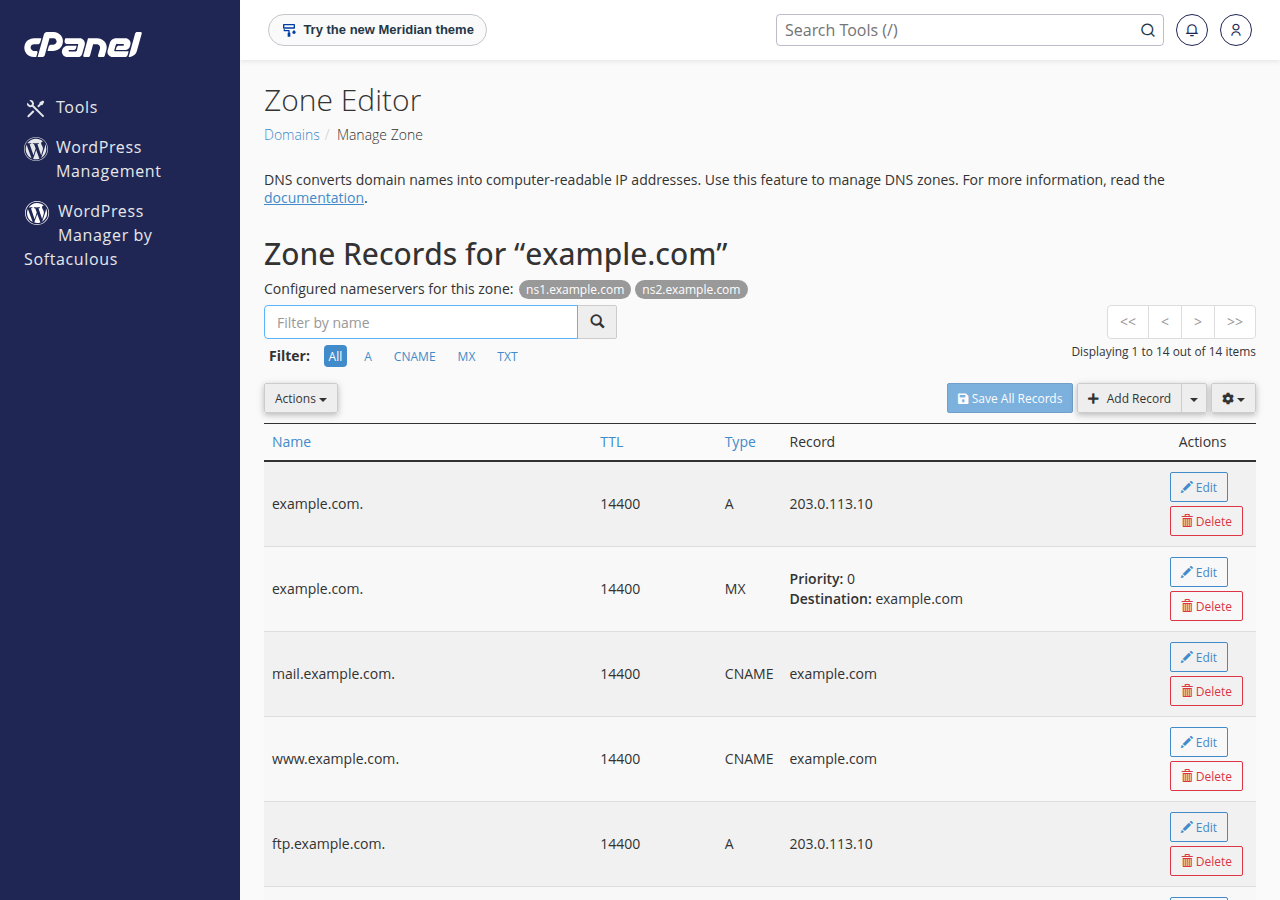
8. Tell your hosting that mail is remote
This step is easy to miss. The hosting server still thinks it handles your domain's mail, so messages your own website sends to your own addresses, such as contact-form notifications, can be delivered to the old mailbox on the hosting server instead of Google.
- cPanel: open Email › Email Routing, choose the domain and select Remote Mail Exchanger.
- DirectAdmin: open E-mail Manager › MX Records, untick Use this server to handle my e-mails and click SAVE.
- Webuzo: open Email › Email Router, click the edit icon next to the domain, choose Remote Mail Server and click Change.
- Windows (Plesk): ask support to set the domain's mail as remote.
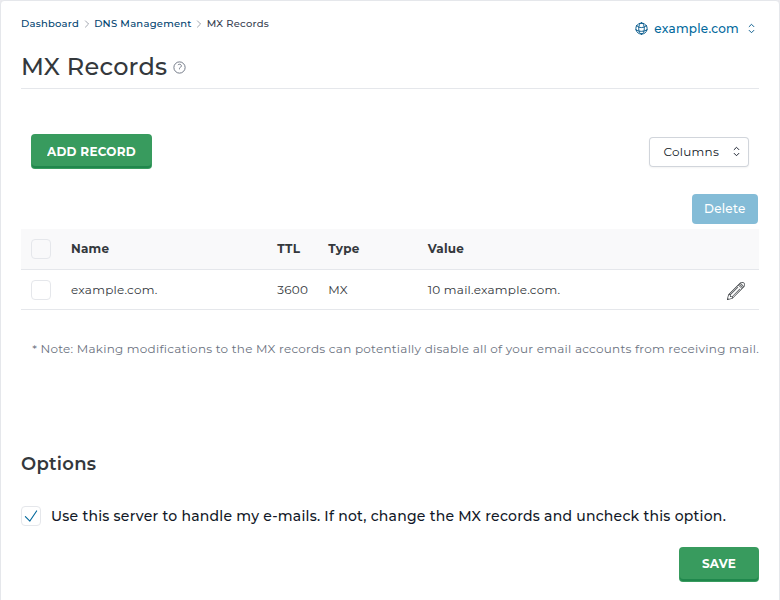
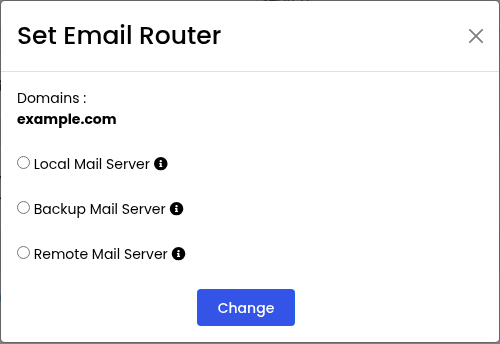
To go back to hosting email later, point MX back to your hosting and set Email Routing to Local Mail Exchanger.
9. Test and troubleshoot
Send a message from an outside address, such as a personal Gmail, to a Workspace user, and reply. Then, in Gmail, open the received message's menu, choose Show original, and check that SPF, DKIM and DMARC all say PASS.
| Problem | Likely cause | Fix |
|---|---|---|
| Domain verification fails | Record added in the wrong place, or not yet visible | Check where DNS is managed; wait and retry |
| Some mail still reaches the old mailboxes | An old MX record remains, or DNS is still updating | Delete non-Google MX records; wait up to 24 to 48 hours |
| Contact-form mail never reaches Google | Hosting still delivers the domain's mail locally | Set Email Routing to Remote Mail Exchanger |
| Mail lands in spam | Missing DKIM or DMARC, or two SPF records | Publish DKIM, merge SPF into one record, add DMARC |
| "Start authentication" fails | The DKIM TXT value was split or truncated | Paste the full value again, or use a 1024-bit key |
For mail app settings, app passwords and sending from printers, see Google Workspace email settings.
PHP libraries such as PHPMailer connect to smtp.gmail.com through socket functions. On cPanel shared hosting those functions are disabled, so the connection fails before Google is reached. See PHP disabled functions on shared hosting for the alternatives.
10. Where Domain India fits
Domain India gives you the domain and the hosting or DNS where these records live. If you would rather keep email with us, there are two options: the mailboxes included with every cPanel, DirectAdmin and Webuzo hosting plan, or Business Email, a separate mail platform priced per mailbox, with webmail at https://mail.yourdomain.com:8443/. Business Email has no office suite; Google Workspace does.
- Priced per mailbox - start with one
- Email at your own domain ([email protected])
- Add and remove mailboxes yourself
- Webmail with calendar, contacts and tasks
The card shows the Domain India list price, excluding 18% GST.
Frequently asked questions
What MX record does Google Workspace use?
Google currently tells new setups to use a single MX record, smtp.google.com, with priority 1. The older set of five aspmx.l.google.com records still works. Use what your Google Admin console shows, and delete all other MX records for the domain.
Is the Google Workspace DKIM record a CNAME?
No. It is a TXT record containing a public key generated for your domain in the Admin console, under Apps, Google Workspace, Gmail, Authenticate email. It is usually published at google._domainkey. After publishing it, click Start authentication.
What SPF record do I need for Google Workspace?
v=spf1 include:_spf.google.com ~all, as a TXT record on the root of the domain. If an SPF record already exists, add include:_spf.google.com to it instead of creating a second one, because a domain may have only one SPF record.
Where do I add Google Workspace DNS records for a Domain India domain?
Wherever the domain's DNS is managed. If it uses your hosting nameservers, add them in your control panel, for example cPanel's Zone Editor. If it uses another DNS provider, add them there.
Why does mail from my website not reach Google Workspace?
The hosting server may still deliver your domain's mail to its own mailboxes. In cPanel, set Email, Email Routing to Remote Mail Exchanger for the domain. On other panels, ask support to set the domain's mail as remote.
Does Domain India sell Google Workspace?
No. Google Workspace is bought from Google. Domain India provides domains, hosting with included email, and a separate Business Email product priced per mailbox.
Will my old hosting mailboxes keep working after I switch?
They keep the mail already in them, but stop receiving new mail once MX points to Google. Copy anything you need into Google Workspace before or soon after the switch.
Ready to connect your domain? Check where your DNS is managed in How to change your domain DNS settings, then add the records above. If you would rather keep email with us, compare Business Email. Need a hand finding your DNS? Open a support ticket.
Mailboxes at your own domain, priced per mailbox, with webmail and IMAP and SMTP over TLS.
See Business Email