WordPress runs a huge share of the web, so bots probe WordPress sites all day for the same handful of weaknesses. Most of them have simple fixes that take minutes. This article lists the common problems, what each lets an attacker do, and the step that closes it.
The most common WordPress security problems are outdated or pirated plugins and themes, weak or reused passwords without two-factor authentication, an open XML-RPC endpoint, too many administrators, and PHP running in the uploads folder. Update everything weekly, delete what you do not use, use a password manager and 2FA, block xmlrpc.php if you do not need it, lock down uploads and keep your own backup. Domain India's servers add a firewall and automatic malware cleanup, but they cannot update your plugins for you.
1. The common issues at a glance
| Issue | What it lets an attacker do | Simple step |
|---|---|---|
| Outdated plugins, themes or core | Use a published hole to upload files or create an administrator | Update weekly; turn on auto-updates for trusted plugins |
| Unused, abandoned or nulled code | Attack files you forgot about, or use a backdoor that came with a pirated theme | Delete what you do not use; never install nulled themes or plugins |
| Weak or reused passwords | Log in with a guessed password or one leaked from another site | Unique passwords from a password manager, plus 2FA |
| Open XML-RPC | Test hundreds of passwords in one request | Block xmlrpc.php if nothing you use needs it |
| SQL injection and XSS | Read your database or run scripts in an administrator's browser | Keep plugins updated; the server firewall blocks many attempts |
| Too many administrators | Turn one stolen login into full control | Lowest role that works for each person |
| No HTTPS | Read passwords and cookies sent in plain text | Free SSL certificate and a redirect to https |
| PHP running in uploads | Run a malicious file uploaded through a weak form | Block PHP in wp-content/uploads |
| No monitoring or backups | Stay hidden for weeks, leaving you nothing clean to go back to | A security plugin with alerts, and your own backups |
For how each route works in detail, see why and how WordPress websites get hacked.
2. Outdated, unused and pirated plugins and themes
Most WordPress hacks start here. Once a plugin's security fix is public, bots scan for sites that have not updated.
- Update every week, or turn on auto-updates for the plugins and themes you trust (Plugins › Enable auto-updates). Leave WordPress's automatic core security updates on.
- Delete, do not just deactivate, plugins and themes you are not using. Their files are still on the server and can still be attacked. Keep one default theme as a fallback.
- Replace abandoned plugins. If a plugin's WordPress.org page shows no update for over a year, or says the plugin was closed, find a maintained alternative.
- Never install nulled themes or plugins. Pirated copies often contain a hidden backdoor and can never be updated. Buy from the developer or use free plugins from the WordPress.org directory.
3. Weak passwords and brute-force logins
Bots try common usernames such as "admin" with common passwords, and replay email and password pairs leaked from other websites.
- Use a password managerand a long, unique password for WordPress, your control panel, FTP, the database and your email. See best password managers.
- Turn on two-factor authenticationfor every administrator and editor. WordPress core does not include 2FA, so add it with Wordfence, Solid Security (formerly iThemes Security) or the free Two Factor plugin, and use an authenticator app rather than SMS.
- Limit login attempts.Most security plugins include this; Limit Login Attempts Reloaded does only this job.
- Retire the "admin" username.Create a new administrator, log in with it, and delete the old account, assigning its posts to the new user.
Block XML-RPC if you do not use it
xmlrpc.php is an old remote-publishing interface. One request to it can test hundreds of passwords, which slips past simple login limits. Jetpack and some older publishing apps still need it. If you use neither, block it with your security plugin, or add this to the .htaccess file in your WordPress folder:
<Files xmlrpc.php>
    Require all denied
</Files>
Older guides show order deny,allow, which is outdated Apache 2.2 syntax.
4. SQL injection and cross-site scripting (XSS)
These are bugs inside plugins and themes, not settings you switch off.
- SQL injection: a plugin puts visitor input straight into a database query, and the attacker's input changes the query, for example to read user records or create an administrator.
- XSS: a plugin prints visitor input back into a page without cleaning it, so the attacker's script runs in the browser of whoever views it, possibly you, logged in as administrator.
The fix is the same as section 2: update promptly and remove what you do not need. A web application firewall is a second layer. On our cPanel servers, Imunify360's firewall runs with its full ruleset and WordPress protection on by default (measured 20 September 2026), so many common injection attempts are blocked before they reach WordPress.
5. Too many administrators
Every administrator is a full key to the site. Give each person their own login with the lowest role that works:
- Editor or Author for people who write and publish content;
- Administrator only for people who install plugins and change settings.
Remove accounts for people who have left, and check Users every month. An administrator you did not create is the clearest sign of a hack. Also look under Users › Profile › Application Passwords and revoke any you do not recognise.
6. HTTPS and SSL certificates
Without HTTPS, login passwords and session cookies cross the internet in plain text. You do not need to buy a certificate for a normal website:
- On our cPanel servers, free Let's Encrypt certificates are issued and renewed automatically (AutoSSL, measured 20 September 2026).
- On DirectAdmin it is issued automatically; on Webuzo, request the free certificate from the panel.
Then set both WordPress addresses in Settings › General to https://, and make sure plain http:// addresses redirect. A plugin such as Really Simple Security (formerly Really Simple SSL) can handle the redirect and fix mixed-content warnings. See how to enable free SSL.
7. Lock down files
Stop PHP running in the uploads folder. Images never need to execute, but a malicious upload does. Create wp-content/uploads/.htaccess containing:
<FilesMatch "\.(php|phtml|phar)$">
    Require all denied
</FilesMatch>
Test it by uploading a file called test.php there with the File Manager and opening it in your browser. You should get a 403 error. Then delete the test file.
Turn off the dashboard code editor. Add this line to wp-config.php, above "That's all, stop editing":
define( 'DISALLOW_FILE_EDIT', true );Use sane permissions: 755 for folders, 644 for files, and 640 or 600 for wp-config.php if the site still loads. Never 777.
Changing the default wp_ database prefix is often listed as a security step. It only slows down the crudest automated attacks, and changing it on a live site can break it if one table or option is missed. Choose a different prefix when you install a new site, but on an existing site, spend the time on updates and 2FA instead.
8. Monitoring and backups
On our cPanel servers, Imunify360 scans new and changed files as they are written and again every week, removes malicious code automatically, and keeps the original file for 14 days (measured 20 September 2026). Two things it does not do:
- you cannot start an Imunify360 scan yourself from the control panel;
- you are not emailed when malware is found or cleaned.
So add your own early warning: one security plugin, such as Wordfence, Solid Security or Sucuri Security, with email alerts for new administrators, changed files and vulnerable plugins (two security plugins together often conflict), and your site verified in Google Search Console.
For backups, our cPanel and DirectAdmin hosting runs weekly JetBackup 5 backups, keeping five copies, which you can download or restore from the panel. Treat them as a safety net and keep your own copies off the server too, because malware can sit unnoticed for longer than a week. See how to restore or download a backup with JetBackup.
If your site has already been hacked, follow the security checklist for hacked websites.
9. Where Domain India hosting fits
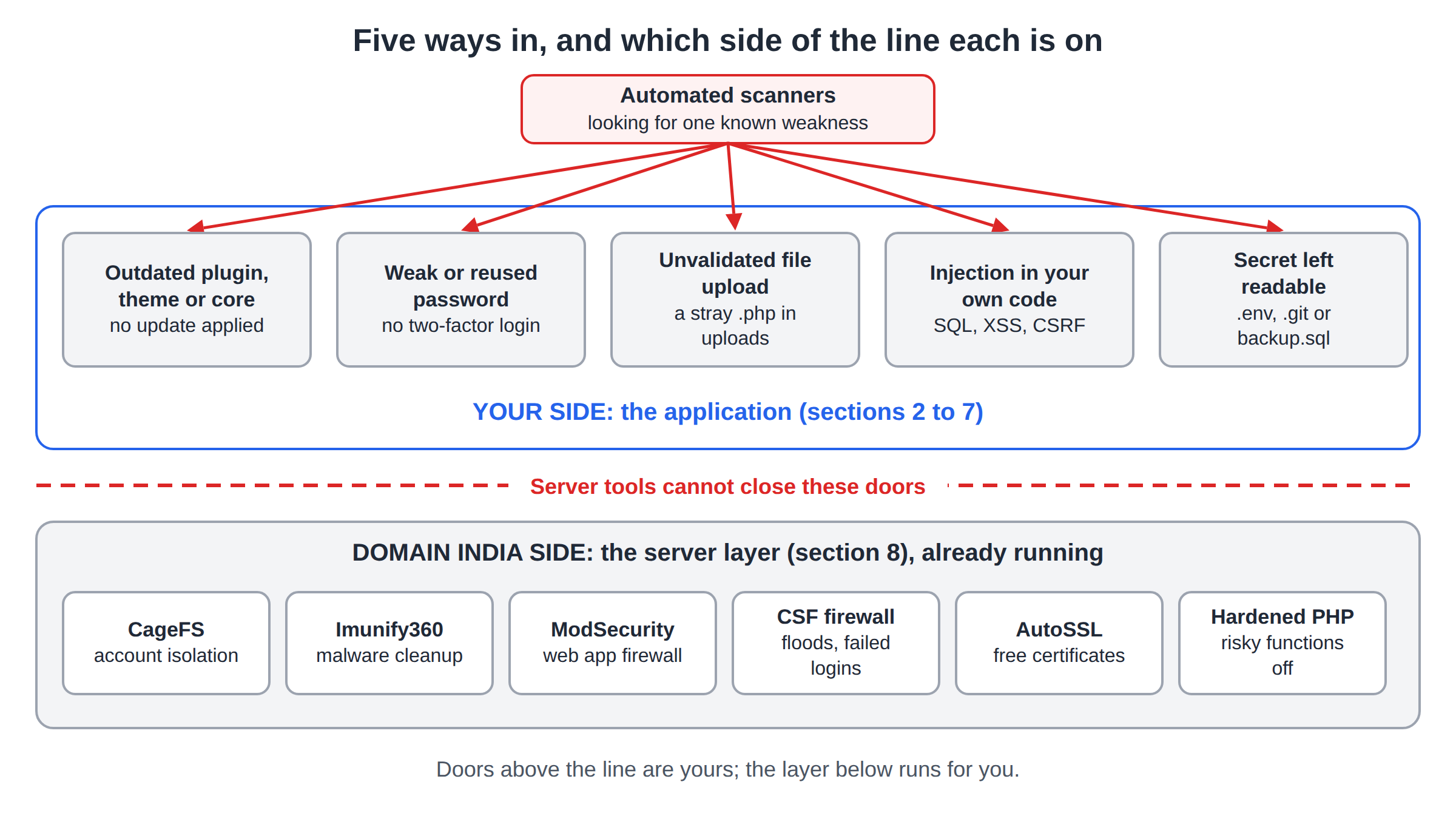
The host secures the server; you secure the WordPress site on it. On our cPanel and DirectAdmin servers, CloudLinux CageFS keeps each hosting account isolated from the others, and Imunify360 and the CSF firewall run server-wide, with the same configuration for every account on the server. You get the same protection on every plan, so choose a plan by resources, not security.
- 25 GB NVMe SSD Storage
- 50 GB Monthly Bandwidth
- 1 Website
- 10 Email Accounts
- 10 GB NVMe SSD Storage
- 50 GB Monthly Bandwidth
- 1 Website
- 5 Email Accounts
Plan cards show live Domain India list prices, excluding 18% GST. Hosting cannot update your plugins or stop someone who logs in with your real password, so the steps above are still yours. For the full list of tips, see useful tips to secure WordPress.
What is the most common WordPress security issue?
Outdated plugins and themes. When a security fix is published, bots scan for sites that have not updated yet. Update every week or turn on auto-updates, and delete plugins and themes you do not use.
Do I need a security plugin if my hosting has a firewall?
It is still worth having one. The server firewall blocks many attacks, but a security plugin adds login limits, two-factor authentication and email alerts for new administrators and changed files. On Domain India shared hosting you are not emailed when the server's scanner removes malware, so plugin alerts fill that gap.
How do I block xmlrpc.php in WordPress?
Use the XML-RPC option in your security plugin, or add a Files block for xmlrpc.php with "Require all denied" to the .htaccess file in your WordPress folder. Do not block it if you use Jetpack or an app that publishes through XML-RPC.
How do I stop PHP files running in the uploads folder?
Create an .htaccess file in wp-content/uploads with a FilesMatch rule that denies .php, .phtml and .phar files. Test it by uploading a test.php file and checking that your browser shows a 403 error, then delete the test file.
Does Domain India back up my WordPress site?
Domain India cPanel and DirectAdmin hosting runs weekly JetBackup 5 backups and keeps five copies, which you can download or restore from your panel. Keep your own copies off the server as well.
Ready to secure your site? Start with updates and 2FA today, work through the WordPress hardening guide, and open a support ticket if something on your hosting account looks wrong.
CloudLinux account isolation, Imunify360 with automatic malware cleanup, a web application firewall and free SSL on Domain India cPanel hosting.
See cPanel hosting plans