Yes, you can change the domain name your hosting account runs on. Rebrands, a better domain, or a typo at signup are all common reasons. But the main (primary) domain of a hosting account can't be changed from the client area or from inside the control panel: our support team makes that change on the server. Often you don't need it at all, because adding the new domain to your existing account does the job in minutes. This guide helps you pick the right route.
If you only want a new domain to show your website, add it yourself in your control panel as an alias (same site) or an addon domain (separate site), and point its DNS to your hosting. If you want the new domain to replace the old one as the account's main domain, open a support ticket with the old and new domain names. Your website files stay in place unless you explicitly ask for another site to replace them. Either way, the new domain must be registered and pointing to your hosting before it works.
1. The main domain and the other domains in your account
Every hosting account is created with one main domain (also called the primary domain). It is the name the account is set up under: its website normally lives in the public_html folder, and it is the domain shown for the service in your client area.
You can then add more names on top of it:
- an alias (cPanel's old "parked domain"), which shows the same website as the main domain;
- an addon domain, a separate website with its own folder, in the same account;
- a subdomain, such as
shop.yourdomain.in.
For the full explanation, read What is the difference between parked, addon and subdomains.
2. Which change do you actually need?
| You want | Best route | Who does it |
|---|---|---|
| The new domain to show your existing website, keeping the old one too | Add the new domain as an alias, or redirect it | You, in the control panel |
| The old domain to send visitors to the new one | Add the old domain as an alias and set a 301 redirect | You, in the control panel |
| A second, separate website on the new domain | Add it as an addon domain (plan must allow more than one website) | You, in the control panel |
| The new domain to become the account's main domain, replacing the old one | Primary domain change | Domain India support |
If you are rebranding, the usual best result is: the new domain as the main address, and the old domain kept registered and redirecting to it, so old links, bookmarks and search results still work.
3. Route 1: add the new domain yourself
On cPanel this takes a few minutes and needs no ticket.
- Open cPanel.In the client area go to Hosting › My hosting and click the cPanel button on your domain's row.
- Open Domains.In the Domains section, click Domains, then Create A New Domain.
- Enter the new domainand choose the document root. Tick Share document root for an alias that shows your existing site; untick it for an addon domain with its own folder.
- Submit, then point the new domain's DNS to your hosting (section 5).
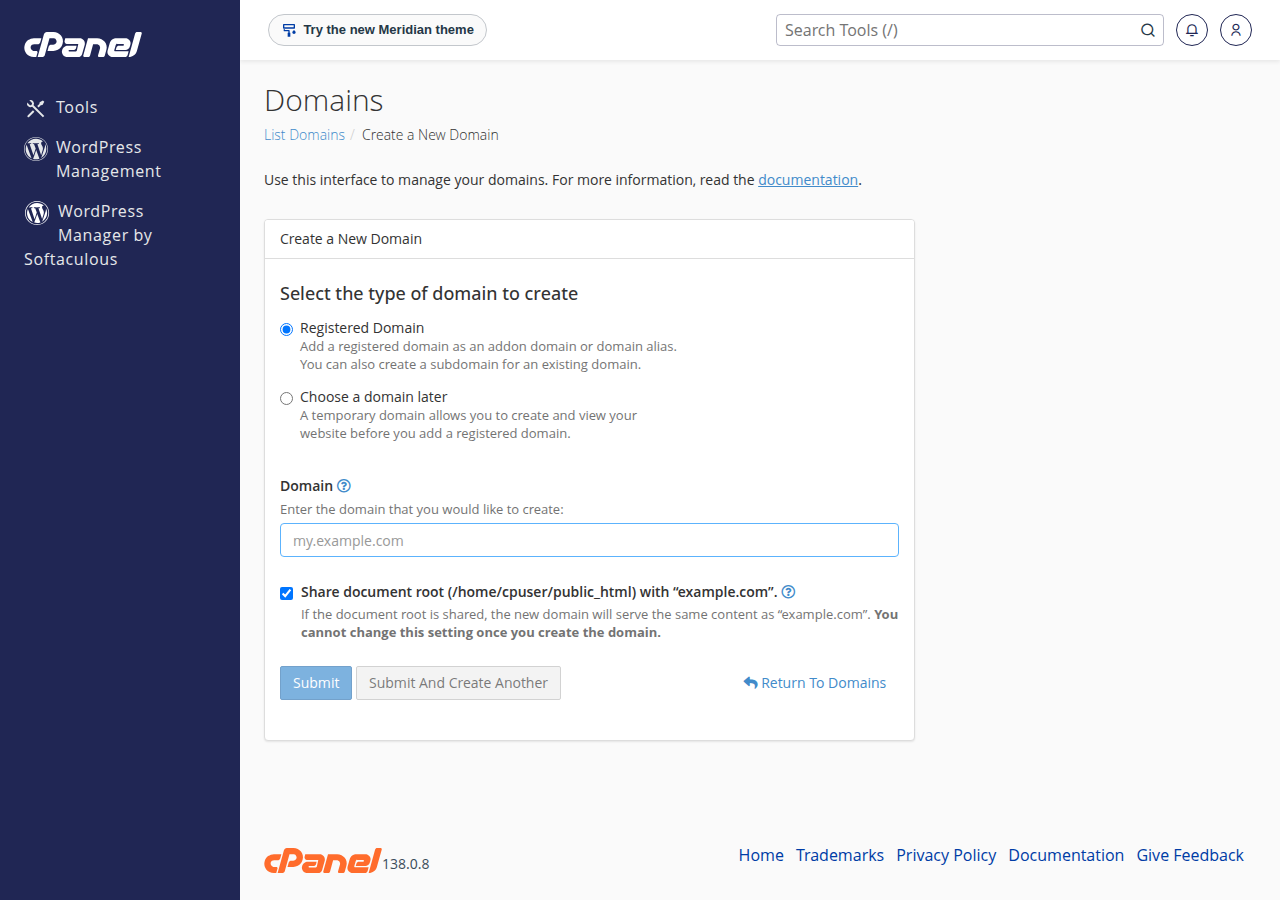
To make the alias redirect to your main domain instead, use cPanel's Redirects tool with a permanent (301) redirect. On DirectAdmin, add the domain under Account Manager › Domain Pointers with Create as an Alias unticked, which redirects it to your main domain. On Webuzo, use Domain › Redirects. A one-website plan (Starter) can't host a second separate site; see section 7.
4. Route 2: ask support to change the primary domain
Changing the main domain is a server-level operation, so it isn't available as a button in the client area or in cPanel. Our team does it for you.
- Register the new domainif you haven't already. It can be registered with Domain India or elsewhere.
- Open a ticket.Use New ticket in the client area, or the support ticket page. Include the current domain, the new domain and the hosting plan.
- Say what should happen to the website.In most cases the site in
public_htmlsimply keeps running under the new name. If the new domain is already an addon domain with its own site and you want that site to become the main one, say so clearly; see the callout below. - List the email addresses you useon the old domain, so support can tell you how they will be handled.
- Point the new domain's DNSto your hosting once support confirms the change (section 5).
A primary domain change does not create a new website and does not delete the files in public_html. The only case where files are replaced is when you ask for an addon domain's website to become the main site. That overwrites the current main site, so support will ask for your explicit confirmation first. Take your own copy of the site before any change of this kind.
5. Point the new domain to your hosting
Whichever route you choose, visitors reach the new domain only when its DNS points to your hosting server. The Point a domain to this hosting card on your hosting service page in the client area gives two options:
- Option 1, nameservers: set the new domain's nameservers to the ones shown on the card. Your control panel then manages all of its records, including email. Follow How do I change my nameservers.
- Option 2, A records: keep the domain's current DNS provider and add A records for
@andwwwpointing to the server IP address on the card.
Copy the values from the card, never from an old article. DNS changes usually take effect within a few hours and can take up to 24-48 hours. The free SSL certificate for the new domain can be issued only once its DNS points to the server, so a short certificate warning right after the change is normal.
6. After the change: a checklist
7. Where Domain India fits
On Domain India shared hosting you manage the extra domains in your account from the control panel, within your plan's limits, and support handles primary domain changes. If you want the old and new domains to run separate websites, you need a plan with more than one website. Domain India list prices on 19 September 2026, excluding 18% GST: cPanel Growth hosts 5 websites for ₹200 a month, and DA Growth hosts 5 websites for ₹150 a month.
- 50 GB NVMe SSD Storage
- 100 GB Monthly Bandwidth
- 5 Websites
- 50 Email Accounts
Still need the new name? A .in domain is ₹575 for the first year (₹625 to renew) and a .com is ₹1,150 a year. Already on a smaller plan? You can move up without losing your site: see Can I upgrade my web hosting package at any time.
Support is available by 24/7 live chat and by ticket, with a first response to tickets within 15 minutes; resolution can take longer depending on the issue. There is no phone support.
Frequently asked questions
Can I change the domain name of my hosting account?
Yes. The main domain of a Domain India hosting account is changed by the support team on the server, because it is not available in the client area or inside the control panel. Open a support ticket with the old and new domain names. If you only need the new domain to show your site, you can add it yourself as an alias or addon domain.
Will I lose my website if I change my primary domain?
No. A primary domain change keeps the files in public_html. Files are replaced only if you explicitly ask for an addon domain's website to become the main site, and support asks you to confirm that first. Keep your own copy of the site before any change.
Can I change the main domain myself in cPanel?
No. cPanel lets you add and remove aliases, addon domains and subdomains, but the account's main domain is changed at server level. Ask support to do it.
What is the difference between changing the primary domain and adding an addon domain?
Changing the primary domain renames the account's main domain, so the existing website runs under the new name. Adding an addon domain creates a second, separate website in the same account and needs a plan that allows more than one website.
Does the new domain need to be registered first?
Yes. The new domain must be registered, with Domain India or any registrar, and its DNS must point to your hosting through the hosting nameservers or A records before visitors can reach it.
What happens to my old domain after the change?
It is no longer the account's main domain, but it stays registered for as long as you renew it. Keeping it and adding it back as an alias with a 301 redirect sends old links, bookmarks and search traffic to the new domain.
Ready to make the change? Add the new domain from your hosting list, register a new domain if you still need one, or open a support ticket to change the primary domain.
Growth and Business plans host several websites in one account, each with its own folder, email and free SSL.
See cPanel hosting plans