A site that nobody looks after keeps working until the day it doesn't: a certificate fails to renew, the disk fills with logs, or an old library turns out to have a known hole. A short, regular routine catches these early. This checklist covers what you, as the site owner, should check on an ASP.NET site hosted on Domain India Windows (Plesk) hosting, and what the server side leaves to us.
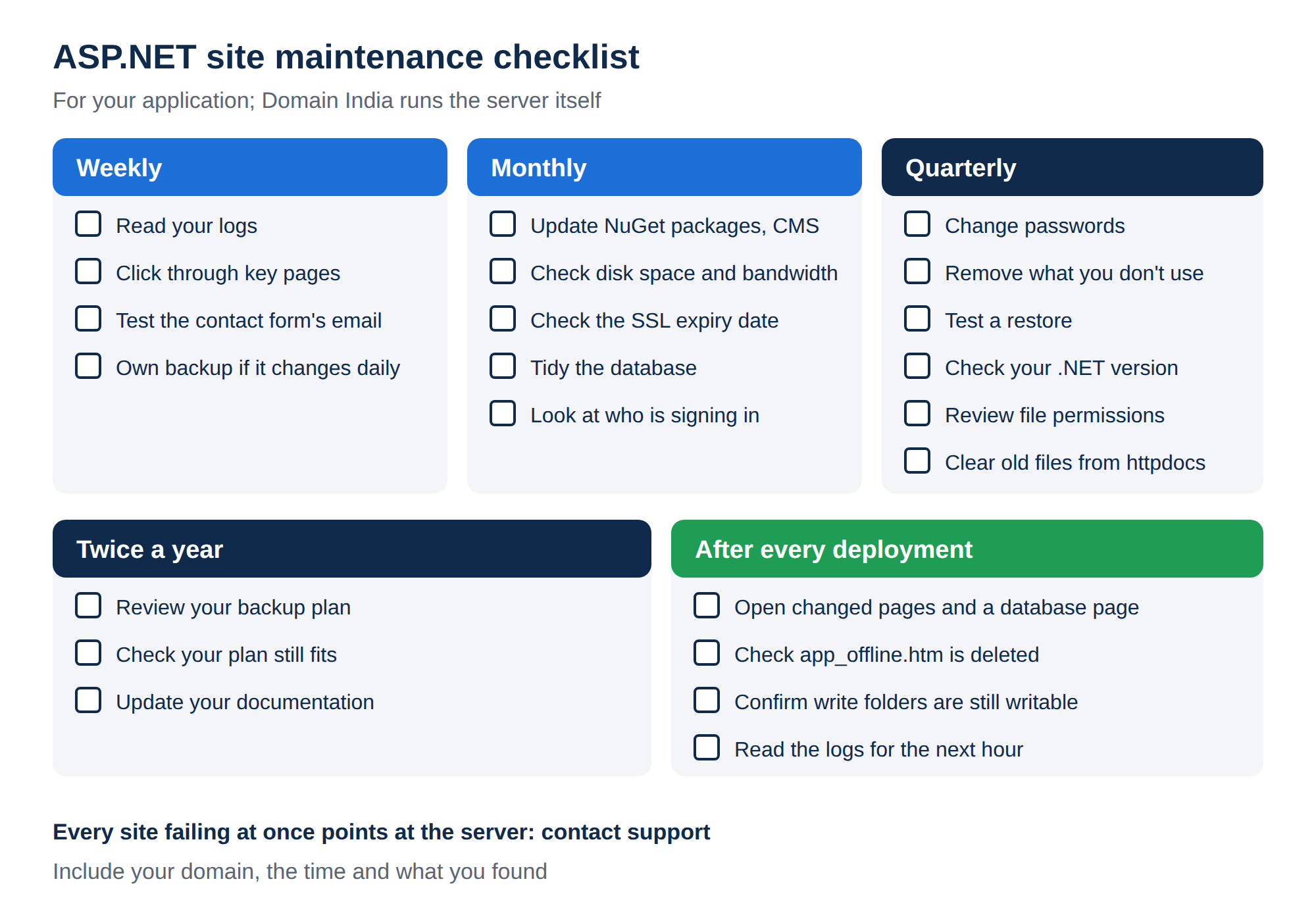
On shared Windows hosting, Domain India runs the server itself, including Windows, IIS and Plesk; you look after your application. Weekly: check your logs and key pages, and download a fresh backup if your site changes often. Monthly: update NuGet packages and any CMS, check disk and bandwidth in Plesk, and look at your SSL certificate's expiry. Quarterly: change passwords, remove unused accounts and files, test a restore, and check your .NET version is still supported.
1. Who maintains what
- Your code, NuGet packages, CMS and plugins
- Your databases' content and structure
- Passwords for Plesk, FTP, databases and mailboxes
- Your own backups and your web.config
- The server's operating system
- IIS, Plesk and server-wide settings
- Server-wide security such as the firewall
- The weekly backups included with shared hosting
Many maintenance checklists for Windows hosting are written for server administrators and include tasks such as installing Windows updates, updating Plesk or reviewing firewall rules. On shared hosting those are not tasks you can or need to do. Everything below is something you can do from Plesk, FTP or your own computer.
2. Weekly
- Read your logs.In Plesk, open Websites & Domains, pick your domain and choose Logs. Look for new 500 or 503 errors and unusually slow pages. See checking Plesk logs.
- Click through key pages.Home, a contact form, login and any checkout. A form that silently fails costs more than an error page.
- Test your contact form's email.Send yourself a message through the site and check it arrives.
- Back up if your site changes daily.The included backups are weekly, so a shop or booking site needs its own copies in between. See creating backups in Plesk.
3. Monthly
- Update dependencies. Check your NuGet packages for updates, especially security fixes, and update any CMS, modules or themes. Test locally, then deploy.
- Check disk space and bandwidth. Open Statistics in Plesk. If usage is climbing, look for large log files, a forgotten ASP.NET Core stdout log, old backups kept on the server, or uploads your app never deletes.
- Check SSL. Plesk renews free Let's Encrypt certificates automatically as long as the domain points at your hosting. Open your site in a browser and check the certificate's expiry date anyway: renewal fails if DNS has changed, and Plesk's warning email is easy to miss. See install SSL in Plesk.
- Tidy the database. Delete or archive old log tables, expired sessions and abandoned carts. Check that queries on your busiest pages are still fast as tables grow.
- Look at who is signing in. Many failed logins to your site's admin area from a few addresses mean someone is guessing passwords.
4. Quarterly
IIS won't serve web.config, but a copy named web.config.bak, or a ZIP of your site left in httpdocs, may be downloadable by anyone who guesses the name. They contain your connection strings. Keep backups off the server or outside the web root.
5. Twice a year
- Review your backup plan. Does the frequency still match how often the site changes? Where are the off-server copies?
- Check your plan still fits. Compare your usage with the limits in Windows hosting plans comparison. Moving between Windows plans is done with support.
- Update your documentation. Note how to deploy, where the database lives, and who has which login, so someone else could take over.
6. After every deployment
A deployment is when most problems start, so a quick check afterwards is worth more than any schedule:
- open the pages you changed, and one page that uses the database;
- check that
app_offline.htmhas been deleted; - confirm that folders your app writes to are still writable;
- read the logs for the next hour.
For deploying safely, see how to deploy an ASP.NET application in Plesk, and for pool restarts the IIS application pools guide.
7. When to contact support
Contact support when something points at the server rather than your site: every site on your subscription failing at once, a service not responding, or something you need from logs you can't see. Include your domain, the time and what you found. Support is on 24/7 live chat, and tickets get a first response within 15 minutes; how long a fix takes depends on the issue. There is no phone support.
The live card shows today's price for the Windows plan most people start on, excluding 18% GST.
- 30 GB Storage
- 150 GB Monthly Bandwidth
- 5 Websites
- 50 Email Accounts
Do I need to install Windows updates on shared Windows hosting?
No. On Domain India shared Windows hosting, the server itself, including Windows, IIS and Plesk, is managed by Domain India; you have no administrator access to it. You maintain your own application, its packages, passwords and backups.
How often should I check my ASP.NET site?
Check logs and key pages weekly, update packages and check disk space and SSL monthly, and change passwords, remove unused accounts and test a restore every quarter.
Does Plesk renew my SSL certificate automatically?
Plesk renews free Let's Encrypt certificates automatically as long as the domain still points at your hosting. Check the expiry date in your browser now and then, because renewal fails if DNS has changed.
What uses up disk space on Windows hosting?
Usually log files, an ASP.NET Core stdout log left switched on, backups stored on the server, and uploads your app never deletes. Check Statistics in Plesk and clean these up first.
How do I know if my .NET version is still supported?
Microsoft publishes a support end date for every .NET and .NET Framework version. Compare it with the version your project file targets, and check in Plesk which versions are available if you need to retarget.
Ready to start your routine? Open My Hosting and click the Plesk button to check your logs and statistics, or open a ticket if you find something that points at the server.
Send us your domain, the time and what you saw, and we will help you work out the cause.
Open a ticket