"HTTP Error 503. The service is unavailable." on a Windows-hosted website almost always means IIS has no running worker process for your site: the application pool has stopped, usually because your application crashed repeatedly, or the site has been taken offline on purpose. This guide shows how to tell which one it is, what you can fix yourself in Plesk, and when to ask Domain India support.
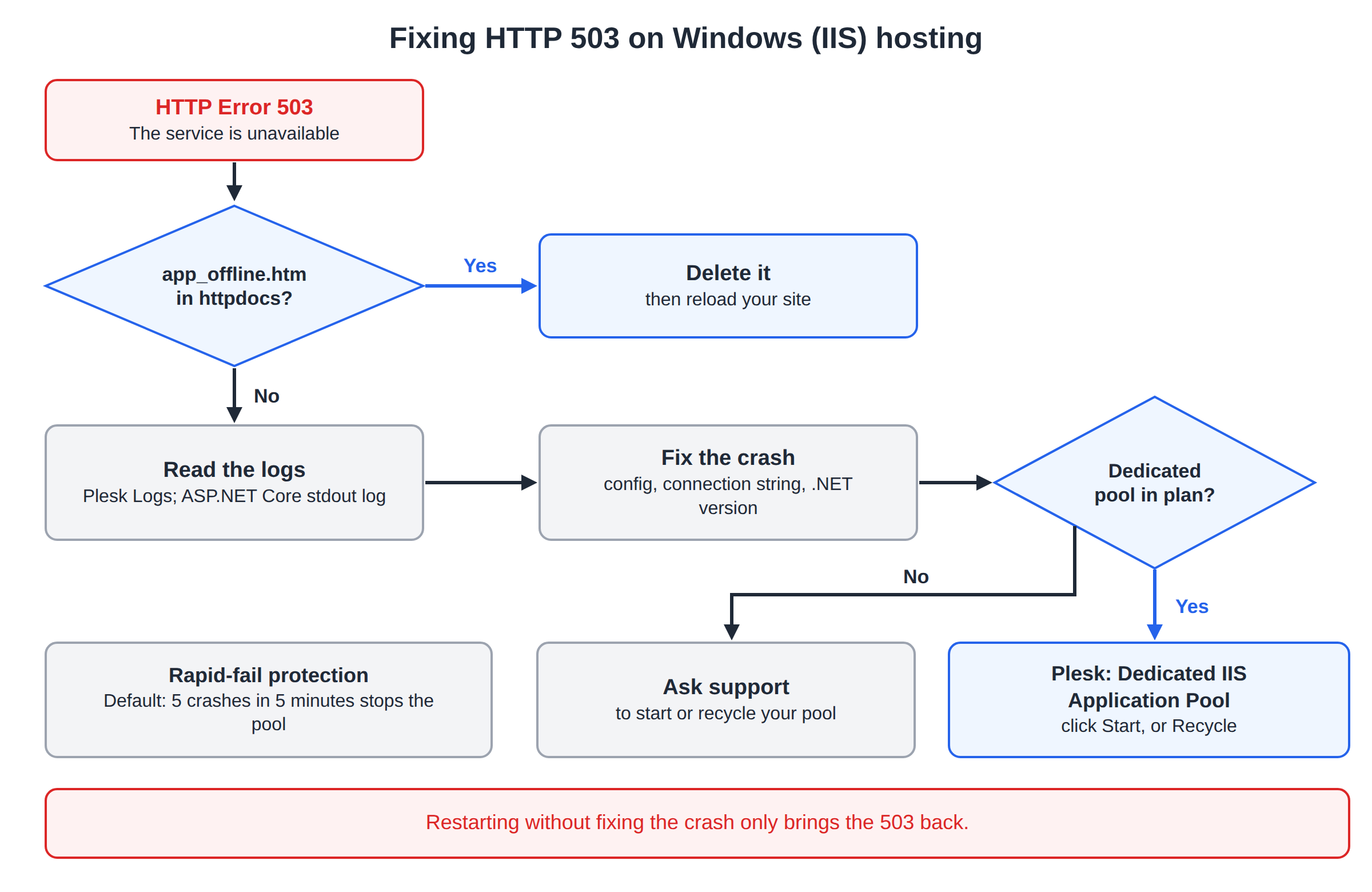
On IIS, a 503 usually means your application pool is stopped. The most common reason is rapid-fail protection: the app crashed several times in a few minutes, so IIS stopped the pool. Check for a leftover app_offline.htm in httpdocs first, then read your logs for the crash. Restart the pool from Dedicated IIS Application Pool in Plesk if your plan includes one (ASP Enterprise lists it), or ask support. Restarting without fixing the crash only brings the 503 back.
1. What a 503 on IIS means
A 503 comes from the web server, not from your code. IIS is up and answering, but it can't hand your request to the process that runs your site. On Windows hosting that is nearly always one of these:
| Cause | How it looks | How common |
|---|---|---|
| Application pool stopped after repeated crashes | Every page returns the plain IIS 503 text | Most common |
app_offline.htm left in httpdocs | Visitors see your "offline" page, or a 503 | Common after a deploy |
| App is still starting | 503 or a slow first load that clears within a minute | After a recycle or deploy |
| Server-wide problem | Every site on the server fails, not only yours | Rare; support handles it |
A 503 is different from a 500. A 500 means your application ran and failed on that request; a 503 means it isn't running at all.
2. Rule out app_offline.htm first
ASP.NET takes an application offline whenever a file named app_offline.htm sits in its root folder. Deploy tools create it, and a failed or interrupted upload can leave it behind.
- Open the File Manager.In Plesk, open Files for your domain, or connect with FTP.
- Look in
httpdocs.Also look in the folder of any sub-application. - Delete
app_offline.htmif it is there, then reload your site.
3. Why an application pool stops
IIS has a safety feature called rapid-fail protection. If the worker process for a pool crashes too many times in a short period (by default 5 times in 5 minutes), IIS stops the pool rather than restart it forever. From then on, every request gets a 503.
What makes a .NET worker process crash:
- an unhandled exception during startup, such as a missing configuration value, a bad connection string or a database that can't be reached;
- a stack overflow or an infinite recursion in your code;
- a DLL built for a .NET version the server doesn't have, or a 32/64-bit mismatch;
- running out of memory under a leak.
Memory or CPU limits set on the pool can also make IIS recycle or stop it. The fix is in your application: the pool will keep stopping until the crash is gone.
4. Find the crash in your logs
Before restarting anything, find out why it stopped.
- Plesk logs. Open your domain in Websites & Domains and choose Logs. Look at the entries from just before the 503 started. See checking Plesk logs.
- ASP.NET Core startup log. In
web.config, setstdoutLogEnabled="true"on theaspNetCoreelement, create an emptylogsfolder insidehttpdocs, restart the app and read the newest file inlogs. Set it back tofalsewhen you're done. - Your own application log, if your app writes one.
The Windows Event Log, where IIS records pool shutdowns, is on the server and isn't available to shared hosting customers. If your own logs show nothing, ask support to look there for you.
5. Restart the application pool
Once you have fixed the cause, or if you need the site back while you investigate:
If your Plesk has pool controls (a dedicated application pool): open your domain, go to Dedicated IIS Application Pool and click Start if it is stopped, or Recycle if it is running. The step-by-step version is in restarting your app pool in Plesk.
If it doesn't: your subscription uses a shared pool. Ask support to start or recycle it, using live chat or a ticket. Tell us your domain, the time the 503 started and what you changed just before.
Older guides say to restart IIS from Tools & Settings. On shared hosting that option isn't available to customers: an IIS restart affects every site on the server. If you believe the whole server has a problem, contact support.
6. The dedicated IIS application pool
A dedicated application pool runs your subscription's sites in their own worker process, separate from other customers. That brings two benefits for 503 problems:
- another subscription's crash or traffic can't stop your site;
- you can see your pool's state and start or recycle it yourself.
Whether a subscription gets a dedicated pool is set by its hosting plan, so it isn't a switch you turn on in Hosting Settings. Among the Domain India Windows plans, ASP Enterprise lists a dedicated app pool. If you are on another plan and keep needing pool restarts, consider upgrading.
- 100 GB Storage
- Unmetered Bandwidth
- 15 Websites
- 100 Email Accounts
7. Check your .NET and site settings
Wrong settings make an app crash on its first request, so they show up as a 503 soon after a change.
- .NET version. In your domain's ASP.NET or hosting settings in Plesk, make sure the selected version matches the one your app targets. ASP.NET Core apps need a pool with No Managed Code; .NET Framework 4.x apps need CLR v4.0.
- web.config. If you edited it just before the 503, restore the previous copy.
- Default document. If the home page gives a 403 or 404 instead, check that
default.aspx,index.htmlor your chosen start page exists.
More about these settings is in the IIS application pools guide.
8. Preventing repeat 503s
What does HTTP Error 503 The service is unavailable mean on IIS?
IIS is running but has no worker process to hand your request to. Usually your application pool has stopped, most often because the application crashed several times in a few minutes and IIS's rapid-fail protection stopped the pool.
How do I fix a 503 error on Domain India Windows hosting?
Delete any app_offline.htm file in httpdocs, read your logs to find why the application crashed, fix it, then start or recycle the application pool. If your plan has no pool controls in Plesk, ask support to start the pool.
Can I restart IIS myself to fix a 503?
No. On shared hosting only Domain India restarts IIS, because a restart affects every site on the server. You can recycle your own pool if your plan includes a dedicated pool.
Why does the 503 come back after the pool is restarted?
The cause is still there. The application crashes again, and after several crashes in a short time IIS stops the pool again. Find and fix the crash using the Plesk logs or the ASP.NET Core stdout log.
How do I get a dedicated IIS application pool?
A dedicated pool comes with the hosting plan rather than a setting you switch on. Among Domain India Windows plans, ASP Enterprise lists a dedicated app pool.
Is a 503 the same as a 500 error?
No. A 500 means your application ran and failed on that request. A 503 means the application isn't running at all, usually because its pool is stopped or the site is offline.
Ready to stop chasing 503s? Compare the Windows hosting plans, or open a support ticket if your pool keeps stopping. Support is on 24/7 live chat, and tickets get a first response within 15 minutes.
Tell us your domain, when the error started and what changed, and we'll check the application pool and the server logs.
Open a ticket