An application pool is the part of IIS, the Windows web server, that actually runs your website's code. When a Windows-hosted site is slow, throws 503 errors or ignores a change you just uploaded, the application pool is often where the answer is. This guide explains what a pool is, which settings matter, what you can manage yourself in Plesk on Domain India Windows hosting, and when to ask support.
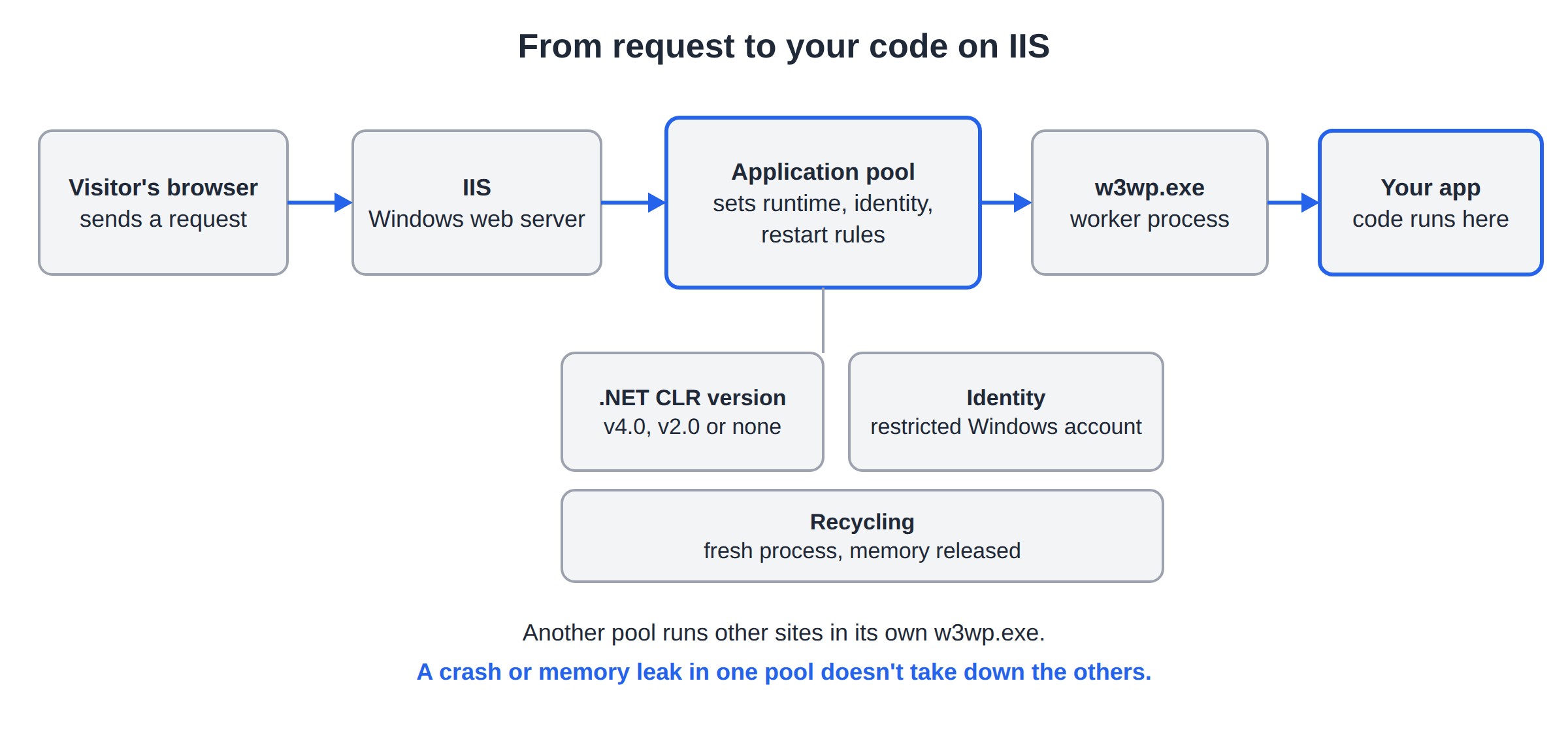
Each IIS application pool runs one or more websites in its own worker process (w3wp.exe). Recycling the pool restarts your application and clears its memory without touching other sites. On Domain India Windows hosting, pool controls appear in Plesk only if your plan gives your subscription a dedicated application pool; the ASP Enterprise plan lists one. Server-wide IIS settings and IIS restarts are handled by Domain India, so if you can't see pool controls, ask support to recycle it for you.
1. What an application pool is
IIS doesn't run your code inside the web server itself. It hands each request to a worker process called w3wp.exe, and the application pool decides how that process behaves: which .NET runtime it loads, which Windows identity it runs as, and when it restarts.
2. Shared pool or dedicated pool
On shared Windows hosting there are two arrangements.
| Arrangement | What it means | What you can do in Plesk |
|---|---|---|
| Dedicated pool | Your subscription's sites run in their own worker process | See the pool, and usually stop, start and recycle it yourself |
| Shared pool | Your sites run in a pool shared with other subscriptions | No pool controls; ask support to recycle it for you |
A dedicated pool is better for isolation: another customer's traffic spike or crash can't restart your application. Among the Domain India Windows plans, ASP Enterprise lists a dedicated app pool as a feature. On the other plans, check whether Plesk shows pool controls for your subscription; if it doesn't, the pool isn't yours to manage.
3. The settings that matter
Whoever manages the pool, these are the settings that decide whether your app runs.
.NET CLR version. A .NET Framework 4.x application needs a pool running CLR v4.0. Very old 2.0 to 3.5 applications need v2.0. ASP.NET Core applications need No Managed Code, because the ASP.NET Core Module starts the .NET runtime itself. PHP and static sites don't need a CLR either.
Pipeline mode. Integrated is the normal mode for anything built in the last fifteen years. Classic exists only for very old applications that depend on ISAPI-style behaviour. If your app works locally in Integrated mode, keep Integrated.
32-bit applications. Most apps don't care. An app that loads a 32-bit-only native DLL (some older database drivers and reporting components) needs this enabled; a 64-bit app with it enabled can fail to start.
Open Websites & Domains, pick your domain and look for ASP.NET Settings, Hosting Settings or Dedicated IIS Application Pool. Plesk shows only the pages your plan allows, and the names vary a little between Plesk versions. If you can't find a setting, use the search box at the top of Plesk, or ask support.
4. Recycling: what it does and when to use it
Recycling starts a fresh worker process and lets the old one finish the requests it is handling, then shuts it down. Your application restarts, its memory is released, and any in-memory data (sessions stored in memory, cached objects) is lost.
Recycle when:
- you have uploaded new DLLs or changed configuration and the site still shows the old behaviour;
- the site has become slow and memory use has grown over hours or days;
- requests hang but the site isn't returning errors;
- support asks you to, after a fix on their side.
Don't recycle as a routine cure for a 500 error: the error will come back until you fix its cause. Read the logs first; see checking Plesk logs.
How to recycle. With a dedicated pool, open your domain in Plesk, go to Dedicated IIS Application Pool (the name can vary) and choose Recycle. The step-by-step version is in restarting your app pool in Plesk.
Without pool controls, two things restart just your application:
- Save
web.config.Any saved change toweb.configmakes IIS restart the application that uses it. - Or use
app_offline.htm.Upload a file with that name intohttpdocs; ASP.NET stops the app. Delete it and the app starts again on the next request.
5. Automatic recycling and idle timeout
IIS also recycles pools on its own. Out of the box, IIS recycles a pool every 1,740 minutes (29 hours) and stops an idle worker process after 20 minutes without requests. On shared hosting these values are set by the server administrator and may differ from the defaults.
Two consequences matter for your app:
- The first request after a recycle or idle stop is slow. The worker process has to start and your application has to load, which can take several seconds for a large .NET app. This "cold start" is normal.
- In-memory state doesn't survive. If users are logged out at random, your app is probably keeping sessions in memory. Store sessions and important state in the database instead.
6. Common application pool problems
| Symptom | Likely cause | What to do |
|---|---|---|
| HTTP 503 Service Unavailable | The pool stopped, often after repeated crashes | Fix the crash, then start or recycle; see the 503 guide |
| Site works, then stops after a few minutes | App crashes on some requests and IIS stops the pool | Read the logs for the unhandled exception |
| 500.30 or 500.31 on an ASP.NET Core site | App fails at startup, or the runtime it needs is missing | Turn on the stdout log in web.config and read it |
| "Could not load file or assembly" | Wrong CLR version, missing DLL, or 32/64-bit mismatch | Check the CLR setting and the bin folder |
| Memory keeps growing, site slows down | A leak in the app, such as undisposed connections | Recycle for now; fix the code |
| Changes don't show up | The old worker process is still running | Recycle, or re-save web.config |
IIS has rapid-fail protection: if a pool's worker process crashes several times in a short period (by default 5 times in 5 minutes), IIS stops the pool, and every request gets a 503 until it is started again. Starting it without fixing the crash just repeats the cycle. The 503 guide walks through this.
7. What you can change and what support handles
- Choose the .NET version and ASP.NET settings Plesk shows for your domain
- Recycle, stop or start your pool, if your plan gives you a dedicated pool
- Restart your app by saving web.config or using app_offline.htm
- Read your site's logs and fix the cause of crashes
- Restarting IIS or any Windows service on the server
- Recycling a shared pool
- Server-wide pool defaults such as recycling and idle-timeout values
- Installing a .NET runtime version that isn't on the server
To ask for any of the right-hand items, use live chat or open a ticket and include your domain, the time the problem started and the exact error you see.
8. Choosing a plan with a dedicated pool
If your application needs isolation from other sites, or you want to recycle it yourself whenever you deploy, pick a plan that lists a dedicated application pool.
- 100 GB Storage
- Unmetered Bandwidth
- 15 Websites
- 100 Email Accounts
- 30 GB Storage
- 150 GB Monthly Bandwidth
- 5 Websites
- 50 Email Accounts
Compare every Windows plan on Windows hosting, and see the Plesk Windows hosting guide for the rest of the panel.
What is an IIS application pool?
It is the IIS setting group that runs your website's code in its own worker process, w3wp.exe. It decides which .NET runtime is loaded, which Windows account the code runs as, and when the process restarts.
What does recycling an application pool do?
It starts a fresh worker process, lets the old one finish its current requests and then stops it. Your application restarts, its memory is released, and anything held only in memory, such as in-memory sessions, is lost.
Can I recycle my application pool on Domain India Windows hosting?
Yes, if your plan gives your subscription a dedicated application pool: Plesk then shows pool controls for your domain. The ASP Enterprise plan lists a dedicated app pool. Without one, ask support to recycle it, or restart just your application by saving web.config or using app_offline.htm.
Can I restart IIS myself?
No. IIS and other Windows services on the shared server are restarted only by Domain India, because a restart affects every site on the server. Ask support if you think a server service has a problem.
Which .NET CLR version should my pool use for ASP.NET Core?
No Managed Code. The ASP.NET Core Module starts the .NET runtime itself. A .NET Framework 4.x application needs CLR v4.0.
Why is the first page load slow after a while without visitors?
IIS stops idle worker processes and recycles pools on a schedule. The next request has to start the process and load your application again, which can take several seconds. This is normal behaviour.
Why do my users get logged out at random?
Your application probably keeps sessions in memory, and a recycle or idle stop clears that memory. Store sessions in the database or another persistent store instead.
Ready to run your .NET application with its own pool? Compare the Windows hosting plans, or contact support if your pool keeps stopping. Support is on 24/7 live chat, and tickets get a first response within 15 minutes.
ASP.NET, .NET Framework and MSSQL hosting managed through Plesk, with a 30-day refund on new shared hosting purchases.
Compare Windows plans