WordPress sites collect log files quietly: the WordPress debug.log, and PHP's own error_log files in the folders where scripts fail. Left alone, they can grow to hundreds of megabytes, eat your disk space and, in the case of debug.log, expose details anyone can download. This guide shows how to find them, read what they are telling you, and keep them small.
Big log files are a symptom: something on the site is producing the same warning thousands of times. Find the files (wp-content/debug.log and any error_log file), read the most repeated line, and fix that plugin, theme or setting. Then delete the file, turn WP_DEBUG off when you are not actively debugging, and move the WordPress log outside public_html if you need to keep it on. On shared hosting you can't configure logrotate; on your own VPS you can.
1. Which log files a WordPress site creates
| File | Created by | When it grows |
|---|---|---|
| wp-content/debug.log | WordPress | Only while WP_DEBUG and WP_DEBUG_LOG are true |
| error_log (in public_html, wp-admin or other folders) | PHP | Whenever a script in that folder raises an error or warning |
| logs/yourdomain_com.php.error.log in your home folder (cPanel) | PHP-FPM | For domains running PHP-FPM on our cPanel servers |
On our cPanel and DirectAdmin servers PHP logs errors by default, so an error_log file can appear even if you never turned anything on. For where each log lives, see reviewing error logs in cPanel and DirectAdmin.
2. Find the large files
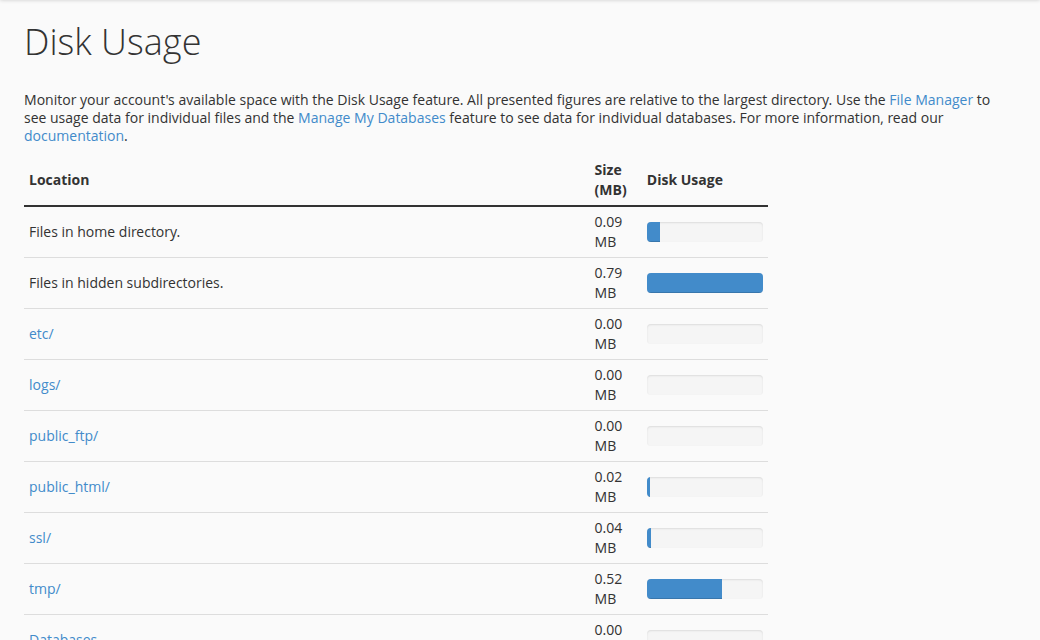
- cPanel: the Disk Usage tool shows which folders are largest. In the File Manager, open
public_html,public_html/wp-adminandpublic_html/wp-contentand look at the size column forerror_loganddebug.log. - DirectAdmin and Webuzo: use the panel's File Manager in the same way.
- SSH: if jailed SSH is enabled on your account, one command lists every large log:
find ~ -type f \( -name 'error_log' -o -name 'debug.log' -o -name '*.error.log' \) -size +10M -exec ls -lh {} \;A log counts towards your account's disk space like any other file, so a full disk from logs can stop uploads, email and backups.
3. Read the log before you delete it
A large log is almost always the same few lines repeated. Download the file and find the most frequent message rather than scrolling:
# Most repeated messages, with counts, ignoring the timestamp
sed 's/^\[[^]]*\] //' debug.log | sort | uniq -c | sort -rn | head -20
A typical top line looks like this:
48213 PHP Deprecated: Creation of dynamic property My_Plugin::$cache is deprecated in /home/youruser/public_html/wp-content/plugins/my-plugin/class-cache.php on line 42The path tells you the culprit: a folder inside wp-content/plugins/ or wp-content/themes/ names the plugin or theme.
| Severity | What it means | What to do |
|---|---|---|
| Fatal error | A page stopped working | Fix now: update or disable the plugin or theme |
| Warning | Something went wrong but the page continued | Update the component; report it to its developer |
| Deprecated / Notice | Old code style for your PHP version; the site still works | Update the component, or use a PHP version it supports |
Deprecation notices after a PHP version change are the most common cause of runaway logs. Updating the plugin or theme usually stops them. If no update exists, report it to the developer, and check how to change your PHP version for the versions available.
4. Stop the growth at the source
- Update everything.WordPress core, plugins and themes. Most repeated warnings disappear with the current release.
- Fix or replace the noisy component.If one abandoned plugin fills the log, replace it with a maintained alternative.
- Turn WordPress debugging offwhen you are not actively debugging. In
wp-config.php, setdefine( 'WP_DEBUG', false );. Thedebug.logthen stops growing. - Delete the old files.Once the cause is fixed, delete
debug.logand theerror_logfiles. PHP creates a fresh file the next time something fails, so a new, small file is a useful signal.
Step-by-step instructions for the WordPress switches are in how to enable debugging in WordPress.
5. Keep debug.log private if it must stay on
By default debug.log sits at https://yourdomain.com/wp-content/debug.log, where anyone who knows the address can download it. If you need logging on for a while, write the log outside your website by giving WP_DEBUG_LOG a path instead of true:
define( 'WP_DEBUG', true );
define( 'WP_DEBUG_LOG', '/home/youruser/wp-debug.log' );
define( 'WP_DEBUG_DISPLAY', false );
Replace youruser with your hosting username, shown on the Access tab of your hosting service in the client area. Check the file every few days and empty it once you have read it.
6. Rotating logs
On shared hosting you can't configure the server's logrotate or reload Apache, and PHP code on our servers can't run shell commands, because exec and similar functions are disabled (see PHP disabled functions). So the old advice to rotate logs from a PHP snippet that calls shell commands does not work. Keep logs small by fixing the cause and deleting old files, as above. If you want a scheduled clean-up, ask support what your account can run from the panel's cron jobs.
On your own VPS you control the server, so use logrotate. A file in /etc/logrotate.d/ such as this rotates the log weekly, keeps four compressed copies and truncates in place, so PHP keeps writing to the same file without a web server reload:
/var/www/example.com/wp-content/debug.log {
    weekly
    rotate 4
    compress
    missingok
    notifempty
    copytruncate
}
Better still on a VPS, point WP_DEBUG_LOG at a path outside the web root such as /var/log/wordpress/, owned by the user PHP runs as.
7. Where Domain India hosting fits
Domain India cPanel hosting gives you File Manager, Disk Usage, the error logs and WP Toolkit in one panel, which covers everything in this guide. On a VPS you manage the server yourself, including logrotate; VPS plans are self-managed and come without cPanel. The card shows the live price, excluding 18% GST.
- 25 GB NVMe SSD Storage
- 50 GB Monthly Bandwidth
- 1 Website
- 10 Email Accounts
Where is the WordPress error log?
When WP_DEBUG and WP_DEBUG_LOG are true, WordPress writes to wp-content/debug.log, or to the path you give WP_DEBUG_LOG. PHP also writes error_log files in the folders where scripts fail, and on Domain India cPanel servers PHP-FPM domains log to logs/yourdomain_com.php.error.log in your home folder.
Is it safe to delete debug.log and error_log files?
Yes. They are only logs. Read the most repeated message first so you can fix the cause, then delete them. PHP and WordPress create new files the next time something is logged.
Why is my error log growing so fast?
Usually one plugin or theme is producing the same warning or deprecation notice on every page load, often after a PHP version change. Find the most repeated line, then update or replace the component it names.
Should I leave WP_DEBUG on?
No. Leave WP_DEBUG false on a live site unless you are actively debugging. The default debug.log can be downloaded by anyone who knows its address, and it keeps growing.
Can I use logrotate on shared hosting?
No. Shared hosting customers can't change the server's logrotate configuration. Fix the cause, delete old logs, or ask support about a scheduled clean-up. On your own VPS you can use logrotate.
Ready to clean up? Find the largest log, fix what it repeats, then delete it, or open a support ticket if you can't tell what the log is pointing to.
Send us the site address and the most repeated line from the log, copied as text, and we will help you find the cause.
Open a support ticket