Softaculous, the app installer inside Webuzo, can set up hundreds of open-source applications beyond WordPress: content management systems, online shops, forums, learning platforms and project tools. This guide shows how to install any of them on Domain India Webuzo hosting, how to check an app will run before you install it, and how to look after it afterwards.
Open the Webuzo panel from the client area, open Softaculous, find the app, read its requirements, then click Install, choose https://, your domain and a folder, set an admin username and a strong password, and click Install again. Before installing, check the app's PHP requirement: some current releases need a newer PHP version than a shared account may offer, so ask support if you are unsure. Keep apps updated, and keep your own copy of anything important.
1. What you can install
Softaculous is installed on our Webuzo server. These are some of the apps we found in it on 24 September 2026:
| Type | Examples in Softaculous |
|---|---|
| Content management | WordPress, Joomla 5, Drupal 10, Grav |
| Online shop | PrestaShop 8, OpenCart |
| Forum | phpBB, MyBB |
| Learning | Moodle, Chamilo |
| Files and collaboration | Nextcloud, ownCloud |
| Project management | Kanboard |
Some apps that older guides list, such as Ghost, Discourse and Wekan, are not in Softaculous; they need Node.js or Ruby on a server you control. Softaculous also still offers old releases of some apps, such as Magento 1 and Joomla 3 and 4. Those versions no longer get security fixes, so don't install them on a public site. Magento 2 needs OpenSearch, which shared hosting doesn't have, so it needs a VPS.
For WordPress, follow the dedicated guide: installing WordPress with Webuzo.
2. Check the app will run
- Read the requirements.Each app's page in Softaculous shows the PHP version, PHP extensions and database it needs.
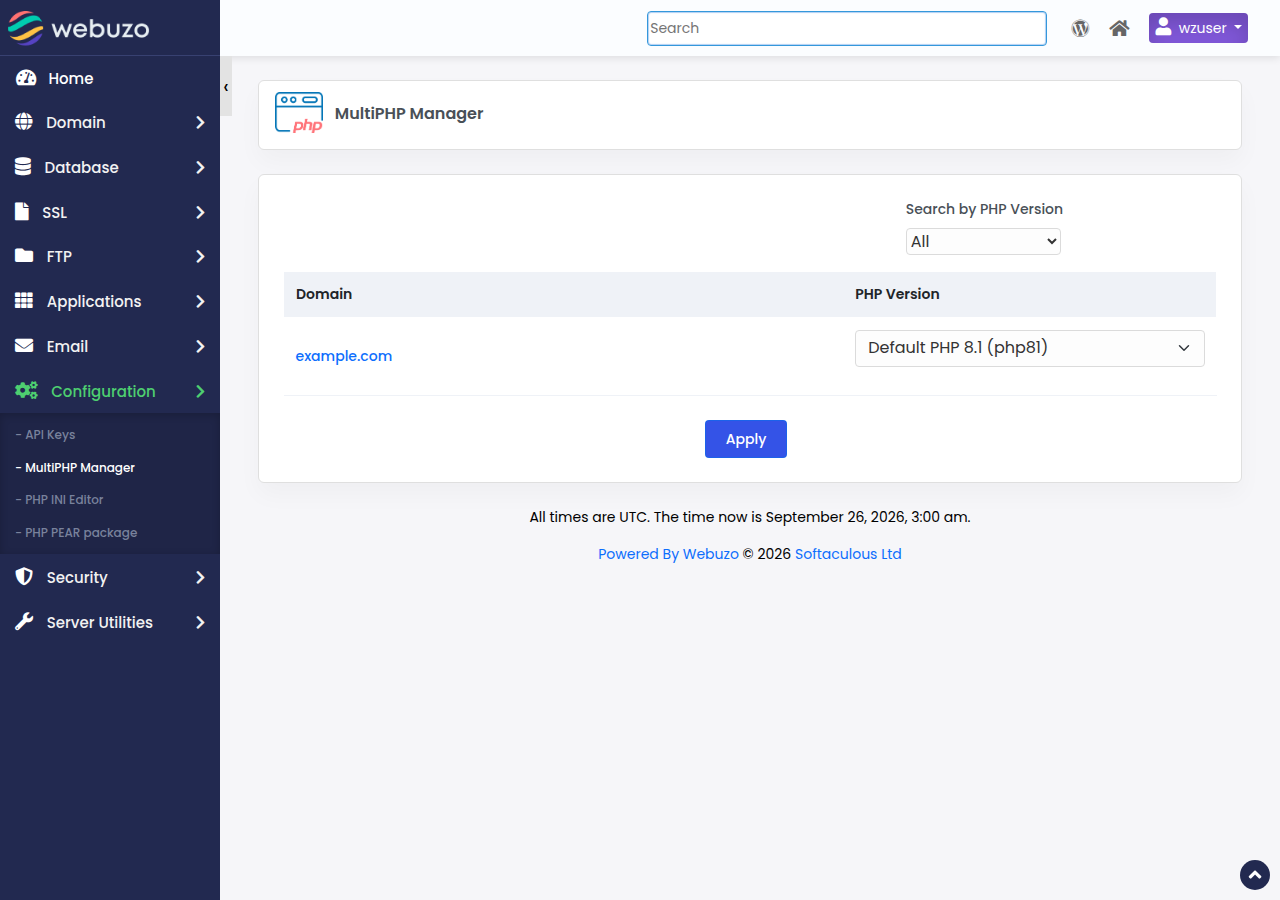
- Check PHP.Some current releases need PHP 8.2 or 8.3, for example recent versions of Laravel, Nextcloud, ownCloud, Grav and Moodle 5. Our Webuzo server offers PHP 8.0 and 8.1 only, so an app that needs PHP 8.2 or newer won't run there.
- Check your plan's room.Each install uses disk space and usually one database. Webuzo Starter includes 1 website and 5 MySQL databases, Webuzo Developer 5 websites and 10 databases, and Webuzo Agency 50 websites and 50 databases (Domain India plan limits on 19 September 2026).
- Point the domain first.The domain should already point to your Webuzo hosting, so the app's address and free SSL work from the start.
3. Install an app
- Open Webuzo.Go to
https://yourdomain.com:2003and sign in with your Webuzo username and password; see logging in to Webuzo. - Open Softaculousand find the app by category or with the search box.
- Click Install.Choose the protocol
https://and your domain. - Choose the folder.Leave the directory empty to install at the root of the domain, or type a folder name such as
shopto install atyourdomain.com/shop. The folder must be empty. - Set the admin account.Use a username other than
admin, a long unique password, and an email address you check. The app sends password resets there. - Click Install.Most apps finish within a few minutes. Softaculous then shows the site address and the admin address.
Install each app in its own folder, for example WordPress at the root, a shop in /shop and a forum in /forum. Each gets its own database, so check your plan's database limit first. On Webuzo Starter, which includes one website, all of them share one domain.
4. Manage installed apps
Softaculous keeps a list of everything it installed on your account, with the version, address and date. From that list you can:
- Update an app when a new version is available. Take a copy of the files and database first, then update, then check the site.
- Remove an app. Softaculous asks whether to delete the files and the database as well.
- Open the app's admin area directly.
Keep apps and their plugins or extensions updated. Outdated apps are the most common way sites get hacked; see why and how WordPress websites get hacked. If Softaculous emails you about updates, check the address it uses; see updating the contact email for Softaculous scripts.
Before an update or a removal, download a copy of the app's files and export its database to your own computer. Domain India also backs up your account every night; to restore from those backups, open a support ticket saying what to restore and from which date.
5. If the install fails
The most common causes are a folder that isn't empty, a full disk quota, no free database slot, or a PHP requirement the account doesn't meet. The fixes, and how to clean up a half-finished install, are in troubleshooting app installation in Webuzo. For errors after the install, such as a database connection error or a 500 error, see common Webuzo errors and fixes.
6. Where Domain India fits
Webuzo shared hosting suits one small site or a few simple apps, managed from a straightforward panel. If an app needs the newest PHP, lots of resources or services such as OpenSearch, look at cPanel hosting or a self-managed VPS instead, and ask support before ordering if you're unsure. See the Webuzo plans on Webuzo hosting.
- 10 GB NVMe SSD Storage
- 50 GB Monthly Bandwidth
- 1 Website
- 5 Email Accounts
Prices on the cards exclude 18% GST.
Frequently asked questions
Which apps can I install with Softaculous on Webuzo hosting?
Hundreds of open-source apps, including WordPress, Joomla, Drupal, PrestaShop, OpenCart, phpBB, MyBB, Moodle, Nextcloud and Kanboard. Check each app's requirements in Softaculous before installing.
How do I install an app in a subfolder?
In the Softaculous install form, type a folder name such as shop in the directory field. The app is then installed at yourdomain.com/shop. Leave the field empty to install at the root of the domain. The folder must be empty.
Why does an app say it needs a newer PHP version?
Some current releases, such as recent Laravel, Nextcloud and Moodle 5, need PHP 8.2 or 8.3. Check the requirement on the app's Softaculous page before you install: our Webuzo server offers PHP 8.0 and 8.1 only.
Can I install Ghost or Discourse with Softaculous?
No. They are not in Softaculous because they need Node.js or Ruby and their own services. Run them on a VPS you manage.
How many apps can I install on my Webuzo plan?
It depends on disk space and databases. Webuzo Starter includes 1 website and 5 MySQL databases, Webuzo Developer 5 websites and 10 databases, and Webuzo Agency 50 websites and 50 databases. Most apps need one database each.
Should I back up an app before updating it?
Yes. Download the app's files and export its database to your own computer before any update or removal, and check the site after updating.
Ready to install? Open Webuzo from your hosting services, or open a ticket if you want support to check an app's requirements first.
Tell us the app and version you want and your domain, and we will check it against your Webuzo account before you install.
Open a support ticket