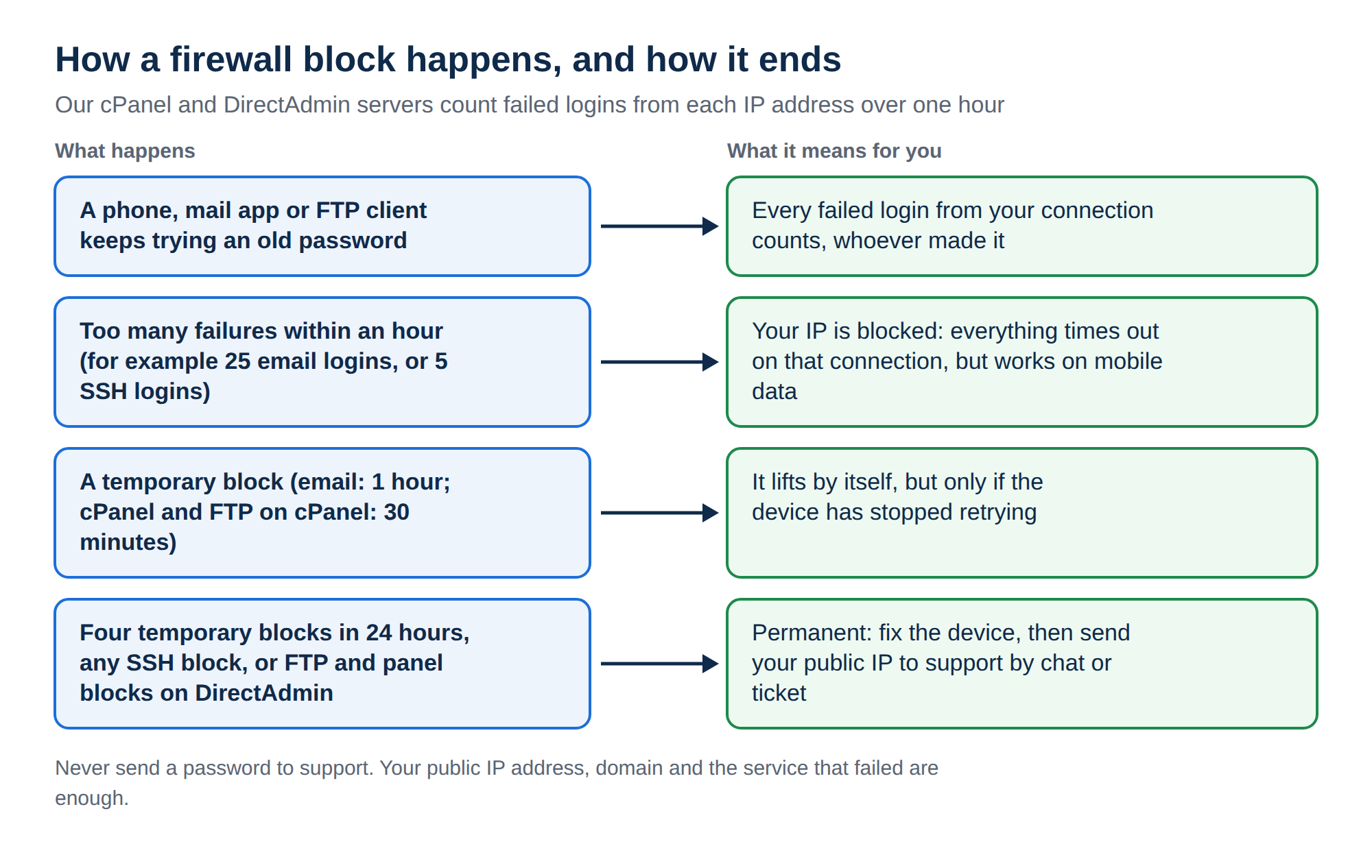
CSF (ConfigServer Security & Firewall) and its login-failure daemon, LFD, block an IP address that fails to log in too often. When that happens to you, the server seems to vanish: website, webmail, FTP and SSH time out, but only on your connection. Who removes the block depends on whose server it is.
If the site works on mobile data but times out on your usual connection, your IP is probably blocked. On Domain India shared hosting the firewall is ours: fix the device with the wrong password, then send your public IP to support. On your own VPS, find the reason with csf -g YOUR_IP and /var/log/lfd.log, then remove it with csf -dr YOUR_IP (permanent) or csf -tr YOUR_IP (temporary).
Step-by-step help for Domain India customers, including how to find your public IP and how to stop repeat blocks, is in I can't reach my server: have I been blocked?. VPS owners can also read How to tell if CSF has blocked your IP on your VPS.
1. Confirm it is a block
| Test | Points to an IP block | Points to a server problem |
|---|---|---|
| Open the site on mobile data (Wi-Fi off) | Works | Fails too |
| What the browser shows | Spins, then times out | An error page such as 500 or 503 |
| Who is affected | Everyone on your office or home connection | Everyone, everywhere |
Then find your public IP from the blocked connection by searching "what is my IP". Note both the IPv4 and IPv6 addresses if you see two. A 192.168.x.x address is private and is not what the firewall sees.
2. On Domain India shared hosting
On cPanel, DirectAdmin and Webuzo shared hosting, the block is on our server and there is no self-service unblock button.
- Fix the cause first.Correct the saved password in the phone, mail app or FTP client that kept failing, or switch it off. Otherwise you will be blocked again soon after the unblock.
- Send us your IP.Use live chat (24/7) or a ticket, with your public IP addresses, your domain and the service that stopped working. Tickets get a first response within 15 minutes; there is no phone support.
- Test, then reconnect devices one at a time.
Support needs only your IP address, domain and the service that failed. Don't paste mailbox or control panel passwords into a ticket or chat.
3. On your own VPS or server
With root access you remove the block yourself. Connect from another network, such as mobile data, or through your provider's console. Replace 203.0.113.25 with your IP.
csf -g 203.0.113.25                       # is it blocked, and why?
grep 203.0.113.25 /var/log/lfd.log | tail -n 20
csf -dr 203.0.113.25                      # remove a permanent block
csf -tr 203.0.113.25                      # remove a temporary block
The LFD log line names the service that failed, for example IMAP, SMTP, FTP, SSH or the control panel login, and the number of failures. To find the device or mailbox behind it on a RHEL-based server:
grep 203.0.113.25 /var/log/maillog | grep -i "auth failed\|failed login"
grep 203.0.113.25 /var/log/secure | grep -i "failed"
The unblock takes effect immediately; you don't need to restart CSF. If you are blocked again straight away, clear the control panel's own list too: cPHulk in WHM, or the Brute Force Monitor in DirectAdmin, which can re-block the IP within minutes.
4. Stop it happening again
csf -a IP "office" is for a static IP you control, never a home or mobile IP.LF_ threshold in /etc/csf/csf.conf a little and run csf -r, rather than switching LFD off.ConfigServer stopped developing CSF in 2025. Existing installations keep working, but for a new VPS consider firewalld or nftables with Fail2ban. Domain India VPS plans are self-managed with full root access, so the firewall you install is yours to run.
How do I know if CSF has blocked my IP?
The server times out on your own connection but works on mobile data or for other people. On a server you manage, csf -g followed by your IP shows the block and its reason.
Can I unblock my IP myself on Domain India shared hosting?
No. On cPanel, DirectAdmin and Webuzo shared hosting the firewall belongs to the server. Send your public IP address, domain and the failing service to support by live chat or ticket.
What is the command to unblock an IP in CSF?
csf -dr followed by the IP removes a permanent block, and csf -tr followed by the IP removes a temporary one. Both take effect immediately.
Why does my IP keep getting blocked?
A device on your connection keeps trying an old password, usually a phone mail app or an FTP client. Fix or remove the saved login on every device before the block is removed.
Should I whitelist my IP in CSF?
Only on a server you manage, and only for a fixed IP that belongs to you. Home and mobile IPs change and are shared with other people.
Ready to get back in? On shared hosting, open a ticket or use the public ticket form from mobile data, with your public IP. For the full walkthrough, read I can't reach my server: have I been blocked?
Tell us your public IP address, your domain and which service stopped working, and support will check the server firewall.
Send us your IP