Our cPanel and DirectAdmin shared hosting servers run a firewall called CSF (ConfigServer Security & Firewall). Together with its login monitor, it blocks any IP address that fails to log in too many times. The rule protects every account on the server from password-guessing bots, but it can also block you when one of your own devices keeps trying an old password. This page explains why that happens, how to avoid it, and what to do if you are blocked.
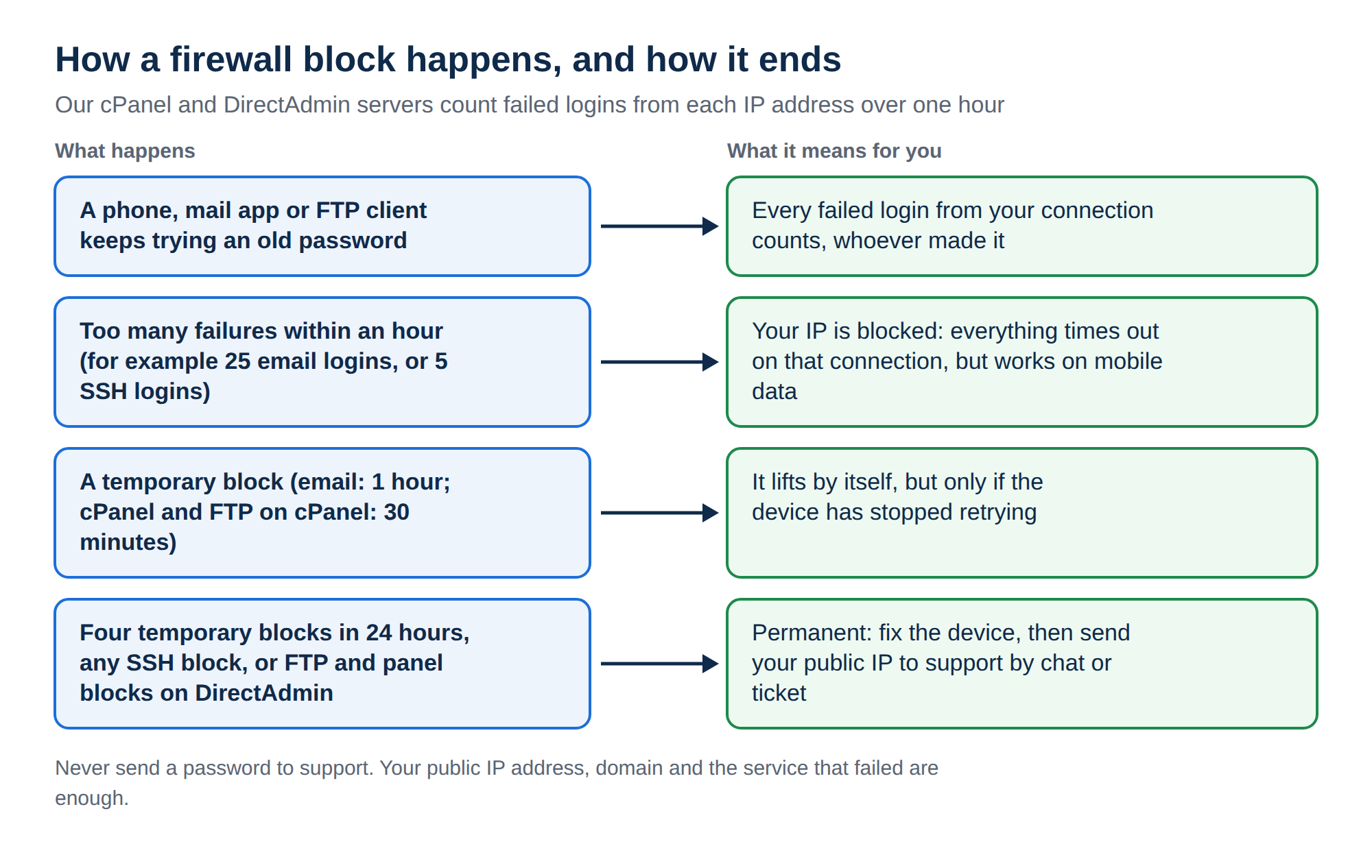
CSF blocks an IP address after repeated failed logins to email, FTP, SSH, the control panel or password-protected folders. Usually the cause is a phone or mail app still trying an old password. On Domain India shared hosting the block is on our server, so support removes it: send your public IP address by ticket or live chat, and fix the saved password on every device first. On your own VPS, the firewall is yours and you remove the block yourself.
Follow the full step-by-step guide: I can't reach my server: have I been blocked?. It shows the two-minute test that tells a block from an outage, how to find your public IP address, and how to get unblocked.
1. What CSF watches
CSF works with a login failure daemon that reads the server's logs. When one IP address fails too often, the daemon adds that address to the firewall's block list. The services it watches include:
- Email: IMAP, POP3 and SMTP authentication from mail apps and phones;
- FTP: FileZilla and other FTP clients;
- SSH: failed key or username attempts;
- Control panel and webmail logins;
- Password-protected folders (
.htaccess/.htpasswdlogins); - Web application firewall rule hits, which can count against an IP too.
On cPanel servers, cPanel's own brute-force protection (cPHulk) works alongside CSF.
The firewall cannot tell a bot from your office laptop. Every failed login from your IP address counts, whoever made it.
2. What a block looks like
A blocked IP address gets no reply at all. So the website, webmail, cPanel, FTP and email all time out from your connection, while they work fine on mobile data or for someone in another city. Most offices share one public IP address, so one device with a wrong password can block everyone on the same connection.
A proper error page, such as 403 or 500, means the server is answering you. That is not a firewall block. See Understanding and resolving HTTP error 403 Forbidden.
3. How to avoid being blocked
- Update saved passwords everywhere.After you change a mailbox or cPanel password, update it on every phone, tablet, laptop and mail app that uses it. In phone mail apps, remove the account and add it again if the app keeps the old password.
- Remove old accounts.Delete mailboxes you no longer use from devices, including devices that former staff used.
- Check your mail and FTP settings.A wrong port or SSL option can fail on every try without telling you. Use the settings in How to log into webmail and What settings do I need to upload my website.
- Keep FTP connections low.Many parallel connections with a wrong password fail many times at once.
- Use a password managerso you type passwords correctly the first time.
- Use SSH keys.SSH on our cPanel and DirectAdmin servers accepts key logins only, so a script that retries with a password just fails and adds to the count. Stop scripts from reconnecting in a loop.
- Protect your client area with 2FA.It doesn't prevent firewall blocks, but it protects the account that controls your services. See How to enable two-factor authentication.
4. If you are blocked on Domain India shared hosting
On cPanel, DirectAdmin and Webuzo hosting, the block is on our server. The client area has no self-service unblock button.
- Fix or switch off the device with the wrong password. Otherwise you will be blocked again soon after the unblock.
- Find your public IP address from the blocked connection. Search "what is my IP" and send both the IPv4 and IPv6 addresses if you see two.
- Contact support with your IP address, your domain and the service that failed. Use a new support ticket in the client area, the public ticket form if you cannot log in, or 24/7 live chat on domainindia.com. Tickets get a first response within 15 minutes; removing the block can take longer, depending on the issue. There is no phone support.
Support needs only your IP address, domain and the service that stopped working. Never paste mailbox or control panel passwords into a ticket or chat.
5. If you run your own VPS
On a Domain India VPS you have root access, and the firewall is the one you or your administrator installed. You remove blocks yourself. With CSF, for example:
csf -g 203.0.113.25    # is this IP blocked, and why?
csf -dr 203.0.113.25   # remove a permanent block
csf -tr 203.0.113.25   # remove a temporary block
Commands for Fail2ban and UFW, and the extra step for control panel brute-force monitors, are in I can't reach my server: have I been blocked?.
Why did the firewall block my IP address?
The server's firewall, CSF, blocks an IP address after too many failed logins to email, FTP, SSH, the control panel or a password-protected folder. The usual cause is a phone or mail app that keeps trying an old password.
Can I unblock my own IP on Domain India shared hosting?
No. On Domain India cPanel, DirectAdmin and Webuzo hosting, the block is on our server. Send your public IP address, domain and the failed service to support by ticket or live chat, and our team removes it.
Will I be blocked again after the unblock?
Yes, if the device with the wrong password is still trying to log in. Correct the saved password on every device, or switch the device off, before asking for the unblock.
Why is everyone in my office blocked when only one person typed a wrong password?
Most offices share one public IP address through their router. When that address is blocked, every computer and phone on the connection loses access to the server at once.
I have a VPS. Who removes a CSF block?
You do. On a Domain India VPS you manage your own firewall. Connect from another network, such as mobile data, and run csf -dr followed by the IP address to remove a permanent block, or csf -tr for a temporary one.
Ready to get back in? Send your public IP address in a new support ticket, or use the public ticket form if you cannot log in. The complete walk-through is in I can't reach my server: have I been blocked?.
Tell us your public IP address, your domain and the service that stopped working, and our team will check the server firewall for you.
Open a support ticket