AH01071: Got error 'Primary script unknown' is Apache telling you that PHP-FPM was asked to run a PHP file it could not find. The page usually shows "File not found." or a 404 or 5xx error instead of your site. The cause is either a file or folder that isn't where the server expects it, or, on a server you run yourself, a PHP-FPM pool with a wrong or empty doc_root. This guide covers what you can check on shared hosting, and how to fix the pool on your own cPanel server.
On Domain India shared hosting, PHP-FPM pools are created and managed by us, so you can't edit them. Check that the file exists in your domain's document root (cPanel › Domains shows it), that the folder name matches exactly, and that .htaccess has no leftover PHP handler lines from an old host. Read the path in Metrics › Errors. If everything is in place and the error continues, open a ticket. On your own cPanel server, find the empty doc_root in the generated pool file, fix the YAML override that caused it, and rebuild with cPanel's tools instead of editing the pool file by hand.
1. What "Primary script unknown" means
When a visitor requests a PHP page, Apache passes the request to a PHP-FPM pool, together with the full path of the script to run. PHP-FPM looks for that file. If the path points nowhere, or points outside the folder the pool is allowed to use, PHP-FPM answers "Primary script unknown" and Apache logs AH01071. A related message, AH01067: Failed to read FastCGI header, often appears when the pool fails in the middle of a request.
So the question is always: which path did PHP-FPM look for, and why isn't the file there?
2. On shared hosting: what you can check
On Domain India shared hosting, each domain's PHP-FPM pool is generated by the server and managed by us. You can't open or edit pool files, and the doc_root setting is not something you control. You can check everything around it, which is where most of these errors come from.
- Read the error line.In cPanel, open Metrics › Errors, load the failing page with
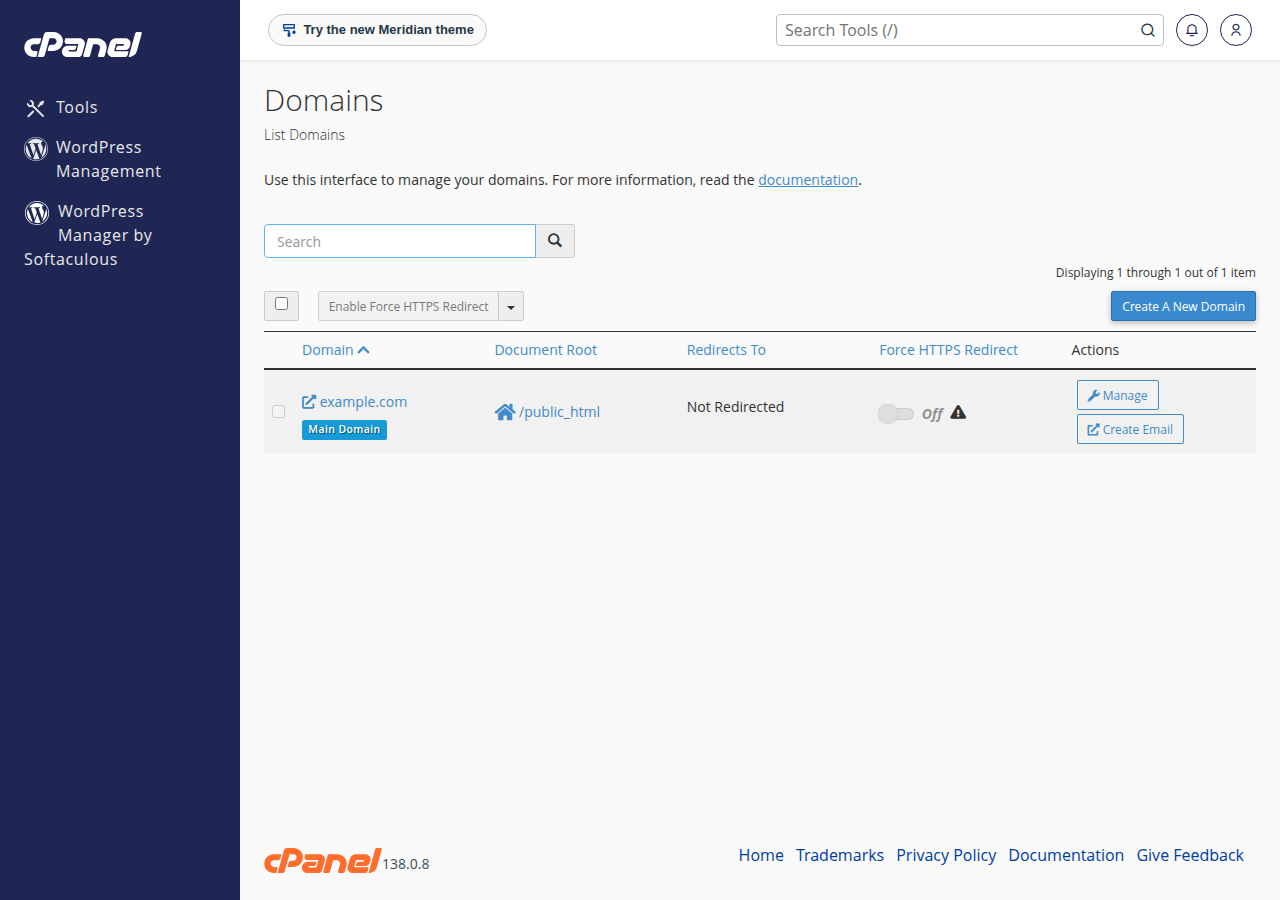
?t=test1added to the URL, and find the matchingAH01071line. Note the path it shows. - Check the document root.In cPanel, open Domains. Each domain shows its document root, such as
public_htmlfor the main domain or its own folder for an addon domain. Compare it with the path in the error line. - Check the file exists.Open File Manager, go to that folder and confirm the file is there. Names are case-sensitive:
Index.phpis notindex.php. - Check recent moves.If you renamed or moved a site's folder, or changed an addon domain's document root, that is the most likely cause. Move the files back or tell support what you changed.
- Check .htaccess.Look for
AddHandler,SetHandlerorAddTypelines for PHP that came from another host, and rewrite rules that send every request to a file that doesn't exist.
The ?t= part matters on cPanel: our servers run nginx in front of Apache as a cache, and a cached page never reaches Apache, so it writes no log line.
Lines such as AddHandler application/x-httpd-php74 .php point Apache at a handler that doesn't exist here. On cPanel, choose your PHP version in MultiPHP Manager and let it manage the handler block in .htaccess. Also don't add php_value or php_flag lines: PHP doesn't run as an Apache module on our servers, so they give a 500 error.
3. Common causes on shared hosting and their fixes
| What you find | Why it breaks | What to do |
|---|---|---|
| The path in the error is an old folder name | The site was moved or the folder renamed | Move the files back, or open a ticket saying what changed |
| The file isn't in the document root | Uploaded to the wrong folder, or deleted | Upload it to the folder shown in cPanel › Domains |
A rewrite rule sends all requests to index.php, but there is none | The app's front controller is missing | Restore the app's index.php from your backup or the app's download |
An old AddHandler or SetHandler line for PHP | It points at a handler this server doesn't have | Remove it and set the version in MultiPHP Manager |
| The error started with no change on your side | Possibly a server-side pool issue | Open a ticket with the details in section 4 |
If files are missing after an accident, JetBackup in your control panel keeps weekly backups that you can restore from. See how to download a backup of your site.
On DirectAdmin, the same checks apply: the site's files live in domains/yourdomain.com/public_html, and DirectAdmin runs PHP through PHP-FPM too. For reading logs on both panels, see reviewing error logs in cPanel and DirectAdmin.
4. When to open a ticket
If the file is where it should be, the document root is right and .htaccess is clean, the pool itself may need regenerating, which only we can do on shared hosting. Open a ticket at /client/support/new when logged in, or /support/ticket, with:
- the domain and the full URL that fails;
- the date and time you last reproduced it;
- the
AH01071line from Metrics › Errors; - anything you changed recently, such as a moved folder, a new PHP version or a restored backup.
Support is on 24/7 live chat, and tickets get a first response within 15 minutes.
5. On your own cPanel server: find the empty doc_root
This section applies only to a cPanel and WHM server where you have root access. A Domain India VPS is self-managed and comes without cPanel.
cPanel writes one pool file per domain under /opt/cpanel/ea-phpXX/root/etc/php-fpm.d/, generated from its own defaults plus any YAML overrides. If the doc_root value in that file is empty or wrong, PHP-FPM rejects scripts. Compare what cPanel thinks the document root is with what the pool contains (replace the user, domain and PHP version):
grep -i documentroot /var/cpanel/userdata/exampleuser/example.com
grep -n doc_root /opt/cpanel/ea-php83/root/etc/php-fpm.d/example.com.conf
If the pool shows doc_root = "" or an old path, find the override that put it there:
grep -rn doc_root /var/cpanel/ApachePHPFPM/ /var/cpanel/userdata/exampleuser/ 2>/dev/nullLook especially at the domain's own example.com.php-fpm.yaml in the user's userdata folder, and at any system-wide pool defaults or overrides under /var/cpanel/ApachePHPFPM/. A domain-level file takes precedence over system-wide settings.
6. On your own cPanel server: fix and rebuild
- Fix the source, not the output.Correct or remove the
doc_rootentry in the YAML file that set it, so that cPanel uses the domain's real document root. Check cPanel's PHP-FPM documentation for the exact key format your version expects. - Keep the domain on PHP-FPM.Don't remove the
_is_presentline from a domain's.php-fpm.yaml; it marks the domain as using PHP-FPM. - Rebuild the pool files.Run
/scripts/php_fpm_config --rebuild. - Restart PHP-FPM.Run
/scripts/restartsrv_apache_php_fpm, then reload Apache. - Check the result.Run the
grep -n doc_rootcommand again and confirm the path is right, then watch the log withtail -f /etc/apache2/logs/error_logwhile you load the site.
cPanel rewrites the files in php-fpm.d whenever it rebuilds pools, for example after an update, a PHP version change or a domain change. A manual edit there works until the next rebuild, then the error returns. Always change the YAML override and rebuild.
If the error continues after a clean rebuild, check the other usual causes on your own server: a document root folder that was deleted, an open_basedir value that excludes the site's folder, symlinks that Apache's SymLinksIfOwnerMatch refuses to follow, and conflicting settings in the SSL-specific configuration for the domain. As a last resort, switch the domain off PHP-FPM in WHM › MultiPHP Manager, rebuild, and switch it back on.
For PHP-FPM setup and pool sizing on your own cPanel server, see mastering PHP-FPM in cPanel.
7. Where Domain India fits
On our cPanel hosting, PHP-FPM pools are created and maintained for you, and you choose each domain's PHP version in MultiPHP Manager. If you want to manage PHP-FPM yourself, a VPS gives you root access; it is self-managed and you install the stack you want.
- 25 GB NVMe SSD Storage
- 50 GB Monthly Bandwidth
- 1 Website
- 10 Email Accounts
- 1 vCPU
- 2 GB DDR4 RAM
- 64 GB NVMe SSD Storage
- 2 TB Monthly Bandwidth
What causes "Primary script unknown" in Apache?
PHP-FPM was asked to run a PHP file it could not find. Usually the file isn't in the domain's document root, a folder was moved or renamed, a rewrite rule points to a missing file, or on a self-managed server the PHP-FPM pool's doc_root is empty or wrong.
Can I edit my domain's PHP-FPM pool on Domain India shared hosting?
No. Pools are generated and managed by us for every domain. You can change the PHP version in MultiPHP Manager and PHP settings in MultiPHP INI Editor or .user.ini, and open a ticket if the pool itself needs attention.
How do I find my domain's document root in cPanel?
Open Domains in cPanel. Each domain is listed with its document root, such as public_html for the main domain or a separate folder for an addon domain.
Where do I see the AH01071 error?
In cPanel, open Metrics › Errors after reproducing the problem. Add a query string such as ?t=test1 to the URL so the request reaches Apache and is logged.
Can I fix it by adding php_value lines to .htaccess?
No. PHP doesn't run as an Apache module on our servers, so php_value and php_flag lines give a 500 error. Use MultiPHP INI Editor or .user.ini for PHP settings.
On my own cPanel server, can I just edit the pool .conf file?
You can, but cPanel overwrites it at the next rebuild. Fix the YAML override that set the wrong doc_root, then run /scripts/php_fpm_config --rebuild and restart PHP-FPM.
Ready to get your site running? Check your document root and error log, then open a support ticket with the details if the error continues. Running your own server? Compare VPS plans.
Send us the domain, the failing URL, the time and the error line, and we will check the PHP-FPM setup for your site.
Open a support ticket