Shared, VPS, dedicated and cloud hosting all put a website online. What changes between them is how much of the server is yours, and how much of the work is too. This guide explains each type in plain terms, gives you a few questions that settle the choice, and shows where Domain India's plans fit.
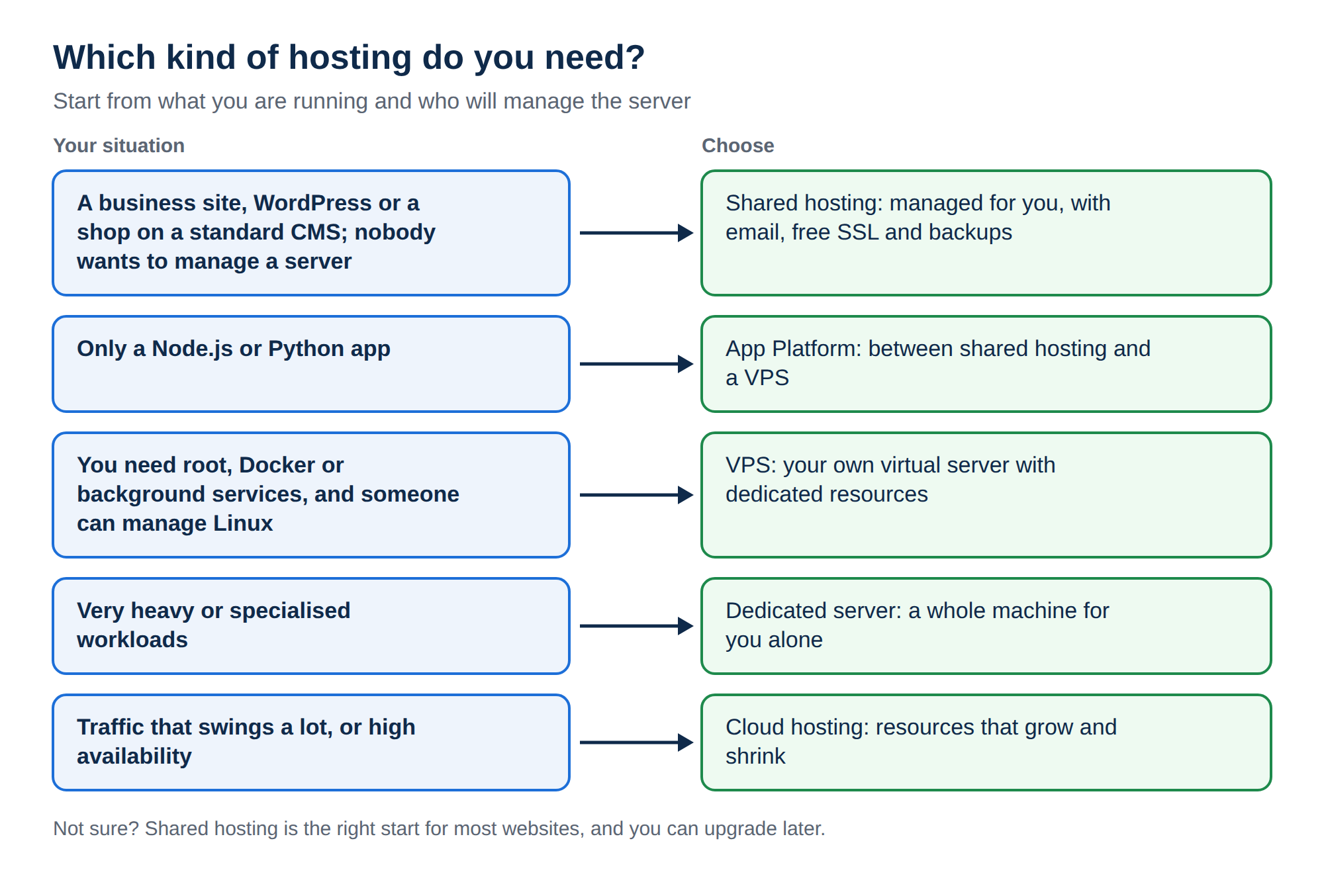
Most business websites, WordPress sites and online shops on a standard CMS belong on shared hosting: the server is managed for you and email is included. Choose a VPS when you need root access, Docker, background services or dedicated resources, and someone can manage a Linux server. Dedicated servers and cloud hosting are for large or specialised workloads. If you only need to run a Node.js or Python app, the App Platform sits between shared hosting and a VPS.
1. Four questions that decide it
Answer these before you look at any plan:
- What are you running? WordPress or a PHP site, a custom app, or several heavy apps?
- Who will manage the server? If nobody on your team wants to patch Linux, stay with a managed option.
- Do you need root access? Docker, system packages, custom firewall rules or a service on its own port all need it.
- How much traffic, and how steady? Modest, steady traffic suits shared hosting. Sustained heavy load needs dedicated resources.
If your answers are "a website", "nobody", "no" and "modest", shared hosting is the right choice, and the rest of this guide is background.
2. The four types at a glance
| Type | What you get | Who runs the server | Best for |
|---|---|---|---|
| Shared hosting | An account on a managed server, with per-account limits and a control panel | The host | Business sites, WordPress, email at your domain |
| VPS | A virtual server with its own vCPU, RAM, storage and root access | You | Custom software, Docker, developers |
| Dedicated server | A whole physical machine for you alone | You, unless you buy management | Very heavy or specialised workloads |
| Cloud hosting | Resources spread across several machines that can grow and shrink | Depends on the service | Traffic that swings a lot, high availability |
3. Shared hosting
Your website runs in its own account on a server that also hosts other customers. The host runs the operating system, web server, PHP, databases and security. You look after your website.
On Domain India's Linux shared hosting, measured on our servers in September 2026:
- on the cPanel and DirectAdmin servers, CloudLinux gives each account its own limits, so one busy site cannot take over the server;
- the web server is Apache, and
.htaccessrules work; - you choose cPanel, DirectAdmin or Webuzo as your control panel, with a one-click installer for WordPress;
- email accounts, free SSL and weekly backups are included;
- jailed SSH access is available on every shared plan. It is off by default; ask support to enable it.
- Lowest cost and no server to maintain
- Email, SSL, backups and a control panel ready to use
- Easy upgrade to a bigger plan as you grow
- Per-account limits on CPU, memory and processes
- Some PHP functions are disabled for security
- No root access and no Docker
If your software needs something shared servers block, PHP disabled functions on shared hosting lists what is off. For ASP.NET sites, Windows hosting runs IIS with Plesk.
4. VPS hosting
A VPS (virtual private server) is a virtual machine with its own vCPUs, RAM, storage and IP address. You get full root access and can install anything that runs on Linux. The trade-off is responsibility: security updates, the firewall, email and extra backups are yours to run.
Domain India's VPS is a KVM virtual machine with NVMe storage and a choice of Linux operating systems, self-managed by default. cPanel is not offered on our VPS plans; if you want cPanel, stay on shared cPanel hosting. For the full comparison, read VPS vs shared hosting.
Many slow sites need caching, a lighter theme or more resources on the same shared hosting, not a VPS. Check your usage first with Check hosting resource usage, and see Can I upgrade my web hosting package.
5. Dedicated servers
A dedicated server is a physical machine used by one customer only. Nothing is shared, so you get all of its CPU, memory and disk. It suits large databases, very busy online shops, or software licensed per physical server.
It is also the most expensive option, and like a VPS it needs someone to manage it. Most growing businesses are better served by a larger VPS first. Current configurations are on the dedicated servers page; for a custom build, contact us.
6. Cloud hosting
"Cloud" is used loosely. In the strict sense it means your site runs on resources pooled across several machines, so capacity can be added as traffic rises and a failed machine does not take the site down. It suits applications with traffic that swings sharply, or that need high availability, and it usually needs more technical setup than a single server.
For an ordinary business website, cloud hosting adds cost and complexity without a clear benefit. See the cloud servers page if your application needs it.
7. The in-between options
Two Domain India products sit between the classic types:
- App Platform: deploy a Node.js, Python or Dockerfile-based app from GitHub or with a deploy token, and we run the containers, SSL and routing. Each plan includes a PostgreSQL database. There is no SSH or root access, and it is not meant for WordPress. See Getting started with the App Platform.
- AI Website Builder: describe your business and the builder creates the site, which you then edit by chatting with it. There is no server or control panel to manage. See the AI Website Builder.
8. Where Domain India fits
Here is the honest short version. Start on shared hosting unless you already know you need root access. The plan cards below show live prices, excluding 18% GST.
For a business or WordPress website:
- 25 GB NVMe SSD Storage
- 50 GB Monthly Bandwidth
- 1 Website
- 10 Email Accounts
For a custom app or a stack you control:
- 1 vCPU
- 2 GB DDR4 RAM
- 64 GB NVMe SSD Storage
- 2 TB Monthly Bandwidth
For a Node.js or Python app without managing a server:
- 512 MB RAM per app
- 1 vCPU
- 5 GB NVMe SSD
- PostgreSQL Database
Every shared plan can be upgraded later without starting again, and renewals work by invoice: nothing is charged to a saved card automatically. If you are unsure, tell us what you run and where it struggles. Support is on 24/7 live chat, and tickets get a first response within 15 minutes.
Frequently asked questions
Which type of hosting is best for a small business website?
Shared hosting. It is the lowest-cost option, the server is managed for you, and email, free SSL and a control panel are included. Most small business and WordPress websites never need more.
When should I move from shared hosting to a VPS?
When you need root access, Docker, background workers or dedicated resources, or your software needs PHP functions that shared servers disable. Check your resource usage first, because a bigger shared plan is often enough.
Is a Domain India VPS managed?
Our VPS is self-managed by default. You get full root access and you look after the operating system, security updates and software.
What is the difference between a VPS and a dedicated server?
A VPS is a virtual machine with its own share of a physical server's resources. A dedicated server is the whole physical machine for one customer. Both give root access; a dedicated server costs more and suits very heavy workloads.
Is cloud hosting better than shared hosting?
Not for most websites. Cloud hosting spreads resources across several machines, which helps applications with sharp traffic swings or high-availability needs. An ordinary business website gains little from it and costs more to run.
Can I run WordPress on the App Platform?
The App Platform is designed for Node.js, Python and Dockerfile-based apps, not WordPress. For WordPress, use shared hosting with cPanel, DirectAdmin or Webuzo.
Can I have cPanel on a VPS?
No. cPanel is not offered on Domain India's VPS plans. If you want cPanel, use shared cPanel hosting.
Ready to choose? Compare shared hosting plans, VPS plans and the App Platform. New to all of this? Hosting basics walks through the whole path from order to live website, or ask us through a support ticket.
cPanel, DirectAdmin or Webuzo, with email at your domain, free SSL, backups (weekly on cPanel and DirectAdmin, nightly on Webuzo) and a one-click WordPress installer.
See hosting plans