If your hosting plan gives you more than you use, you can move to a smaller one. On Domain India a downgrade does not happen straight away: you schedule it from the client area, you keep your current plan until your renewal date, and the smaller plan starts from then.
Upgrades, prices and plan limits are covered in Can I upgrade my web hosting package at any time?. This page covers moving down.
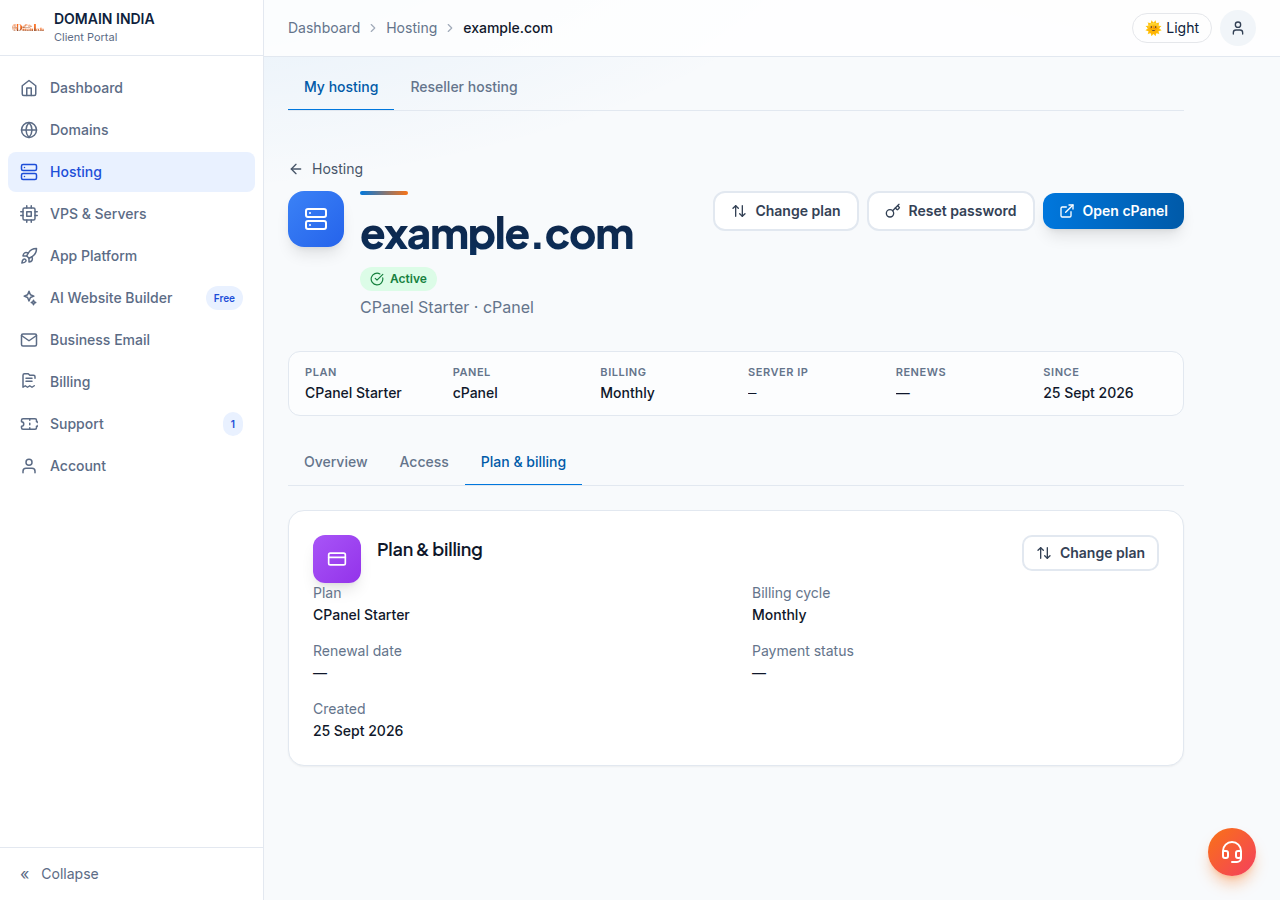
Open your hosting service in the client area, choose Change plan, and click Schedule downgrade on the smaller plan. The change is booked for your renewal date, you keep your current plan until then, and there is no refund or credit for the current term. You can cancel a scheduled downgrade from the same page before that date. Webuzo and Windows customers should contact support instead.
1. How a downgrade works
- The change is booked for your renewal date. You keep your current plan and its limits until then.
- A banner on the Change plan page shows the scheduled downgrade, with a Cancel downgrade button.
- Upgrading before the date cancels the scheduled downgrade automatically.
- There is no refund or credit for the rest of the current term.
- Your files, mailboxes and databases must fit the smaller plan's limits.
- Only one downgrade can be scheduled at a time.
A downgrade changes the plan of the hosting account you already have. It stays on the same control panel: a cPanel plan moves to a smaller cPanel plan, a DirectAdmin plan to a smaller DirectAdmin plan.
2. Check that your site fits the smaller plan
Do this before you schedule anything. Sign in to your control panel and compare what you use today with the limits of the plan you want:
| Check | Where to look |
|---|---|
| Disk space used | Your control panel's disk usage figure |
| Number of websites (domains) | The domains list in your control panel |
| Email accounts | The email accounts page |
| MySQL databases | The databases page |
The limits of each plan are listed in the plan table of the upgrade guide and on the cPanel and DirectAdmin hosting pages. For where to find your usage, see how to check your hosting resource usage.
If you are over a limit, tidy up before the renewal date: delete old backups and unused WordPress installs, remove test databases and mailboxes nobody reads, and take a copy of anything you want to keep first.
3. How to schedule a downgrade
- Sign inand open Hosting › My hosting, then select your hosting service.
- Choose Change plan.The page shows your current plan, your billing cycle and every plan on the same control panel.
- Click Schedule downgradeon the smaller plan and confirm.
- Check the banner.The Change plan page now shows the scheduled downgrade and the date it takes effect.
To change your mind, open the same page before your renewal date and click Cancel downgrade. If you upgrade instead, the scheduled downgrade is cancelled automatically.
Your current plan runs to the end of the term you have paid for. The unused part of that term is not refunded or credited when you move down.
4. Webuzo, Windows and changing control panel
Webuzo and Windows (ASP.NET) hosting. Contact support before changing plan on these. We will confirm the options for your account and make the change with you.
A different control panel or operating system. Moving from DirectAdmin to cPanel, or from Linux to Windows, is not a downgrade: it means ordering the new service and moving the website. Read migrating your website to us and open a ticket so we can plan it with you before you cancel anything.
No longer need hosting at all? That is a cancellation, not a downgrade. See how to cancel a service.
5. Need help choosing?
Tell us what you run and what you actually use, and we will suggest the smallest plan that fits. Support is on 24/7 live chat, and tickets get a first response within 15 minutes; resolution time depends on the issue. We do not offer phone support.
Frequently asked questions
Can I downgrade my Domain India hosting plan?
Yes, for cPanel and DirectAdmin plans. Open your hosting service in the client area, choose Change plan and click Schedule downgrade on the smaller plan. Webuzo and Windows customers should contact support.
When does a downgrade take effect?
On your renewal date. You keep your current plan and its limits until then, and the smaller plan starts from that date.
Do I get a refund when I downgrade?
No. There is no refund or credit for the rest of the current term, because the downgrade only starts at your renewal date.
Can I cancel a scheduled downgrade?
Yes. Before your renewal date, open the Change plan page and click Cancel downgrade on the banner. Upgrading before that date also cancels the scheduled downgrade automatically.
What if my website is bigger than the smaller plan allows?
Reduce disk use, websites, mailboxes and databases to fit the new plan's limits before your renewal date. Take a copy of anything you want to keep before deleting it.
Can I downgrade to a plan on a different control panel?
No. A plan change stays on the same control panel. Moving to another panel or to Windows means ordering the new service and migrating, so open a support ticket first.
Ready to change your plan? Open Hosting › My hosting and choose Change plan, read the full plan change guide, or open a ticket if you would like help choosing.
Open your hosting service, choose Change plan, and schedule the smaller plan for your renewal date.
Go to My hosting