You can upgrade an active Domain India cPanel or DirectAdmin hosting plan at any time from the client area. You pay only the difference between the two plans for the time left until your renewal date, and the new plan applies as soon as that invoice is paid. This page gives you the short version; the full guide covers pricing examples and every plan.
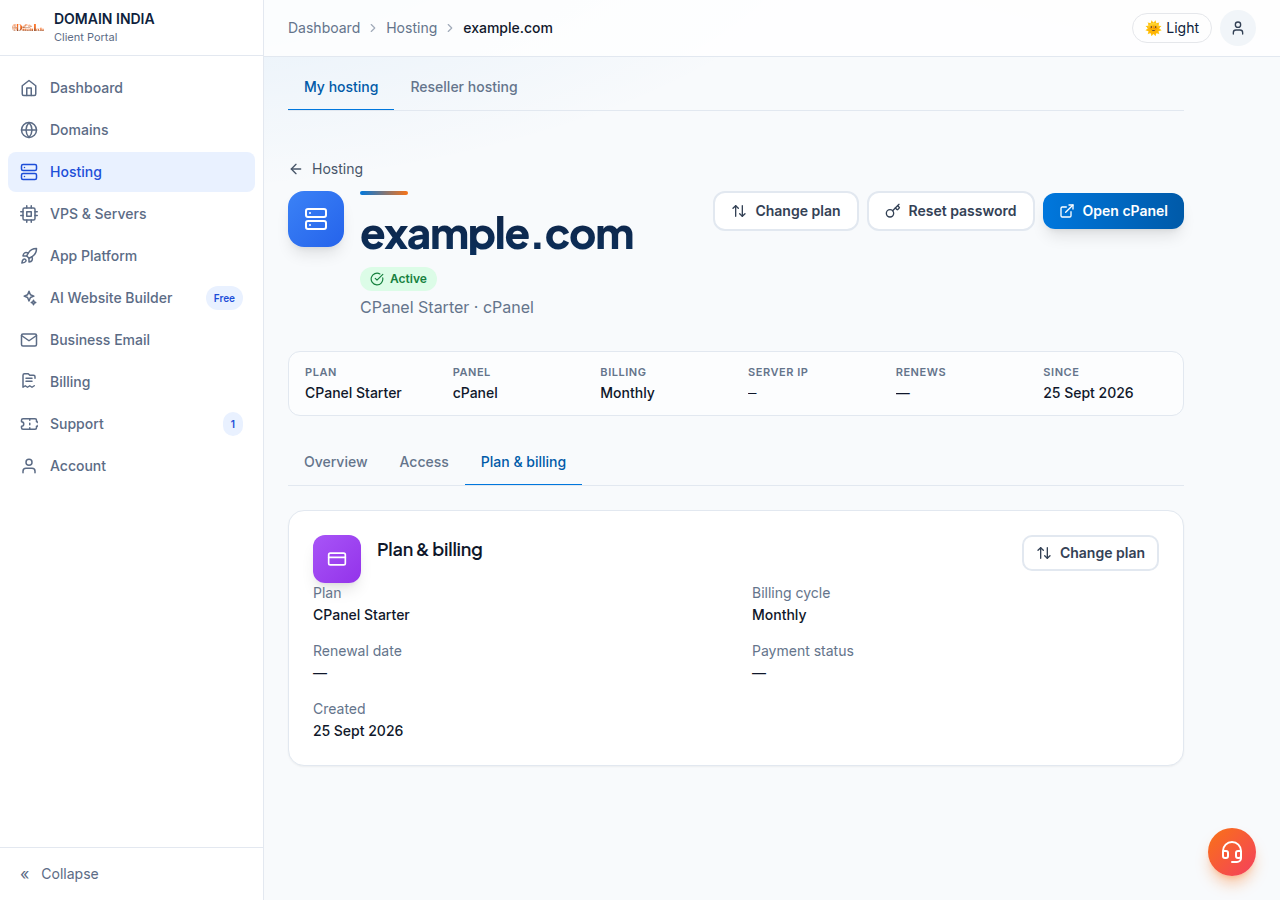
Open Hosting › My hosting, select your hosting service and choose Change plan. Pick a bigger plan on the same control panel, click Upgrade and pay the invoice: the plan changes once the payment is confirmed. You pay the prorated difference plus 18% GST, and your renewal date stays the same. Webuzo and Windows customers should contact support before changing plan.
Worked price examples, plan limits and downgrade rules are in Can I upgrade my web hosting package at any time?. This page follows it exactly.
1. When an upgrade makes sense
Upgrade when your site genuinely needs more of what the plan limits: disk space, bandwidth, websites, mailboxes or databases. Check your control panel's disk and resource usage first. Old backups, unused WordPress installs and full mailboxes often explain a "disk full" warning, and deleting them costs nothing. If the site is slow rather than full, read My website is slow before you pay for a bigger plan.
2. How to upgrade
- Sign inand open Hosting › My hosting, then select your hosting service.
- Choose Change plan.The page shows your current plan and billing cycle, and every plan on the same control panel.
- Compare the plans.Each higher plan shows its monthly price, its features and the exact amount due now, with the tax shown separately.
- Click Upgradeon the plan you want and confirm. You are taken straight to the invoice payment page.
- Pay the invoice.The plan on your account changes as soon as the payment is confirmed, and your new plan's limits apply.
Two conditions apply. The account must be active: a suspended or cancelled account cannot change plan. And the new plan must use the same control panel: cPanel to a bigger cPanel plan, DirectAdmin to a bigger DirectAdmin plan.
If the upgrade invoice is left unpaid, nothing changes and you stay on your current plan. You can only have one unpaid upgrade invoice for a service at a time. The invoice is due 7 days after it is raised and appears under Invoices.
3. What an upgrade costs
You are not charged the full price of the new plan. The client area credits the unused value of your current plan up to your renewal date, charges the new plan for the same remaining days, and bills the difference plus 18% GST. The Due now figure on the Change plan page is the exact amount for your own dates, so there is no need to work it out by hand.
Your renewal date does not change. From your next renewal, the renewal invoice is for the new plan at the same billing cycle.
- 50 GB NVMe SSD Storage
- 100 GB Monthly Bandwidth
- 5 Websites
- 50 Email Accounts
4. What changes, and what doesn't
- Changes: the plan name and its limits, and the price of your next renewal.
- Stays the same: the hosting account itself, your domain, your control panel login, and your files, databases and mailboxes. You do not order a new account or move your website.
If the new limits are not showing in your control panel shortly after payment, open a ticket with the invoice number so we can check the account.
5. Webuzo, Windows and switching control panel
Webuzo and Windows (ASP.NET) hosting: contact support before changing plan. We will confirm the options available for your account and make the change with you.
A different control panel or operating system, such as DirectAdmin to cPanel, Linux to Windows, or shared hosting to a VPS, is a migration to a new service, not a plan change. Open a ticket first so we can plan the move with you before you cancel anything.
Frequently asked questions
Can I change my hosting billing cycle, for example from monthly to yearly?
The billing cycle is chosen when you order, and changing plan keeps the same cycle. The client area has no option to change the cycle of an existing hosting service, so open a support ticket with the service name and the cycle you want, and support will tell you what can be done. For domains, you choose how many years to add each time you renew.
How do I upgrade my Domain India hosting plan?
Sign in, open Hosting › My hosting, select your hosting service and choose Change plan. Click Upgrade on a bigger plan on the same control panel and pay the invoice. The plan changes as soon as the payment is confirmed.
How much does an upgrade cost part-way through my term?
You get credit for the unused value of your current plan and pay for the new plan over the same remaining days, so you pay only the difference plus 18% GST. The Change plan page shows the exact amount due before you confirm.
Does upgrading change my renewal date?
No. Your renewal date stays the same, and your next renewal invoice is for the new plan.
Will I lose my website or email when I upgrade?
No. An upgrade changes the plan of your existing hosting account. Your files, databases, mailboxes and control panel login stay the same.
Can I upgrade Webuzo or Windows hosting from the client area?
Contact support before changing plan on Webuzo or Windows hosting. Support will confirm the options for your account and make the change with you.
Ready to upgrade? Open Hosting › My hosting and choose Change plan, read the full upgrade guide, or open a ticket if you would like help choosing. Support is on 24/7 live chat, and tickets get a first response within 15 minutes; resolution can take longer depending on the issue. There is no phone support.
Open your hosting service, choose Change plan, and see the exact upgrade price for your own renewal date before you pay.
Go to My hosting