Your domain's DNS settings tell the internet where your website and email live. There are two kinds: nameservers, which decide which provider answers for your domain, and DNS records, which are the answers themselves, such as the IP address of your website or the server that receives your email. This page is a short overview of both and where to change each one.
Change nameservers to move all of your DNS to a new provider. Change records to point one service somewhere and keep everything else. Records only work at the provider your nameservers point to: for a domain on Domain India hosting nameservers, that is your control panel's DNS editor, such as the Zone Editor in cPanel. Changes usually take effect within a few hours, and can take up to 24-48 hours because of caching.
Step-by-step instructions, common setups (Domain India hosting, Google Workspace, Microsoft 365, website platforms) and how to check a change are in How to change your domain DNS settings. For every record type in detail, read the guide to DNS records.
1. Nameservers or records?
| You want to | Change | Where |
|---|---|---|
| Move website, email and everything else to one new provider | Nameservers | Domain India client area, the domain's Nameservers tab |
| Point only the website to a new host | A and/or CNAME records | Wherever your nameservers point today |
| Move only email | MX and TXT records | Wherever your nameservers point today |
| Verify the domain for a service | TXT or CNAME record | Wherever your nameservers point today |
Changing nameservers moves all of your DNS at once. If your email works today and you switch nameservers without re-creating the mail records at the new provider, email stops arriving.
2. The records you will meet
| Type | What it does |
|---|---|
| A | Points a name to an IPv4 address |
| AAAA | Points a name to an IPv6 address |
| CNAME | Makes a name an alias of another hostname, for example www |
| MX | Names the server that receives email, with a priority (lower is tried first) |
| TXT | Holds text other services read, such as SPF, DKIM, DMARC and verification codes |
| SRV | Points a specific service, such as some calling or chat systems, to a server and port |
| NS | Names the nameservers for the domain or delegates a subdomain |
| CAA | Limits which certificate authorities may issue SSL certificates for the domain |
Two rules save most mistakes: the domain itself (@) cannot be a CNAME, so use an A record there; and a domain may have only one SPF record, so merge several into one.
3. Where to make the change
- Find out where your DNS is managed.Sign in to the client area, open Domains → My domains, select the domain and look at the Nameservers tab.
- To change nameservers,click Edit on that tab, enter the nameservers your hosting or DNS provider gave you, and save. You don't need to unlock the domain first.
- To change records on Domain India hosting nameservers,sign in to your hosting control panel and use its DNS editor: the Zone Editor in cPanel, or the DNS management page in DirectAdmin.
- To change records at another provider,such as Cloudflare or a website platform, use that provider's dashboard.
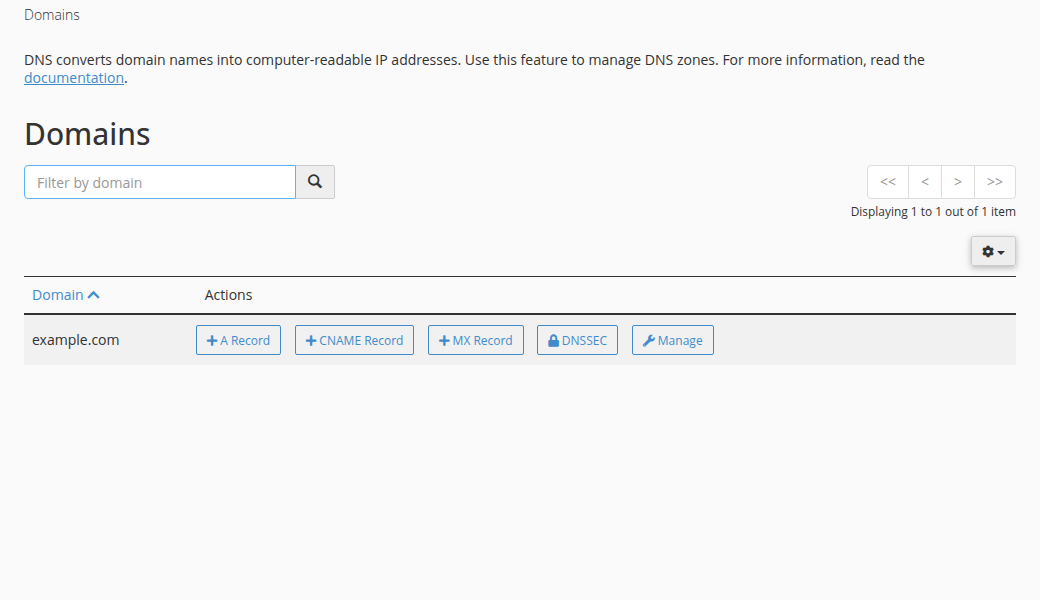
For a domain on hosting nameservers or an outside DNS provider, the client area's DNS tab says the records are managed elsewhere. That is expected.
The DNS tab may offer Activate Free DNS or Switch to Free DNS. It changes your domain's nameservers without copying your records, so email and the website can stop working. Point the domain to your hosting nameservers, or add A records at your current DNS provider, as described in How do I change my nameservers.
4. How long changes take
DNS changes usually take effect within a few hours, and can take up to 24-48 hours to reach every network. The delay is caching by internet providers and devices, not a queue at Domain India. Record changes follow the old record's TTL; nameserver changes can take longer. Check with dig or nslookup rather than only a browser, which may show a cached page.
Frequently asked questions
What is the difference between nameservers and DNS records?
Nameservers decide which provider answers DNS questions for your domain. DNS records are the answers that provider gives, such as the website's IP address (A record) or the mail server (MX record). Changing nameservers moves all of your DNS; changing a record changes one service.
Where do I edit DNS records for a domain registered with Domain India?
At the provider your nameservers point to. If the domain uses your Domain India hosting nameservers, use your control panel's DNS editor, such as the Zone Editor in cPanel. If it points to Cloudflare or another provider, edit the records there.
How long does a DNS change take?
Usually a few hours, and up to 24-48 hours, because internet providers cache DNS answers for as long as each record's TTL allows. Nameserver changes can take longer than record changes.
Will changing nameservers affect my email?
Yes, unless you re-create your mail records (MX, SPF, DKIM and DMARC) at the new provider first. To change only the website, change its A or CNAME records instead.
Do I need to unlock my domain to change DNS?
No. The transfer lock only stops the domain being transferred to another registrar. You can change nameservers and DNS records while it is on, and you should leave it on.
Ready to make the change? Open My domains in the client area, read the full DNS settings guide, or open a support ticket with your domain name and the records you are trying to set.
Change nameservers and check your domain's settings in one place.
Go to My domains