A cron job is a command your hosting account runs on a schedule: every 15 minutes, every night at 2 a.m., or every Monday. This guide explains the command part of a cron job, with ready-to-use examples for PHP, WordPress, Laravel and web URLs on Domain India cPanel hosting.
In cPanel, open Advanced › Cron Jobs, choose a schedule and enter a command such as /usr/local/bin/php /home/username/public_html/cron.php >/dev/null 2>&1. /usr/local/bin/php runs your script with the PHP version selected for it, and >/dev/null 2>&1 stops cron emailing you on every run. Always use full paths, run PHP directly rather than through a URL, and remember that the same PHP disabled functions apply to cron as to your website.
1. How a cron job is built
Every cron job has two parts: when it runs (five time fields) and what it runs (the command).
*/15   *    *    *    *    /usr/local/bin/php /home/username/public_html/cron.php >/dev/null 2>&1
minute hour day month weekday command| Field | Allowed values | Example | Meaning |
|---|---|---|---|
| Minute | 0-59 | */15 | Every 15 minutes |
| Hour | 0-23 | 2 | At 2 a.m. |
| Day of month | 1-31 | 1 | On the 1st of the month |
| Month | 1-12 | * | Every month |
| Weekday | 0-7 (0 and 7 are Sunday) | 1 | On Mondays |
A * means "every", */15 means "every 15", 1-5 is a range and 1,15 is a list. So 0 2 * * * runs daily at 2:00, and 30 9 * * 1 runs every Monday at 9:30.
On our cPanel servers, cron times follow Indian Standard Time (measured September 2026), so 0 2 * * * means 2:00 a.m. IST.
On our cPanel and DirectAdmin shared servers, a server script runs every hour and rewrites any cron job set to run every 1, 2 or 3 minutes (for example or /2 ) to */4, every 4 minutes. So the shortest interval that actually takes effect is 4 minutes. Plan your jobs around that; if a task truly must run every minute, use the App Platform or a VPS.
2. Add a cron job in cPanel
- Log in to cPanel.
- Open Cron Jobs.It is in the Advanced section, or type "cron" in the search box.
- Set the cron email (optional).At the top, enter an address to receive any output your jobs print. Leave it and silence the output if you do not want emails.
- Choose the schedule.Pick a preset from Common Settings, such as "Once Per Hour", or fill in the five fields yourself.
- Enter the commandand click Add New Cron Job. It appears under Current Cron Jobs, where you can edit or delete it.
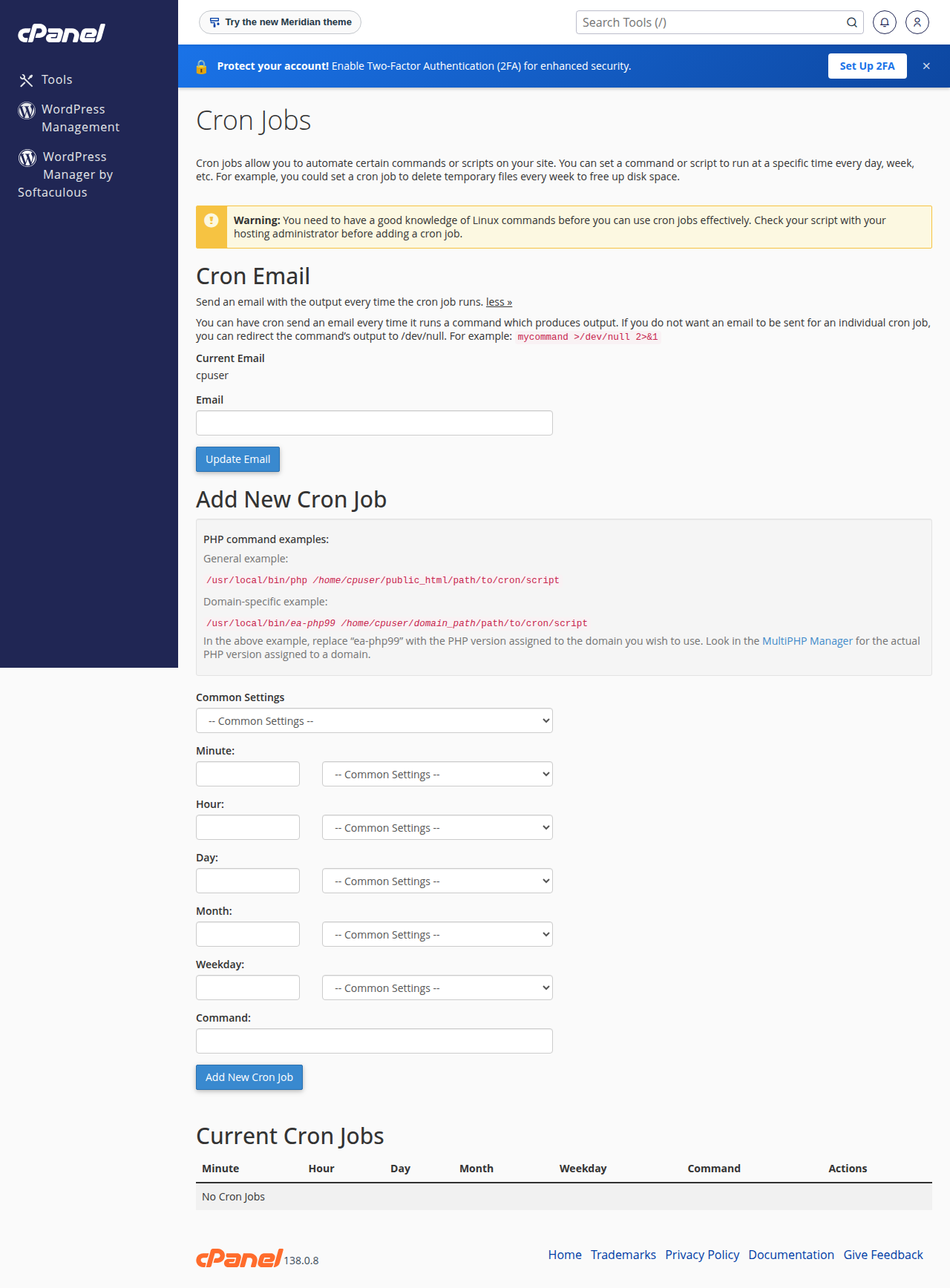
In DirectAdmin and Webuzo, cron jobs are also set in the control panel, with the same five fields and a command box. Use the search box to find the page, or ask support if you cannot see it.
3. PHP commands
On our cPanel servers, use /usr/local/bin/php. It is cPanel's PHP command-line wrapper: it runs your script with the PHP version selected for that folder in the control panel, so cron and your website use the same version.
/usr/local/bin/php /home/username/public_html/cron.phpReplace username with your cPanel username. Your home folder is /home/username, and your main website is in /home/username/public_html.
A specific PHP version. If a script needs a different version from the site, call that version's binary directly. For PHP 8.3 on our cPanel servers:
/opt/cpanel/ea-php83/root/usr/bin/php /home/username/public_html/cron.phpChange 83 to the version you need (for example 82 or 84), picking only one that your control panel offers. Old guides mention /usr/local/php5.6/bin/php; that path does not exist on our servers, and PHP 5.6 has had no security fixes for years.
Scripts that include other files. If your script uses relative paths such as include 'config.php', change to its folder first:
cd /home/username/public_html && /usr/local/bin/php cron.phpThe -q flag that older guides add is not needed with the command-line PHP; it only hid HTTP headers in the CGI version.
4. WordPress: replace WP-Cron with a real cron job
WordPress runs its scheduled tasks (WP-Cron) when someone visits the site. On a quiet site, tasks run late; on a busy one, they can start at the worst moment and add to your resource usage. A real cron job fixes both.
- Turn off the visit-triggered cron.Add
define('DISABLE_WP_CRON', true);towp-config.php, above the line that says to stop editing. - Add the cron job.In cPanel's Cron Jobs, add this command to run every 15 minutes:
*/15 * * * * /usr/local/bin/php /home/username/public_html/wp-cron.php >/dev/null 2>&1In cPanel, the five time fields go in their own boxes and only the part from /usr/local/bin/php goes in the command box. If WordPress is in another folder, use that path. More on this in understanding the "Resource Limit Is Reached" error.
5. Laravel and other frameworks
Laravel's documentation asks for one cron entry every minute:
* * * * * cd /home/username/laravel-app && /usr/local/bin/php artisan schedule:run >/dev/null 2>&1On our shared servers, an every-minute entry like this is rewritten to every 4 minutes within the hour (see section 1), so schedule:run actually runs every 4 minutes, at 0, 4, 8 … 56 minutes past each hour. Laravel runs a task only when a schedule:run call lands on a minute the task is due, so:
->everyMinute(),->everyTwoMinutes()and->everyFourMinutes()all end up running every 4 minutes;->hourly(),->daily()and times whose minute is a multiple of 4, such as->dailyAt('02:00')or->hourlyAt(20), run as expected;- other minutes are skipped or thinned out:
->hourlyAt(17)never runs,->everyFifteenMinutes()and->everyThirtyMinutes()run only on the hour, and->everyFiveMinutes()runs only at :00, :20 and :40.
Write the entry as */4 * * * * yourself so the Cron Jobs page shows what really happens, and give any task that needs a different rhythm, such as every 15 minutes, its own cron entry.
On our cPanel servers the same PHP functions are disabled for cron and command-line PHP as for your website, including exec, shell_exec, system, proc_open, popen and fsockopen. The Laravel scheduler itself runs, but each Schedule::command(...) task starts a child process with proc_open and fails. Use Schedule::call(...) or Schedule::job(...), or give each task its own cron entry. Details and workarounds are in PHP disabled functions on shared hosting.
For a long-running queue worker, run it from cron with a stop condition, for example php artisan queue:work --stop-when-empty, instead of leaving a process running all the time.
6. Calling a web address with curl or wget
Some applications give you a URL to call on a schedule. curl and wget are available to cron jobs on our cPanel servers:
/usr/bin/curl -s "https://yourdomain.com/cron.php?key=YOUR_KEY" >/dev/null 2>&1
/usr/bin/wget -q -O /dev/null "https://yourdomain.com/cron.php?key=YOUR_KEY"
Prefer running the PHP file directly (section 3) when you can. A URL call goes through the web server, so it is subject to web time limits, and on our cPanel servers a caching layer in front of the site can answer repeat requests from a cached copy, in which case your script does not run at all. If you must use a URL, make it unique on every call by adding the time:
/usr/bin/curl -s "https://yourdomain.com/cron.php?key=YOUR_KEY&t=$(date +\%s)" >/dev/null 2>&1In a crontab, % has a special meaning, so it must be written as \%, as above.
7. Output, logs and cron emails
By default, anything a job prints is emailed to the cron email address. Choose what you want:
| Ending | What happens |
|---|---|
| Nothing | Output is emailed after every run |
| >/dev/null 2>&1 | All output is thrown away; no emails |
| >> /home/username/logs/cron.log 2>&1 | Output and errors are added to a log file |
| >/dev/null | Normal output is discarded, but errors are still emailed |
Create the logs folder first with the File Manager, and watch the file's size, as it grows with every run. A log is the best way to see why a job fails.
8. Other useful commands
- Perl or Python scripts:
/usr/bin/perl /home/username/public_html/cgi-bin/script.plor/usr/bin/python3 /home/username/scripts/task.py. For a Python app set up with Setup Python App, use the Python of that app's virtual environment. - Stop jobs overlapping: if a job can run longer than its interval, wrap it with
flockso a new run does not start while the last is still going:/usr/bin/flock -n /home/username/cron.lock /usr/local/bin/php /home/username/public_html/cron.php. - Delete old files:
find /home/username/public_html/tmp -type f -mtime +7 -deleteremoves files older than 7 days in that folder. Test it first without-deleteto see what it would remove.
9. Good practice on shared hosting
/usr/local/bin/php, not just php.If jobs fail to start or your site shows 503 errors when they run, you may be hitting your account's process limit; see how to check your hosting resource usage.
10. Where Domain India fits
Cron jobs are part of every Domain India cPanel, DirectAdmin and Webuzo shared hosting plan, set up from the control panel. Jailed SSH is also available on every shared plan; it is off by default, so ask support to enable it. If your application needs permanent background workers or programs that shared hosting blocks, the App Platform or a VPS fits better. Prices on the cards below are live and exclude 18% GST.
- 25 GB NVMe SSD Storage
- 50 GB Monthly Bandwidth
- 1 Website
- 10 Email Accounts
- 512 MB RAM per app
- 1 vCPU
- 5 GB NVMe SSD
- PostgreSQL Database
Support is on 24/7 live chat, and tickets get a first response within 15 minutes; how long a fix takes depends on the problem. We do not offer phone support.
Frequently asked questions
What is the PHP path for cron jobs on Domain India cPanel hosting?
Use /usr/local/bin/php. It runs your script with the PHP version selected for that folder in cPanel. To force one version, call its binary directly, for example /opt/cpanel/ea-php83/root/usr/bin/php for PHP 8.3.
How do I stop cron jobs from sending me emails?
Add >/dev/null 2>&1 to the end of the command, which discards all output. You can also clear the cron email address at the top of the Cron Jobs page in cPanel, or send output to a log file instead.
How do I run WordPress cron with a real cron job?
Add define('DISABLE_WP_CRON', true); to wp-config.php, then create a cPanel cron job every 15 minutes with the command /usr/local/bin/php /home/username/public_html/wp-cron.php >/dev/null 2>&1, using your own username and folder.
Which time zone do cron jobs use?
On Domain India cPanel servers, cron schedules follow Indian Standard Time, so a job set for 0 2 * runs at 2:00 a.m. IST.
Why does my cron job fail when the same script works in the browser?
The usual causes are a relative path (change to the script's folder with cd first), a missing full path to PHP, or a PHP function that is disabled on shared hosting. Log the output to a file to see the exact error.
Can I use exec or shell_exec in a cron PHP script?
No. On Domain India shared hosting, the PHP functions that start other programs, such as exec, shell_exec, system and proc_open, are disabled for cron and command-line PHP as well as for websites.
Can I run a cron job every minute on Domain India shared hosting?
No. On Domain India cPanel and DirectAdmin shared servers, an hourly server script changes cron jobs set to every 1, 2 or 3 minutes to every 4 minutes, so the shortest effective interval is 4 minutes. A Laravel scheduler entry of * therefore runs every 4 minutes. For tasks that must run every minute, use the App Platform or a VPS.
Should I call my cron script with curl or run it with PHP?
Run it with PHP when you can. A URL call goes through the web server, is subject to web time limits and can be answered from a cache without running your script. If you must use curl, add a changing query string such as the current time.
Ready to automate? Open Cron Jobs in cPanel and add your first job, check what PHP allows in PHP disabled functions on shared hosting, or open a support ticket if a job will not run.
Send us the domain, the exact command and schedule, and any error from the log, and we will check it with you.
Open a support ticket