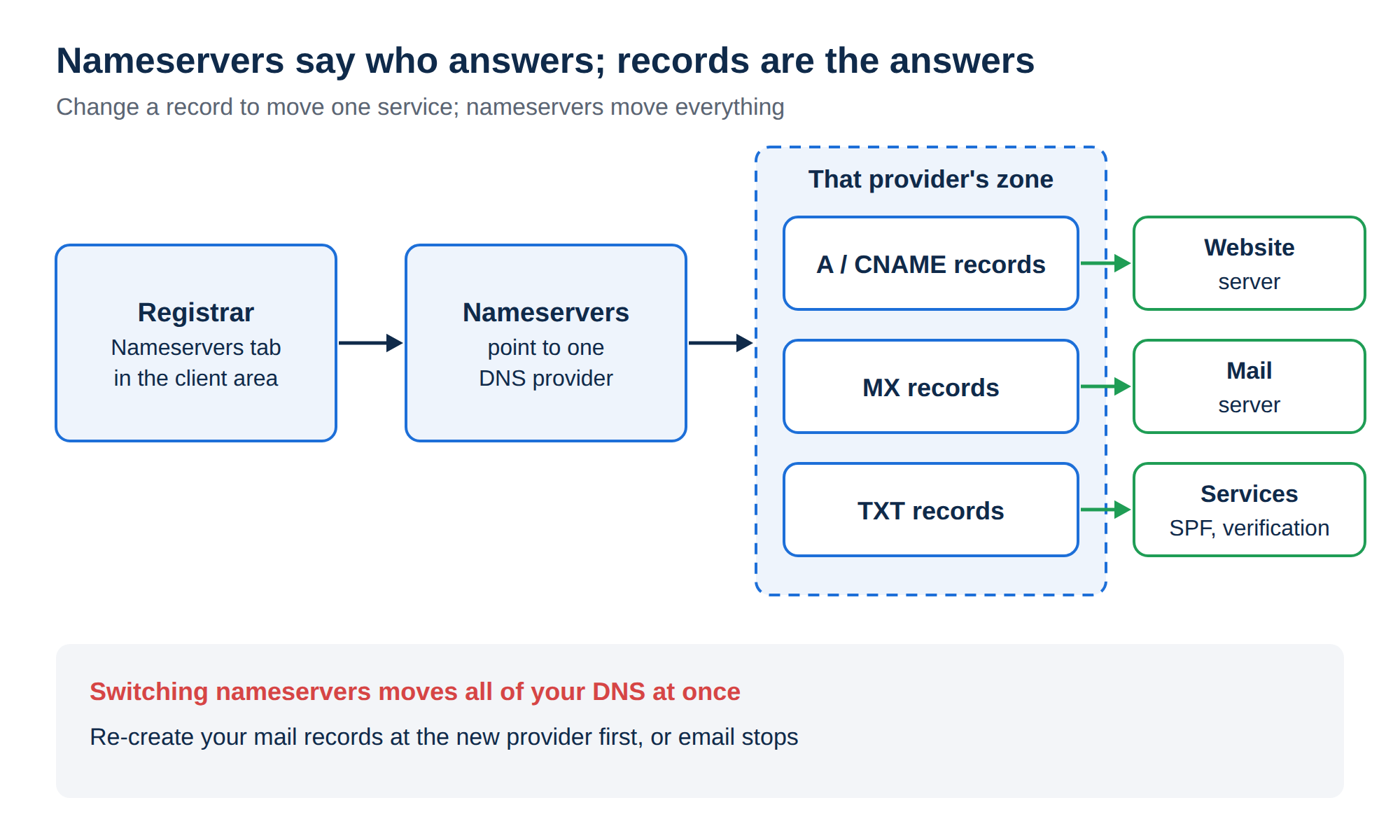
To put a website on your domain, you point the domain's name servers to the provider that will answer for it: usually your web hosting. For a domain registered with Domain India, you update them on the domain's Nameservers tab in the client area, using the values given for your own hosting account. The change usually takes effect within a few hours and can take up to 24-48 hours.
This is the short version. For every detail, including how to check the result and what to do if your domain is registered elsewhere, read How do I change my nameservers.
Sign in to the client area, open Domains → My domains, select the domain, open the Nameservers tab, click Edit, enter the new name servers and click Save. Take the values from your hosting service page or welcome email, never from an old list. You don't need to unlock the domain first. Changing name servers moves all of your DNS, including email, so make sure your records exist at the new provider.
1. Get the right name servers
Use only name servers given for your account. Hostnames differ from server to server, and a wrong or retired name server takes your website and email offline.
- Domain India hosting: open your hosting service in the client area. The Point a domain to this hosting card shows the name servers under Option 1. They are also in your welcome email, "Your Hosting Account is Ready".
- Another host or DNS provider: copy them from that provider's dashboard or welcome email.
- A website platform: use the values on the platform's "connect a domain" page.
If your email lives somewhere else and you only want to move the website, you may not need new name servers at all: Option 2 on the same card lets you keep your current DNS and add two A records, @ and www, pointing to the server IP address shown there.
2. Update the name servers in the client area
- Sign in.Go to the client area.
- Open your domains.Choose Domains → My domains, then select the domain.
- Open the Nameservers taband click Edit.
- Enter the new name servers, one per field. Use Add nameserver for a third or fourth; you can enter up to four. Enter every name server your provider gave you, usually two or more.
- Save.Click Save. The client area confirms "Nameservers updated".
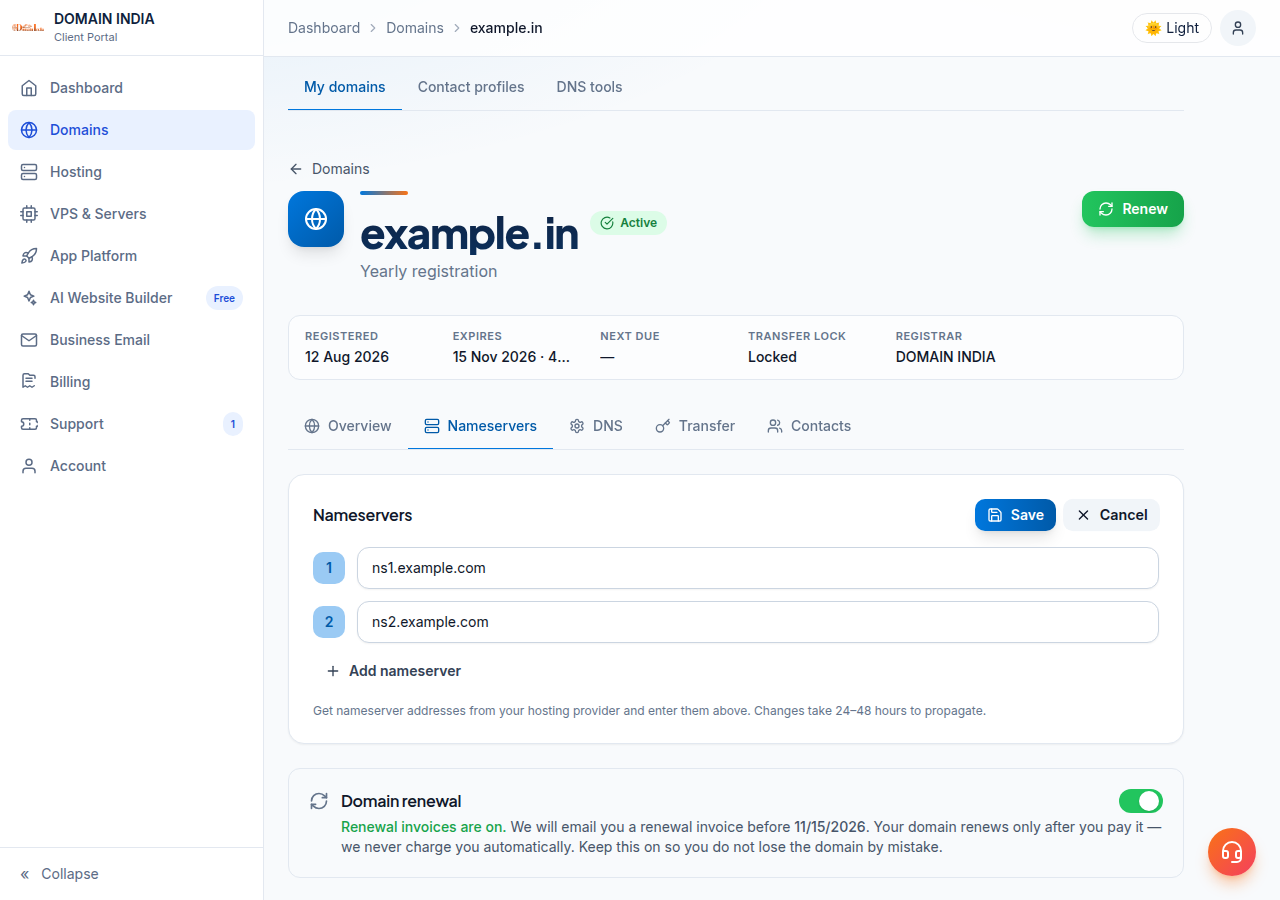
Type the hostnames exactly, with no http://, no spaces and no trailing dot.
From the moment the change takes effect, the new provider answers for the website, email and every subdomain. If it doesn't have your MX, SPF, DKIM and DMARC records, email stops arriving. Write down your current records and recreate the ones you need at the new provider before you switch.
3. If the save fails
The registry can reject a name server that does not exist or is not registered. Check each hostname for typos. If it still fails, confirm the values with your provider or open a support ticket with the error message.
Custom name servers on your own domain, such as ns1.yourbusiness.in, need glue records first. They are set in the Custom nameservers (glue records) section of the same tab; see Registering and managing child name servers. Most customers never need it.
4. How long it takes
A name server change usually takes effect within a few hours and can take up to 24-48 hours to reach every network. There is no guaranteed time: the delay is caching, not a queue at Domain India. Keep your old hosting running until the change has spread.
To check, run dig NS yourbusiness.in +short (macOS or Linux) or nslookup -type=ns yourbusiness.in (Windows). When the answer shows the new name servers, the change has reached that resolver.
Frequently asked questions
How do I update the name servers for my domain at Domain India?
Sign in to the client area, open Domains → My domains, select the domain, open the Nameservers tab, click Edit, enter the new name servers and click Save. The client area confirms "Nameservers updated" when the change is accepted.
Do I need to unlock my domain before changing name servers?
No. The transfer lock only stops the domain being transferred to another registrar. You can change name servers while it is locked, and you should leave the lock on.
How many name servers can I add?
The Nameservers tab accepts up to four. At least one is required, but enter every name server your provider gives you, which is usually two or more, so that your domain keeps working if one is unreachable.
How long does a name server change take?
It usually takes effect within a few hours and can take up to 24-48 hours to reach every network, because resolvers cache the old answer. There is no guaranteed time.
Why was my name server rejected?
Usually because of a typo, or because the name server is not registered at the registry. Check the hostnames against your provider's values. If it still fails, open a support ticket with the error message.
Ready to connect your domain? Sign in to the client area, follow the full guide How do I change my nameservers, or open a support ticket if you are not sure which values to use.
Register your domain with Domain India and connect it to your hosting from the same client area.
Search for a domain