If your website, webmail, FTP or control panel suddenly times out on your office or home connection but works on mobile data, the server's firewall has most likely blocked your IP address after repeated failed logins. Many blocks lift on their own after a set time; some stay until support removes them. This page explains which is which, and what to do.
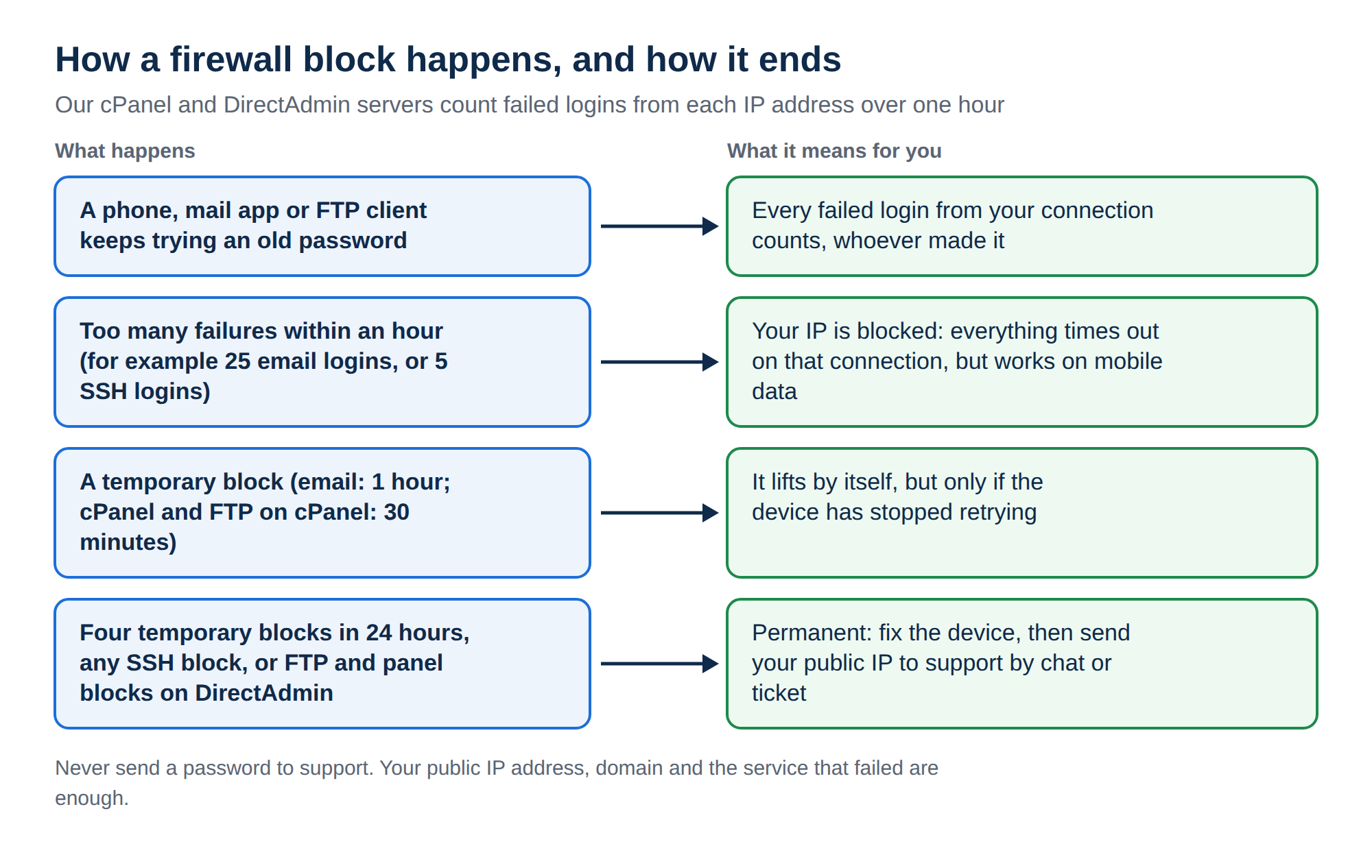
Our cPanel and DirectAdmin servers block an IP address that fails to log in too often within an hour. Email and password-protected folder blocks lift after one hour, cPanel and FTP blocks on cPanel after 30 minutes, and failed SSH logins block permanently. Four temporary blocks within 24 hours become a permanent block. Fix the device with the wrong password first, then send your public IP address to support by live chat or ticket.
The complete walk-through, including the two-minute test that tells a block from an outage and how to find your public IP address, is in I can't reach my server: have I been blocked?. Why the firewall exists and how to avoid it is in CSF blocklist and multiple login failures.
1. How long a temporary block lasts
The firewall on our shared servers counts failed logins from each IP address over one hour. When a service's limit is reached, it blocks the address, either for a fixed time or permanently. These are the settings we measured on our cPanel and DirectAdmin servers on 23 September 2026:
| Failed logins to | Limit within an hour | Block on cPanel | Block on DirectAdmin |
|---|---|---|---|
| Email (IMAP, POP3, SMTP sign-in) | 25 | 1 hour | 1 hour |
| Password-protected folders | 10 | 1 hour | 1 hour |
| FTP | 10 | 30 minutes | Permanent |
| Control panel login | 10 on cPanel, 15 on DirectAdmin | 30 minutes | Permanent |
| SSH | 5 | Permanent | Permanent |
Web application firewall hits and malformed mail connections can also count against an IP address. On cPanel servers, cPanel's own brute-force protection (cPHulk) works alongside the firewall.
A temporary block lifts by itself when its time runs out, but only helps if the device that caused it has stopped trying. Otherwise the block comes straight back.
2. When a temporary block becomes permanent
If the same IP address is temporarily blocked four times within 24 hours, the firewall blocks it permanently. A permanent block does not expire. Only support can remove it.
In practice this is how most permanent blocks happen: a phone with an old mailbox password keeps retrying all day, is blocked for an hour, tries again, and on the fourth block is shut out for good.
3. What usually causes the failed logins
- A saved password that is out of date. You changed a mailbox or cPanel password, but a phone, tablet, laptop or mail app still has the old one and retries in the background.
- Several devices on one connection. Offices share one public IP address, so one device with a wrong password blocks everyone on the same Wi-Fi.
- Wrong server, port or SSL setting. A mail or FTP client with the wrong settings can fail on every attempt. Use the settings in How to log into webmail and What settings do I need to upload my website.
- Too many FTP connections retrying the same wrong login at once.
- SSH password attempts. SSH on our cPanel and DirectAdmin servers accepts key login only, so any password attempt fails and counts. Five of them block the IP permanently.
- Malware on a computer trying saved logins. Scan the device if you can't find another cause.
4. Find the device that is failing
- List every device and appthat uses the account: office desktops, laptops, phones, tablets, and devices former staff returned.
- Update the saved passwordon each one. In phone mail apps, remove the account and add it again if the app keeps the old password.
- Switch devices off one at a time.If you cannot tell which device is failing, turn them all off or disconnect them from Wi-Fi, then bring them back one by one after the unblock and check each connects cleanly.
- Check recently changed devices first.A new phone, a reinstalled mail app or a password change in the last day is the usual culprit.
5. Getting unblocked on Domain India shared hosting
On cPanel, DirectAdmin and Webuzo hosting the firewall is on our server, and the client area has no self-service unblock button.
- Fix or switch off the failing device first.
- From the blocked connection, search "what is my IP" and note your public IP address. Send both the IPv4 and IPv6 addresses if you see two.
- Contact support with the IP address, your domain and the service that stopped working. Use a new support ticket in the client area, the public ticket form from mobile data if you cannot reach the site, or 24/7 live chat on domainindia.com.
Tickets get a first response within 15 minutes; removing the block can take longer, depending on the issue. There is no phone support.
Support needs only your IP address, domain and the service that failed. Never paste mailbox or control panel passwords into a ticket or chat.
If you run your own VPS, the firewall is yours and you remove blocks yourself; the commands are in the canonical guide linked at the top.
How long does a temporary IP block last on Domain India hosting?
On our cPanel and DirectAdmin servers, blocks for failed email and password-protected folder logins last one hour. On cPanel, FTP and control panel login blocks last 30 minutes. Failed SSH logins, and FTP or control panel failures on DirectAdmin, block permanently until support removes them.
How many failed logins trigger a block?
It depends on the service, counted within one hour: 25 for email sign-in, 10 for FTP and password-protected folders, 10 for the cPanel login, 15 for the DirectAdmin login, and 5 for SSH.
Why did my temporary block become permanent?
The firewall makes a block permanent when the same IP address is temporarily blocked four times within 24 hours. This usually means a device kept retrying an old password after each block expired.
Can I remove the block myself?
No, not on Domain India shared hosting. The firewall runs on our server. Fix the device with the wrong password, then send your public IP address, domain and the failing service to support by live chat or ticket.
Why is everyone in my office blocked?
Most offices share one public IP address through their router. When that address is blocked, every computer and phone on the connection loses access to the server at the same time.
Ready to get back in? Send your public IP address in a new support ticket, or use the public ticket form if you cannot log in. The full walk-through is in I can't reach my server: have I been blocked?.
Tell us your public IP address, your domain and the service that stopped working, and our team will check the server firewall for you.
Open a support ticket