When a DirectAdmin hosting account runs out of disk space, uploads fail, new email stops arriving and database writes break. The quickest way to find what is filling the account is a few commands over SSH. This guide shows those commands for Domain India's jailed SSH, what usually takes the space, and how to do the same job with the File Manager if you do not use SSH.
Log in over SSH, run du -h --max-depth=1 ~ | sort -h to see which folders are biggest, then drill down and use find to list files over 50 MB. Old backups, zip archives, cache folders, logs and old email are the usual culprits. Jailed SSH is available on every shared hosting plan but is off by default, so ask support to enable it; without SSH, the DirectAdmin File Manager does the same job more slowly.
1. Before you start
- SSH must be enabled. Jailed SSH access is available on every shared hosting plan (cPanel, DirectAdmin, Webuzo). It is off by default; ask support to enable it for your account. You log in with an SSH key, not your DirectAdmin password; how to add the key and connect is in enabling and accessing jailed SSH.
- The commands below are standard Linux tools. The tools available inside the jailed shell vary; if one is missing on your server, use the File Manager method in section 7 or ask support.
- Disk space and inodes are separate limits. Disk space is how many gigabytes you store; inodes are how many files and folders you have. Either one, when full, stops uploads, email and database writes. See understanding hosting resource limits.
2. See which folders are biggest
Connect with ssh -i ~/.ssh/id_ed25519 -p 22 [email protected], then run:
cd ~
du -h --max-depth=1 . 2>/dev/null | sort -h
du adds up the size of each folder in your home folder, and sort -h puts the biggest at the bottom. The last line, ., is your total. Then go into the biggest folder and repeat:
cd domains
du -h --max-depth=1 . 2>/dev/null | sort -h
Keep drilling down (cd yourdomain.com/public_html, and so on) until you reach the folder that is actually large. The 2>/dev/null part simply hides "permission denied" messages for the few system folders you cannot read.
3. Find large files
To list every file over 50 MB in your account, largest first:
cd ~
find . -type f -size +50M -exec ls -lh {} + 2>/dev/null | sort -k5 -h -r
-type flooks at files only, not folders.-size +50Mkeeps files larger than 50 MB. Change it to+10Mor+500Mas you need.-exec ls -lh {} +shows each file's size, date and path in a readable form.
Files with names like backup, .zip, .tar.gz, .sql or error_log are the ones to look at first.
4. Count files if you hit the inode limit
If you have space left but still cannot upload, you may have too many files. Count them per folder:
cd ~
du --inodes --max-depth=1 . 2>/dev/null | sort -n
A cache folder with tens of thousands of small files is the usual cause. If du --inodes is not accepted on your server, find ./foldername -type f | wc -l counts the files in one folder.
5. Browse interactively with ncdu, if available
ncdu shows the same information as a menu you move through with the arrow keys, and lets you delete with the d key. Run ncdu ~; if the command is not found, it is not provided in your jail, and du and find do the same job.
6. What usually takes the space, and how to clean it safely
| Where to look | What you find | Safe way to clean it |
|---|---|---|
domains/yourdomain.com/public_html | Old site copies, .zip or .tar.gz archives, .sql dumps left after a migration | Download anything you may need, then delete it |
wp-content/cache and plugin cache folders | Thousands of cached pages | Clear the cache from the plugin's settings, not with rm |
wp-content/uploads | Large images and videos | Compress or remove unused media from the WordPress media library |
Folders named backups or similar | Backup archives you created | Download to your computer, then delete from the server |
error_log files | Logs that grew for months | Fix the error, then empty or delete the log |
imap folder | Your email, per mailbox | Delete old mail in webmail or your mail app, never with rm |
rm deletes permanently. Download a copy of anything you are unsure about before you remove it, and never delete your domains folder structure, .ssh or imap itself. For mail, use webmail so your mailboxes stay intact; managing email quotas helps too.
Databases are not in your home folder, so du does not show them. Check each database's size in phpMyAdmin, and clear out old log or session tables your application no longer needs.
7. No SSH? Use the File Manager
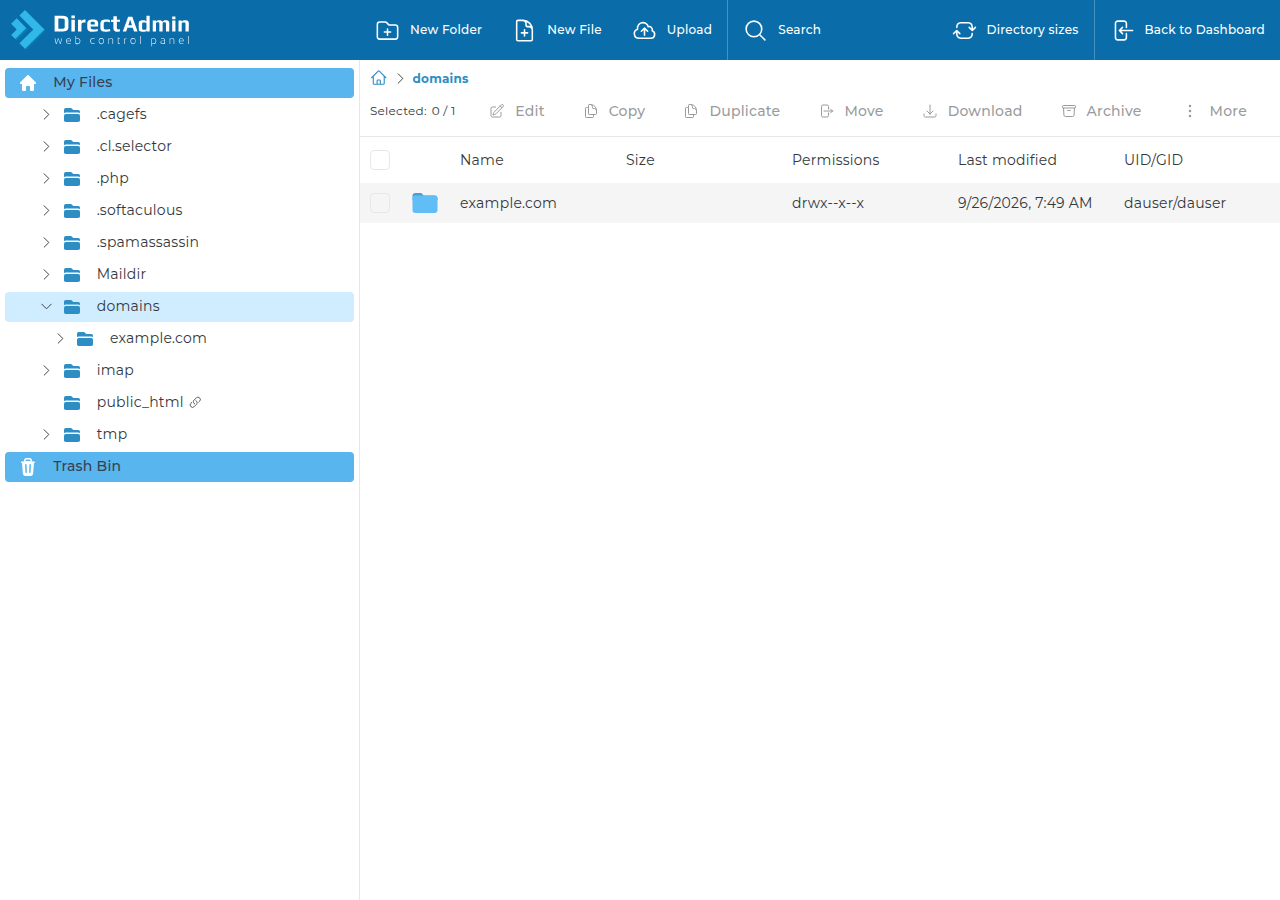
You can find big folders without SSH. Open the DirectAdmin File Manager, go into domains/yourdomain.com/public_html, and look through the folders for archives, backups and cache folders. It is slower, because you open each folder in turn, but it needs nothing enabled. If you cannot see your total disk usage in the panel, ask us in a ticket and we will read it for you. The DirectAdmin resource usage guide explains the other limits.
8. When cleaning up is not enough
If the account is genuinely full of files you need, a bigger plan is the fix. An active DirectAdmin plan can be upgraded at any time: open Hosting › My hosting, select your hosting service and choose Change plan. You pay only the difference for the time left until your renewal date, plus 18% GST, and your files, email and login stay the same.
- 30 GB NVMe SSD Storage
- Unmetered Bandwidth
- 5 Websites
- 50 Email Accounts
- 100 GB NVMe SSD Storage
- Unmetered Bandwidth
- 25 Websites
- 250 Email Accounts
Prices on the cards are live and exclude 18% GST.
How do I find what is using disk space on DirectAdmin over SSH?
Log in over SSH and run du -h --max-depth=1 ~ | sort -h to see the biggest folders, then drill into the largest one and repeat. Use find . -type f -size +50M to list individual files over 50 MB.
Do I have SSH on my Domain India DirectAdmin hosting?
Jailed SSH access is available on every shared hosting plan, including DirectAdmin, but it is off by default. Ask support by live chat or a ticket to enable it for your account.
Why can I not upload files when I still have disk space left?
You may have reached the inode limit, which counts files and folders. Cache folders with many small files are the usual cause. Count files per folder with du --inodes, then clear the cache from your application.
Is ncdu available in the jailed shell?
The tools available inside the jailed shell vary by server. Run ncdu ~ to check; if the command is not found, du and find give the same information.
Can I find large folders without SSH?
Yes. Browse your folders in the DirectAdmin File Manager, starting with domains/yourdomain.com/public_html, and look for archives, backups and cache folders. Support can also tell you your total disk usage.
Should I delete email with rm to free space?
No. Delete old mail in webmail or your mail app so the mailbox stays intact. Deleting files inside the imap folder by hand can break a mailbox.
Ready to free up space? Ask support to enable jailed SSH if you do not have it yet, or start with the DirectAdmin File Manager. If you need more room, compare plans on DirectAdmin hosting.
Choose Change plan on your hosting service to move to a larger plan. You pay only the difference for the time left until renewal.
Open My hosting