On shared hosting, "scaling" doesn't mean adding servers. Your application runs on one server, in one IIS application pool, with resources shared with other customers. What you can do is make each request cost less, keep your app ready to move when it outgrows its plan, and know where the ceiling is. This guide explains how to grow an ASP.NET application on Domain India Windows (Plesk) hosting, and when shared hosting stops being the right home.
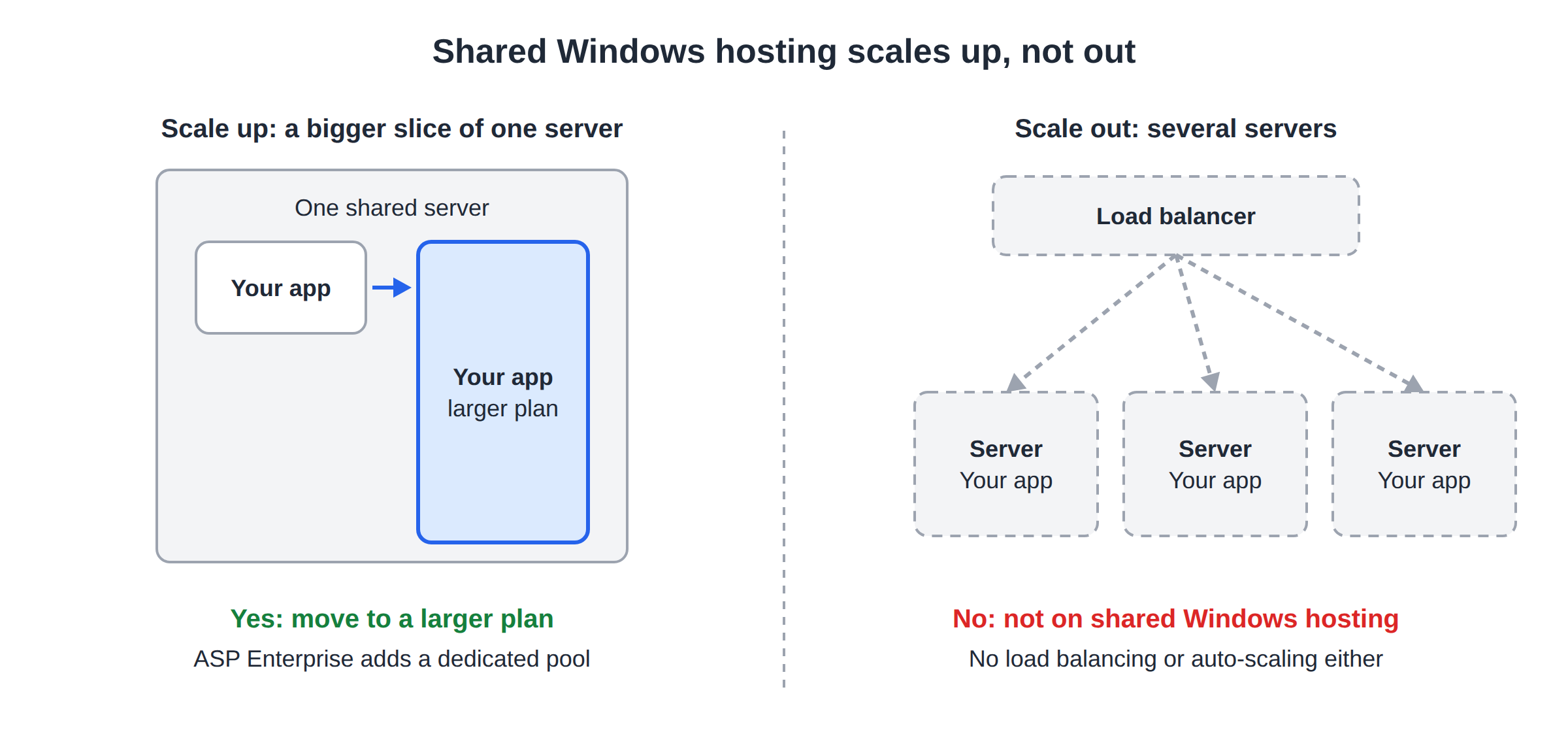
Shared Windows hosting scales up, not out: a bigger plan gives you more sites, databases, storage and bandwidth, and ASP Enterprise adds a dedicated application pool, but there is no load balancing or auto-scaling. Within a plan, the biggest gains come from caching, efficient database queries and doing less work per request. Build your app as if it might run on several servers later: keep sessions and files out of server memory. When one site needs guaranteed resources or software you can't install on shared hosting, ask support about server options.
1. Scaling up versus scaling out
| Approach | What it means | On shared Windows hosting |
|---|---|---|
| Scale up | Give the app a bigger slice of one machine | Yes, by moving to a larger plan |
| Scale out | Run the app on several servers behind a load balancer | No |
| Auto-scale | Add servers automatically when traffic rises | No |
| Optimise | Make each request cheaper | Yes, always, and usually the biggest win |
The honest picture: a shared plan gives your site room to grow, not unlimited capacity. Optimisation lets you do far more within the same plan, so start there.
2. Know your limits
Each Windows plan sets how many websites, MSSQL databases, mailboxes, how much storage and, on ASP Starter and ASP Business, how much monthly bandwidth you get. They are listed side by side in Windows hosting plans comparison. Check your usage under Statistics in Plesk.
CPU and memory on a shared server are shared among the sites on it, and they aren't a figure you can raise from Plesk. If your app is regularly slow at busy times even after the work below, it is a sign it needs more isolation.
3. Make every request cheaper
Growth multiplies whatever each request costs. Cut the cost and the same plan carries more visitors.
- Cache what doesn't change per visitor. Use output caching for public pages, and cache expensive query results for a short time. See how to handle traffic spikes for the details.
- Serve static files efficiently. Let browsers cache them through
web.config, and put a CDN in front of images and scripts. - Go async for database and HTTP calls, so threads aren't held while waiting.
- Trim startup. A large app that loads slowly suffers every time the pool recycles or goes idle. Load only what each request needs.
4. Scale the database with the app
The database is where most ASP.NET sites hit their limit first.
- Index what you search.Add indexes on columns used in WHERE clauses, joins and sorting.
- Fetch less.Select only the columns you need and page long lists rather than loading everything.
- Avoid the N+1 pattern.In Entity Framework, load related data in one query with
Include, rather than one query per row. - Use no-tracking queries for reads.
AsNoTracking()makes read-only EF queries lighter. - Clean up old data.Archive or delete logs and old records that make tables and queries grow.
Your plan also caps the number of MSSQL databases, from 1 on ASP Starter to 50 on ASP Enterprise, so an app with a database per module or per customer can outgrow a small plan quickly. Connection details are in what to use for an MSSQL connection string.
5. Build for the next step now
Even on one server, design as if your app might one day run on several. It costs little now and makes a later move easy.
The IIS application pools guide explains why in-memory state doesn't survive recycles.
6. Moving up a plan
When you reach a plan limit, or your app needs isolation from other sites, move to a larger plan. Plan changes between Windows plans are done with support: open a ticket and we will confirm the options for your account and make the change with you.
ASP Enterprise is the largest shared Windows plan. It lists a dedicated application pool, which means other sites' traffic or crashes don't restart your app, plus unmetered bandwidth and up to 50 MSSQL databases. The live card shows today's price, excluding 18% GST.
- 100 GB Storage
- Unmetered Bandwidth
- 15 Websites
- 100 Email Accounts
7. When shared hosting is no longer enough
Consider leaving shared hosting when:
- your app needs guaranteed CPU and memory, not a share;
- you need software, a Windows service or a server setting that shared hosting doesn't allow;
- you need more than one server, for load balancing or failover;
- your database has outgrown what a shared server's database engine offers.
If any of these apply, ask support about server options before you order anything, and describe your app, its traffic and what it needs. Shared hosting doesn't offer Remote Desktop, administrator access or server-wide IIS settings.
Can I scale an ASP.NET application on shared Windows hosting?
You can scale up by moving to a larger plan, and optimise your app so each request costs less. Shared hosting doesn't offer scaling out across several servers, load balancing or auto-scaling.
Does Domain India offer load balancing on shared Windows hosting?
No. Shared Windows hosting runs your site on one server in an IIS application pool. If your app needs several servers, ask support about server options.
How do I get more resources for my ASP.NET site?
Move to a larger Windows plan. Plan changes between Windows plans are made with support, so open a ticket. ASP Enterprise is the largest plan and includes a dedicated application pool.
What is the biggest scaling problem for ASP.NET sites on shared hosting?
Usually the database. Slow queries without indexes, loading too much data and one query per row in Entity Framework multiply with traffic. Fix those before changing plan.
Why should I store sessions in the database?
In-memory sessions are lost whenever the application pool recycles or goes idle, and they can't be shared between servers. Storing sessions in the database keeps users logged in and makes a later move to several servers possible.
When should I leave shared hosting?
When your app needs guaranteed CPU and memory, software or services that shared hosting doesn't allow, or more than one server. Ask support about server options before you order.
Ready to give your app room to grow? Compare the Windows hosting plans, or open a ticket to move to a larger plan or talk through what your app needs.
Tell us your domain, your plan and what is slowing down, and we will help you choose the next step.
Talk to support