A sudden rush of visitors, from a sale, a news mention or a viral post, is the moment your site most needs to work and the moment it is most likely to slow down. On shared Windows hosting you can't add servers during the rush, so the work happens before it: make each request cheaper, move what you can off the server, and know what to do if the site struggles. This guide covers that for ASP.NET sites on Domain India Windows (Plesk) hosting.
Shared hosting has fixed resources, shared with other customers, and no automatic scaling or load balancing. To survive a spike: cache static files in the browser with web.config, cache expensive pages and queries in your app, serve images through a CDN, and fix slow database queries before the day. Keep a maintenance page ready. If spikes are regular rather than rare, a larger plan helps; ASP Enterprise adds a dedicated application pool. No shared plan can promise to absorb any amount of traffic.
1. What shared hosting can and can't do in a spike
Be clear about the limits before you plan:
- Browser caching set in web.config
- Caching inside your application
- A CDN in front of your site for static files
- Faster queries and fewer external calls
- Automatic scaling to more servers
- Load balancing across servers
- A guaranteed amount of CPU or memory during a surge
- Server-wide settings you can tune yourself
Your application runs in an IIS application pool on a server shared with other sites. On most plans that pool is shared too, so a crash or a restart caused by heavy load can affect other sites in it, and theirs can affect yours. ASP Enterprise lists a dedicated application pool, which isolates your app.
Watch your bandwidth as well. ASP Starter and ASP Business have a monthly bandwidth allowance, and a spike uses it quickly. Check Statistics in Plesk after a busy day.
2. Cache static files in the browser
Every repeat visitor who downloads your CSS, JavaScript and images again adds load for nothing. Tell browsers to keep them. Add this inside system.webServer in web.config:
<staticContent>
  <clientCache cacheControlMode="UseMaxAge" cacheControlMaxAge="7.00:00:00" />
</staticContent>
That lets browsers reuse static files for seven days. Use versioned file names (for example site.v3.css, or ASP.NET's asp-append-version) so a change still reaches visitors at once.
If the site returns a 500.19 error after the change, that section is locked on the shared server. Remove it and use your application's static file settings instead.
3. Cache inside your application
The cheapest request is one your code doesn't have to compute.
- Output caching (ASP.NET Core): cache whole responses for pages that are the same for every visitor, such as the home page or a product list, for a minute or two. Even a 60-second cache turns thousands of identical requests into one.
- Data caching: keep the results of expensive queries in
IMemoryCache(Core) orMemoryCache(Framework) for a short time. - External APIs: cache responses from payment, shipping or weather APIs where you can. A slow third party during a spike makes every request wait.
In-memory caches are cleared whenever the application pool recycles, so treat them as a speed-up, not as storage. The IIS application pools guide explains recycling.
4. Put a CDN in front of static files
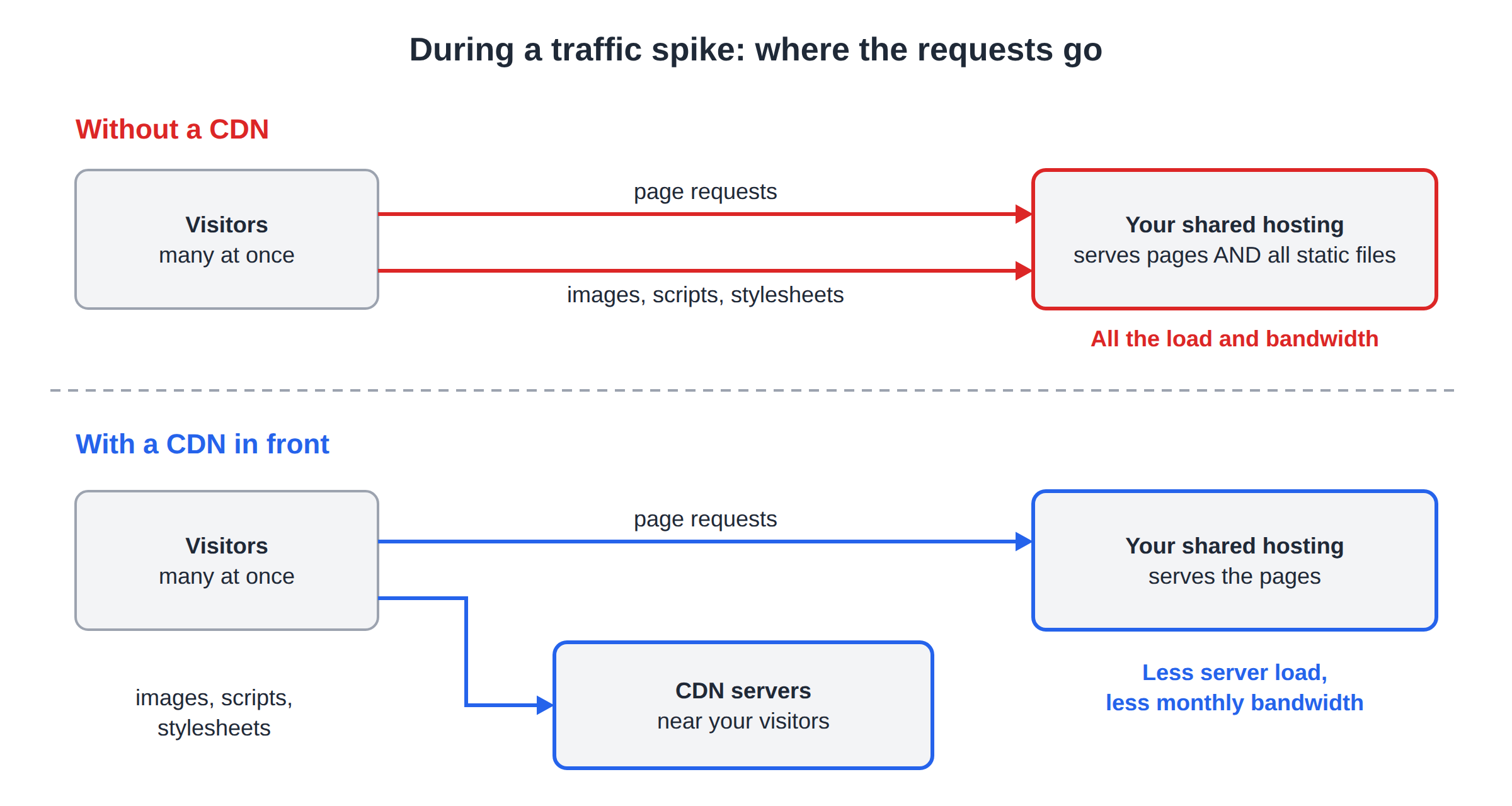
A content delivery network (CDN) serves your images, scripts and stylesheets from its own servers near your visitors. During a spike, most of the bytes then never touch your hosting, which saves both server load and bandwidth. Many CDNs have free plans. The Cloudflare setup guide walks through one option, and CDN vs app cache explains what to cache where.
5. Fix the slow parts before the day
Load problems are almost always a few slow pages multiplied by many visitors.
- Find the slowest pages.Sort your IIS access log by
time-taken; see checking Plesk logs. - Check their queries.Add indexes for the columns you filter and join on, fetch only the columns you need, and avoid one query per item in a loop.
- Use async codefor database and HTTP calls, so waiting requests don't hold threads.
- Remove work from the request.Don't send emails or resize images while the visitor waits if you can do it later.
- Time the key pages yourselfbefore the event, such as home, product and checkout, and compare them with the logs. Don't point a load-testing tool at shared hosting: heavy test traffic affects other customers on the server.
6. During the spike
- Watch, don't tinker. Keep an eye on your site and logs, but avoid deploying new code in the middle of a surge.
- Turn off heavy extras. A search page, a live stock counter or a big report can be disabled for a few hours.
- Use a maintenance page if you must. Uploading
app_offline.htmintohttpdocsstops the app and shows that page to everyone, which is better than timeouts. Delete it to bring the site back. - Contact support if every page returns 503 and the pool doesn't recover, with your domain and the time it started. Support is on 24/7 live chat, and tickets get a first response within 15 minutes; resolution time depends on the problem.
After the spike, look at the logs to see what failed first. That is your to-do list for next time.
7. When spikes stop being rare
If your site regularly outgrows its plan, move up. Plan changes between Windows plans are done with support, so open a ticket and we will confirm the options for your account. ASP Enterprise adds a dedicated application pool, more storage and unmetered bandwidth. If your application has outgrown shared hosting altogether, ask support about server options before you order anything. For a longer-term view, read how to scale your ASP.NET applications on shared hosting.
The live card shows today's price, excluding 18% GST.
- 100 GB Storage
- Unmetered Bandwidth
- 15 Websites
- 100 Email Accounts
Can shared Windows hosting handle a sudden traffic spike?
It depends on how heavy each request is. Shared hosting has fixed resources shared with other customers and no automatic scaling, so a well-cached site copes far better than one that queries the database on every page. No shared plan can promise to absorb any amount of traffic.
Does Domain India shared Windows hosting have auto-scaling or load balancing?
No. Shared Windows hosting runs your site on one server in an IIS application pool. Use caching and a CDN to reduce load, and move to a larger plan if spikes are regular.
How do I enable browser caching for static files on IIS?
Add a staticContent section with a clientCache element inside system.webServer in web.config, for example with cacheControlMaxAge set to seven days. If that causes a 500.19 error, the section is locked on the shared server; remove it and use your application's static file settings.
What should I do if my site goes down during a spike?
Check whether pages return 503, which usually means the application pool stopped. Turn off heavy features, and if needed upload app_offline.htm to show a maintenance page. Contact support with your domain and the time if the pool doesn't recover.
Will a CDN help on shared hosting?
Yes. A CDN serves your images, scripts and stylesheets from its own servers, so most of the traffic never reaches your hosting. That saves server load and your monthly bandwidth.
Which Windows plan is best for busy sites?
ASP Enterprise lists a dedicated application pool, unmetered bandwidth and the most storage. Plan changes between Windows plans are made with support, so open a ticket to move up.
Ready to prepare for your next rush? Compare the Windows hosting plans, or open a ticket to ask about moving to a larger plan before your event.
Tell us your domain, your plan and what you expect, and we will help you check whether your plan fits.
Talk to support