Every domain carries one or more status codes: short, standard labels that say what can and can't be done with it right now. They explain why a domain won't transfer, why it has stopped resolving, or why a change is refused. This guide explains the codes you will see in a WHOIS lookup, who sets each one, and what to do about it, and then the simpler statuses shown in your Domain India client area.
Status codes come in two families. Codes starting with client are set by the registrar, often at your request, and codes starting with server are set by the registry. ok means no restrictions. clientTransferProhibited is the normal transfer lock. clientHold or serverHold stops the domain resolving. redemptionPeriod and pendingDelete mean the domain has expired and is being deleted. Check any domain's codes with a WHOIS lookup.
1. What domain status codes are
Status codes are defined by EPP, the standard protocol registrars use to talk to registries. The same codes are used by .com, .net, .org, .in and most other extensions, so once you know them you can read the status of almost any domain.
A domain can carry several codes at once. A healthy, locked domain often shows three: clientTransferProhibited, clientUpdateProhibited and clientDeleteProhibited. That is normal and nothing to worry about.
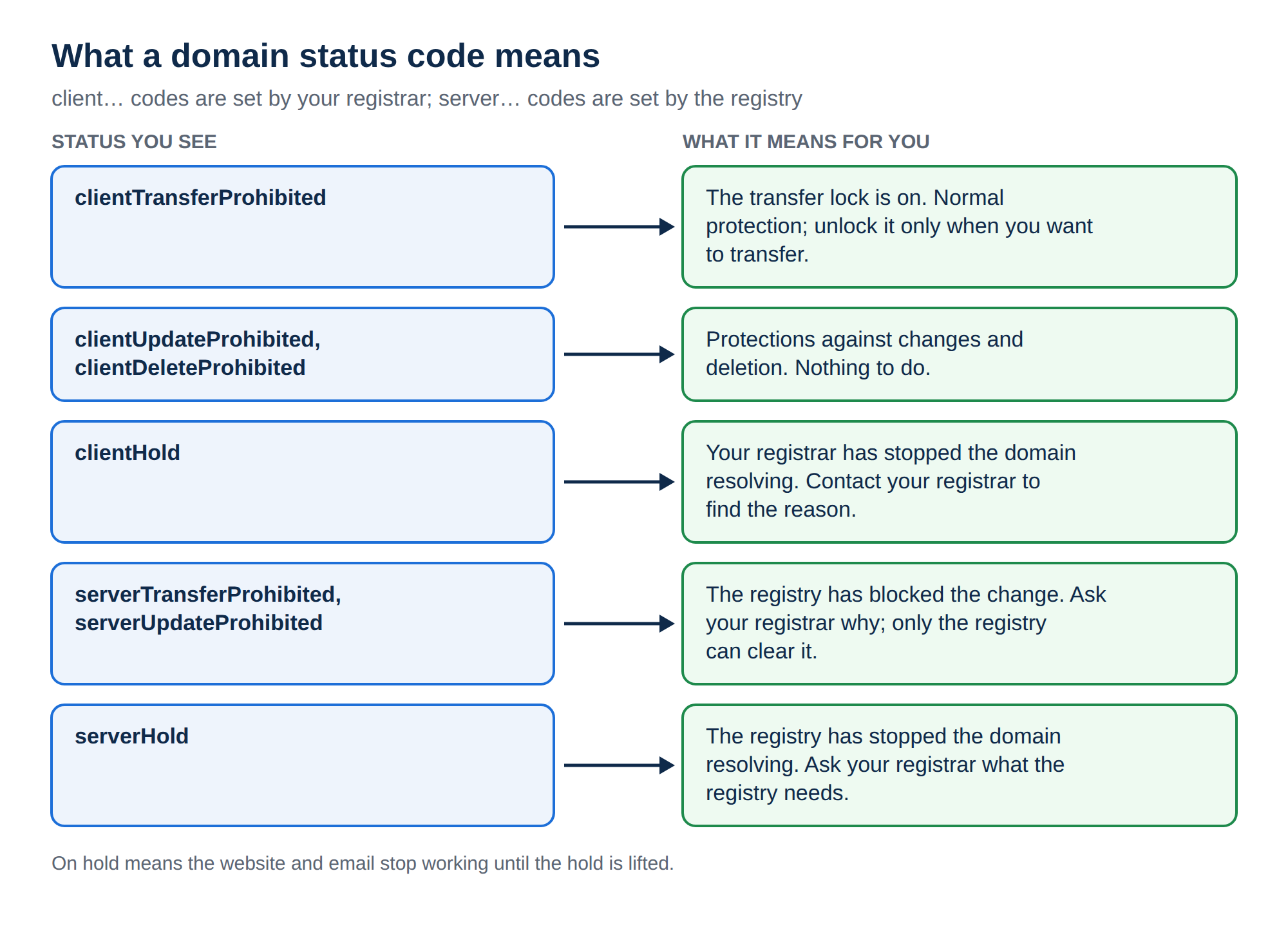
2. How to see a domain's status codes
- Run a WHOIS lookup.Enter the domain on the WHOIS lookup page.
- Find the status lines.Look for lines labelled "Domain Status" or "Status".
- Read each code.Use the tables below. Many WHOIS tools also add a link after each code that explains it.
From a terminal, whois yourbusiness.com shows the same "Domain Status" lines. For .in domains, personal registrant details are not shown in public WHOIS, but the status codes are.
3. Client codes: set by the registrar
Codes that start with client are set by the domain's registrar. Many of them are protections you can turn on or off yourself.
| Status | What it means | What to do |
|---|---|---|
| clientTransferProhibited | The transfer lock is on, so the domain can't move to another registrar | Nothing, unless you want to transfer. Then turn the lock off at your registrar |
| clientUpdateProhibited | Changes to the domain's details are blocked | Your registrar lifts it when you make a change, or on request |
| clientDeleteProhibited | The domain can't be deleted | Nothing; this is a protection |
| clientRenewProhibited | Renewal is blocked, often during a dispute or review | Contact your registrar |
| clientHold | The registrar has stopped the domain resolving, so your website and email stop working | Contact your registrar to find the reason, such as non-payment, an unverified email or an abuse report |
4. Server codes: set by the registry
Codes that start with server are set by the registry that runs the extension. Your registrar can't remove them on its own; the registry does, usually after the registrar asks.
| Status | What it means | What to do |
|---|---|---|
| serverTransferProhibited | The registry has blocked transfers | Ask your registrar why; only the registry can clear it |
| serverUpdateProhibited | The registry has blocked changes | Ask your registrar |
| serverDeleteProhibited | The registry has blocked deletion | Nothing, unless you asked for it to be removed |
| serverRenewProhibited | The registry has blocked renewal | Ask your registrar |
| serverHold | The registry has stopped the domain resolving | Ask your registrar what the registry needs; it can be lifted only by the registry |
Some high-value domains carry all the server...Prohibited codes deliberately, as a "registry lock" against unauthorised changes. In that case they are a protection, not a problem.
clientHold and serverHold take the domain out of DNS, so it stops resolving. The registration still exists, and your hosting, files and mailboxes are untouched. Once the reason is fixed and the hold lifted, the domain works again.
5. Normal, pending and grace statuses
These codes describe a domain's everyday state, or an action that is in progress:
| Status | What it means |
|---|---|
| ok (sometimes shown as active) | No restrictions and nothing pending |
| inactive | The domain has no nameservers, so it doesn't resolve. Add nameservers to fix it |
| pendingCreate | The registration is being processed |
| pendingUpdate | A change is being processed |
| pendingRenew | A renewal is being processed |
| pendingTransfer | A transfer to another registrar is in progress |
| addPeriod | A short period just after registration |
| renewPeriod | A short period just after an explicit renewal |
| autoRenewPeriod | A short period after the registry has renewed the domain automatically at expiry, before the registrar confirms or cancels it |
| transferPeriod | A short period just after a completed transfer |
autoRenewPeriod is something registries do between themselves and the registrar. It doesn't mean your card was charged: Domain India never charges a saved card automatically, and a domain renews with us only when you pay the renewal invoice.
6. Expiry and deletion statuses
These codes appear when a domain has expired and wasn't renewed in time:
| Status | What it means | Can it be recovered? |
|---|---|---|
| redemptionPeriod | The registrar has asked for the domain to be deleted; it no longer resolves | Yes, by the registrar restoring it, for a restoration fee |
| pendingRestore | A restore has been requested and the registry is completing it | It is being recovered; wait for it to finish |
| pendingDelete | The domain is about to be removed from the registry | No; once deleted, it is released for anyone to register |
How long each stage lasts depends on the extension and the registry, so ask support for the exact dates for your domain. For .in domains registered with Domain India, the rule is simple: you can renew at the normal price up to day 36 after expiry. From day 37 the domain can only be restored, for ₹4,000, which includes GST and the renewal. Why is the redemption fee so high? explains restoration prices for .in and .com.
A domain in pendingDelete can't be restored by anyone. If your domain is in redemptionPeriod, contact your registrar straight away.
7. Statuses in the Domain India client area
Your client area uses plain labels rather than EPP codes. Open your domains and click a domain to see its status and any notice about it.
| What you see | What it means | Next step |
|---|---|---|
| Active | The domain is registered and working | Nothing |
| Expired | The expiry date has passed | Pay the renewal invoice in your invoices now |
| Suspended | The domain is on hold | Read the notice on the domain's page, or open a ticket |
| Pending verification | A .in domain is waiting for identity verification (eKYC) | Complete the verification shown on the domain's page |
| Transferring | A transfer to Domain India is in progress | Wait, and approve any email from your current registrar |
If a domain shows Suspended or Pending verification, Why is my domain suspended? walks through each cause and its fix.
8. Status codes and transfers
A transfer is usually refused if the domain carries clientTransferProhibited, serverTransferProhibited, a hold, pendingDelete or redemptionPeriod, or if it is still inside the 60 days after its registration or last transfer. Clear the code first, then start the transfer. Check if your domain name can be transferred covers each case.
9. Where Domain India fits
Domain India is a NIXI-accredited .IN registrar and registers .com, .net, .org and many other extensions. For domains you hold with us, you manage the transfer lock, nameservers and renewals from the domain's page in the client area. If a code appears that you can't clear, support can tell you who set it and what it needs. Support is on 24/7 live chat, and tickets get a first response within 15 minutes; resolution can take longer. There is no phone support.
Frequently asked questions
What does clientTransferProhibited mean?
It means the registrar's transfer lock is on, so the domain can't move to another registrar. It is a normal protection. Turn it off at your registrar only when you want to transfer the domain.
What is the difference between client and server status codes?
Codes starting with client are set by the domain's registrar, and codes starting with server are set by the registry that runs the extension. A registrar can remove its own client codes, but only the registry can remove server codes.
What does serverHold mean?
The registry has taken the domain out of DNS, so it no longer resolves and your website and email stop working. The registration still exists. Ask your registrar what the registry needs; only the registry can lift the hold.
My domain shows redemptionPeriod. Can I get it back?
Usually yes, but only through your registrar, and only by restoring it for a restoration fee. For a .in domain at Domain India, restoration from day 37 after expiry costs ₹4,000, which includes GST and the renewal. Act quickly, because the next stage is deletion.
What does pendingDelete mean?
The domain is about to be removed from the registry and can no longer be restored. Once deleted, it is released and anyone can register it.
What does the status ok mean?
It means the domain has no restrictions and nothing pending. Some WHOIS tools show it as active.
Where do I see my domain's status at Domain India?
Open Domains in your client area and click the domain. The page shows its status, such as Active, Expired, Suspended or Pending verification, and any notice explaining what is needed.
Ready to check a domain? Run a WHOIS lookup, open your domains to see the status of the ones you hold with us, or open a support ticket if a status code is blocking you.
Tell us the domain name and the status you see. We will tell you who set it and what is needed to clear it.
Open a ticket