A domain transfer moves the management of your domain from one registrar to another. You keep the same name, you stay the owner, and your website and email keep working if your DNS is set up correctly. This page explains the rules every transfer follows and sends you to the right step-by-step guide for your direction: into Domain India, or away from it.
Moving a domain to Domain India: Can I transfer an existing domain to Domain India. Moving a domain away from Domain India: Transferring a domain name to another registrar.
To transfer a domain, it must be at least 60 days old, unlocked, not expired, and you need its auth (EPP) code from the current registrar. You enter the domain and code at the new registrar and pay a transfer fee, which for most extensions adds one year to the existing expiry date. Most .com-type transfers finish within about 5 to 7 days. A transfer doesn't change your nameservers, so your website and email keep working unless your old registrar was hosting your DNS.
1. What a transfer changes, and what it doesn't
A transfer changes who you pay and where you manage the domain. It does not change:
- Ownership. You stay the registrant.
- Your hosting. Your website stays where it is hosted.
- Your nameservers. The same DNS keeps answering.
- Your email. Mailboxes live with your mail provider, not the registrar.
The one thing to watch: if your current registrar hosts your DNS records for free, that DNS may stop when the domain leaves. Copy every record (A, CNAME, MX and TXT, including SPF and DKIM) before you start.
2. Is the domain ready to transfer?
| Condition | Why it matters | What to do |
|---|---|---|
| At least 60 days since registration or the last transfer | Registries refuse transfers inside this window | Wait until 60 days have passed |
| Transfer lock is off | A locked domain rejects every transfer request | Unlock it at the current registrar |
| You have the auth (EPP) code | It proves the owner agreed to the move | Get it from the current registrar |
| Not expired, on hold or pending deletion | These statuses block transfers | Renew, restore or clear the hold first |
| No recent change of registrant (gTLDs) | Changing the registrant's name, organisation or email can start a 60-day transfer lock | Wait for the lock to end |
| Registrant email is current | Approval emails go there | Update it well before you start |
A WHOIS lookup shows the domain's status. clientTransferProhibited means the registrar lock is still on. serverTransferProhibited or pendingDelete means only the current registrar or the registry can clear the block. For unusual cases, see Check if your domain name can be transferred.
3. The transfer, step by step
- Unlock the domainat your current registrar. It may be called Registrar Lock, Domain Lock or Transfer Lock.
- Get the auth (EPP) code.Look for Get Auth Code, EPP Code or Transfer Out. For .com and other generic domains, ICANN rules require the registrar to give the code to the registrant within five days of a request.
- Start the transfer at the new registrar.Enter the domain name and paste the code exactly, with no spaces.
- Pay the transfer fee.For most extensions it includes one year, added to the existing expiry date, so you don't lose the time already paid for.
- Approve the transferif you get a confirmation email. Approving early can make it faster.
- Check everything once it completes.Lock the domain again, check the contacts and nameservers, and test your website and email.
Keep the auth code private. Anyone with the code of an unlocked domain can try to move it.
4. Transferring to Domain India
Enter the domain and the auth code on the Domain Transfer page. It checks eligibility and shows the price before you pay, and you can add hosting in the same order. After payment, the domain appears under Domains in your client area, where you can follow its progress.
Transfer prices include one year. Domain India list prices on 19 September 2026, excluding 18% GST:
| Extension | Transfer (includes 1 year) |
|---|---|
| .in | ₹625 |
| .co.in | ₹525 |
| .com | ₹1,150 |
Domain India is a NIXI-accredited .IN registrar. .in and .co.in domains transfer the same way, with an auth code; keep the registrant details accurate, because .in domains may need identity verification. Other extensions are on the domain pricing page.
5. Transferring away from Domain India
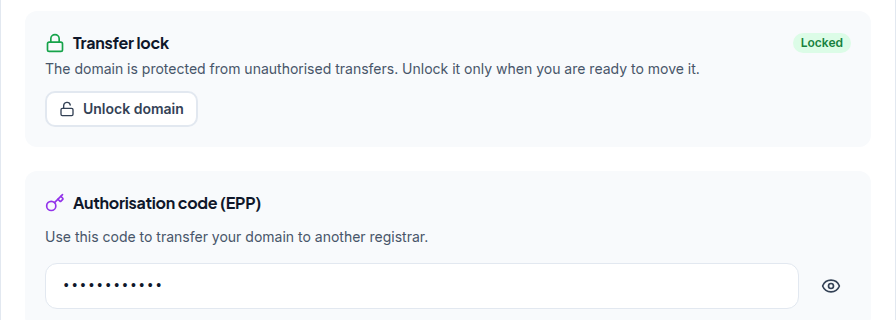
Open your domains, click the domain and go to its Transfer tab. The domain must be unlocked, at least 60 days old and have WHOIS privacy turned off. Click Unlock domain, then Get EPP code, and enter the code at the new registrar.
For .in domains there is nothing to switch off: personal registrant details are not shown in public WHOIS, and this is free and automatic. If the code box says Not Available, open a ticket with the domain name.
6. Timing and special cases
- Start at least two weeks before expiry. A domain that expires mid-transfer can stall, and you may have to renew it at the old registrar first.
- Most .com-type transfers finish within about 5 to 7 days. If the current registrar neither approves nor rejects the request, the registry normally completes it after five days. This is a typical time, not a guarantee.
- .uk domains don't use an auth code. They move by changing the registrar tag (the "IPS tag") at the current registrar. Ask the receiving registrar for its tag.
- Other country extensions have their own rules. Ask support before you start.
If you receive a transfer approval request you didn't start, don't approve it. Reject it, lock the domain and contact your registrar straight away.
Frequently asked questions
What do I need to transfer a domain?
The domain must be at least 60 days old, unlocked, not expired or on hold, and you need its auth (EPP) code from the current registrar. You enter the domain and the code at the new registrar and pay the transfer fee.
How long does a domain transfer take?
Most transfers of .com and other generic domains finish within about 5 to 7 days. Approving the confirmation email promptly can make it faster. Some registrars take longer, so this is a typical time, not a guarantee.
Do I lose the time left on my registration when I transfer?
No. The remaining time moves with the domain, and for most extensions the transfer fee adds one year to the existing expiry date.
Will my website and email stop during a transfer?
Not if your DNS is hosted by your web host or a DNS service, because a transfer keeps your nameservers unchanged. If your old registrar hosts your DNS for free, copy all your records before you start.
How much does it cost to transfer a domain to Domain India?
₹625 for a .in, ₹525 for a .co.in and ₹1,150 for a .com, excluding 18% GST. These are Domain India list prices on 19 September 2026, and each includes a one-year extension.
How do I get the EPP code for a domain registered with Domain India?
Open the domain in the client area, go to its Transfer tab, click Unlock domain and then Get EPP code. If it shows Not Available, open a support ticket.
Ready to move a domain? Transferring in, start at Domain Transfer. Transferring out, open your domains and use the Transfer tab. If something blocks the move, open a support ticket with the domain name.
Enter your domain and auth code, pay the transfer fee, and one year is added to your registration when the domain arrives.
Start a transfer