Keeping your website in a GitHub repository gives you a full history of every change and a clean way to move code from your computer to your hosting. This tutorial sets up a GitHub repository for a site on Domain India's DirectAdmin hosting: create the repository, connect your hosting account to it over jailed SSH, deploy with one command, and avoid the traps that are specific to shared hosting.
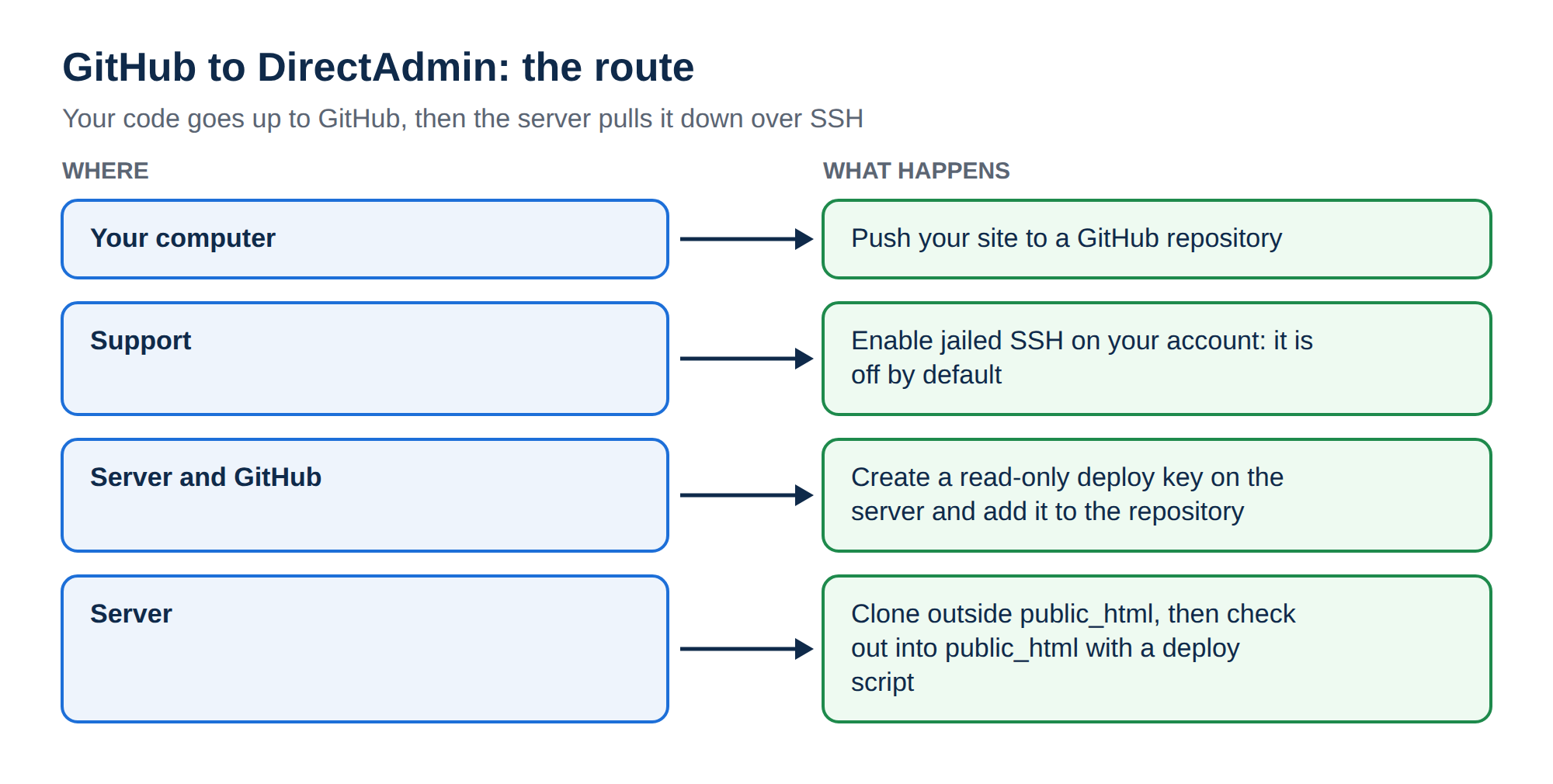
Create the repository on GitHub and push your site from your computer. Ask support to enable jailed SSH on your DirectAdmin account (it is off by default), add your SSH key, then create a read-only deploy key on the server and add it to the GitHub repository. Clone the repository outside public_html and check it out into domains/yourdomain.com/public_html with a small deploy script. Composer isn't pre-installed, but you can run php composer.phar install over SSH (add --no-scripts if it stops with a proc_open message), or build on your computer or in CI.
This tutorial covers GitHub with DirectAdmin. For every Git option across cPanel, DirectAdmin, the App Platform and VPS, see Deploying your website with Git.
1. How the pieces fit together
Your computer holds a working copy where you edit and commit. GitHub holds the shared copy and history. Your hosting account holds the live files. There are three ways to get code from GitHub to DirectAdmin hosting:
| Method | Needs | Best for |
|---|---|---|
| Pull from GitHub on the server (this tutorial) | Jailed SSH, a deploy key | Keeping the server in step with GitHub |
| Push to a bare repository on the server | Jailed SSH | Deploying straight from your computer |
| Build locally and upload | FTP or File Manager | No SSH, or a site with a build step |
The push method is described in Deploying your website with Git; this tutorial uses the pull method.
2. What our DirectAdmin hosting gives you
Measured on our DirectAdmin server on 23 September 2026:
- SSH: jailed SSH access is available on every shared hosting plan (cPanel, DirectAdmin, Webuzo). It is off by default; ask support to enable it for your account. Login is by SSH key only, on port 22.
- Git: the
gitcommand is present inside the jailed environment. Tools available inside the jailed shell vary, so confirm with support when you ask for SSH. - DirectAdmin's own Git feature in the panel is switched on for only a small number of accounts. If you would like it, ask support; this tutorial doesn't need it.
- Outgoing connections: the server firewall allows outgoing SSH (port 22) and HTTPS (443), which is what
gitneeds to reach GitHub. - Disabled PHP functions:
exec,shell_exec,proc_openandpopenare disabled, so Composer scripts and webhook scripts that rungit pullfrom PHP don't work on the server.
Your sites live under domains/yourdomain.com/public_html in your home folder.
3. Create the repository and push your site
- Create the repository.On GitHub, click New repository, give it a name, choose Private for a business site, and create it without a README if you already have code.
- Add a .gitignore.Keep secrets and generated files out of Git:
.env,wp-config.phpor your config file with passwords,vendor/if you build it,node_modules/, logs and uploads. - Push from your computer.In your project folder, run the commands below.
git init -b main
git add .
git commit -m "First commit"
git remote add origin [email protected]:yourname/yoursite.git
git push -u origin main
Set your name and email for commits once on your own computer with git config --global user.name and user.email. GitHub accepts SSH keys or a personal access token over HTTPS; account passwords no longer work for Git.
4. Connect to your DirectAdmin account
- Ask for SSH.Open a ticket at /client/support/new or use live chat, and say you need jailed SSH for Git deployment.
- Add your key.Create a key with
ssh-keygen -t ed25519on your computer, and put the public key in.ssh/authorized_keysin your home folder, or send the public key to support. - Connect.Your username and server IP are on the Access tab at /client/services/hosting. Connect on port 22, not 2222, which is the control panel.
ssh -i ~/.ssh/id_ed25519 -p 22 [email protected]Full details, including PuTTY on Windows, are in enabling and accessing SSH on DirectAdmin hosting.
5. Give the server read-only access with a deploy key
A deploy key is an SSH key that can read one repository and nothing else. If your hosting account is ever compromised, the attacker gets read access to that one repository, not your GitHub account.
On the server:
ssh-keygen -t ed25519 -f ~/.ssh/github_deploy -N "" -C "[email protected]"
cat ~/.ssh/github_deploy.pub
On GitHub, open the repository's Settings › Deploy keys › Add deploy key, paste the public key, and leave Allow write access unticked. Then tell SSH on the server to use that key for GitHub by adding this to ~/.ssh/config:
Host github.com
    IdentityFile ~/.ssh/github_deploy
    IdentitiesOnly yes
Test it with ssh -T [email protected]. GitHub answers that you have authenticated but have no shell access, which is correct.
6. Clone and deploy into public_html
Keep the repository outside public_html, so nobody can download your .git history from the web, and check the files out into the web folder:
git clone --bare [email protected]:yourname/yoursite.git ~/repos/yoursite.gitSave this deploy script as ~/deploy.sh and make it executable with chmod +x ~/deploy.sh:
#!/bin/bash
set -e
REPO="$HOME/repos/yoursite.git"
WEB="$HOME/domains/yourdomain.com/public_html"
git --git-dir="$REPO" fetch origin '+refs/heads/main:refs/heads/main'
git --git-dir="$REPO" --work-tree="$WEB" checkout -f main
echo "Deployed $(git --git-dir="$REPO" rev-parse --short main)"
From now on, your workflow is: commit and push on your computer, then run ~/deploy.sh over SSH. The first checkout overwrites files with the same name in public_html, so take a copy of the folder first. Files that are not in the repository, such as your config file and uploads, are left alone.
Composer isn't pre-installed on our shared servers, but over SSH you can download composer.phar and run php composer.phar install --no-dev; if it stops with a proc_open message, run it again with --no-scripts. Or run composer install --no-dev and any npm run build on your computer or in CI, and commit or upload the result. See PHP disabled functions on shared hosting.
7. Troubleshooting
Permission denied (publickey)when connecting to your hosting: your key is not in.ssh/authorized_keys, or SSH is not enabled yet.Permission denied (publickey)from GitHub: the deploy key is not added to the repository, or~/.ssh/configdoesn't point to it. Runssh -vT [email protected]to see which key is offered.git: command not found: ask support to confirm Git is available in your jail.- The site doesn't change after a deploy: check the branch name (
mainormaster) and theWEBpath for your domain. - A GitHub webhook to a PHP script does nothing:
shell_execandexecare disabled. For deploy on every push, use the App Platform with a deploy-token step in your CI (such as GitHub Actions), or a VPS.
8. Where Domain India hosting fits
DirectAdmin hosting suits PHP and WordPress sites that you deploy from GitHub with jailed SSH. The price on the card is live and excludes 18% GST.
- 10 GB NVMe SSD Storage
- 50 GB Monthly Bandwidth
- 1 Website
- 5 Email Accounts
If you want every push to GitHub to deploy automatically, the App Platform builds and runs your app from a repository or a deploy token in your CI. For any workflow with full root access, see VPS plans.
Can I use GitHub with Domain India DirectAdmin hosting?
Yes. Ask support to enable jailed SSH on your account, add a read-only deploy key from the server to your GitHub repository, clone it outside public_html and check it out into your site's folder with a small deploy script.
Is Git installed on Domain India DirectAdmin hosting?
The git command was present in the jailed environment on our DirectAdmin server when we measured in September 2026. Tools vary, so confirm with support when you ask for SSH. DirectAdmin's own Git panel feature is enabled only for some accounts; ask support if you want it.
Do I need SSH to deploy from GitHub to DirectAdmin?
For pulling from GitHub on the server, yes. Jailed SSH is available on every shared plan and is off by default; ask support to enable it. Without SSH, build and commit on your computer and upload the files with FTP or File Manager.
What is a deploy key and why use one?
A deploy key is an SSH key that GitHub allows to read one repository only. Using one on your hosting means a compromised hosting account cannot reach the rest of your GitHub account.
Can a GitHub webhook deploy automatically to DirectAdmin shared hosting?
Not with a PHP script that runs git, because exec and shell_exec are disabled on our shared servers. Run the deploy script over SSH, or, for deploy on every push, use the Domain India App Platform with a deploy-token step in your CI, or a VPS.
Can I run composer install on the server after pulling?
Yes. Download composer.phar into your account and run php composer.phar install --no-dev; if it stops with a proc_open message, run it again with --no-scripts. Or run it on your computer or in CI and deploy the result.
Ready to connect GitHub? Ask support to enable jailed SSH, then follow sections 4 to 6. For the other Git routes, read Deploying your website with Git.
Connect a GitHub repository or use a deploy token in your CI, and your app is built and served over HTTPS.
See App Platform plans