Yes, you can have your own nameservers, such as ns1.yourbusiness.com, as long as there is a DNS server behind them that you control or that your reseller account provides. At Domain India that means your own VPS or dedicated server, or a DirectAdmin reseller plan with private nameservers. On a single shared hosting account you can't run your own DNS server, so you use the nameservers your hosting gives you.
Own nameservers are child name servers: names inside your own domain, registered at the registry with an IP address (a glue record). They need a DNS server that answers for your domains. You can have them if you run DNS on your own VPS or server, or if you resell hosting on a Domain India DirectAdmin reseller plan, which lists private nameservers among its features. Shared hosting customers can't run their own DNS server, so they use the hosting nameservers shown on their hosting service page.
1. What "your own nameservers" really means
A nameserver is the server that answers DNS questions for a domain: where the website is, where email goes. Normally your domain points at nameservers that belong to your hosting company or DNS provider.
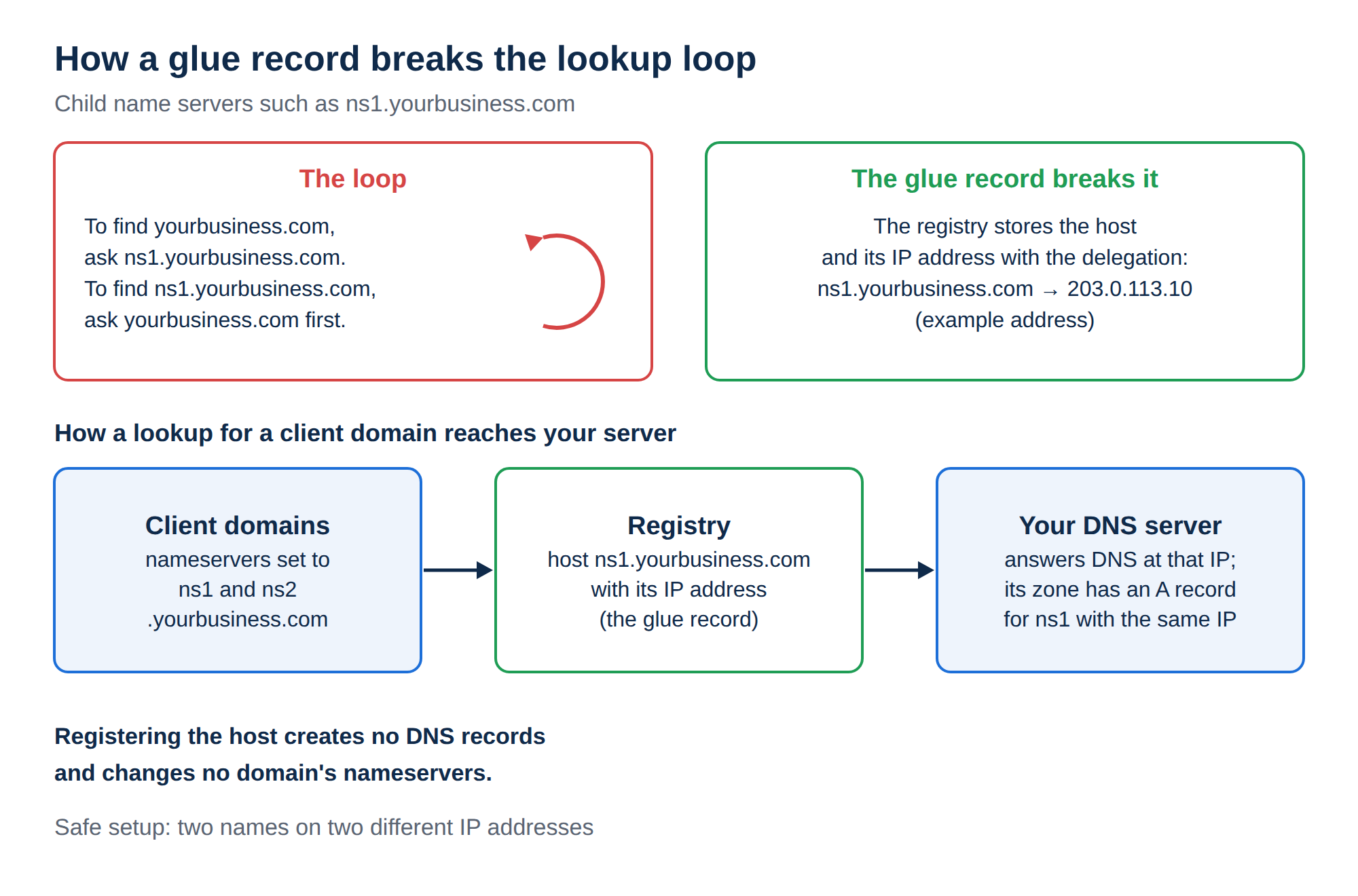
"Your own nameservers" means nameservers named after your own domain, for example ns1.yourbusiness.com and ns2.yourbusiness.com. Because the name sits inside the domain it serves, the registry must also store each name's IP address. That stored address is the glue record, and a name registered this way is a child name server (resellers often call them private nameservers). For the background, read What is a nameserver and why do I need it.
The name is only a label. What matters is the machine behind it: that IP address must belong to a server that answers DNS queries for every domain pointed at it.
2. Who can have them at Domain India
| Your setup | Own nameservers? | How |
|---|---|---|
| Your own VPS or dedicated server running DNS software | Yes | Register ns1 and ns2 with your server's IP addresses, then host the zones on your server |
| DirectAdmin reseller hosting | Yes | Private nameservers are listed among the reseller plan features; ask support for the IP addresses to use |
| cPanel, DirectAdmin or Webuzo shared hosting (one account) | No | Use the hosting nameservers shown on your hosting service page |
| Domain with no hosting, using an outside DNS provider | Only if that provider supports it | Ask your DNS provider; registration is the same glue-record step |
A shared hosting account gives you a website, email and a DNS zone on our server, but not a DNS server of your own. A glue record has to point at a machine that answers DNS for your domains, and on shared hosting there is no such machine you control. If you point ns1.yourbusiness.com at an address that doesn't answer DNS, every domain using it stops resolving. Branded nameservers are a reseller or VPS feature.
3. Do you actually need them?
- You run your own DNS server on a VPS or dedicated server
- You resell hosting and want clients to see your brand instead of your provider's
- You want to keep the same nameserver names if you move provider, by repointing two glue records
- You have one website on shared hosting
- You only want to point your website or email somewhere, which is a DNS record change
- You want branding for its own sake: visitors never see nameserver names
To connect a domain to Domain India hosting, use the nameservers on your hosting service page; see How do I change my nameservers. To point just the website or email, change records instead; see How to change your domain DNS settings.
4. How to set them up
The full steps are in two guides. Here is the outline.
- Have a DNS server ready.Your VPS or dedicated server running DNS software, or your reseller account. Note the IP addresses: your server's public IPv4 addresses, or for a reseller account the IPs support gives you.
- Register the names at the registry.For a domain registered with Domain India, open it in the client area, go to the Nameservers tab and expand Custom nameservers (glue records). Add
ns1.yourbusiness.comandns2.yourbusiness.comwith their IP addresses. If the section isn't available for your domain, open a support ticket and we will register them for you. - Add the matching A recordsfor
ns1andns2in your domain's zone on your DNS server, with the same IP addresses. - Point domains at the new names.Set each domain's nameservers to
ns1andns2of your domain, and make sure a zone for each one exists on your server. Allow up to 24-48 hours for the change to reach every network.
Step by step:
- Registering and managing child name servers: the full guide, including changing and removing hosts, and the registry rules.
- How to set up private nameservers: the short version for resellers.
Check the result with a lookup rather than a browser:
dig A ns1.yourbusiness.com +short     # should return your DNS server's IP
dig NS clientdomain.com +short        # should list ns1/ns2.yourbusiness.com
5. Where Domain India fits
If you run your own server, a Domain India VPS gives you full root access and a dedicated IPv4 address, from ₹553 a month (Domain India list price on 19 September 2026, excluding 18% GST). If you sell hosting under your own brand, our DirectAdmin reseller plans list private nameservers and white-label branding among their features, and support supplies the IP addresses to use.
- 1 vCPU
- 2 GB DDR4 RAM
- 64 GB NVMe SSD Storage
- 2 TB Monthly Bandwidth
If you have one website, cPanel or DirectAdmin shared hosting with our nameservers is the simpler choice.
Frequently asked questions
Can I have my own nameservers with Domain India?
Yes, if there is a DNS server behind them: your own VPS or dedicated server running DNS software, or a Domain India DirectAdmin reseller plan, which lists private nameservers among its features. On a single shared hosting account you use the hosting nameservers instead.
Why can't I use custom nameservers on shared hosting?
Custom nameservers must point at a server that answers DNS queries for your domains. A shared hosting account doesn't include a DNS server of your own, so a name like ns1.yourbusiness.com would have nothing to point at, and any domain using it would stop resolving.
What is the difference between own nameservers, private nameservers and child name servers?
They are the same thing: nameservers named after your own domain, such as ns1.yourbusiness.com, registered at the registry with an IP address in a glue record. Resellers usually call them private nameservers.
How do I register ns1 and ns2 for my domain?
For a domain registered with Domain India, open it in the client area, go to the Nameservers tab, expand Custom nameservers (glue records) and add each hostname with its IP address. If the section isn't available for your domain, open a support ticket and we will register them at the registry.
Does registering ns1 and ns2 change my domain's nameservers?
No. It only creates the hosts at the registry. You still set each domain's nameservers to the new names, and create a DNS zone for each domain on your DNS server.
Ready to set it up? Read Registering and managing child name servers, compare VPS plans and reseller hosting, or open a support ticket with the nameserver names and IP addresses you want.
Tell us whether you run your own server or a reseller account, and the names you want. We will tell you the IP addresses to use and help register them.
Open a support ticket