A Domain India invoice can carry up to three different numbers: a proforma number starting PI-, an invoice number starting INV- and, once it is paid, a GST tax invoice number starting TAX-. This guide explains what each one means, which document to give your accountant, and what to do when an invoice doesn't look right.
Most invoices start as a Proforma Invoice (its number starts with PI-): a request for payment, not a tax document. When you pay, the same invoice gets an INV- number and a Tax Invoice is issued with its own number that includes the financial year (for example TAX-2026-27-009876). Give your accountant the tax invoice, downloaded with Download Tax Invoice from Invoices.
1. The three numbers at a glance
| Number | Example | When it appears | Is it a tax document? |
|---|---|---|---|
| Proforma (PI-) | Starts with PI- | When an order, renewal or upgrade invoice is created | No, it is a request for payment |
| Invoice (INV-) | Starts with INV- | When that invoice is paid | It is the invoice reference; use the tax invoice for GST |
| Tax invoice (TAX-) | Starts with TAX- and the financial year | When the payment goes through | Yes, this is the GST tax invoice |
The PI- and INV- numbers include the calendar year. The TAX- number includes the Indian financial year, which runs from April to March, so 2026-27 means April 2026 to March 2027. The example numbers above are illustrations of the format, not real invoices.
2. The proforma invoice (PI-)
A proforma invoice is the bill you receive before you pay. It is created when:
- you place a new order;
- a renewal is due (renewal invoices are generated up to 30 days before the due date);
- you upgrade a plan.
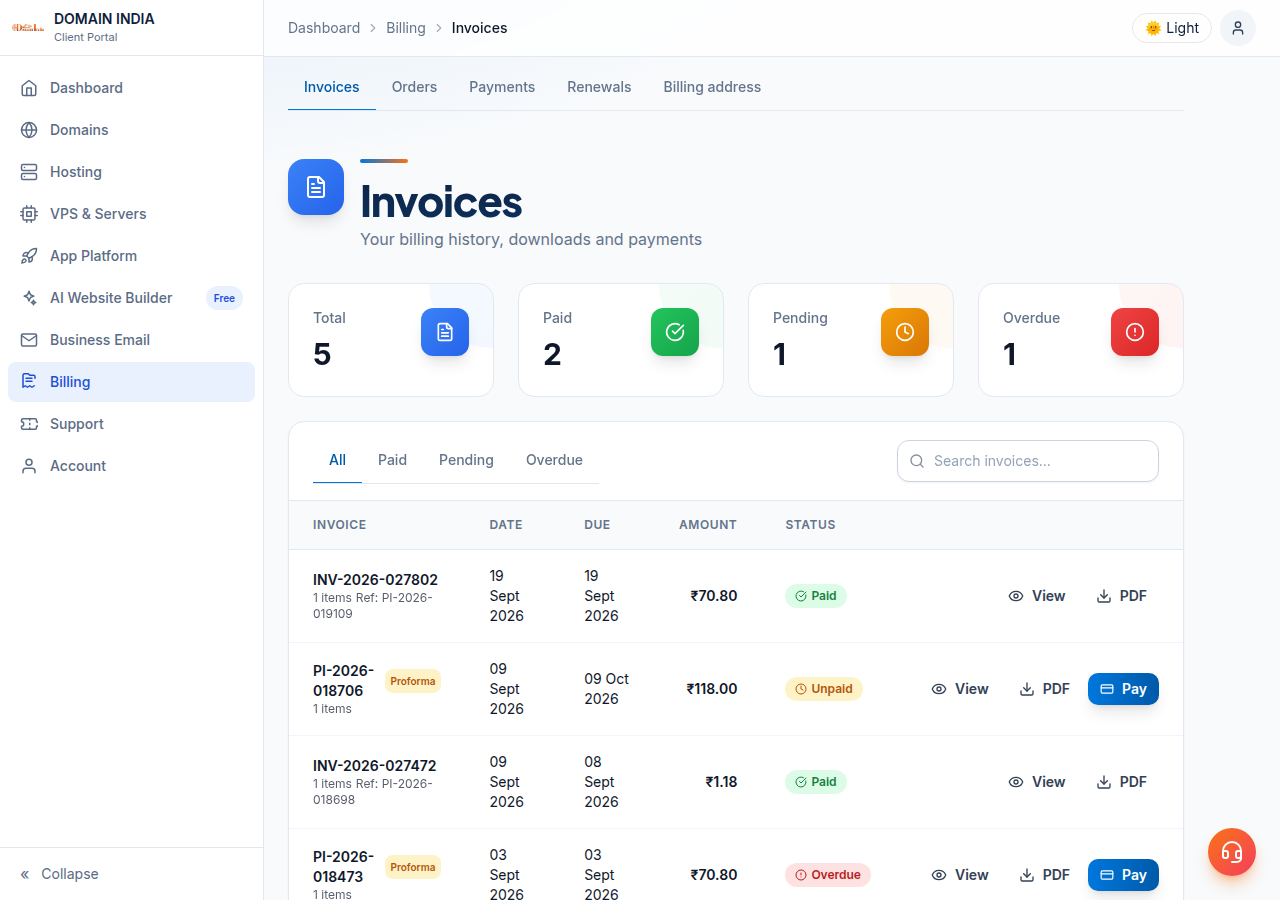
In the client area it is titled Proforma Invoice and marked with a Proforma label in your invoice list. It shows what you owe and by when, but it is not a tax invoice, so it cannot be used to claim input tax credit.
Domain India never charges a saved card automatically. A renewal happens only when you pay its invoice. If you don't want a service to renew, decline it on the Renewals page or leave the invoice unpaid; see How auto-renewal works.
3. After you pay: the INV- number and the tax invoice
When the payment is confirmed, two things happen to the same invoice:
- It gets a final invoice number starting with INV-. The original proforma number is kept as a reference, shown as Ref: PI-… in your invoice list and as Proforma Ref on the invoice page.
- A GST tax invoice is issued, numbered TAX- with the financial year. The invoice page is then titled Tax Invoice followed by that number, and shows the INV- number underneath.
A few invoices never have a proforma stage, for example some add-ons paid at once, so they carry an INV- number from the start. Some older invoices kept their PI- number after payment. In every case, the tax invoice is the document that counts for GST.
4. What the tax invoice shows
The tax invoice carries the GST details your accountant needs:
- Domain India's GSTIN, 33AAFCD9427N1Z9;
- your GSTIN, if it was on your account when you paid;
- the Place of Supply, taken from your billing state;
- SAC code 998315 against each item;
- the taxable value, the tax and the total.
Domain India charges 18% GST. Domain India is registered in Tamil Nadu, so the split depends on your billing state:
| Your billing state | Tax on the invoice | Total tax |
|---|---|---|
| Tamil Nadu | CGST 9% + SGST 9% | 18% |
| Any other Indian state or union territory | IGST 18% | 18% |
Customers without a GSTIN still receive a tax invoice. For how GST applies in more detail, see Understanding GST on Hosting Services.
5. What the invoice statuses mean
| Status | What it means | What to do |
|---|---|---|
| Payment Due | Waiting for payment (listed under the Pending tab of your invoice list) | Pay it before the due date, or leave it if you don't want the service |
| Payment Overdue | The due date has passed and it is still unpaid | Pay it if you want to keep the service |
| Payment Received | Payment confirmed; the tax invoice is available | Download the tax invoice for your records |
| Cancelled or Void | The invoice was withdrawn and nothing is owed on it | Nothing |
| Refunded | The payment was refunded | Keep the record; ask your CA how to account for it |
6. View and download your invoices
- Sign in.Go to the client area and open Billing › Invoices, or go straight to /client/invoices.
- Find the invoice.Filter by status or search by number. Each row shows the number, the amount and the status.
- Open it.A paid invoice opens as a Tax Invoice; an unpaid one opens as a Proforma Invoice with the option to pay online.
- Download or print.On a paid invoice, click Download Tax Invoice to save the PDF. On an unpaid invoice, Download PDF saves the proforma. Print works on both.
7. Get your GSTIN on the tax invoice
The tax invoice is created when the payment goes through, using the details on your account at that moment. Add your GSTIN and check your billing state before paying a new order or a renewal.
Add your 15-character GSTIN in the GST information card on your Profile, or under billing settings, where the billing address also lives. The full walkthrough is in Adding GSTIN to Your Account.
If a tax invoice has already been issued without your GSTIN, or with the wrong state, open a ticket with the tax invoice number. Don't assume it can be changed.
8. When something doesn't look right
- You paid, but the invoice still shows Payment Due. Most payments confirm within about two minutes. Don't pay again. If it hasn't changed after you have been charged, open a ticket with the invoice number and your payment reference.
- A paid invoice has no Download Tax Invoice button. Open a ticket with the invoice number and we will check it.
- The amount is higher than the plan price. Website prices exclude GST; 18% is added on the invoice. Also check the billing period: a yearly invoice covers the whole year.
- You need a correction. Open a ticket with the tax invoice number and exactly what needs to change.
Tickets go through /client/support/new when you are logged in, or /support/ticket. Live chat is available 24/7, and tickets get a first response within 15 minutes.
What is the difference between a PI- and an INV- invoice at Domain India?
A PI- number is a proforma invoice: a request for payment created for a new order, renewal or upgrade. When you pay, the same invoice gets an INV- number, and the PI- number is kept as a reference. A GST tax invoice with a TAX- number is issued at the same time.
Can I claim input tax credit with a proforma invoice?
No. A proforma invoice is not a tax document. Use the tax invoice issued after payment, downloaded with the Download Tax Invoice button. Ask your CA whether your purchase qualifies for input tax credit.
What does the TAX- number on my invoice mean?
It is the number of the GST tax invoice. It includes the Indian financial year, which runs from April to March, so TAX-2026-27 means a tax invoice from the 2026-27 financial year.
Which invoice should I give my accountant?
The tax invoice. It carries Domain India's GSTIN, your GSTIN if it was on your account, the place of supply, SAC code 998315 and the GST breakup.
I don't have a GSTIN. Do I still get a tax invoice?
Yes. Every paid invoice gets a tax invoice. If you are not GST-registered, leave the GSTIN field on your profile blank.
I paid but the invoice still says Unpaid. What should I do?
Don't pay a second time. Some payments take a little time to confirm. If the status has not changed after you have been charged, open a support ticket with the invoice number and your payment reference.
Does Domain India charge my card automatically for renewals?
No. Domain India never charges a saved card automatically. A renewal invoice is generated up to 30 days before the due date, and the service renews only when you pay it.
Ready to check your invoices? Open Invoices in the client area, add your GSTIN on your Profile before your next payment, or read How to Pay an Invoice via Razorpay.
Pay proforma invoices online and download your GST tax invoices from one place.
Open Invoices