DMARC is a TXT record that tells receiving mail servers what to do with a message that claims to be from your domain but fails SPF and DKIM, and where to send you reports about it. You add it the same way in every control panel: a TXT record named _dmarc with a value that starts v=DMARC1. This page shows where that record goes in cPanel, DirectAdmin, Plesk, Webuzo and Cloudflare.
Every tag, the step-by-step move from monitoring to p=reject, reading reports and fixing failing senders are covered in Setting up DMARC. This page is the quick panel-by-panel version.
Add a TXT record named _dmarc with a value such as v=DMARC1; p=none; rua=mailto:[email protected], in whichever DNS editor your domain actually uses. A domain may have only one DMARC record, and most domains on our cPanel servers already have a p=none record, so edit that one rather than adding another. Start with p=none, read the reports, then tighten to quarantine and finally reject.
1. What DMARC does, in short
DMARC builds on two older checks. SPF lists the servers allowed to send mail for your domain, and DKIM signs each message with a key published in your DNS. A message passes DMARC only when SPF or DKIM passes for the same domain that appears in the visible From address. Your DMARC policy then tells receivers what to do with mail that fails:
| Policy | What receivers do with failing mail |
|---|---|
| p=none | Nothing changes; you only receive reports |
| p=quarantine | Put it in spam |
| p=reject | Refuse it outright |
A good first record is:
v=DMARC1; p=none; rua=mailto:[email protected]Use a mailbox you read, or a DMARC report service. ruf (per-message failure reports) is optional, and most large providers don't send them.
2. Before you add it
- Check SPF and DKIM first. Send a message from your domain to a Gmail address, open it and choose Show original. You want
SPF: PASSandDKIM: PASSfor your domain. - Find where your DNS is managed. The record must go in the DNS editor the internet actually queries: your hosting panel if the domain uses our hosting nameservers, otherwise Cloudflare or your DNS provider. See How do I change my nameservers.
- Check for an existing record. Run
dig +short TXT _dmarc.yourdomain.com(on Windows,nslookup -type=TXT _dmarc.yourdomain.com). If an answer starts withv=DMARC1, edit it. Two DMARC records make DMARC invalid.
On 23 September 2026, 1,377 of 1,819 zones on our cPanel servers already had a DMARC record, almost all p=none. On our DirectAdmin server only 61 of 2,553 zones had one. So on cPanel you will usually edit, and on DirectAdmin you will usually add.
3. Add the record in your control panel
The record is always type TXT, name _dmarc, and your value. Only the screen changes.
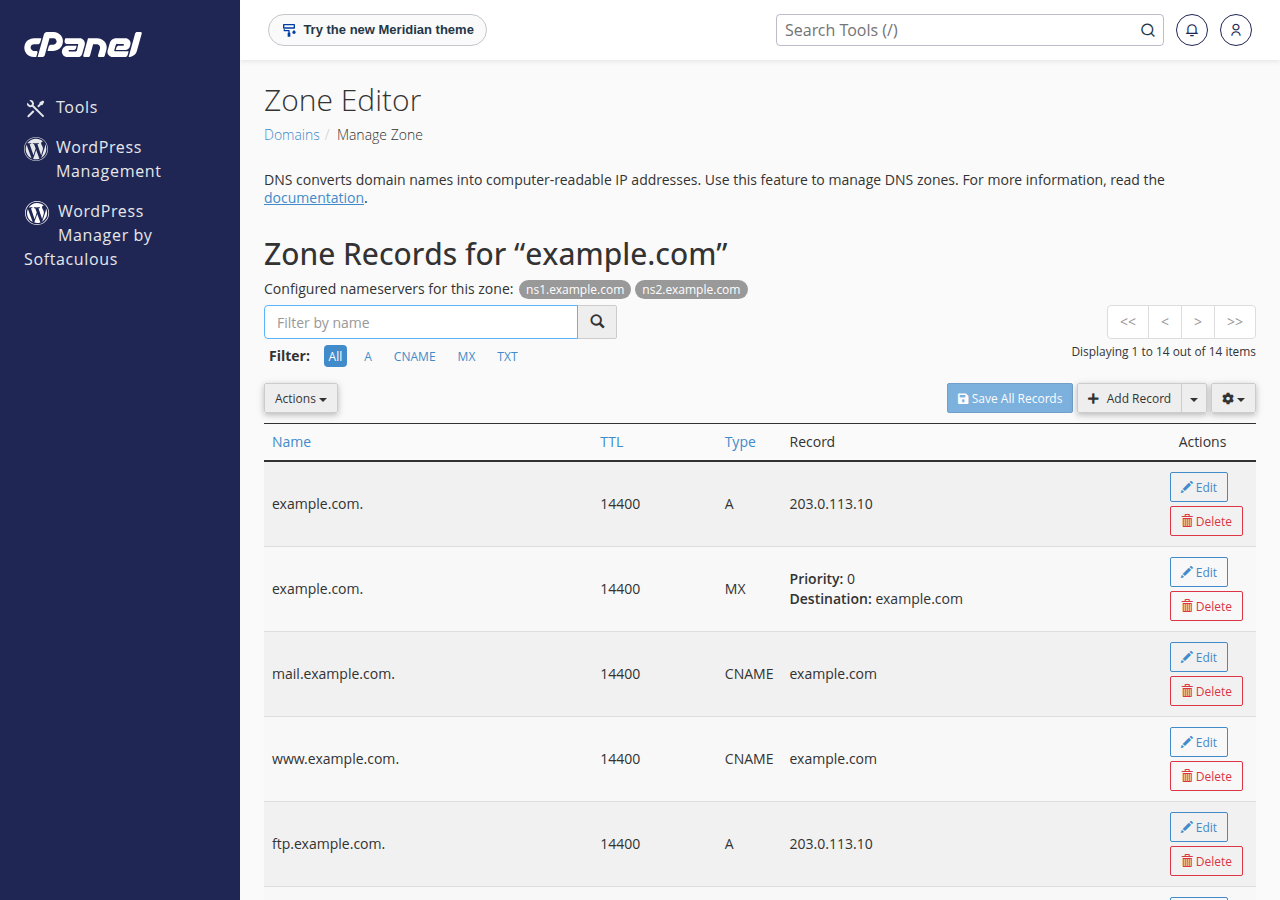
- cPanel.Log in (How to log in to cPanel), open Domains › Zone Editor, click Manage next to your domain and filter by TXT. Edit the existing
_dmarcrecord if there is one; otherwise choose Add Record › TXT, name_dmarc, paste the value and save. - DirectAdmin.Open Account Manager › DNS Management for the domain, add a TXT record named
_dmarcwith your value, and save. DirectAdmin signs mail with the DKIM selectorx; check DKIM with How to check and manage DKIM in DirectAdmin. - Plesk (Windows hosting).In Plesk, open Websites & Domains, then the domain's DNS settings, and add a TXT record named
_dmarcwith your value. If you can't find the DNS page, ask support. - Webuzo.Open Domain › DNS Zone Settings. New Webuzo zones already contain a
_dmarcTXT record (v=DMARC1; p=none;), so edit it with your value rather than adding a second record; two DMARC records are invalid. - Cloudflare or another DNS provider.Add a TXT record named
_dmarc(the provider adds your domain) and paste the value. Cloudflare never proxies TXT records, so there is nothing else to set.
After saving, repeat the dig lookup: you should see exactly one line starting v=DMARC1. Other networks may show the old answer for a few hours.
4. Verify, then tighten slowly
Send a test message to Gmail and check Show original for DMARC: 'PASS'. Then keep p=none for two to four weeks while the reports show you every service that sends as your domain, such as your hosting mail server, a newsletter tool or a billing system. Make each one pass SPF or DKIM. Move to p=quarantine, optionally with pct to apply it to part of your mail, and finally to p=reject.
If any genuine sender is not aligned, p=reject makes its mail bounce, and you may only find out when customers say they never got an invoice or password email.
5. DMARC on Domain India hosting
Every Domain India shared hosting plan lets you manage DNS records for domains that use our hosting nameservers, so you can publish SPF, DKIM and DMARC yourself. On cPanel, cPanel's Email › Email Deliverability page checks SPF and DKIM for you, and DKIM is on by default for new accounts. On our cPanel servers SRS is off, so mail forwarded from a cPanel mailbox to an outside address relies on DKIM to pass DMARC.
For the wider picture, including BIMI and MTA-STS, see Email deliverability: SPF, DKIM, DMARC and BIMI.
Frequently asked questions
Where do I add a DMARC record?
In the DNS editor your domain actually uses. If the domain uses Domain India hosting nameservers, that is your control panel's DNS or Zone Editor; otherwise it is Cloudflare or your DNS provider. The record is a TXT record named _dmarc.
Can my domain have two DMARC records?
No. A domain must have exactly one TXT record at _dmarc. With two, receivers treat DMARC as invalid, so edit the existing record instead of adding another.
Which DMARC policy should I start with?
Start with p=none, which changes nothing for your mail but sends you reports. Move to p=quarantine and then p=reject only after the reports show all of your genuine mail passing for a few weeks.
Can I list more than one report address?
Yes. Separate the addresses with commas in the rua tag, for example rua=mailto:[email protected],mailto:[email protected]. A report address on a different domain needs an authorisation record on that domain.
Does my Domain India cPanel domain already have DMARC?
Usually yes. On 23 September 2026, 1,377 of 1,819 zones on our cPanel servers already had a DMARC record, almost all with p=none. Check with dig and edit the existing record in the Zone Editor.
Ready to publish your record? Follow the full walkthrough in Setting up DMARC, or open a support ticket with your domain name if a record won't save or your mail starts failing. Support is on 24/7 live chat, and tickets get a first response within 15 minutes.
Tell us your domain and where its DNS is managed, and we will check your SPF, DKIM and DMARC records with you.
Open a support ticket