When you run a hosting business on a Domain India reseller plan, Domain India bills you for the plan and you bill your own clients at your own prices. This guide explains how to set up that second half: choosing between manual invoicing and billing software, where billing software can and can't run, how it connects to your control panel, pricing, and GST.
Start with manual invoicing if you have a handful of clients. Once you have more, use billing software such as WHMCS or Blesta: both are third-party products you license separately, and no licence is included with any Domain India reseller plan. Install the billing software on a VPS, not on your reseller hosting account, connect it to WHM or DirectAdmin with an API token or login key, map your packages, and test an order before going live. GST on your invoices is your responsibility; confirm the setup with your accountant.
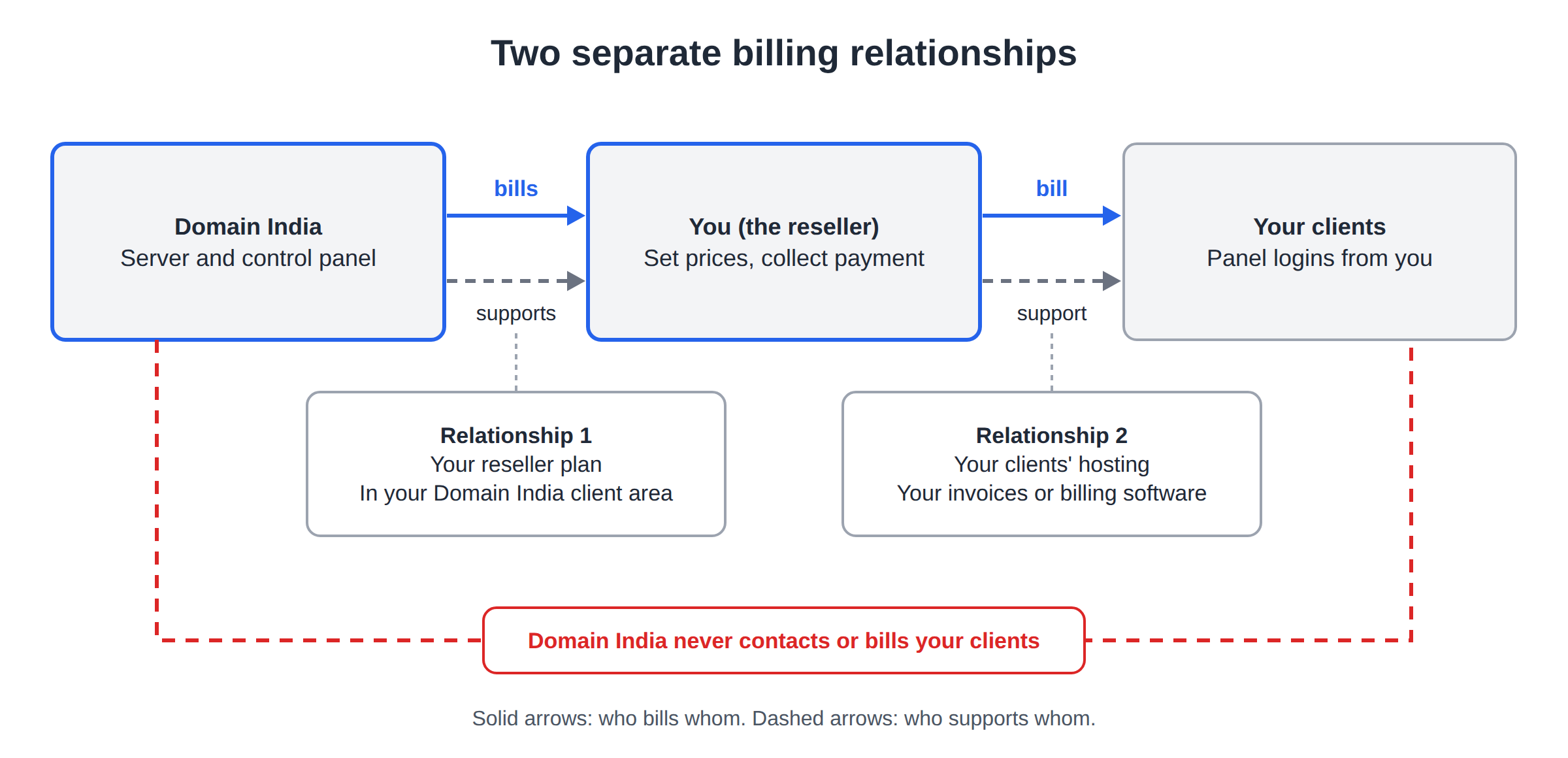
1. Two separate billing relationships
| Relationship | Who bills whom | Where it is managed |
|---|---|---|
| Your reseller plan | Domain India bills you | Your Domain India client area, under invoices |
| Your clients' hosting | You bill your clients | Your own invoices or billing software |
Domain India never contacts or bills your clients. You set your prices, collect payment and decide when to suspend an unpaid account. Your clients get their cPanel or DirectAdmin logins from you, and you support them; Domain India supports you with the server and the control panel.
Domain India does not charge a saved card automatically. Your reseller plan renews when you pay its renewal invoice, which is generated up to 30 days before the due date. Leave enough margin in your own billing so that your clients have paid you before your plan is due.
2. Choose how to bill
The main billing platforms
- WHMCS: the most widely used platform for hosting businesses, with modules for cPanel/WHM and DirectAdmin. Commercial, with a monthly licence bought from WHMCS.
- Blesta: a commercial alternative with cPanel and DirectAdmin modules. See our Blesta guide for cPanel resellers for the full setup.
- Other options: HostBill is another commercial platform. BoxBilling is no longer developed; its community continuation is FOSSBilling, which is free but check its current release status before trusting it with payments.
Domain India reseller plans are WHMCS-compatible: WHMCS can create and manage accounts on them. The software itself, and its licence, are not included with any plan. Check each vendor's website for current prices and requirements.
3. Where to run your billing software
Install billing software on a separate server, not on the reseller cPanel or DirectAdmin account it manages. WHMCS and Blesta are encoded with ionCube, and the ionCube Loader is not available for current PHP versions on our cPanel shared servers. Shared hosting also disables functions such as proc_open and exec, and cron jobs run at most every 4 minutes. Keeping billing apart also protects your client records if the hosting server has a problem.
The dependable home is a VPS you control. On a Domain India VPS you install the web server, PHP with the ionCube Loader, MySQL or MariaDB and an SSL certificate yourself. The VPS is self-managed, so updates, security and backups of the billing server are yours to look after.
- 1 vCPU
- 2 GB DDR4 RAM
- 64 GB NVMe SSD Storage
- 2 TB Monthly Bandwidth
Prices on the cards exclude 18% GST.
4. Connect billing to your control panel
- Create your packages first.Build your hosting packages in WHM (Packages › Add a Package) or DirectAdmin, so the billing software has something to link to. See creating hosting packages in WHM.
- Create an API credential.In WHM, open Development › Manage API Tokens and generate a token for the billing software; every cPanel reseller account we checked has this privilege. In DirectAdmin, use a login key if your billing module supports one, or the module's recommended method.
- Find your server details.Open your reseller service under your hosting and click Manage; the Access tab shows the username, server IP and panel URL.
- Add the server in your billing software.Choose the cPanel/WHM or DirectAdmin module, enter the hostname, your reseller username and the token or key, and switch SSL on. Test the connection.
- Create products.Make one product per package, link it to the matching package name, and set your prices and billing cycles.
- Set up payments, email and cron.Add a payment gateway your customers can use, set up SPF, DKIM and DMARC for the domain the software sends from, and add the software's cron job on your VPS.
- Place a test order.Pay it, check that the account appears in WHM or DirectAdmin with the right package, then suspend, unsuspend and terminate it from the billing software.
Anyone with your WHM token or DirectAdmin key can create, change and delete your clients' accounts. Keep it only in the billing software, never in email or chat, and revoke it at once if it leaks.
WHMCS-specific notes are in integrating with WHMCS for automated billing.
5. Price your plans
Work out your cost per client first, then add margin for your time and support.
- Know your cost. Domain India list prices on 19 September 2026, excluding 18% GST: DirectAdmin Reseller Starter costs ₹617 a month with 250 GB NVMe storage and no limit on the number of accounts, and yearly billing gets a 10% discount. cPanel reseller plans are priced by the number of cPanel accounts; see reseller hosting for current prices.
- Divide by what you can sell. Your storage and bandwidth are shared by all your clients, so plan packages that fit inside your plan with room to spare.
- Price for support. Your clients will contact you, not Domain India. Charge enough to answer them properly.
- Match the renewal. Bill clients yearly where you can, so their payments arrive before your own renewal.
As an illustration only: if 20 client sites on DirectAdmin Reseller Starter each pay you ₹150 a month, you take in ₹3,000 against a ₹617 plan cost, before GST and your own time.
6. GST on your invoices
If you are registered for GST, your invoices to clients must carry your GSTIN, the SAC code for the service, the taxable value and the tax: CGST and SGST for a client in your own state, IGST for one in another state. Domain India's own hosting invoices use SAC 998315. Registration thresholds, place of supply and invoice numbering rules have details that an accountant should confirm for your business.
Whatever billing software you choose, set up its tax rules, company details and invoice layout yourself and check a sample invoice with your accountant before you send real ones. Don't assume any package produces a correct Indian GST invoice without configuration.
Add your own GSTIN to your Domain India account under your profile, in "GST information", so the invoices we send you for your reseller plan carry it. See billing settings and GST details.
7. Where Domain India fits
Domain India offers cPanel/WHM and DirectAdmin reseller plans with white-label branding, compared on the reseller hosting page. DirectAdmin reseller plans have no limit on the number of accounts and include private nameservers under your own brand. No reseller plan includes hourly backups, a wildcard SSL certificate or a WHMCS licence; client sites get free SSL and weekly JetBackup backups. Resellers get the same support as every customer: 24/7 live chat, and tickets get a first response within 15 minutes, with no separate reseller team and no phone line. New reseller hosting purchases can be refunded in full within 30 days under our refund policy.
Frequently asked questions
Does Domain India bill my clients directly?
No. Domain India bills you for your reseller plan. You set your own prices and invoice your clients yourself, by hand or with billing software.
Is a WHMCS licence included with Domain India reseller hosting?
No. No Domain India reseller plan includes a WHMCS licence. The plans are WHMCS-compatible, so you can buy a licence from WHMCS and connect it to your reseller account.
Can I install WHMCS on my reseller hosting account?
Don't. WHMCS and Blesta need the ionCube Loader, which is not available for current PHP versions on Domain India's cPanel shared servers. Install billing software on a VPS and connect it to your reseller account through the API.
How does billing software create cPanel accounts automatically?
Through its cPanel/WHM module. Create an API token in WHM under Development, Manage API Tokens, add your server in the billing software with your reseller username and that token, and link each product to a WHM package.
Which billing software can I use with a DirectAdmin reseller plan?
WHMCS and Blesta both have DirectAdmin modules. Connect them with your DirectAdmin reseller username and a login key or the method the module recommends, and test with a sample order first.
Does billing software handle Indian GST automatically?
Not without setup. Configure the tax rules, your GSTIN, the SAC code and the invoice layout yourself, and have your accountant check a sample invoice before you send real ones.
How much does a DirectAdmin reseller plan cost?
DirectAdmin Reseller Starter is ₹617 a month excluding 18% GST, Domain India list price on 19 September 2026, with no limit on the number of hosting accounts. Yearly billing gets a 10% discount.
Ready to start billing your own clients? Compare plans on reseller hosting, pick a VPS for your billing software, or open a support ticket if you have questions about connecting it.
cPanel and DirectAdmin reseller plans with white-label branding, free SSL for client sites and weekly backups.
Compare reseller plans