Composer is the dependency manager for PHP: you list the libraries your project needs, and Composer downloads the right versions, their own dependencies and an autoloader that loads them for you. This guide installs Composer 2 on your computer or your own VPS, covers the everyday commands, and shows how to deploy a Composer project to shared hosting, where Composer isn't pre-installed but can be run over jailed SSH.
Install Composer 2 on your own computer (the Windows installer, Homebrew on macOS, or the verified installer script on Linux) or on a VPS. Use composer require to add libraries, commit composer.json and composer.lock, and include vendor/autoload.php in your code. On Domain India shared hosting Composer isn't pre-installed: with jailed SSH (on request) download composer.phar and run php composer.phar install --no-dev --optimize-autoloader, adding --no-scripts if it stops with a proc_open message, or run that install on your computer, matched to the server's PHP version, and upload the project with its vendor/ folder.
Composer isn't pre-installed on shared hosting, but with jailed SSH (on request) you can download composer.phar and run php composer.phar install. Shared hosting disables PHP functions such as proc_open that Composer scripts need, so if the install stops with a proc_open message, run it again with --no-scripts. This is a security setting, not a fault with your account. Or build on your computer or in CI and upload the result. See PHP disabled functions on shared hosting.
1. What Composer does
Three files and folders do all the work:
| File or folder | What it is | Commit to Git? |
|---|---|---|
| composer.json | The libraries you asked for and their allowed versions | Yes |
| composer.lock | The exact versions installed, so every machine gets the same | Yes, for applications |
| vendor/ | The downloaded libraries and the autoloader | No; rebuild it from the lock file |
Version constraints use ^ most of the time: "guzzlehttp/guzzle": "^7.9" allows any 7.x from 7.9 up, but never 8.0, which may break your code.
2. Install Composer
You need PHP on the command line (php -v) with the openssl and zip extensions; git and unzip help too.
- Windows: download and run Composer-Setup.exe from getcomposer.org. It finds your PHP and adds
composerto your PATH. - macOS:
brew install composer. - Linux or your VPS: use the official installer and check its signature before running it:
php -r "copy('https://getcomposer.org/installer', 'composer-setup.php');"
EXPECTED="$(curl -fsSL https://composer.github.io/installer.sig)"
ACTUAL="$(php -r "echo hash_file('sha384', 'composer-setup.php');")"
[ "$EXPECTED" = "$ACTUAL" ] && echo "Installer verified" || { echo "Installer corrupt"; rm composer-setup.php; exit 1; }
sudo php composer-setup.php --install-dir=/usr/local/bin --filename=composer
rm composer-setup.php
composer --version
Distribution packages (apt install composer, dnf install composer) also work but are often a version behind; composer self-update keeps the installer version current. Don't run Composer as root on a project; use your normal user.
3. Everyday commands
composer init                               # create composer.json interactively
composer require guzzlehttp/guzzle          # add a library
composer require --dev phpunit/phpunit      # add a development-only tool
composer install                            # install exactly what composer.lock says
composer update vendor/package              # update one library within its constraint
composer remove vendor/package              # remove a library
composer outdated --direct                  # what has newer versions
composer audit                              # known security advisories in your dependencies
Then load everything with one line at the top of your entry script:
<?php
require __DIR__ . '/vendor/autoload.php';
Use install for deployments and update only when you mean to change versions, then test and commit the new composer.lock. Running update blindly on a live project is how sites break.
Your own classes can use the same autoloader. Add a PSR-4 mapping to composer.json and run composer dump-autoload:
{
    "autoload": {
        "psr-4": { "App\\": "src/" }
    }
}
4. Deploy a Composer project to shared hosting
The simplest route is to build the vendor/ folder on your computer. The one thing to get right is the PHP version.
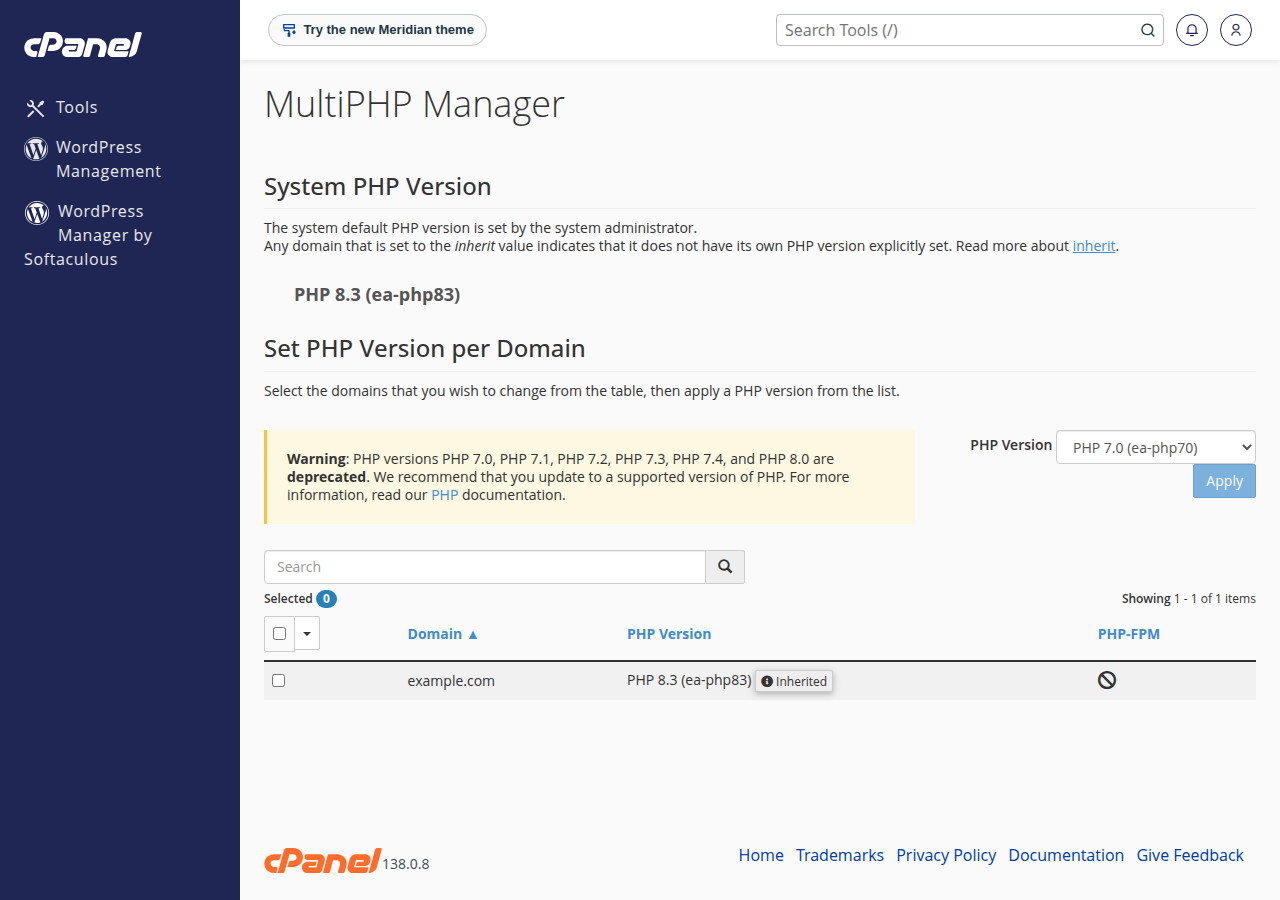
- Check the server's PHP version.In cPanel open MultiPHP Manager (or your panel's PHP version page) and note the version your domain uses.
- Tell Composer to build for that version.Run
composer config platform.php 8.3.0, using your server's version, thencomposer updateonce so the lock file is resolved for it. Composer then picks library versions that will run there, even if your computer has newer PHP. - Build for production.Run
composer install --no-dev --optimize-autoloader. This leaves out development tools and speeds up autoloading. - Upload the project with
vendor/.Zip the project, upload it with File Manager or SFTP, and extract it. Keepvendor/,.envand your source outsidepublic_htmlwhere you can, with only the public folder in the web root. - Repeat after every dependency change.When
composer.lockchanges, rebuild and uploadvendor/again.
Jailed SSH access is available on every shared hosting plan (cPanel, DirectAdmin, Webuzo). It is off by default; ask support to enable it for your account. On our cPanel servers git is available inside the jail, so you can pull your code with Git and build vendor/ there: download Composer with curl -sS -o composer.phar https://getcomposer.org/download/latest-stable/composer.phar and run php composer.phar install --no-dev --optimize-autoloader. If it stops with a proc_open message, run it again with --no-scripts and run the commands under scripts in composer.json yourself with php. For a full framework example, see Deploying Laravel on cPanel.
5. Libraries worth knowing
Sending mail with PHPMailer on cPanel: SMTP fails on our cPanel servers because the socket functions it needs are disabled. PHPMailer's isMail() mode with Sender is no fix either: PHPMailer passes the envelope sender (-f) only when escapeshellcmd is available, and it is disabled there, so Sender is silently ignored and the Return-Path becomes the server's address. Instead, let PHPMailer build the message with preSend(), then send it yourself with PHP mail() and -f:
$from = '[email protected]';           // a mailbox on your own domain
$mail->isMail();
$mail->setFrom($from, 'Your Site');
$mail->addAddress($to);
// ... Subject, Body, attachments ...
$mail->preSend();                           // build the message, don't send it

// Split headers from body, take out To and Subject, then send with -f.
[$head, $body] = preg_split("/\r?\n\r?\n/", $mail->getSentMIMEMessage(), 2);
$head = preg_replace("/\r?\n[ \t]+/", ' ', $head);
$headers = [];
$subject = '';
foreach (preg_split("/\r?\n/", $head) as $line) {
    if (stripos($line, 'To:') === 0) { continue; }
    if (stripos($line, 'Subject:') === 0) { $subject = trim(substr($line, 8)); continue; }
    $headers[] = $line;
}
mail($to, $subject, $body, implode("\r\n", $headers), '-f' . $from);
The complete handler, with validation and error handling, is in How to use PHPMailer for contact forms.
On DirectAdmin we haven't measured the socket functions, so test SMTP on your plan. See PHP sendmail settings.
Keep debugging tools such as filp/whoops in require-dev only; an error page that shows code and settings must never reach a live site.
6. Troubleshooting
| Message | Cause | Fix |
|---|---|---|
| proc_open() has been disabled for security reasons | A Composer script (or --prefer-source) tried to start a program on shared hosting | Run it again with --no-scripts, then run the script commands yourself with php, or build vendor/ on your computer and upload it |
| The Process class relies on proc_open, which is not available on your PHP installation | A Composer script needs proc_open, which is disabled on shared hosting | Run it again with --no-scripts, then run the script commands yourself with php |
| Your requirements could not be resolved | A library needs a different PHP version or extension | Set platform.php to the server's version, or choose another library version |
| Composer detected issues in your platform | vendor/ was built for newer PHP than the server runs | Rebuild with platform.php set correctly and upload again |
| Allowed memory size exhausted | Dependency resolution on a large project | Run COMPOSER_MEMORY_LIMIT=-1 composer update on your computer |
| The zip extension and unzip command are both missing | Missing PHP extension | Install php-zip or unzip on your computer or VPS |
7. Where Domain India fits
Shared hosting runs Composer-built PHP projects well once you upload vendor/.
- 25 GB NVMe SSD Storage
- 50 GB Monthly Bandwidth
- 1 Website
- 10 Email Accounts
A VPS gives you root access, so you can install Composer on the server, run it in your deployment script and use any PHP extension. It is self-managed.
- 1 vCPU
- 2 GB DDR4 RAM
- 64 GB NVMe SSD Storage
- 2 TB Monthly Bandwidth
Prices on the cards are live and exclude 18% GST. The App Platform detects Node.js apps automatically; a PHP app there needs its own Dockerfile.
Can I run Composer on Domain India shared hosting?
Yes, over jailed SSH (on request). Composer isn't pre-installed, so download composer.phar and run php composer.phar install; if it stops with a proc_open message, run it again with --no-scripts. Or run Composer on your computer or in CI and upload the project with its vendor folder.
Should I upload the vendor folder?
Yes, on shared hosting, unless you build it there over SSH with composer.phar. Upload the vendor folder you built with composer install --no-dev --optimize-autoloader. In Git you normally leave vendor out and rebuild it from composer.lock.
How do I make sure vendor works with the server's PHP version?
Check the version your domain uses in the control panel, run composer config platform.php with that version, then run composer update once and build with composer install. Composer then chooses library versions that run on the server.
What is the difference between composer install and composer update?
composer install installs exactly the versions recorded in composer.lock. composer update looks for newer versions within your constraints and rewrites composer.lock. Use install for deployments and update only when you intend to change versions.
Why does PHPMailer fail with SMTP on cPanel hosting?
The PHP socket functions SMTP needs are disabled on our cPanel servers, and PHPMailer's isMail() mode silently ignores the Sender address there because escapeshellcmd is disabled. Let PHPMailer build the message with preSend(), then send it with PHP mail() and -f set to an address on your own domain, as shown in How to use PHPMailer for contact forms.
Can I install Composer on a Domain India VPS?
Yes. The VPS gives you root access, so install Composer with the official installer and run it as a normal user in your project.
Ready to deploy your PHP project? Read PHP disabled functions on shared hosting, compare cPanel hosting and VPS plans, or open a ticket if you are not sure which fits your project.
Choose your PHP version, upload your Composer-built project and get free SSL on every plan.
See cPanel hosting