White-label reseller hosting lets you sell hosting under your own company name. Your clients see your brand on their nameservers, their bills and their support, while Domain India runs the servers underneath. This guide explains what you can brand on a Domain India reseller account, how to set each part up, and where the limits are.
On a Domain India reseller plan, your clients deal with you, not us: you create their accounts, bill them and support them. Brand the parts they see: private nameservers such as ns1.yourbrand.com, your company details and package names in the panel, your own billing system and your own help pages. Domain India never sends invoices or support replies to your clients, because they are your customers, not ours.
1. What white label means on a reseller account
A reseller account gives you your own slice of a server with a control panel (WHM for cPanel resellers, the reseller level of DirectAdmin for DirectAdmin resellers). You create a separate hosting account for each client. Your client logs in to their own cPanel or DirectAdmin, which shows their domain and their files, not Domain India's name.
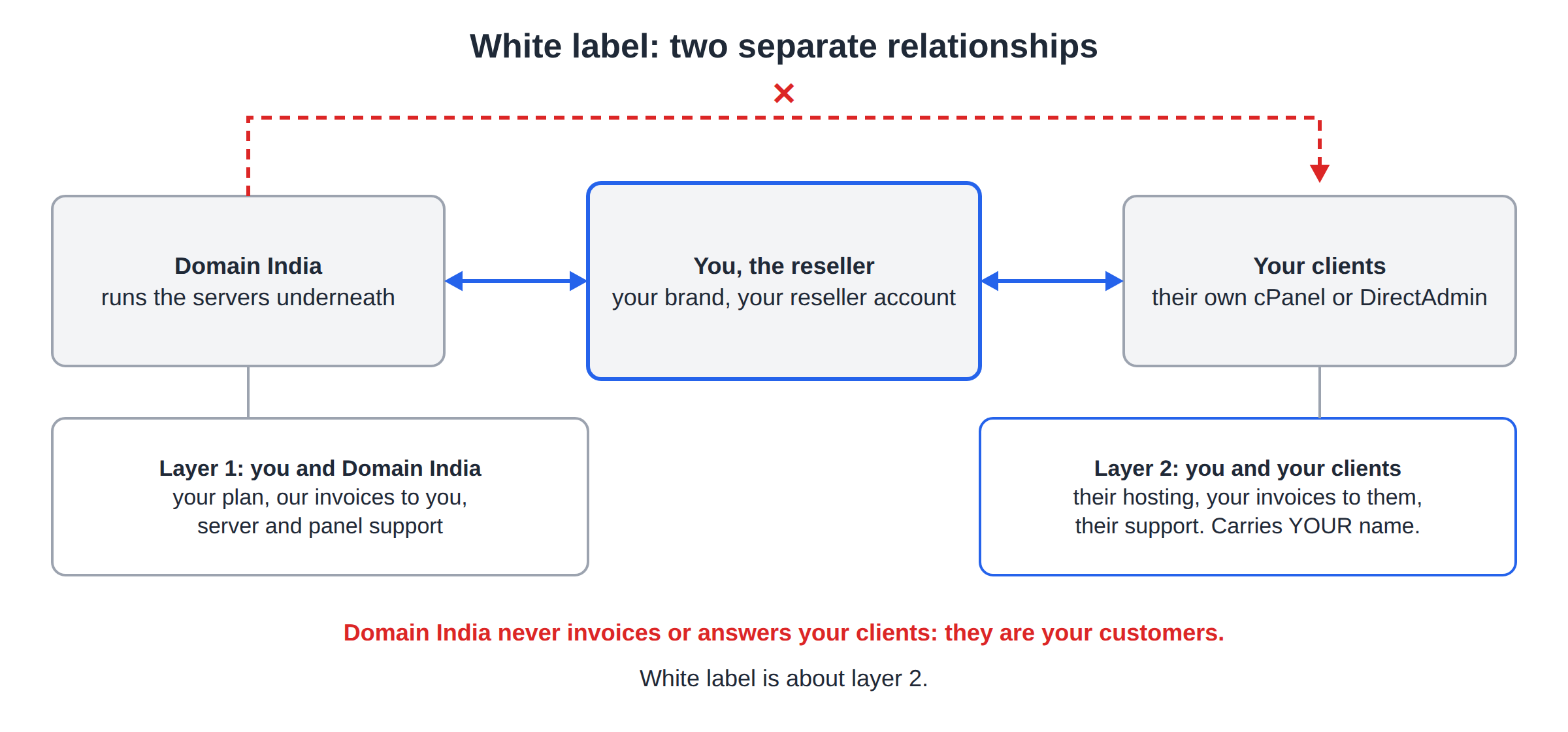
The relationship is in two layers:
| Relationship | Who it is between | What it covers |
|---|---|---|
| Your reseller account | You and Domain India | Your plan, your invoices from us, server and panel support |
| Your clients' accounts | You and your clients | Their hosting, their invoices from you, their support |
White label is about the second layer. Everything a client touches should carry your name, and questions should come to you.
2. Private nameservers
Nameservers are the most visible part of hosting: anyone can look them up for a domain. With private nameservers, your clients' domains show ns1.yourbrand.com and ns2.yourbrand.com instead of ours.
- Ask support for the IP addressesto use for your reseller account.
- Register the names as glue records.For a brand domain registered with Domain India, open it in the client area, go to the Nameservers tab and expand Custom nameservers (glue records).
- Set them for new accountsin your reseller panel, so every client account you create uses them.
- Point each client domainat
ns1.yourbrand.comandns2.yourbrand.com.
Private nameservers are listed as a feature of the DirectAdmin reseller plans. On a cPanel reseller plan, open a ticket first so we can tell you what your account supports. The full walkthrough, including checks with dig, is in how to set up private nameservers.
3. Your brand inside the control panel
Company details. Fill in your company name and contact details in your reseller settings, so account notices and contact information point to you.
Package names. Name your packages after your own product line ("Basic", "Business", "Pro") rather than ours. Clients see the package name in their panel.
Panel look on DirectAdmin. Our DirectAdmin server runs the Evolution skin and allows resellers to customise it, so you can set your own logo and colours for your users. Menu names change a little between DirectAdmin versions; if you can't find the option, ask support.
Panel look on cPanel. Where your reseller plan includes WHM's branding options, you can add your logo and company name to cPanel for your clients. The WHM menus you see depend on the privileges attached to your plan, so if branding isn't there, ask support whether your plan includes it.
The server itself is shared and managed by us. Resellers cannot change the server hostname, server-wide settings, the PHP builds installed, or the web and mail server configuration. Branding changes apply to what your clients see, not to the server.
4. Billing under your own name
You set your own prices and bill your clients yourself. Domain India invoices only you, for your reseller plan.
- Start simple. A handful of clients can be billed with your normal accounting software and a reminder calendar.
- Automate when you grow. Third-party billing software such as WHMCS or Blesta can take orders, send invoices and create accounts automatically. Our reseller plans are WHMCS-compatible, but no billing licence is included; you buy it from the vendor.
- GST is yours. Your invoices carry your business name and, if you are registered, your GSTIN.
Setup steps and API access are covered in how to set up billing for your reseller business.
5. Support under your own name
Your clients contact you. Give them your own support email, phone number or ticket desk, and answer the everyday questions yourself: logins, email setup, DNS changes and WordPress problems.
When something needs the server, you contact us. Domain India supports resellers the same way as every customer: 24/7 live chat, and tickets with a first response within 15 minutes; resolution can take longer depending on the issue. There is no phone support and no separate reseller team. Open tickets from your client area at /client/support/new and include the client's domain and the exact error.
A short help page per topic saves you most tickets: your nameservers, the webmail address (https://theirdomain.com/webmail), mail app settings and how to log in to the panel. Write them in your brand, and keep them in step with our knowledge base.
6. What your clients can still find out
White label hides our name from everything you control: your website, invoices, emails and nameservers. It does not make the infrastructure invisible. A technically curious client can still look up who owns the IP address their site runs on, or read the server names in email headers. Be honest if asked; many established brands resell infrastructure.
7. A white-label checklist
| Item | Where you set it | Result |
|---|---|---|
| Private nameservers | Glue records on your brand domain, then reseller panel | Client domains show your nameservers |
| Company details | Reseller settings in your panel | Notices point to you |
| Package names | Your packages in WHM or DirectAdmin | Clients see your product names |
| Logo and colours | DirectAdmin Evolution skin, or WHM branding where your plan has it | Panel shows your brand |
| Billing | Your own invoices or billing software | Clients pay you |
| Support | Your own email, desk and help pages | Clients contact you |
8. Where Domain India fits
Domain India sells DirectAdmin and cPanel reseller plans, compared with current prices on the reseller hosting page. Every reseller plan is white-label. DirectAdmin reseller plans carry no per-account panel licence cost and list private nameservers as a feature; cPanel plans suit clients who expect cPanel.
At server level, every client account gets free SSL (Let's Encrypt), weekly JetBackup backups (Sundays, five copies kept) and CloudLinux isolation with Imunify360 security. Jailed SSH is available on every shared hosting account on request; it is off by default. New shared and reseller hosting purchases can be refunded in full within 30 days under our refund policy.
For the first hour with your account, read the DirectAdmin reseller guide or the cPanel WHM reseller guide.
Frequently asked questions
Will my clients see Domain India's name?
Not on anything you control. Your clients get their panel logins, invoices and support from you, and their domains can use your own private nameservers. Domain India never invoices or contacts your clients, because they are your customers. The underlying IP addresses and server names can still be looked up by anyone technical.
Can I use my own nameservers such as ns1.yourbrand.com?
Yes. Private nameservers are listed as a feature of Domain India's DirectAdmin reseller plans. Ask support for the IP addresses to use, register ns1 and ns2 as glue records on your brand domain, then set them for new accounts. On a cPanel reseller plan, open a ticket first to confirm what your account supports.
Can I put my own logo in the control panel?
On DirectAdmin, resellers can customise the Evolution skin with their own logo and colours. On cPanel, WHM's branding options are available where your reseller plan includes them. If you can't find the option, ask support.
Is WHMCS included with Domain India reseller hosting?
No. The reseller plans are WHMCS-compatible, but no billing licence is included. You can buy WHMCS or Blesta from the vendor, or bill clients with your own accounting software.
Who supports my clients?
You do. Your clients contact you, and you contact Domain India for anything that needs the server. Domain India support is on 24/7 live chat, and tickets get a first response within 15 minutes. There is no phone support.
Can I change the server hostname to my own brand?
No. Reseller accounts run on shared servers managed by Domain India, so the server hostname and server-wide settings can't be changed. Brand your nameservers, panel, billing and support instead.
Ready to start your own hosting brand? Compare plans on reseller hosting, set up private nameservers, or open a support ticket to get the nameserver IPs for your account.
DirectAdmin and cPanel reseller plans with white-label branding, free SSL and weekly backups for every client account.
Compare reseller plans