Every Domain India invoice follows the same pattern: a proforma invoice asks for payment, and once you pay, a GST tax invoice records the sale. This page walks through what you see on an invoice in the client area, what each status means, and where the GST details are, so you can check a bill before you pay it and file it correctly afterwards.
Open Billing › Invoices at /client/invoices. An unpaid invoice is a Proforma Invoice (number starting PI-) with a Payment Due banner and a Pay Now button. Once paid it shows Payment Received, gets an INV- number, and a Tax Invoice with its own TAX- number is issued, showing Domain India's GSTIN, your GSTIN if it is on your account, SAC 998315 and 18% GST. Download it with Download Tax Invoice.
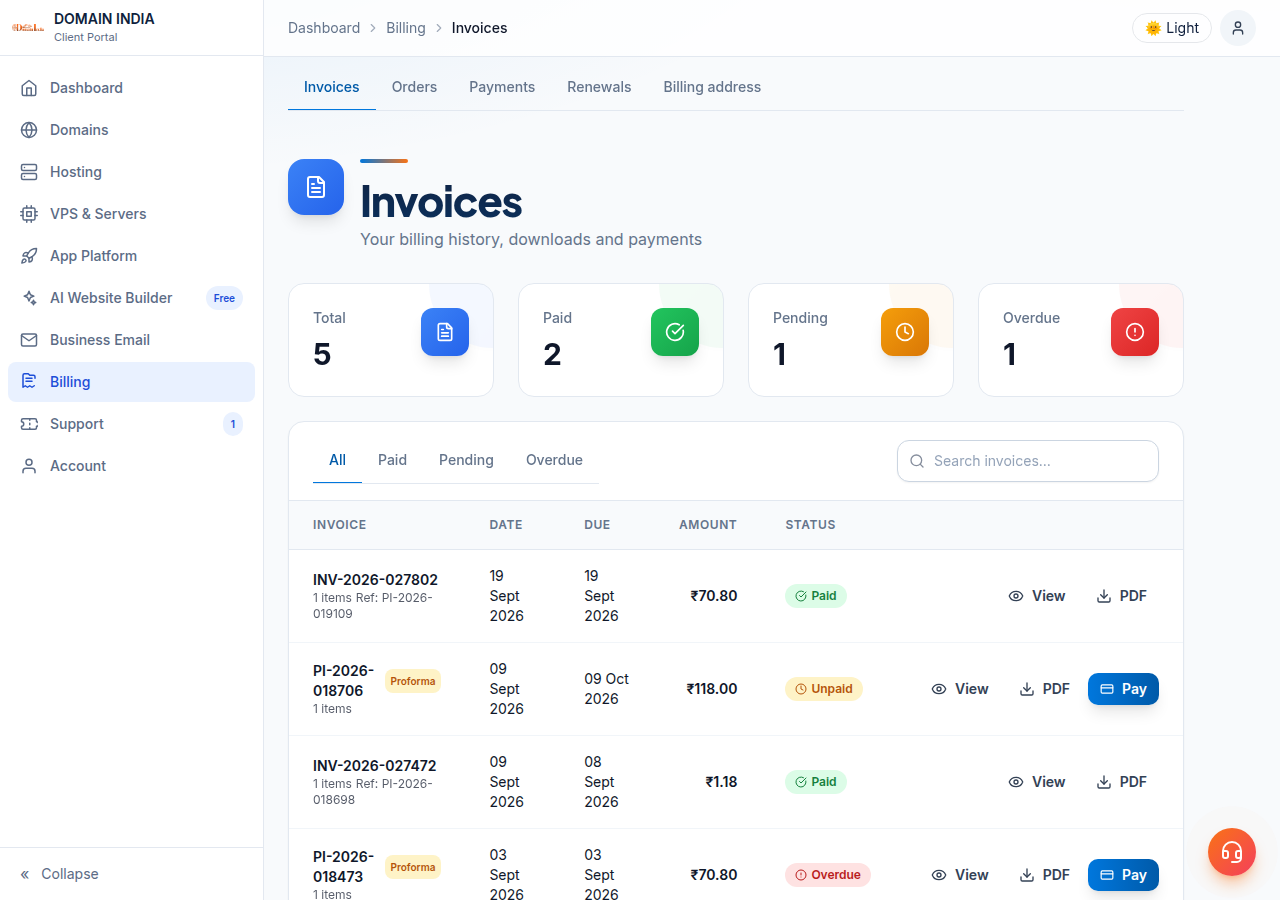
The complete explanation of PI-, INV- and TAX- numbers, GSTIN timing and corrections is in Understanding your invoice (PI vs INV). This page is the quick tour of the invoice screen.
1. Where to find your invoices
Sign in and open Billing › Invoices, or go straight to /client/invoices. The list shows each invoice's number, date, due date, amount and status; the tabs at the top filter it. Open any invoice to see the full page. Your payment records are under Billing › Payments at /client/payments.
2. The parts of an invoice
| Part | What it shows |
|---|---|
| Title and number | Proforma Invoice with a PI- number before payment; Tax Invoice with a TAX- number after payment |
| Proforma Ref | On a paid invoice, the original PI- number, kept for reference |
| Dates | When the invoice was created and when payment is due |
| Items | Each service or domain you are paying for, with its amount |
| Tax | GST at 18%, split by your billing state |
| Totals | The taxable value, the GST and the total |
| Payment banner | Payment Due, Payment Overdue or Payment Received |
The PI- and INV- numbers include the calendar year. The TAX- number includes the Indian financial year, which runs from April to March.
3. The GST on your invoice
Prices on our website exclude GST; 18% is added on the invoice. Domain India is registered for GST in Tamil Nadu (GSTIN 33AAFCD9427N1Z9), so the split depends on your billing state:
| Your billing state | Tax on the invoice | Total tax |
|---|---|---|
| Tamil Nadu | CGST 9% + SGST 9% | 18% |
| Any other Indian state or union territory | IGST 18% | 18% |
The tax invoice also shows the place of supply, SAC code 998315 and your GSTIN if it was on your account when you paid. Customers without a GSTIN still get a tax invoice. Add your GSTIN on your Profile before paying; see Adding GSTIN to your account.
4. What the statuses mean
| Status | What it means | What to do |
|---|---|---|
| Unpaid | Waiting for payment; the page shows Payment Due | Pay it before the due date, or leave it if you don't want the service |
| Overdue | The due date has passed; the page shows Payment Overdue | Pay it if you want to keep the service |
| Paid | Payment received; the tax invoice is available | Download the tax invoice for your records |
| Cancelled or Void | The invoice was withdrawn; nothing is owed on it | Nothing |
| Refunded | The payment was refunded | Keep the record; ask your CA how to account for it |
Domain India never charges a saved card automatically. A renewal happens only when you pay its invoice; renewal invoices are generated up to 30 days before the due date. See How auto-renewal works.
5. Checking an invoice before you pay
- The amount is higher than the plan price. The website price excludes GST, and the invoice adds 18%. Also check the billing period: a yearly invoice covers the whole year.
- You don't recognise an item. Renewal invoices list each service that is coming due. Open a ticket before paying if something looks wrong.
- Your GSTIN or state is wrong. Correct it on your Profile or in billing settings before you pay, because the tax invoice uses the details on your account at the moment of payment.
Don't pay a second time. Most Razorpay payments show as Paid within a couple of minutes. If it hasn't changed after you have been charged, open a ticket with the invoice number and your payment reference.
Frequently asked questions
Where can I see my Domain India invoices?
Sign in to the client area and open Billing, then Invoices, at /client/invoices. Open any invoice to see its items, GST, totals and status, and to pay or download it.
What does Payment Due mean on my invoice?
The invoice is unpaid and waiting for payment. Use the Pay Now button on the invoice page. If the due date passes, the banner changes to Payment Overdue.
Why is the total higher than the price on the website?
Domain India website prices exclude GST. The invoice adds 18% GST: CGST 9% plus SGST 9% if your billing state is Tamil Nadu, or IGST 18% for any other state.
Which invoice should I give my accountant?
The tax invoice issued after payment, downloaded with the Download Tax Invoice button. It carries Domain India's GSTIN 33AAFCD9427N1Z9, SAC 998315 and your GSTIN if it was on your account.
How do I correct the GSTIN on an invoice that is already paid?
Open a support ticket with the tax invoice number and the correct details. Adding your GSTIN afterwards does not change a tax invoice that has already been issued, so add it before future payments.
Ready to review your bills? Open Invoices in the client area, read how to download your invoice PDF, or open a support ticket with the invoice number if something doesn't add up.
Check, pay and download every Domain India invoice from one page in the client area.
Open Invoices