When your Windows-hosted website, email or database stops working, it can look as if a Plesk service has failed to start. On Domain India Windows hosting you can't start or restart server services yourself: IIS, the mail server, SQL Server and FTP are shared by every customer on the server, so Domain India runs them. What you can do is check, in a few minutes, whether the problem is in your own account or on the server, and then give support exactly what they need.
Customers can't start, stop or restart Windows services or IIS on shared hosting; only Domain India does that. First check whether the problem is yours: another website on the same server, your Plesk login, webmail, and your own logs. Most "service down" reports turn out to be a stopped application pool, a broken web.config, a full disk quota or a wrong email setting. If the check points at the server, open a ticket or use live chat with your domain, what fails and since when.
1. What you control and what Domain India controls
| Part | Who manages it | What you can do |
|---|---|---|
| IIS (the web server) | Domain India | Recycle your own app pool, if your plan has pool controls |
| Your application pool | You, if dedicated; otherwise Domain India | See the app pool guide |
| Mail server | Domain India | Manage your mailboxes and settings in Plesk |
| SQL Server (MSSQL) | Domain India | Manage your databases and users in Plesk |
| FTP server | Domain India | Manage your FTP accounts in Plesk |
| Plesk itself | Domain India | Sign in and use it |
Older guides point to Tools & Settings › Service Management in Plesk. That page belongs to the server administrator and isn't available on shared hosting.
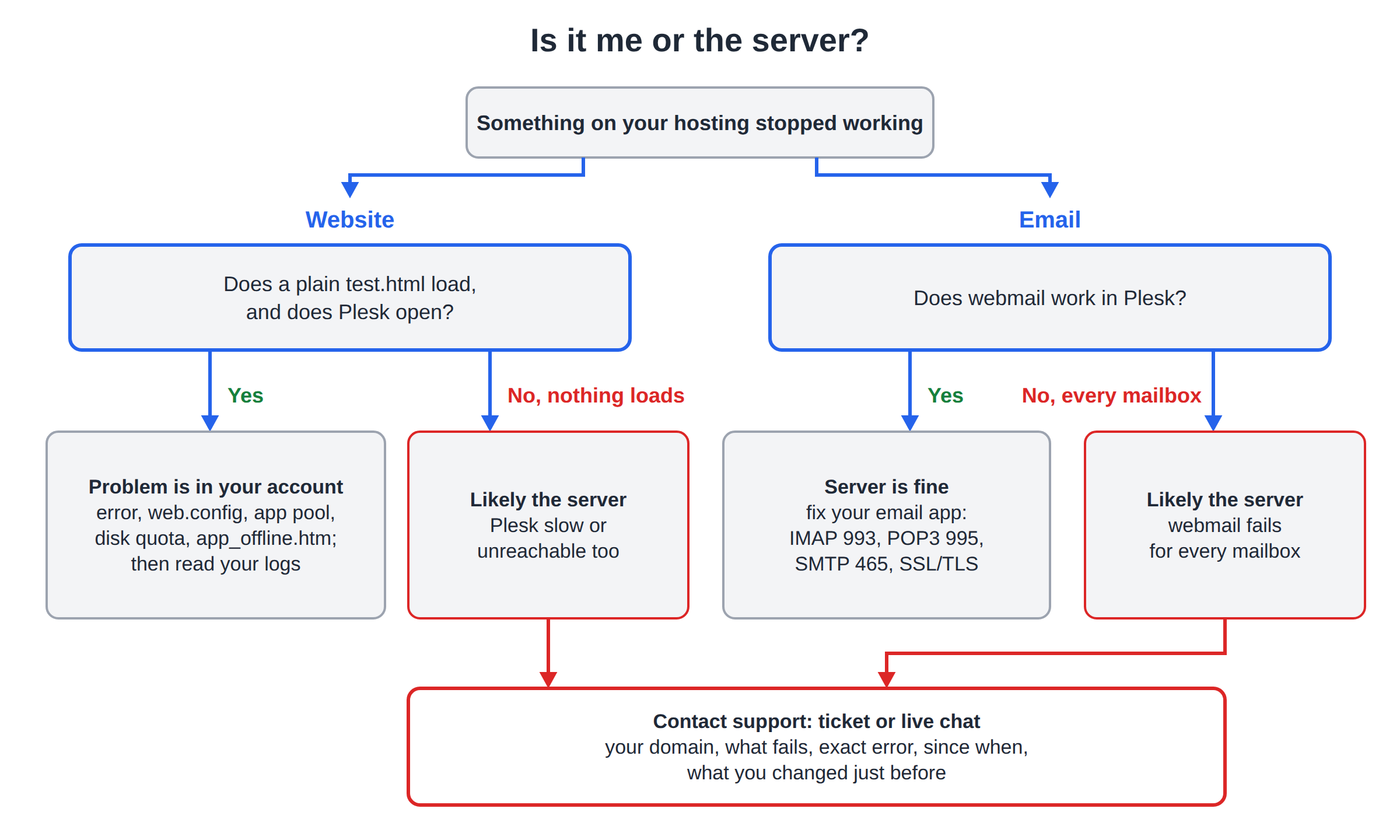
2. Website not loading
Check in this order:
- Read the error.A 503 usually means your application pool has stopped; a 500.19 means
web.configis broken; a 403 means no default page. See common Plesk errors and fixes. - Check for
app_offline.htminhttpdocsand delete it if a deploy left it behind. - Undo your last change.If you edited
web.config, changed the .NET version or uploaded a new build just before, put the previous version back. - Check your disk usagein Plesk. A full quota can stop uploads, logs and sessions from being written.
- Recycle your application poolif your plan gives you pool controls. See restarting your app pool in Plesk.
- Read your logs.See checking Plesk logs.
If none of your sites load, including a plain test.html, and Plesk itself is slow or unreachable, the problem is likely on the server. Contact support.
3. Database not connecting
- Check the connection string: the database server name exactly as Plesk shows it, the full database name, the database user and password. See what to use for an MSSQL connection string.
- Check the user still exists and has access to that database in Plesk's Databases page.
- Connect from your website on the server, not from your own computer.
If Plesk's own database pages fail to open your database, contact support.
4. Email not working
- Test webmail from Plesk first. If webmail works, the server is fine and the problem is your email app's settings.
- Email apps: IMAP 993, POP3 995, SMTP 465, all with SSL/TLS. Port 587 is not open on Windows hosting.
- Check the mailbox isn't full, and that your domain's MX record points at the hosting.
If webmail also fails for every mailbox, contact support.
5. FTP not connecting
- Use port 21 with explicit FTP over TLS. SFTP and port 22 are not available on Windows hosting, and implicit FTPS (port 990) isn't either.
- Check the FTP username and password in Plesk's FTP access page.
- If the connection opens but directory listing hangs, switch your client to passive mode.
- If it fails only on your office network, try mobile data.
The full port list is in Domain India port numbers.
6. Plesk not opening
- Use the Plesk button on your Windows service in the client area; it opens the correct address for you.
- Plesk runs on port 8443. If the page never loads, try another browser, then mobile data: office firewalls often block that port.
- See how to log in to Plesk.
7. What to send support
Include: your domain; which service fails (website, email, database, FTP or Plesk); the exact error text or a screenshot; when it started, with the time zone; what you changed just before; and whether other sites or mailboxes on your account work. Your public IP address helps if only your network is affected.
Domain India support can check the server's services, restart them when needed and look in the server logs that customers can't see.
Can I restart IIS or other services on Domain India Windows hosting?
No. On shared hosting, IIS, the mail server, SQL Server and FTP serve every customer on the server, so only Domain India starts or restarts them. You can recycle your own application pool if your plan includes pool controls.
How do I know whether the problem is my site or the server?
Check another page or site on your account, a plain test.html file, webmail and the Plesk panel. If only your application fails, the cause is almost always in your code, web.config or application pool. If everything fails, contact support.
Where is Service Management in Plesk?
Service Management is part of the server administrator's Tools and Settings and isn't available on shared hosting. Contact support if you think a server service is down.
What does support need from me to investigate?
Your domain, which service fails, the exact error, when it started, what you changed just before, and whether other sites or mailboxes on your account still work.
Can I use SFTP if FTP doesn't connect?
No. Windows hosting has no SSH, so SFTP is not available. Use FTP on port 21 with explicit TLS, or the Plesk File Manager.
Think a server service is down? Open a support ticket or use live chat. Support is on 24/7 live chat, and tickets get a first response within 15 minutes. For the rest of the panel, see the Plesk Windows hosting guide.
Tell us your domain, what fails and since when, and we'll check the server for you.
Open a ticket