A contact or feedback form is often the first thing a customer uses on your website, and it is also one of the first things spam bots attack. This guide gives you a complete, copy-paste contact form for PHP shared hosting in 2026: the form page, one secure PHP handler, a thank-you page, spam protection, testing and the email records that get your messages delivered. If your site runs on WordPress, section 9 shows the plugin route instead.
Use three files: contact.php shows the form with a CSRF token and a hidden honeypot field, send.php validates everything on the server and sends the email, and thank-you.html confirms it. Send from a mailbox on your own domain, put the visitor's address in Reply-To, never in From, and pass your address to mail() with -f so SPF passes. Add a per-IP rate limit, optionally a CAPTCHA, then test the form and check SPF and DKIM before you rely on it.
1. What a safe contact form needs
Old tutorials (including the first version of this article) copied form fields straight into mail(), used the visitor's email as the From address, and relied on functions that were removed from PHP years ago. That code no longer works, and when it does, it gets abused. A modern form handles each of these risks:
| Risk | What goes wrong | Protection in this guide |
|---|---|---|
| Header injection | A bot adds line breaks and extra headers (Bcc) to your form, turning it into a spam relay | Reject control characters in name and email, and validate the email with filter_var |
| Spoofed sender | The visitor's Gmail address in From fails SPF and DMARC, so your enquiries land in spam | From on your own domain, visitor in Reply-To, -f envelope sender |
| Cross-site request forgery | Another site submits your form in a visitor's name | A secret token stored in the session and checked on submit |
| Spam bots | Automated junk fills your inbox | A honeypot field, a minimum fill time and an optional CAPTCHA |
| Flooding | One address sends hundreds of messages and uses up your hourly sending limit | A per-IP rate limit |
| Bad input | Empty, huge or broken messages | Server-side validation of every field, whatever the browser checks |
2. Before you start
- Turn on SSL.The form sets secure session cookies, so the page must load over
https://. Free SSL is included with our hosting plans. - Create a sending mailbox.In your control panel, create a real mailbox such as
[email protected]. This is the From address. See How to create email accounts for your domain. - Pick where enquiries go.For example
[email protected]. It can be any address you read. - Choose PHP 8.1 or newer.The code uses PHP 8.1 features. Select the version in your control panel: see How to change your PHP version.
- Plan the files.Put
contact.php,send.phpandthank-you.htmlinpublic_html. The handler stores rate-limit data in a folder one level abovepublic_html, where visitors cannot open it.
3. The form page: contact.php
This page creates the CSRF token, records when the form was shown, and displays a friendly error if the handler sends the visitor back. It never prints raw input: everything goes through htmlspecialchars().
<?php
declare(strict_types=1);

session_start([
    'cookie_httponly' => true,
    'cookie_secure'   => true,   // the page must load over HTTPS
    'cookie_samesite' => 'Lax',
    'use_strict_mode' => true,
]);

// One secret token per visitor session. send.php checks it (CSRF protection).
if (empty($_SESSION['csrf_token'])) {
    $_SESSION['csrf_token'] = bin2hex(random_bytes(32));
}
// When the form was shown. Bots that submit within seconds are ignored.
$_SESSION['form_shown_at'] = time();

// What the visitor typed, if send.php sent them back with an error.
$old = $_SESSION['old_input'] ?? [];
unset($_SESSION['old_input']);

$messages = [
    'invalid' => 'Please enter your name, a valid email address and a message of at least 10 characters.',
    'expired' => 'Your session expired. Please send the form again.',
    'limit'   => 'You have sent several messages recently. Please try again in an hour.',
    'send'    => 'Sorry, your message could not be sent. Please try again later or email us directly.',
];
$code  = $_GET['error'] ?? '';
$error = is_string($code) ? ($messages[$code] ?? null) : null;

function e(mixed $value): string
{
    return htmlspecialchars(is_string($value) ? $value : '', ENT_QUOTES | ENT_SUBSTITUTE, 'UTF-8');
}

$topic = $old['topic'] ?? 'general';
?>
<!doctype html>
<html lang="en">
<head>
  <meta charset="utf-8">
  <meta name="viewport" content="width=device-width, initial-scale=1">
  <title>Contact us</title>
  <style>
    .hp-field { position: absolute; left: -10000px; width: 1px; height: 1px; overflow: hidden; }
  </style>
</head>
<body>
  <h1>Contact us</h1>

  <?php if ($error !== null): ?>
    <p role="alert"><?= e($error) ?></p>
  <?php endif; ?>

  <form action="send.php" method="post">
    <input type="hidden" name="csrf_token" value="<?= e($_SESSION['csrf_token']) ?>">

    <p>
      <label for="name">Your name</label><br>
      <input type="text" id="name" name="name" required maxlength="100"
             autocomplete="name" value="<?= e($old['name'] ?? '') ?>">
    </p>
    <p>
      <label for="email">Your email</label><br>
      <input type="email" id="email" name="email" required maxlength="254"
             autocomplete="email" value="<?= e($old['email'] ?? '') ?>">
    </p>
    <p>
      <label for="topic">Topic</label><br>
      <select id="topic" name="topic">
        <option value="general" <?= $topic === 'general' ? 'selected' : '' ?>>General question</option>
        <option value="sales" <?= $topic === 'sales' ? 'selected' : '' ?>>Sales</option>
        <option value="support" <?= $topic === 'support' ? 'selected' : '' ?>>Technical support</option>
      </select>
    </p>
    <p>
      <label for="message">Message</label><br>
      <textarea id="message" name="message" rows="6" required minlength="10"
                maxlength="5000"><?= e($old['message'] ?? '') ?></textarea>
    </p>

    <!-- Honeypot: hidden from people, bots fill it in. -->
    <div class="hp-field" aria-hidden="true">
      <label for="website">Leave this field empty</label>
      <input type="text" id="website" name="website" tabindex="-1" autocomplete="off">
    </div>

    <p><button type="submit">Send message</button></p>
  </form>
</body>
</html>
To use your own design, keep the PHP block at the top, the hidden csrf_token input, the honeypot div and the field names (name, email, topic, message, website). Style everything else as you like.
4. The handler: send.php
This is the complete handler. Change only the settings block at the top.
<?php
declare(strict_types=1);

// ---------- Settings: change these ----------
const MAIL_TO     = '[email protected]';      // where enquiries are delivered
const MAIL_FROM   = '[email protected]';   // a real mailbox on YOUR domain
const FROM_NAME   = 'Your Business Website';
const FORM_PAGE   = '/contact.php';
const THANK_YOU   = '/thank-you.html';
const RATE_LIMIT  = 5;       // messages allowed per IP address...
const RATE_WINDOW = 3600;    // ...within this many seconds
const MIN_SECONDS = 3;       // a form sent faster than this is treated as a bot
const DATA_DIR    = __DIR__ . '/../contact-form-data';   // outside public_html
const TOPICS = [
    'general' => 'General question',
    'sales'   => 'Sales',
    'support' => 'Technical support',
];
date_default_timezone_set('Asia/Kolkata');
// ---------------------------------------------

session_start([
    'cookie_httponly' => true,
    'cookie_secure'   => true,
    'cookie_samesite' => 'Lax',
    'use_strict_mode' => true,
]);

function redirect(string $url): never
{
    header('Location: ' . $url, true, 303);
    exit;
}

function fail(string $code, array $input = []): never
{
    $_SESSION['old_input'] = $input;   // refill the form for the visitor
    redirect(FORM_PAGE . '?error=' . $code);
}

function field(string $key): string
{
    $value = $_POST[$key] ?? '';
    return is_string($value) ? trim($value) : '';
}

function rate_limited(string $ip): bool
{
    if (!is_dir(DATA_DIR) && !mkdir(DATA_DIR, 0700, true) && !is_dir(DATA_DIR)) {
        error_log('Contact form: cannot create ' . DATA_DIR);
        return false;   // never block real visitors because of a folder problem
    }
    $fp = fopen(DATA_DIR . '/' . hash('sha256', $ip) . '.json', 'c+');
    if ($fp === false) {
        return false;
    }
    flock($fp, LOCK_EX);
    $now  = time();
    $hits = json_decode((string) stream_get_contents($fp), true);
    $hits = array_filter(is_array($hits) ? $hits : [], fn($t) => is_int($t) && $t > $now - RATE_WINDOW);
    $limited = count($hits) >= RATE_LIMIT;
    if (!$limited) {
        $hits[] = $now;
        ftruncate($fp, 0);
        rewind($fp);
        fwrite($fp, json_encode(array_values($hits)));
    }
    flock($fp, LOCK_UN);
    fclose($fp);
    return $limited;
}

// 1. Accept POST only.
if (($_SERVER['REQUEST_METHOD'] ?? '') !== 'POST') {
    http_response_code(405);
    header('Allow: POST');
    exit('Method not allowed');
}

// 2. CSRF: the token must match the one given to this visitor's session.
$sessionToken = $_SESSION['csrf_token'] ?? null;
if (!is_string($sessionToken) || !hash_equals($sessionToken, field('csrf_token'))) {
    fail('expired');
}

// 3. Honeypot filled in, or sent too fast: a bot. Pretend it worked, send nothing.
$shownAt = $_SESSION['form_shown_at'] ?? 0;
if (field('website') !== '' || !is_int($shownAt) || time() - $shownAt < MIN_SECONDS) {
    redirect(THANK_YOU);
}

// 4. Validate every field on the server.
$name    = field('name');
$email   = field('email');
$topic   = field('topic');
$message = str_replace(["\r\n", "\r"], "\n", field('message'));
$input   = ['name' => $name, 'email' => $email, 'topic' => $topic, 'message' => $message];

$valid = mb_check_encoding($name . $email . $message, 'UTF-8')
    && $name !== '' && mb_strlen($name) <= 100
    && !preg_match('/[\x00-\x1F\x7F]/', $name . $email)       // blocks header injection
    && filter_var($email, FILTER_VALIDATE_EMAIL) !== false && strlen($email) <= 254
    && array_key_exists($topic, TOPICS)
    && mb_strlen($message) >= 10 && mb_strlen($message) <= 5000;

if (!$valid) {
    fail('invalid', $input);
}

// 5. Rate limit per IP address.
$ip = $_SERVER['REMOTE_ADDR'] ?? 'unknown';
if (rate_limited($ip)) {
    fail('limit', $input);
}

// 6. Build the email. From is YOUR mailbox; the visitor goes in Reply-To.
$subject = mb_encode_mimeheader('[Website] ' . TOPICS[$topic] . ' from ' . $name, 'UTF-8', 'B');

$body = "New message from your website contact form\n\n"
    . "Name:  {$name}\n"
    . "Email: {$email}\n"
    . 'Topic: ' . TOPICS[$topic] . "\n"
    . 'Sent:  ' . date('j M Y, H:i T') . "\n"
    . "IP:    {$ip}\n\n"
    . "Message:\n{$message}\n";

// Quoted-printable keeps long lines and non-English text intact.
// Encode with CRLF line ends, then hand sendmail plain LF line ends.
$body = str_replace("\r\n", "\n", quoted_printable_encode(str_replace("\n", "\r\n", $body)));

$headers = [
    'From'                      => mb_encode_mimeheader(FROM_NAME, 'UTF-8', 'Q') . ' <' . MAIL_FROM . '>',
    'Reply-To'                  => $email,
    'MIME-Version'              => '1.0',
    'Content-Type'              => 'text/plain; charset=UTF-8',
    'Content-Transfer-Encoding' => 'quoted-printable',
];

// 7. Send. The fifth parameter sets the envelope sender so SPF passes.
if (!mail(MAIL_TO, $subject, $body, $headers, '-f' . MAIL_FROM)) {
    error_log('Contact form: mail() returned false');
    fail('send', $input);
}

// 8. Success: issue a fresh token for any next message, then say thank you.
unset($_SESSION['csrf_token']);
redirect(THANK_YOU);
5. How the handler keeps you safe
- Server-side validation. The browser's
requiredandmaxlengthhelp honest visitors, but bots skip the browser. The handler re-checks every field, accepts only the three known topics, and limits lengths. - No header injection. Only the name and email reach email headers, and any control character in them (including line breaks) rejects the form.
filter_var()also refuses an email containing line breaks. PHP also rejects invalid line breaks in array headers, but do not rely on that alone. - Your address in From, the visitor in Reply-To. When you click Reply, your email program answers the visitor, and the message passes SPF and DMARC because it really comes from your domain.
-fenvelope sender. Without it, the server's own hostname becomes the bounce address and SPF is checked against the wrong domain.MAIL_FROMis a fixed setting, never form input.- CSRF token.
hash_equals()compares the tokens in constant time. The token is replaced after each successful message. - Honeypot and fill time. Bots that fill the hidden
websitefield, or submit within 3 seconds, get the thank-you page but no email is sent, so they learn nothing. - Rate limit. Five messages per IP per hour by default. The IP is stored only as a SHA-256 hash, in a folder visitors cannot reach.
The old version of this article set From to the visitor's email. Gmail, Outlook and others now reject or junk that as spoofing, because your server is not allowed to send for gmail.com. The same rule is explained in Sending email from PHP on shared hosting: From on your own domain, the visitor in Reply-To, and -f with your own address.
If your site is proxied through Cloudflare and the server does not restore visitor IP addresses, REMOTE_ADDR is a Cloudflare address shared by many visitors, and the rate limit may block real people. Raise RATE_LIMIT, or rely on a CAPTCHA (section 7) instead. Never trust an IP header sent by the browser unless you know your proxy sets it.
6. The thank-you page and error messages
Save this as thank-you.html in public_html, and give it your site's design:
<!doctype html>
<html lang="en">
<head>
  <meta charset="utf-8">
  <meta name="viewport" content="width=device-width, initial-scale=1">
  <meta name="robots" content="noindex">
  <title>Thank you</title>
</head>
<body>
  <h1>Thank you, your message has been sent</h1>
  <p>We have received your message and will reply to the email address you gave us.</p>
  <p><a href="/">Back to the home page</a></p>
</body>
</html>
Errors go back to the form with a short code, and contact.php turns that code into a message from a fixed list, so nothing a visitor types is ever echoed from the URL. The handler redirects with HTTP 303 after every POST, so pressing Refresh cannot send the message twice.
| Code | When it appears | What the visitor sees |
|---|---|---|
| invalid | A field is missing, too long or not a valid email | Please enter your name, a valid email address and a message |
| expired | The CSRF token is missing or old (the page was open too long) | Your session expired. Please send the form again |
| limit | The same IP sent more than the limit | Please try again in an hour |
| send | mail() refused the message | Please try again later or email us directly |
7. Adding a CAPTCHA: reCAPTCHA or Cloudflare Turnstile
The honeypot, fill time and rate limit stop most bots. If spam still gets through, add a CAPTCHA service such as Google reCAPTCHA or Cloudflare Turnstile. Both work the same way:
- Register your domain with the provider and get a site key (public) and a secret key (private).
- Add the provider's widget script and your site key to the form in
contact.php. - In
send.php, after the CSRF check, send the token the widget adds to the form, with your secret key, to the provider's verification endpoint using cURL, and unless the answer is a success, callfail('captcha', $input). Add a matching'captcha'line to the$messageslist incontact.php, for example "Please complete the spam check."
Keep the secret key out of public files, for example in a PHP file above public_html. Follow the provider's current documentation for the exact field names and endpoint. Turnstile is usually invisible to visitors; reCAPTCHA v3 scores visitors without a puzzle.
8. Test the form, then check SPF and DKIM
- Send a real message.Fill in the form with your own Gmail address and submit it. You should land on the thank-you page, and the email should reach
MAIL_TO. - Try the errors.Submit a bad email, a 5-character message, and six messages in a row. Each should show the right error.
- Test Reply.Click Reply on the received message. It must address the visitor, not
noreply@. - Read the headers.In Gmail, open the message, choose the three-dot menu and Show original. SPF, DKIM and DMARC should show PASS, and the Return-Path must be your
MAIL_FROMaddress. - If nothing arrives,check the spam folder and the PHP error log, then open a ticket with the time of your test so support can check the server's mail log (cPanel's Track Delivery tool is not available on our servers).
If SPF or DKIM fails, set up the records for your domain: see Email authentication: SPF, DKIM, DMARC. In cPanel, Email → Email Deliverability checks and installs them. Every message the form sends also counts towards your account's hourly sending limit: see Do you limit the amount of mails I can send per hour.
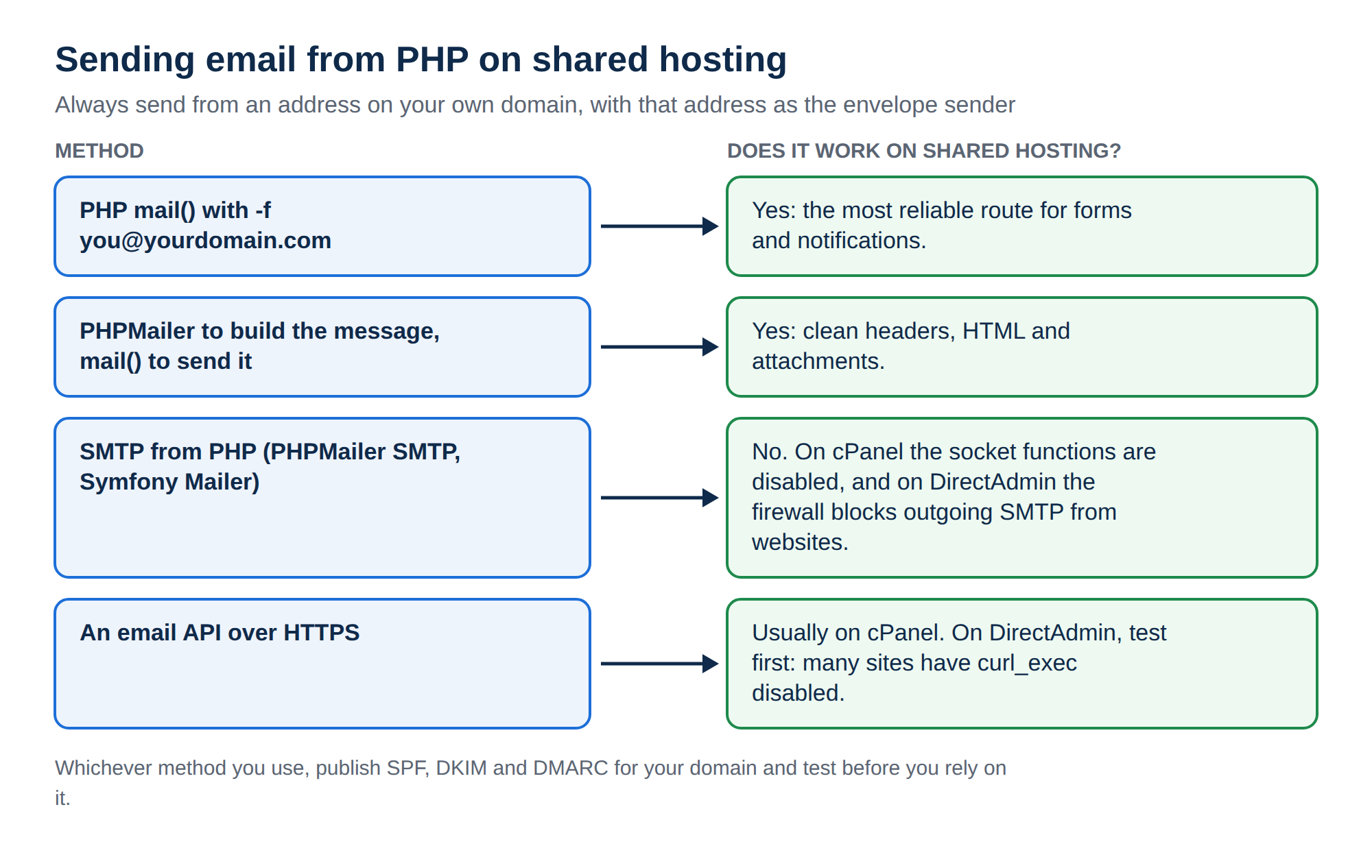
This handler uses mail() because it works on shared hosting without extra libraries. If you later switch to PHPMailer with SMTP and see a "has been disabled for security reasons" error, some servers disable the socket functions SMTP needs: read PHP disabled functions on shared hosting and stay with mail() and -f.
9. WordPress: use a form plugin instead
On WordPress, do not paste PHP handlers into your theme. Use a long-established form plugin such as Contact Form 7 or WPForms, which handle validation, nonces and spam protection for you. Set them up with the same rules:
The WordPress section of Sending email from PHP on shared hosting has the short code that sets the envelope sender. For general WordPress help, see Mastering WordPress.
10. Where Domain India fits
This form runs on any of our cPanel, DirectAdmin or Webuzo shared hosting plans. They include email accounts on your own domain for the From mailbox, free SSL for the secure session cookie and a choice of PHP versions, so you can follow this guide without extra services. Jailed SSH is available on every shared plan but is off by default; ask support to enable it if you want it. The cPanel plan also gives you the Email Deliverability tool used in section 8.
- 25 GB NVMe SSD Storage
- 50 GB Monthly Bandwidth
- 1 Website
- 10 Email Accounts
If you get stuck, open a support ticket with the page address and the time you tested, and our team can check the mail log for your message.
Why does my PHP contact form email go to spam?
Usually because the From address is the visitor's email or the envelope sender is the server's hostname, so SPF and DMARC fail. Send from a mailbox on your own domain, put the visitor's address in Reply-To, pass your address to mail() with the -f parameter, and publish SPF, DKIM and DMARC records for your domain.
Can I use the visitor's email address as the From address?
No. Your server is not allowed to send as the visitor's domain, so receiving servers treat the message as spoofed and reject it or mark it as spam. Use your own address in From and the visitor's address in Reply-To, so clicking Reply still reaches the visitor.
What is header injection in a contact form?
It is an attack where a bot puts line breaks and extra email headers, such as Bcc, into a form field that ends up in the email headers. The server then sends spam to other people. Prevent it by rejecting control characters in every value used in a header and validating email addresses with filter_var.
What is a honeypot field?
A form field hidden from people with CSS. Real visitors leave it empty, but many bots fill in every field. If the handler finds it filled in, it shows the thank-you page without sending an email.
Do I need a CAPTCHA on my contact form?
Not always. A honeypot, a minimum fill time and a rate limit stop most automated spam. If spam still gets through, add a CAPTCHA service such as Google reCAPTCHA or Cloudflare Turnstile and verify its token in your PHP handler.
Why does my form work but the email never arrives?
mail() returning true only means the server accepted the message. Check the spam folder, confirm the From address is a real mailbox on your domain with -f set, check SPF and DKIM, and look up the message in your control panel's delivery tracking.
Should I use PHPMailer instead of mail() for a contact form?
For a simple text contact form, mail() with the -f envelope sender is enough and works on shared hosting. PHPMailer helps with HTML email and attachments. Its SMTP mode needs socket functions that some shared servers disable, so use its mail mode there.
Ready to put a working form on your site? Compare cPanel hosting, DirectAdmin hosting and Webuzo hosting, read Sending email from PHP on shared hosting for more on deliverability, or open a support ticket if your form's email does not arrive.
Email accounts on your own domain, free SSL and PHP mail() that works out of the box, so your enquiries reach your inbox.
See hosting plans