"Domain validation" usually means proving to a certificate authority that you control a domain, so it will issue an SSL certificate for it. On Domain India hosting, that happens automatically for the free certificates, with nothing for you to click. This guide explains the three validation methods, what to fix when an automatic check fails, and how validation works if you bring a paid certificate from another provider. It also points you to the right guide if the email you received was about verifying the domain's owner instead.
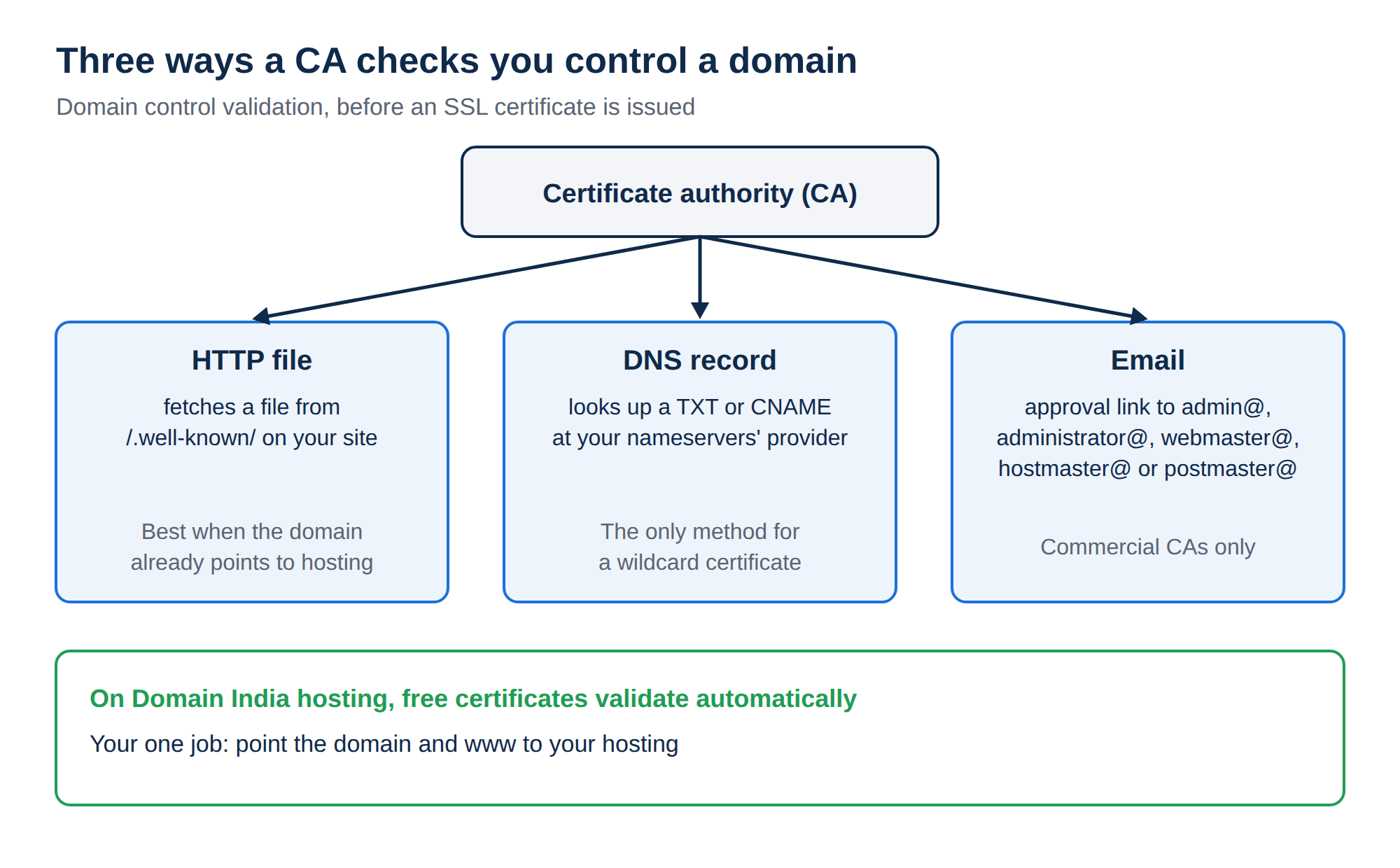
A certificate authority checks that you control a domain by fetching a file from your website (HTTP), looking up a DNS record (DNS) or sending an approval email to an address at the domain. On Domain India cPanel, DirectAdmin and Windows hosting, free Let's Encrypt certificates are validated and renewed automatically; you only need the domain to point to your hosting. If a check fails, the cause is almost always DNS, a proxy such as Cloudflare, a CAA record or a rule blocking /.well-known/. Owner verification for a domain is a different process: eKYC for .in, and a registrant email link for .com.
1. Which "validation" do you mean?
Three different checks are often called domain validation. Work out which one you are dealing with first.
| Check | What it proves | Where it happens |
|---|---|---|
| SSL domain control validation | You control the domain, so a certificate can be issued | Automatic on Domain India hosting; covered in this guide |
| Registrant email verification (.com, .net, .org and other generic domains) | The owner's email address works | A link in an email to the registrant; see Verification of WHOIS details |
| Identity verification, eKYC (.in and Indian extensions) | Who the registrant is | The Identity verification page in the client area |
Asked to confirm your domain's contact details? Skip to section 7.
2. Why certificate authorities validate
A browser trusts a certificate only because a certificate authority (CA) vouched for it, so the CA must first confirm that whoever asks for a certificate really controls the domain. Every certificate starts with this check; Organisation Validated (OV) and Extended Validation (EV) certificates add checks on your company on top.
3. The three methods
| Method | How it works | Best when |
|---|---|---|
| HTTP file | The CA fetches a file it gives you from a set path on your website | The domain already points to your hosting |
| DNS record | You add a TXT or CNAME record the CA gives you, and it looks it up | You control DNS but the site isn't live yet, or you need a wildcard |
| The CA emails an approval link to an address at the domain | You bought a paid certificate and can receive mail at the domain |
HTTP file. Let's Encrypt fetches a file from http://yourdomain.com/.well-known/acme-challenge/. Commercial CAs usually use /.well-known/pki-validation/. The domain must resolve to the server holding the file, and nothing may block that path.
DNS record. The CA gives you a record name, such as _acme-challenge.yourdomain.com for Let's Encrypt, and a value. Add it exactly as given, at the provider your nameservers point to. It works before your website exists, and it is the only method for a wildcard certificate (*.yourdomain.com).
Email. Only commercial CAs offer it; Let's Encrypt doesn't. The approval email goes to one of a fixed set of addresses at the domain: admin@, administrator@, webmaster@, hostmaster@ or postmaster@. Create that mailbox first if it doesn't exist, then click the link in the email.
4. On Domain India hosting it happens automatically
Every Domain India hosting plan includes free SSL, and the validation is done for you:
- cPanel: AutoSSL issues Let's Encrypt certificates and checks every account every three hours. See AutoSSL on cPanel.
- DirectAdmin: Let's Encrypt certificates are issued and renewed automatically; Account Manager › SSL/TLS Certificates lists them and shows any name that failed. See Let's Encrypt in DirectAdmin.
- Windows (Plesk): Let's Encrypt is available in Plesk.
In each case the server places the validation file or record itself. You don't upload files or add records by hand. Your one job is to make sure the domain, and www, point to your hosting.
Let's Encrypt certificates are DV certificates. They encrypt the connection and remove the "Not secure" warning, and browsers trust them exactly as they trust a paid DV certificate. They prove control of the domain, not who your company is.
- 25 GB NVMe SSD Storage
- 50 GB Monthly Bandwidth
- 1 Website
- 10 Email Accounts
Prices on the cards exclude 18% GST.
5. When automatic validation fails
- Check the domain points to us.Run
dig A yourdomain.com +shortanddig A www.yourdomain.com +short. Both should return your hosting server's IP, shown on your hosting service's page in the client area. If not, fix DNS first; see How do I change my nameservers. - Check for an AAAA record.If the domain has an IPv6 (AAAA) record pointing somewhere else, the CA may try that address and fail. Remove it or correct it.
- Check for a proxy.If Cloudflare or another proxy answers for the domain, the check can reach the proxy instead of us. Set the record to DNS only while the certificate is issued; see Complete Cloudflare setup.
- Check CAA records.A CAA record that doesn't list Let's Encrypt stops free certificates being issued. Add Let's Encrypt to it, or remove it.
- Let
/.well-known/through..htaccessrules that deny access or redirect everything to another domain, or a security plugin that blocks unknown requests, can break the HTTP check. An ordinary HTTP to HTTPS redirect is fine. - Wait for the next run.On cPanel, AutoSSL tries again on its own; check the Status tab of Security › SSL/TLS Certificates for the result. On DirectAdmin, the panel retries automatically; check SSL/TLS Certificates for the failure reason. If it still fails, open a ticket with the domain name and the exact error line; on cPanel, support can run AutoSSL for you.
6. Bringing a paid certificate from another provider
Domain India's hosting includes free SSL, and we don't sell paid certificates. If you need an OV or EV certificate for a specific reason, ask support first, then buy it from a CA or reseller of your choice and validate it like this:
- Email method: create the approval mailbox (for example
[email protected]) in your control panel before you start, then click the link when it arrives. Check spam if it doesn't. - HTTP method: upload the file the CA gives you to
public_html/.well-known/pki-validation/with the File Manager, and open its URL in a browser to check it loads. - DNS method: add the record in your control panel's DNS editor if the domain uses your hosting nameservers, or at your DNS provider otherwise. Copy the values exactly; a stray space or a missing dot breaks it.
Once the certificate is issued, install it on the Installation tab of SSL/TLS Certificates in cPanel or the SSL page of your panel. AutoSSL leaves a valid certificate you installed yourself alone.
7. Verifying the domain's owner (not SSL)
If the email you received was about your domain registration, not a certificate:
- .com, .net, .org and other generic domains: after a new registration, a transfer in, or a change to the registrant's name, organisation or email, the registrant receives a verification email. Click the link within 15 days, or the domain can be suspended until you do. See Verification of WHOIS details.
- .in and other Indian extensions: the registrant's identity is verified with eKYC on the Identity verification page in the client area, which uses DigiLocker. That page is the only place it happens: never send Aadhaar or ID copies by ticket or email. If a domain stays on hold after you have verified, open a ticket. See How to complete eKYC verification.
Frequently asked questions
What is domain validation for an SSL certificate?
It is the check a certificate authority makes to confirm you control a domain before issuing a certificate for it. It is done by fetching a file from your website, looking up a DNS record, or sending an approval email to an address such as admin@ at the domain.
Do I need to validate my domain for free SSL on Domain India hosting?
No. On cPanel, DirectAdmin and Windows hosting, the server validates and renews free Let's Encrypt certificates automatically. You only need the domain and www to point to your hosting.
Why does my free SSL fail validation?
Usually the domain or www doesn't point to our server yet, a proxy such as Cloudflare answers instead, a CAA record doesn't allow Let's Encrypt, an AAAA record points elsewhere, or a rule blocks the /.well-known/ path. Fix the cause and run the check again.
Which email addresses can receive an SSL approval email?
Commercial certificate authorities send it to admin@, administrator@, webmaster@, hostmaster@ or postmaster@ at the domain. Create the mailbox before you order. Let's Encrypt doesn't use email validation.
How do I validate a wildcard certificate?
Wildcard certificates can only be validated with a DNS record, added where the domain's DNS is hosted. Ask Domain India support before you try; for most sites, one certificate that lists each subdomain is simpler.
Does Domain India sell paid SSL certificates?
No. Every Domain India hosting plan includes free SSL. If you need a paid certificate for a specific reason, ask support, then install a certificate bought elsewhere in your control panel.
I got an email asking me to verify my domain. Is that SSL validation?
Probably not. For .com and other generic domains, it is usually the registrant email verification, which must be clicked within 15 days. For .in domains, owner verification is eKYC on the Identity verification page in the client area.
Ready to secure your site? Check your certificate in AutoSSL on cPanel or Let's Encrypt in DirectAdmin, and compare plans on cPanel hosting and DirectAdmin hosting, all with free SSL included.
Tell us the domain and what the SSL page in your control panel shows, and we will find what is blocking validation. Support is on 24/7 live chat, and tickets get a first response within 15 minutes.
Open a support ticket