Domain India Business Email is billed per mailbox, starting from a single mailbox, and you manage the mailboxes yourself in the client area. This guide shows how to add, rename, reset and delete mailboxes, what happens to the mail in each case, and how to change the number of mailboxes on your plan.
Open Business Email in the client area, open your service and use the Mailboxes list: Add mailbox creates one instantly within your plan's mailbox count, and each mailbox has Rename, Reset password and Delete. Deleting a mailbox removes its mail permanently, so export what you need first. To add mailboxes beyond your plan's count, or to reduce it, use Upgrade, which opens a pre-filled support ticket.
1. Where to manage mailboxes
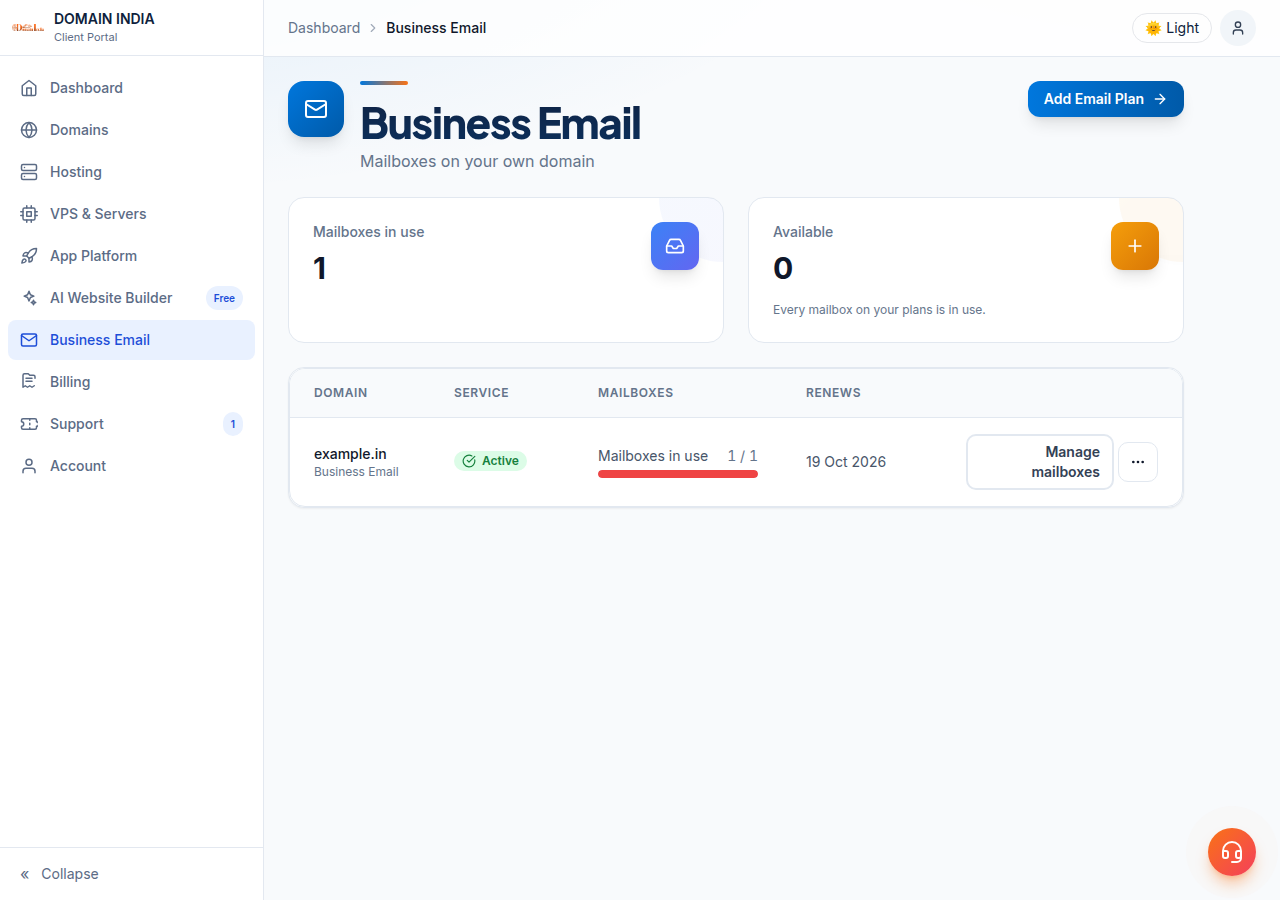
- Sign in to the client areaand open Business Email. The list shows each email plan with its domain and how many mailboxes are in use.
- Open your servicewith Manage (or Manage mailboxes).
- Use the Mailboxes card.It lists every mailbox with its status and creation date, with search and Active/Inactive filters, and the actions for each one.
The Plan & usage card on the same page shows how many of your plan's mailboxes are in use, for example "3 of 5 mailboxes", and the storage your mail uses.
2. Add a mailbox
- Click Add mailbox.
- Enter the mailbox name, the part before the @, such as
sales. Letters, numbers, dots, hyphens and underscores are allowed, and it must start and end with a letter or number. Your domain is added for you. - Add a display name if you like, such as "Sales Team". Recipients see it next to the address.
- Click Create mailbox.
- Save the password.It is shown once, in a Save this password now panel, and Domain India does not store it. Copy it and give it to the person who will use the mailbox.
The mailbox works straight away. There is no ticket to raise and nothing to wait for. The panel also shows the settings to use in a mail app; see setting up Outlook, Apple Mail and your phone.
If the service is waiting for payment, mailboxes are created once the invoice is paid. If it is suspended, mailboxes can't be added or changed until it is active again; existing mail is unaffected.
3. Rename a mailbox
Rename changes a mailbox's address and keeps its mail and its password. It is the answer when:
- your first mailbox was created as
admin@and you want a different name; - a role changes, and
ravi@should becomeaccounts@.
After a rename, sign in to webmail and every mail app with the new address. New mail is delivered to the new address.
Signing in with the old address may still work after a rename. If you renamed a mailbox to stop someone using it, for example after an employee leaves, reset its password as well.
4. Reset a mailbox password
Click Reset password on the mailbox. The current password stops working immediately, on every device: webmail, phones and mail apps. The new password is shown once, so copy it before closing the panel, and update it in each app.
Colleagues who forget their password should ask whoever manages the Business Email service in the client area. That person can reset it in a minute.
Mailbox users can also create app passwords in webmail under Security, one per device, and revoke any of them without changing the main password.
5. Delete a mailbox
Deleting a mailbox is permanent. It stops receiving mail immediately, and the messages stored in it are removed. This can't be undone, and a single deleted mailbox can't be restored, so read this before removing a departing employee's mailbox.
Before you delete:
- Keep what matters. Have the user copy any mail they need to another mailbox or a mail app's local folder, and export their contacts from webmail as a CSV file.
- Consider keeping it instead. If the address still gets customer mail, reset the password so only you can sign in, or rename it to a role address that someone else takes over.
To delete, click Delete, type the mailbox name to confirm, and click Delete mailbox.
A service must keep at least one mailbox, so the last mailbox can't be deleted. If you want to stop using Business Email altogether, open a support ticket.
6. Adding or removing mailbox seats
This is the part that catches people out.
Within your plan's mailbox count, everything is self-service. If your plan includes five mailboxes and you use three, you can create the other two now.
Changing the count is done by support. When every mailbox on the plan is in use, the page says so and offers Upgrade. Upgrade opens a support ticket with the subject already filled in. Support raises the count and adjusts your billing. Reducing the count works the same way: open a ticket.
A new Business Email order creates a separate service. To add mailboxes to the domain you already use, use Upgrade on your existing service instead.
7. Storage
Business Email isn't sold by mailbox size, and there is no storage tier to choose. The Plan & usage card shows the storage your mail uses, as a measured figure rather than a limit.
8. What you pay
Business Email costs ₹60 per mailbox a month, excluding 18% GST (Domain India list price on 19 September 2026), starting from one mailbox. One mailbox is one address someone can sign in to and receive mail at. Longer billing terms are discounted at checkout.
- Priced per mailbox - start with one
- Email at your own domain ([email protected])
- Add and remove mailboxes yourself
- Webmail with calendar, contacts and tasks
Frequently asked questions
How do I add a mailbox to Domain India Business Email?
In the client area, open Business Email, open your service and click Add mailbox in the Mailboxes list. Enter the name before the @, optionally a display name, and click Create mailbox. Copy the password shown, because it is shown only once.
How do I add more mailboxes than my plan includes?
When all mailboxes on your plan are in use, click Upgrade on your service. It opens a pre-filled support ticket, and support raises your mailbox count and adjusts your billing.
What happens to the mail when I delete a mailbox?
The mailbox stops receiving mail immediately and the messages stored in it are removed. Deleting can't be undone, so copy any mail and export contacts first.
Can I change a mailbox's email address without losing mail?
Yes. Use Rename on the mailbox in the client area. The mailbox keeps its mail and its password, and you then sign in with the new address. If you are renaming to lock someone out, reset the password too.
How do I reset a Business Email mailbox password?
In the client area, open your Business Email service and click Reset password on the mailbox. The old password stops working at once on every device, and the new one is shown only once.
Can I delete my only mailbox?
No. A Business Email service must keep at least one mailbox. To stop using the service altogether, open a support ticket.
How much does Domain India Business Email cost?
₹60 per mailbox per month, excluding 18% GST, starting from one mailbox (list price on 19 September 2026). Longer billing terms are discounted at checkout.
Ready to set up your team? Open your Business Email service to add mailboxes, send each person the first sign-in guide, and open a support ticket when you need more mailboxes than your plan includes.
Tell us your domain and how many mailboxes you need, and support will update your plan and your billing.
Open a support ticket