Developers often ask whether Domain India has an API for managing an account in code. There's no general REST API with API keys for your whole account. There are four supported ways to work with your services programmatically, and each one covers a different job. This guide explains which to use and how to make your first call safely.
Domain India doesn't publish a REST API with API keys for domains, billing or orders, and the client area has no API-key page. For programmatic access, use the route that fits the job: connect an AI assistant (the DOMAIN INDIA plugin in ChatGPT, or https://domainindia.com/mcp in Claude and other MCP clients) with OAuth; deploy App Platform apps from CI with a deploy token; script your cPanel hosting with the cPanel UAPI and your own API token on port 2083. For anything else, ask support.
1. What is and isn't available
| You want to | Route | Authentication |
|---|---|---|
| Check domains, invoices, renewals, tickets, websites, email and apps | AI assistant: DOMAIN INDIA plugin in ChatGPT, or https://domainindia.com/mcp in Claude and other MCP clients | OAuth sign-in with permissions you approve |
| Change things: DNS records, email addresses and forwarding, your AI-built websites, your App Platform apps, support tickets | The same connection, with the matching "change" permission ticked | OAuth sign-in with permissions you approve |
| Deploy an App Platform app from GitHub Actions or another CI | App Platform deploy token | A per-app token from the Deploy Tokens tab |
| Manage email accounts, files, databases or DNS on cPanel hosting from a script | cPanel UAPI on port 2083 | Your own cPanel API token |
| Register, renew or transfer domains, place orders or pay invoices by API | Not available | Use the client area |
Older versions of this page described an API address, token menu and endpoints that do not exist. If you have code written against them, it will not work. Use one of the routes above instead.
2. Connect an assistant or MCP client
Domain India runs a Model Context Protocol (MCP) server at https://domainindia.com/mcp. You connect with OAuth: you sign in to your Domain India account and approve permissions on our own page. There is no API key or client ID to copy. More about using AI assistants with your account: Domain India for AI assistants.
- Sign in to the client areain the browser you will use, so the connection goes straight to the permission screen.
- ChatGPT:open Plugins in ChatGPT, search for DOMAIN INDIA (or use this link), and click Connect. No address is needed.
- Claude:in Claude's settings, open Connectors, add a custom connector, and paste
https://domainindia.com/mcp(no trailing slash, nowww). - Developer tools:see the commands below for Claude Code, Cursor and VS Code.
- Approve only what you need.Each permission says whether it can only see something or can also change it. See the table below.
- Ask in plain language.For example, "Which of my domains expire in the next 60 days?"
For developers. Claude Code:
claude mcp add --transport http domain-india https://domainindia.com/mcpThen sign in from /mcp. Cursor (~/.cursor/mcp.json):
{"mcpServers": {"domain-india": {"url": "https://domainindia.com/mcp"}}}VS Code (.vscode/mcp.json):
{"servers": {"domain-india": {"type": "http", "url": "https://domainindia.com/mcp"}}}There is no auth field. The client opens your browser for sign-in the first time it connects.
What each permission allows
| Permission | Can see | Can change |
|---|---|---|
| Account | Your services, invoices, renewals and support tickets | Nothing |
| Account details | Your payment history, the emails we sent you, our help articles and announcements | Nothing |
| Domains | Your domains and their DNS settings | Nothing |
| Domain details | Transfer lock, privacy, contacts and .in verification status | Nothing |
| Services | Your hosting, email accounts, apps, and the domains they use | Nothing |
| Plans and links | The plans we sell; it can prepare a link for you to order, renew or pay | Nothing. You open the link and pay yourself. |
| Websites | Your websites and their previews | Nothing |
| Website visitors | Visitor numbers for your websites | Nothing |
| Website enquiries | Messages visitors send through your websites' contact forms, including their names, emails and phone numbers | Nothing |
| App logs | Your apps' build and runtime logs (they may contain private data) | Nothing |
| DNS | — | Add, change and delete your domains' DNS records |
| Email addresses | — | Add and rename email addresses, and publish their DNS records |
| Email routing | — | Add and remove aliases, and choose where email is forwarded |
| Edit websites | — | Create and edit your websites |
| Publish websites | — | Publish, unpublish and connect domains to your websites |
| Run apps | — | Restart and start your apps |
| Configure apps | — | Change your apps' environment variables (the app restarts) |
| Deploy apps | — | Deploy code to your apps (replaces what is running) |
| Support | — | Open and reply to support tickets for you |
Some things are never possible through this connection, whatever you approve: making a payment or placing an order, cancelling a service, changing nameservers or domain contacts, getting a domain's transfer (EPP) code, and seeing a password. Access keys last one hour and renew in the background. A connection unused for 30 days lapses, and you can disconnect any app instantly on the Connected apps page.
Connections made before 8 October only have the permissions that existed then, so you see fewer tools. To get everything above, disconnect Domain India (on Connected apps, or in ChatGPT) and connect again.
In ChatGPT, publishing a website and getting order or renewal links are not available yet. You can build and edit a site there, then publish it from your client area (or from Claude).
The full walkthrough, with screens for each assistant, is Connecting your Domain India account to an AI assistant.
3. Deploy App Platform apps from CI
For the App Platform, the programmatic route is a deploy token. In your app's Deploy Tokens tab, click Create Token. The token is shown once, together with a ready-to-run command that already contains your token and your app's deploy address. Package your project with tar, then run that command from your terminal or CI job. A connected assistant with the Deploy apps permission can also create a deploy token for you.
- Each token works for one app only, and you can hold up to 5 per app.
- Uploads can be up to 512 MB.
- There is no automatic deploy on push. Your CI job runs the command.
- Copy the command from the tab. Don't type the deploy address from memory.
The full guide is Deploying with a deploy token.
4. Script your cPanel hosting with UAPI
On cPanel hosting, you can call your own account's cPanel API (UAPI) over HTTPS on port 2083. This is cPanel's own API, separate from the assistant connection.
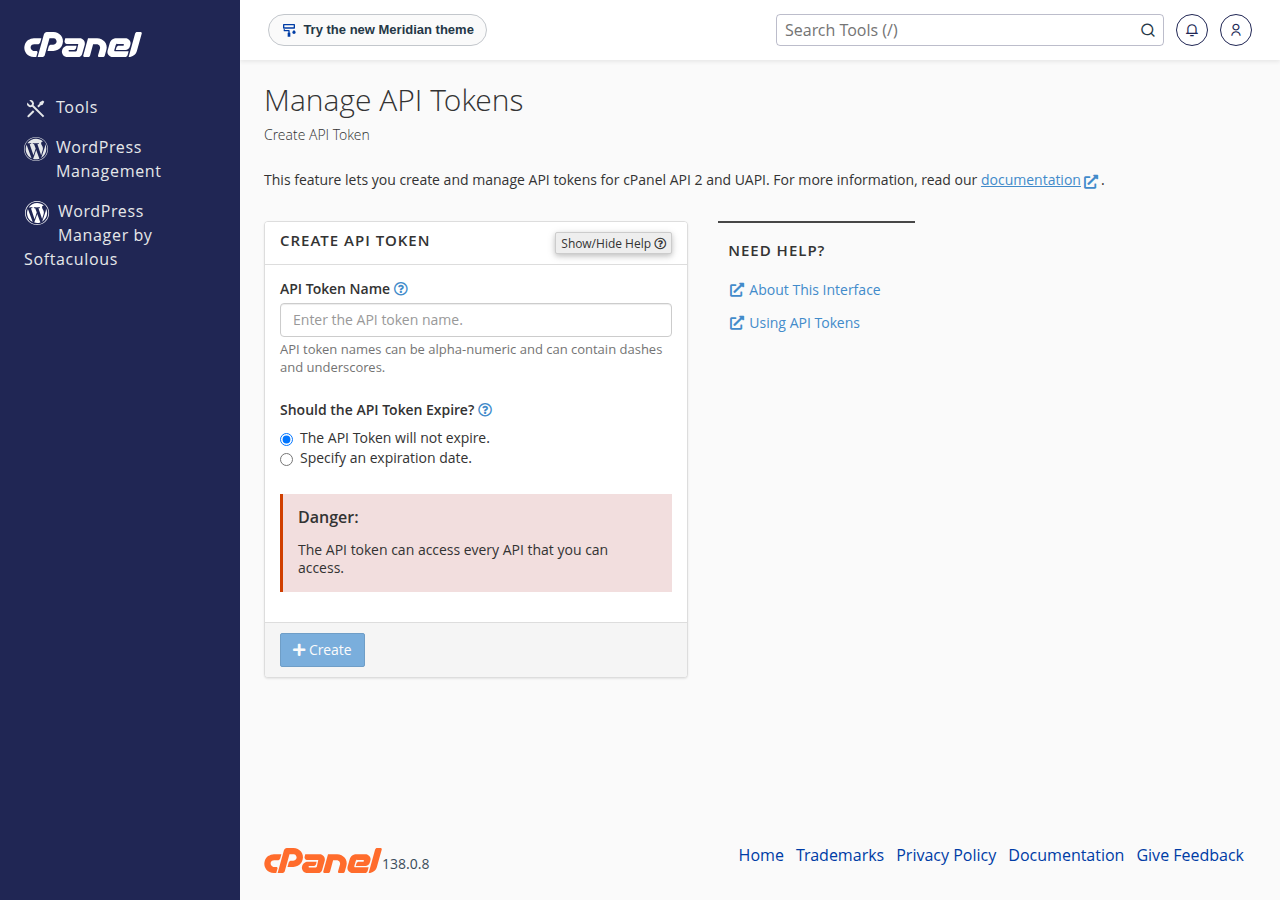
- Create a token.In cPanel, open Security › Manage API Tokens, create a token with a descriptive name, and copy it. cPanel shows it only once.
- Find your panel address.Use the panel address shown on your hosting service's Access tab in the client area.
- Make a test call.List your email accounts with the request below.
- Store the token safely.Put it in an environment variable or a secrets store, never in code you commit.
curl -s -H "Authorization: cpanel yourusername:YOUR_API_TOKEN" \
  "https://your-panel-host:2083/execute/Email/list_pops"
A working call returns JSON with "status": 1 and a data array. A status of 0 comes with an errors array that explains what failed. Other modules follow the same pattern: /execute/Module/function.
Keep these limits in mind:
- WHM's API (port 2087) is not available to shared hosting accounts. UAPI covers your own account only.
- Scripts that run on the hosting itself have some PHP functions disabled on shared hosting, including
proc_openandstream_socket_client. See PHP disabled functions on shared hosting. - DirectAdmin hosting does not offer customer API login keys. Webuzo and Windows (Plesk) hosting have no API route documented here, so ask support if you need one.
To try calls interactively, see API testing with Postman.
5. Keep tokens and connections safe
A cPanel API token has the same power as your cPanel login, and a deploy token can replace your running app. Never put either in browser code, a public repository, a screenshot or a ticket. If one leaks, delete it straight away and create a new one.
- One token per purpose. Name each token after the script or pipeline that uses it, so you can revoke one without breaking the others.
- Least privilege. On the permission screen, tick only what the assistant needs. Leave the "change" permissions (DNS, email, websites, apps, support) off unless you want it to act on them.
- Check the return address, not the name. On the permission screen, an app's name is only a claim. If you did not just start a connection yourself, deny the request.
- Review regularly. Check Connected apps, and your cPanel token list, every few months and remove anything unused.
6. What to do when you need more
If your project needs something these routes don't cover, such as registering domains in bulk from your own software, open a ticket and describe the use case. Support will tell you what is possible. Until then, orders, payments, renewals and transfers are done in the client area.
If you are choosing where to build: the App Platform runs Node.js apps automatically and anything else with a Dockerfile, with deploy tokens for CI. cPanel hosting suits PHP sites that you script through UAPI. A VPS gives you full control of your own server.
Does Domain India have a REST API with API keys?
No. There is no general REST API with API keys for domains, billing or orders, and the client area has no API-key page. For programmatic access, use the assistant connection (the DOMAIN INDIA plugin in ChatGPT, or domainindia.com/mcp), App Platform deploy tokens, or the cPanel UAPI on your own hosting account.
How do I connect my Domain India account to ChatGPT or Claude?
In ChatGPT, open Plugins, search for DOMAIN INDIA (or use https://chatgpt.com/plugins/plugin_asdk_app_6aaa62b9e16081919cbed2e487018663) and connect. In Claude, add https://domainindia.com/mcp as a custom connector. Then sign in to your Domain India account and approve the permissions you want. Some permissions only let the assistant see things; others let it change DNS records, email, websites, apps or tickets. Tick only what you need.
Can an AI assistant pay invoices or transfer my domain?
No. There is no permission for payments, orders, cancelling a service, transfer codes, nameserver or contact changes, or passwords, so no connected app can do these things. It can prepare an order or renewal link that you open and pay yourself.
I connected ChatGPT a while ago and only see a few tools. Why?
Connections made before 8 October 2026 keep the permissions that existed then. Disconnect Domain India on Connected apps (or in ChatGPT) and connect again to get the full set.
Can I use the cPanel API on Domain India shared hosting?
Yes, for your own account. Create a token in cPanel under Security, Manage API Tokens, and call UAPI on port 2083 with the header Authorization: cpanel yourusername:TOKEN. WHM's API is not available to shared hosting accounts.
Can I use the DirectAdmin API with login keys?
No. Login keys are not available to customers on Domain India DirectAdmin hosting. Ask support if you need to automate something on a DirectAdmin account.
How do I deploy to the App Platform from GitHub Actions?
Create a deploy token in your app's Deploy Tokens tab. It comes with a ready-to-run upload command. Store the token as a CI secret and have your pipeline package the project with tar and run that command.
Can I register domains through an API as a reseller?
There is no public domain registration API. Open a support ticket and describe your use case, and support will tell you what is possible.
Ready to automate? Connect an assistant from Connected apps, read Deploying with a deploy token for CI, or open a ticket if your use case isn't covered. Support is on 24/7 live chat, and tickets get a first response within 15 minutes.
Tell us what you want to automate and which services you use, and we will point you to the right tool.
Ask support