You can manage much of a cPanel hosting account from a script instead of clicking through the control panel: list email accounts, create a mailbox, read disk usage and more. This guide shows how to test the cPanel API by hand with a short Perl script, using an API token you create in your own cPanel account. It is written for Domain India cPanel hosting customers and beginner developers.
On shared cPanel hosting you call UAPI, the account-level cPanel API, over HTTPS on port 2083. Create an API token in cPanel under Security › Manage API Tokens, then send requests to https://your-server:2083/execute/Module/function with the header Authorization: cpanel USERNAME:TOKEN. A 25-line Perl script using the core HTTP::Tiny and JSON::PP modules is enough to test any call. The server-level WHM API needs WHM access, which shared hosting accounts do not have.
1. Which cPanel API you can use
cPanel has several APIs, and older guides mix them up.
| API | What it controls | Who can use it | Port |
|---|---|---|---|
| UAPI | One cPanel account: email, domains, databases, files, SSL | The account owner, with a cPanel API token | 2083 |
| WHM API 1 | The whole server: create and suspend accounts, packages | Server administrators and resellers with WHM access | 2087 |
| cPanel API 2 | Legacy account functions | Deprecated; use UAPI instead | 2083 |
As a Domain India shared hosting customer you own one cPanel account, so UAPI is the API for you. Scripts that send Authorization: whm … to port 2087, as many older examples do, are for WHM and will not work with a cPanel account token.
2. Create an API token
- Log in to cPanel.Use the one-click login in the client area, or see how to log in to cPanel.
- Open Manage API Tokens.It is in the Security section.
- Create a token.Give it a name you will recognise, such as
perl-test, and set an expiry date if you only need it for testing. - Copy the token now.cPanel shows the token only once. Store it in a password manager.
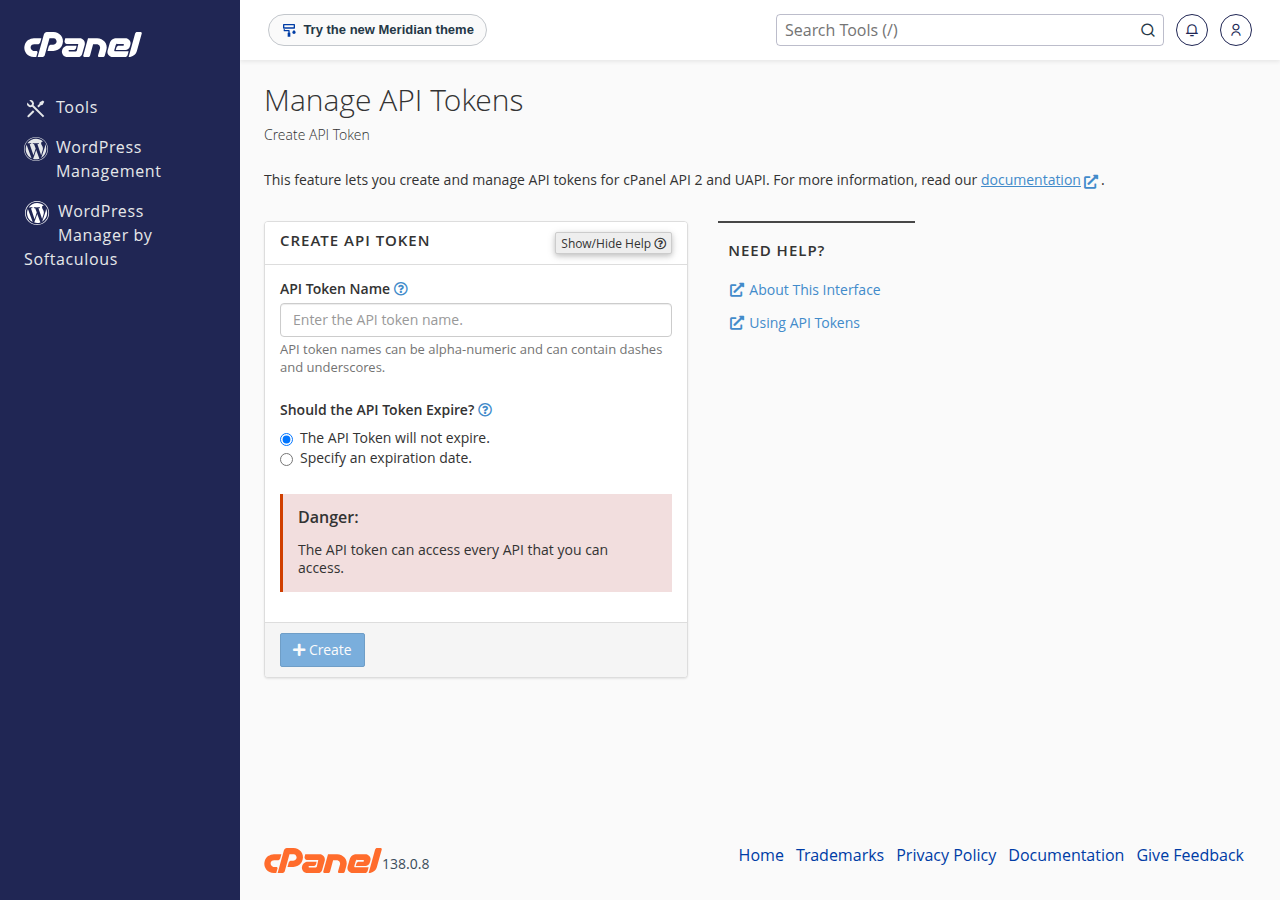
Anyone with your username and token can read and change your email, files and databases, without needing your password or two-factor code. Never paste a token into a ticket, a chat, a public repository or a shared document. Delete tokens you no longer use from the same page.
3. The Perl test script
This script calls one UAPI function and prints the result. It uses only modules that ship with Perl (HTTP::Tiny and JSON::PP), reads the token from an environment variable so it never sits in the file, and keeps certificate checking on.
#!/usr/bin/perl
use strict;
use warnings;
use HTTP::Tiny;
use JSON::PP qw(decode_json);

my $host   = $ENV{CPANEL_HOST}  or die "Set CPANEL_HOST\n";   # server name from the client area
my $user   = $ENV{CPANEL_USER}  or die "Set CPANEL_USER\n";   # your cPanel username
my $token  = $ENV{CPANEL_TOKEN} or die "Set CPANEL_TOKEN\n";  # the API token
my $module = shift // 'DomainInfo';
my $func   = shift // 'list_domains';
my %args   = map { split /=/, $_, 2 } @ARGV;                  # extra key=value arguments

my $ua  = HTTP::Tiny->new(
    verify_SSL      => 1,
    timeout         => 30,
    default_headers => { Authorization => "cpanel $user:$token" },
);
my $url = "https://$host:2083/execute/$module/$func";
$url .= '?' . $ua->www_form_urlencode(\%args) if %args;

my $res = $ua->get($url);
die "HTTP $res->{status} $res->{reason}\n$res->{content}\n" unless $res->{success};

my $data = decode_json($res->{content});
if ($data->{status}) {
    print JSON::PP->new->pretty->canonical->encode($data->{data});
} else {
    print "API error: ", join('; ', @{ $data->{errors} || [] }), "\n";
}
Save it as uapi-test.pl. The script takes the module and function names as its first two arguments, followed by any key=value arguments the function needs.
4. Run it
The easiest place to run the script is your own computer. Perl is installed on macOS and most Linux systems; on Windows, install Strawberry Perl. HTTPS in HTTP::Tiny needs the IO::Socket::SSL module; check it with perl -MIO::Socket::SSL -e1 and install it with your package manager or cpanm IO::Socket::SSL if that command prints an error.
export CPANEL_HOST="server-name-from-client-area"
export CPANEL_USER="yourcpaneluser"
export CPANEL_TOKEN="paste-the-token-here"

perl uapi-test.pl DomainInfo list_domains
perl uapi-test.pl Email list_pops
perl uapi-test.pl Quota get_quota_info
For CPANEL_HOST, use the server name shown for your hosting service in the client area (the Manage › Access tab lists your username, server and panel URL). Using the server name rather than a bare IP address lets certificate checking pass.
A successful call prints the data part of the response. Every UAPI response has the same shape: status (1 for success, 0 for failure), errors, warnings, messages, data and metadata, so your scripts can check status first.
5. Useful UAPI functions to try
| Task | Module and function | Example arguments |
|---|---|---|
| List domains on the account | DomainInfo list_domains | none |
| List email accounts | Email list_pops | none |
| Create an email account | Email add_pop | email=info domain=example.com password=… quota=1024 |
| Show disk usage | Quota get_quota_info | none |
| List MySQL databases | Mysql list_databases | none |
Start with read-only functions such as list_domains and list_pops. Test anything that changes the account, like add_pop, on a test address first. The full list of modules and functions is in cPanel's official UAPI documentation.
On the command line, arguments go after the function name, for example perl uapi-test.pl Email add_pop email=test domain=example.com password='Str0ng-Pass!' quota=1024. Avoid typing real passwords into shell history on a shared computer.
6. Troubleshooting
whm instead of cpanel.Repeated wrong tokens count as failed logins, and the server's protection can block your IP address, cutting off your website and email on that connection too. If a call fails twice, stop and check the token before trying again. I can't reach my server: have I been blocked? explains how to get unblocked.
7. Running this on Domain India
- Shared cPanel hosting: port 2083 is open on our cPanel servers, and Manage API Tokens is in every cPanel account, so the script above works from your own computer. Jailed SSH is available on every shared hosting plan; it is off by default, so ask support to enable it for your account. Tools available inside the jailed shell vary, so if you want to run scripts on the server itself, ask support what is available.
- WHM API: shared hosting accounts have no WHM access, so WHM API 1 calls on port 2087 are not available to them. Our VPS plans do not offer cPanel, so WHM is not part of them either.
- Scheduled scripts: if you want the script to run on a schedule, run it from your own machine or a server you control; keep the token outside the script, as above.
- 25 GB NVMe SSD Storage
- 50 GB Monthly Bandwidth
- 1 Website
- 10 Email Accounts
Frequently asked questions
Which cPanel API should I use on shared hosting?
Use UAPI. It works on one cPanel account, authenticates with an API token you create in that account, and is reached at https://your-server:2083/execute/Module/function. WHM API 1 is for server administrators and is not available to shared hosting accounts.
How do I create a cPanel API token?
Log in to cPanel, open Manage API Tokens in the Security section, create a token with a name and an optional expiry date, and copy it immediately. cPanel shows the token only once.
What authorization header does the cPanel API need?
For UAPI with an account token, send the header Authorization: cpanel USERNAME:TOKEN. The whm prefix is only for WHM API tokens.
Why does my script say Access denied?
The username or token is wrong, the token has expired or been deleted, or the header uses whm instead of cpanel. Repeated failures can block your IP address, so check the details before retrying.
Is cPanel API 2 still supported?
cPanel API 2 is deprecated. New scripts should use UAPI, which covers the same account tasks with a consistent JSON response.
Is it safe to turn off SSL verification in my script?
No. Your token travels in every request, so keep certificate checking on and connect using the server name shown in the client area rather than an IP address.
Ready to try it? Log in through how to log in to cPanel, create a token under Security, and run the script against a read-only function first. If you need SSH on your account, see enabling and accessing jailed SSH.
Tell us which call you are testing and the error you see, without the token, and our team will help you find the cause.
Open a support ticket