This guide is for administrators of their own DirectAdmin VPS or server with root access. When a client, a developer or your own office can't reach a site on that server, the block usually comes from one of three places: the CSF firewall and its login daemon LFD, DirectAdmin's Brute Force Monitor, or ModSecurity. The checks below tell you which one, in a few minutes.
If the whole server times out for one IP but works from mobile data, it is a firewall block: run csf -g IP and read /var/log/lfd.log. If the site loads but one page returns 403, it is usually ModSecurity: search /var/log/httpd/modsec_audit.log for the IP. Fix the cause, then remove the block or add a narrow rule exception. On Domain India shared hosting you have no root access; send your public IP to support instead.
Firewall blocks: How to diagnose and resolve CSF IP blocks and How to tell if CSF has blocked your IP on your VPS. ModSecurity 403s on DirectAdmin: How to check if an IP is blocked in ModSecurity logs.
1. Which kind of block is it?
| Symptom from the affected IP | Likely source | Check |
|---|---|---|
| Everything times out: site, webmail, FTP, SSH, panel | CSF or LFD firewall block | csf -g IP, then /var/log/lfd.log |
| The panel login keeps failing or re-blocks soon after an unblock | DirectAdmin Brute Force Monitor | The Brute Force Monitor page in DirectAdmin as admin |
| Site loads, but one page or form returns 403 | ModSecurity rule | /var/log/httpd/modsec_audit.log |
2. The commands, in order
Replace 203.0.113.25 with the affected public IP. Connect from another network, or through your provider's console, if your own IP is the one blocked.
# 1. Is it blocked by the firewall, and why?
csf -g 203.0.113.25
grep 203.0.113.25 /var/log/lfd.log | tail -n 20

# 2. Which service kept failing? (RHEL-based systems such as AlmaLinux)
grep 203.0.113.25 /var/log/secure | tail -n 20
grep 203.0.113.25 /var/log/maillog | grep -i "auth failed\|failed" | tail -n 20

# 3. Is ModSecurity refusing requests from it?
grep -n 203.0.113.25 /var/log/httpd/modsec_audit.log | tail -n 20
grep ModSecurity /var/log/httpd/error_log | grep 203.0.113.25 | tail -n 20
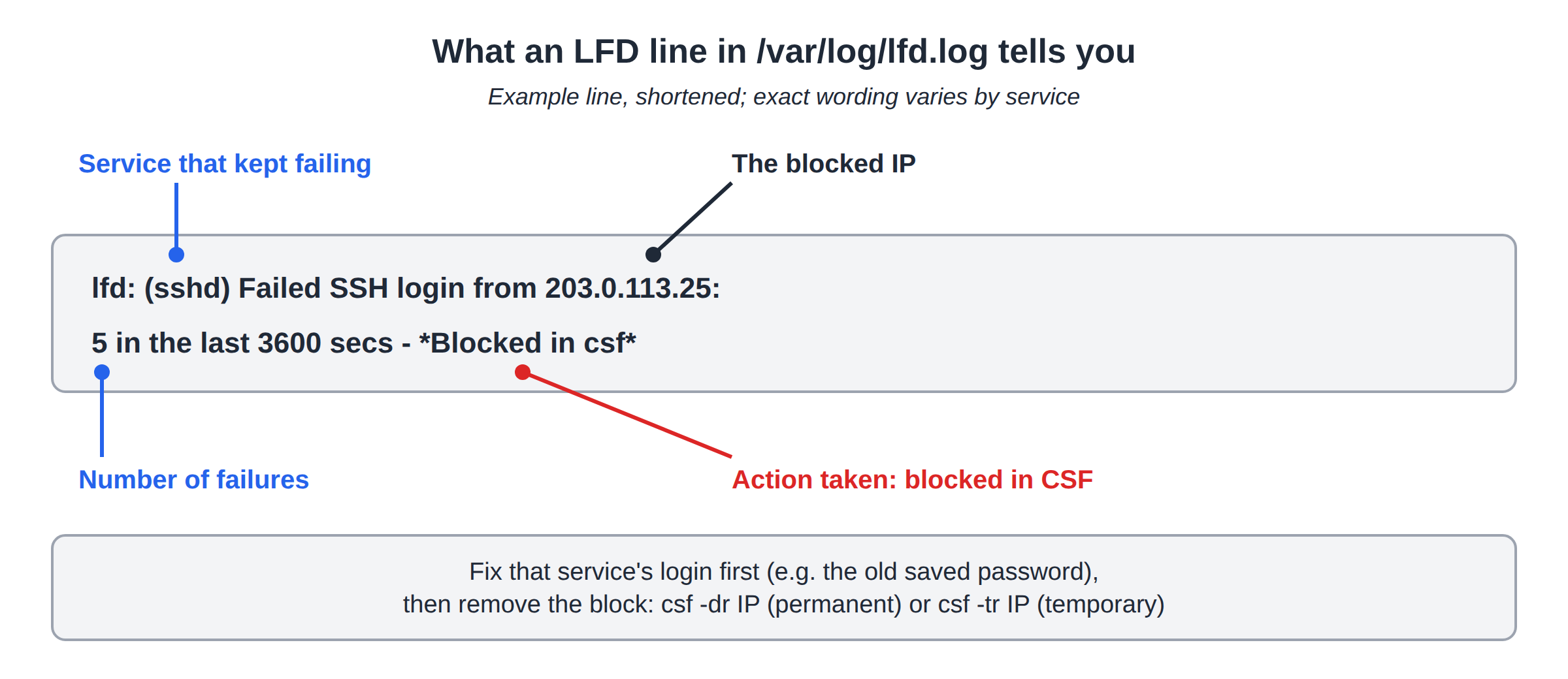
The LFD line names the service and the number of failures. The ModSecurity entry names the rule ID and the reason, which you need before you change anything.
3. Remove the block the right way
- Fix the cause first.Update the old password saved in the mail app or FTP client, or stop the script that keeps failing. Otherwise LFD blocks the IP again within minutes.
- Remove the firewall block.
csf -dr 203.0.113.25removes a permanent block andcsf -tr 203.0.113.25a temporary one. Both take effect immediately. - Clear the Brute Force Monitor entryfor the IP in DirectAdmin too, or it can trigger a fresh block.
- For a ModSecurity false positive,add the smallest exception for that rule ID and URL, in DirectAdmin's custom configuration folder rather than the files CustomBuild regenerates. Then run
apachectl configtest && systemctl reload httpd. Don't switch ModSecurity off. - Allow-list only fixed IPs.
csf -a IP "office"suits a static office IP you control, never a home or mobile IP.
Existing CSF installations keep working. For a new server, consider firewalld or nftables with Fail2ban instead.
4. On Domain India shared hosting
On Domain India cPanel, DirectAdmin and Webuzo shared hosting the server and its firewall are ours, so there is no root access and no self-service unblock. Fix the device with the wrong password, then send support your public IP, your domain and the service that stopped working. For the customer-side walkthrough, see I can't reach my server: have I been blocked?
How do I check if CSF has blocked an IP on my DirectAdmin server?
As root, run csf -g followed by the IP. It shows any deny entry and its reason. The matching lines in /var/log/lfd.log name the service that kept failing.
How do I unblock an IP in CSF?
Run csf -dr followed by the IP to remove a permanent block, or csf -tr followed by the IP to remove a temporary one. Fix the failing login first, or the IP is blocked again.
Where is the ModSecurity log on DirectAdmin?
By default DirectAdmin's CustomBuild writes the ModSecurity audit log to /var/log/httpd/modsec_audit.log, with one-line summaries in /var/log/httpd/error_log.
Can I unblock my own IP on Domain India shared hosting?
No. On shared hosting the firewall belongs to the server. Send your public IP, domain and the failing service to support by live chat or ticket.
Ready to get unblocked? On your own server, work through the checks above. On Domain India shared hosting, open a ticket or use the public ticket form from mobile data. Live chat is available 24/7, and tickets get a first response within 15 minutes.
Tell us your public IP address, your domain and which service stopped working, and support will check the server firewall.
Send us your IP