PHP on a hosting server comes with a set of extensions already compiled in: modules for databases, images, text encoding, compression, XML and more. Knowing what is there saves you from hunting for a plugin or library that isn't needed, and from building on something that isn't available. This guide lists the extensions we measured on Domain India's cPanel and DirectAdmin servers, the old ones that no longer exist in modern PHP, and short, current examples of the ones you will use most.
On Domain India cPanel hosting, PHP 8.2 to 8.5 include the everyday extensions: pdo_mysql and mysqli, mbstring, intl, curl, gd, zip, bcmath, gmp, exif, fileinfo, soap, the XML family and OPcache. Imagick is on PHP 8.2 and 8.3 only, and ionCube and sodium are not on cPanel's PHP 8.2 and later. Some functions are disabled for security even when their extension is loaded, such as fsockopen and proc_open. Check with extension_loaded() in your own code.
1. Extensions, not libraries
What older articles call "pre-installed PHP libraries" are extensions: compiled modules that PHP loads at startup. They are part of the server's PHP, and you switch between sets of them by changing the PHP version. Libraries, such as Guzzle or PHPMailer, are PHP code that you add to your own project with Composer. For the difference, see PHP extensions vs PHP libraries, and for the libraries themselves, top PHP libraries and how to use them.
2. What is installed on our cPanel servers
Measured on 24 September 2026 on our cPanel server, for the default PHP builds (the versions you choose in MultiPHP Manager; a new account starts on PHP 8.3):
| Purpose | Extensions available |
|---|---|
| Databases | pdo_mysql, mysqli, mysqlnd, pdo_sqlite, sqlite3, pgsql, pdo_pgsql, odbc |
| Text and language | mbstring, intl, iconv, gettext, ctype, enchant |
| Web and network | curl, openssl, ftp, soap, sockets, snmp, ldap |
| Images and files | gd, exif, fileinfo, zip, zlib, bz2, Phar |
| Maths | bcmath, gmp, calendar |
| XML and data | dom, SimpleXML, xml, xmlreader, xmlwriter, xsl, tidy, json |
| Performance | OPcache |
Differences between versions on cPanel:
- Imagick is available on PHP 8.2 and 8.3, not on 8.4 or 8.5. If your site depends on Imagick, stay on 8.3 or switch the application to GD.
- pspell is on 8.2 and 8.3 only.
- ionCube Loader and sodium are not included on PHP 8.2 and later. Software encoded with ionCube needs our DirectAdmin hosting or a VPS.
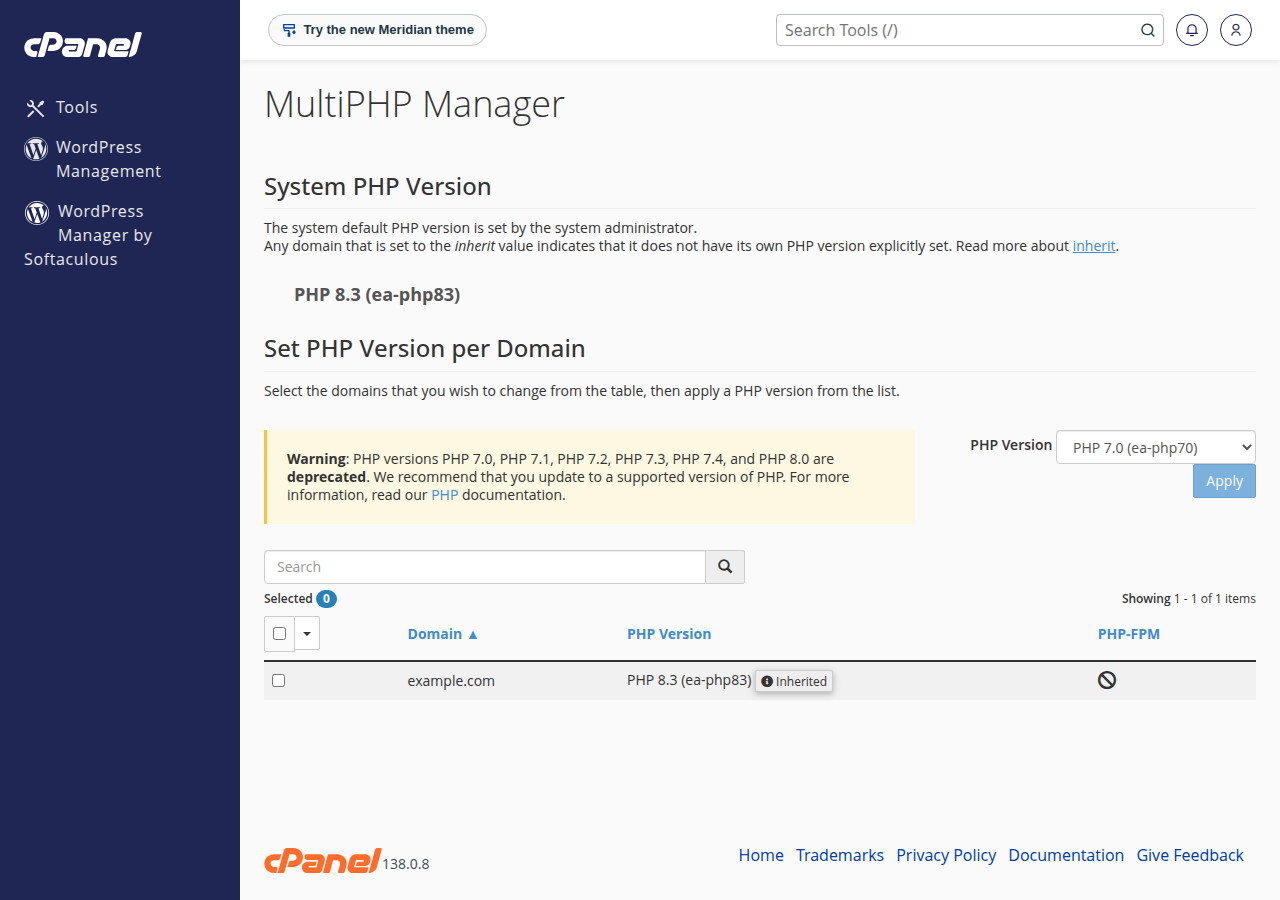
Our DirectAdmin servers offer PHP up to 8.3 with a similar core set, plus ionCube Loader and sodium on 8.1 to 8.3 and Imagick on 8.1 and 8.2; PHP 8.3 there has no OPcache. Neither server has Xdebug, APCu, Redis, Memcached, MongoDB or Swoole. For how to change versions and extensions on DirectAdmin, see installing and managing PHP extensions in DirectAdmin.
For security, our shared servers disable some functions even though their extension is loaded. On cPanel, curl_exec works but curl_multi_exec does not; the sockets extension is present but socket_create, fsockopen and stream_socket_client are disabled; proc_open, shell_exec and phpinfo() are disabled too. The full list and the workarounds are in PHP disabled functions on shared hosting.
3. Extensions from old guides that no longer exist
Many older tutorials, including the first version of this page, list modules that were removed from PHP years ago. If an old script needs one of them, the script needs updating, not the server.
| Old extension | Status | Use instead |
|---|---|---|
mysql (mysql_connect) | Removed in PHP 7.0 | PDO with pdo_mysql, or mysqli |
mcrypt | Removed from PHP in 7.2 | openssl_encrypt() / openssl_decrypt() |
mhash | Merged into hash long ago | hash() and hash_hmac() |
mssql | Removed in PHP 7.0 | pdo_sqlsrv on Windows hosting, or ODBC |
wddx, xmlrpc | Removed in PHP 7.4 and 8.0 | JSON or SOAP |
mime_magic | Removed | fileinfo (finfo_file()) |
4. How to check what your site has
Because phpinfo() is disabled on cPanel, check from code instead:
<?php
foreach (['pdo_mysql', 'mbstring', 'intl', 'gd', 'imagick', 'zip', 'sodium'] as $ext) {
    echo $ext, ': ', extension_loaded($ext) ? 'yes' : 'no', PHP_EOL;
}
echo 'PHP ', PHP_VERSION, PHP_EOL;
Upload it, open it once in the browser, then delete it. If jailed SSH is enabled on your account, php -m lists the extensions of the command-line PHP. SSH is off by default; ask support to enable it (see jailed SSH on Domain India hosting).
5. Short examples of the everyday extensions
bcmath for exact decimal maths, such as money:
echo bcadd('1499.10', '269.84', 2); // 1768.94, no floating-point rounding errorscurl for calling an API, always with timeouts:
$ch = curl_init('https://api.example.com/rates');
curl_setopt_array($ch, [
    CURLOPT_RETURNTRANSFER => true,
    CURLOPT_CONNECTTIMEOUT => 5,
    CURLOPT_TIMEOUT        => 15,
]);
$body = curl_exec($ch);
if ($body === false) {
    error_log('API error: ' . curl_error($ch));
}
Without a timeout, a slow API keeps a PHP process waiting and can make your whole site look down.
mbstring for Indian-language text:
$name = 'नमस्ते';
echo strlen($name);        // 18: bytes
echo mb_strlen($name);     // 6: characters
echo mb_substr($name, 0, 3);
intl for rupee formatting:
$fmt = new NumberFormatter('en_IN', NumberFormatter::CURRENCY);
echo $fmt->formatCurrency(125000, 'INR');   // ₹1,25,000.00
PDO with prepared statements, the safe way to query MySQL:
$pdo = new PDO('mysql:host=localhost;dbname=cpuser_shop;charset=utf8mb4', 'cpuser_app', $password, [
    PDO::ATTR_ERRMODE => PDO::ERRMODE_EXCEPTION,
]);
$stmt = $pdo->prepare('SELECT name FROM customers WHERE city = ?');
$stmt->execute([$city]);
foreach ($stmt as $row) {
    echo htmlspecialchars($row['name']), '<br>';
}
Never build SQL by pasting user input into the query string. For connection details, see how to connect to the MySQL database.
json with errors that you can't miss:
$data = json_decode($input, true, flags: JSON_THROW_ON_ERROR);
echo json_encode(['status' => 'ok', 'city' => 'चेन्नई'], JSON_UNESCAPED_UNICODE);
gd for a quick thumbnail:
$src = imagecreatefromjpeg('photo.jpg');
$thumb = imagescale($src, 300);          // 300 px wide, height kept in proportion
imagewebp($thumb, 'photo-300.webp', 80);
zip to bundle files for download:
$zip = new ZipArchive();
if ($zip->open('export.zip', ZipArchive::CREATE | ZipArchive::OVERWRITE) === true) {
    $zip->addFromString('report.csv', $csv);
    $zip->close();
}
SimpleXML for reading a feed:
$xml = simplexml_load_string('<root><item>Hello</item></root>');
echo $xml->item;   // Hello
6. When you need something that isn't there
- Try another PHP version. Imagick, for example, is on 8.2 and 8.3 on cPanel.
- Use a pure-PHP library. Many tasks have a Composer package that needs no extension. Composer isn't pre-installed on shared hosting, so run
composer.pharover jailed SSH (on request), or install on your computer and upload the project with itsvendor/folder. - Ask support whether an extension can be enabled for your PHP version.
- Move to a VPS for Redis, Memcached, MongoDB, Swoole or Xdebug, which are not on our shared servers. A VPS is self-managed, so you install extensions yourself.
7. Where Domain India fits
cPanel hosting gives you PHP up to 8.5 with the extension set above, OPcache on, and a choice of version per site. If you need ionCube or sodium on current PHP, DirectAdmin hosting has them up to PHP 8.3.
- 25 GB NVMe SSD Storage
- 50 GB Monthly Bandwidth
- 1 Website
- 10 Email Accounts
- 10 GB NVMe SSD Storage
- 50 GB Monthly Bandwidth
- 1 Website
- 5 Email Accounts
Frequently asked questions
Which PHP extensions are installed on Domain India cPanel hosting?
On PHP 8.2 to 8.5 the set includes pdo_mysql, mysqli, mbstring, intl, curl, openssl, gd, exif, fileinfo, zip, bcmath, gmp, soap, sockets, the XML extensions and OPcache. Imagick is on 8.2 and 8.3 only. This was measured on our cPanel server on 24 September 2026.
Is ionCube Loader available on cPanel hosting?
Not on PHP 8.2 or later on our cPanel servers. Our DirectAdmin servers include ionCube Loader on PHP 8.1 to 8.3. Otherwise use a VPS.
Is mcrypt available?
Not on cPanel. mcrypt was removed from PHP in version 7.2. Rewrite the code to use openssl_encrypt and openssl_decrypt instead.
How can I see which extensions my site has if phpinfo() is disabled?
Upload a small script that prints extension_loaded() for the extensions you need, open it once, then delete it. With jailed SSH enabled, php -m lists them too.
Why does fsockopen fail when the sockets extension is loaded?
fsockopen, stream_socket_client and socket_create are disabled on our shared servers for security, even though the extension is loaded. Use curl for HTTP requests.
Are Redis or Memcached available for PHP on shared hosting?
No. Neither server has the Redis, Memcached or APCu extensions, and there is no Redis service on shared plans. Use a VPS if your application needs them.
Ready to build on PHP? Compare cPanel hosting and DirectAdmin hosting, or read PHP extensions and their role in web development for how extensions work. If you need an extension that isn't listed, open a support ticket.
PHP up to 8.5, OPcache on, and a choice of PHP version for every site.
See cPanel hosting