PHP still runs a large share of the web, from WordPress sites to custom business applications. Modern PHP is fast, typed and well tooled, but only if you use it the modern way. This guide collects the practices that matter most in 2026: security first, then clean code, testing, dependencies, performance and deployment, with notes on what works on Domain India hosting.
Run a supported PHP 8 release, validate input and escape output, use prepared statements for every query, and hash passwords with password_hash(). Turn on strict types, follow PSR-12 or PER Coding Style, and let static analysis and PHPUnit or Pest catch mistakes before your users do. Manage libraries with Composer, keep secrets out of your code and out of public_html, and deploy from Git. On Domain India shared hosting Composer isn't pre-installed, so run composer.phar over jailed SSH or build locally or in CI and upload vendor/.
1. Use a supported PHP version
Every PHP release gets about two years of active support, then a period of security fixes only, and then reaches end of life. Old versions stop receiving security patches, and many libraries drop them. Check the current list at php.net/supported-versions and plan an upgrade before your version expires.
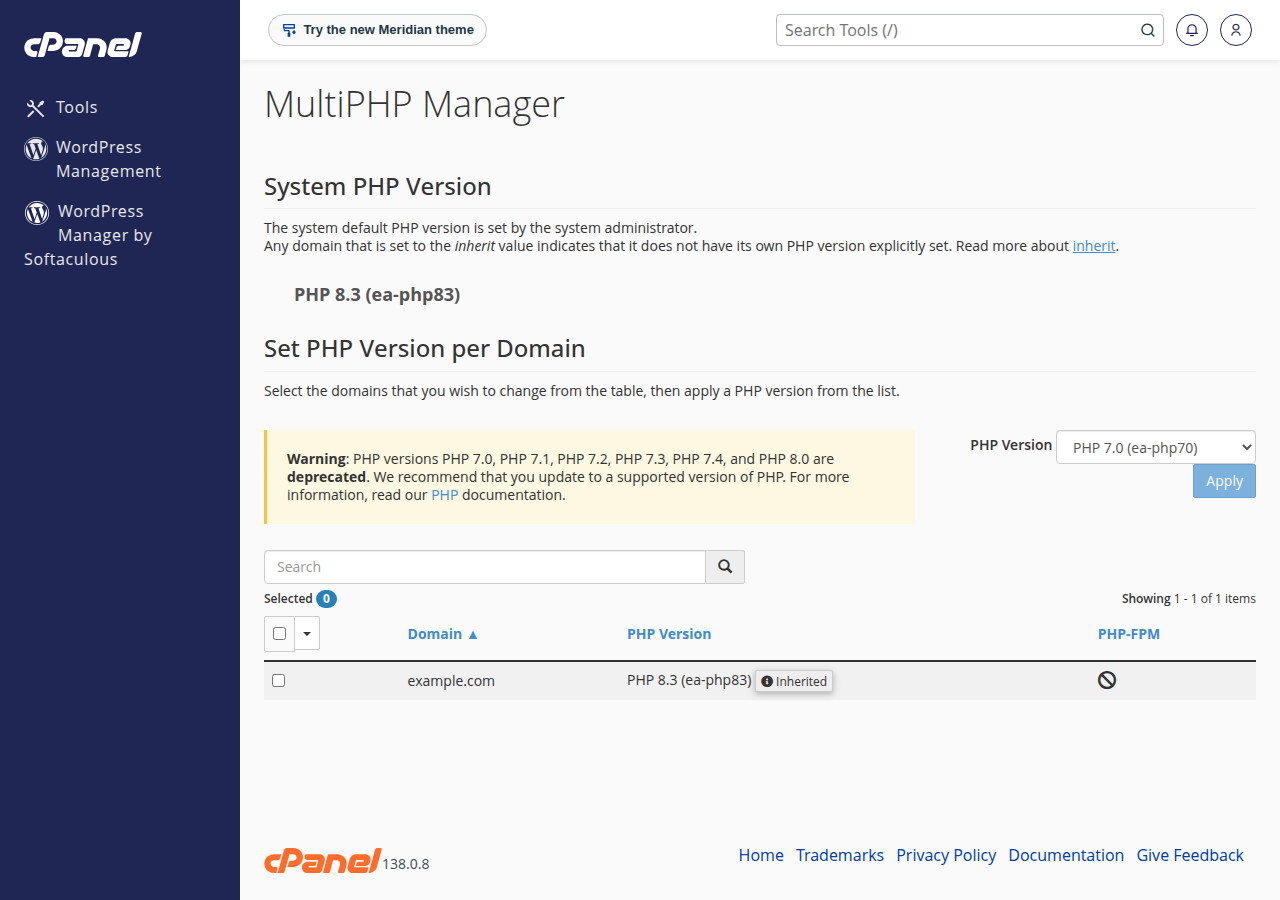
On Domain India shared hosting you choose the PHP version per account or domain in your control panel. cPanel offers versions up to PHP 8.5, with 8.3 as the default for new accounts; DirectAdmin offers versions up to 8.3. See how to change your PHP version and check PHP version compatibility before you switch.
2. Security first
Most PHP breaches come from a handful of mistakes. Fix these and you have closed most of the doors.
Validate input, escape output. Validate data when it arrives: its type, length and format. Escape it when you output it, for the place it goes.
$email = filter_input(INPUT_POST, 'email', FILTER_VALIDATE_EMAIL);
if ($email === false || $email === null) {
    http_response_code(422);
    exit('Please enter a valid email address.');
}

echo htmlspecialchars($name, ENT_QUOTES | ENT_SUBSTITUTE, 'UTF-8');
FILTER_SANITIZE_STRING was deprecated in PHP 8.1; don't use it. Validation rejects bad data, while htmlspecialchars() makes it safe to show in HTML.
Use prepared statements for every query. Never build SQL by joining strings with user data.
$pdo = new PDO($dsn, $user, $pass, [
    PDO::ATTR_ERRMODE => PDO::ERRMODE_EXCEPTION,
    PDO::ATTR_EMULATE_PREPARES => false,
]);
$stmt = $pdo->prepare('SELECT id, name FROM users WHERE email = ?');
$stmt->execute([$email]);
$user = $stmt->fetch(PDO::FETCH_ASSOC);
Store passwords with password_hash(). Check them with password_verify(), and call password_needs_rehash() after login so hashes upgrade when PHP's default algorithm changes. Never use MD5 or SHA-1 for passwords.
Protect forms and sessions. Add a CSRF token to every form that changes data, regenerate the session ID after login with session_regenerate_id(true), and set session cookies as Secure, HttpOnly and SameSite=Lax.
Our detailed guides: preventing SQL injection, preventing XSS, CSRF tokens in PHP forms and the OWASP Top 10 for PHP and Node.js.
3. Write clean, readable code
- Turn on strict types. Start each file with
declare(strict_types=1);so PHP stops silently converting types. - Use types everywhere. Typed parameters, return types and typed properties, plus modern features such as enums, readonly properties and constructor property promotion.
- Follow a coding standard. PSR-12, or its successor PER Coding Style from PHP-FIG. Use PSR-4 autoloading and namespaces instead of long
requirelists. - Format automatically. PHP_CodeSniffer or PHP CS Fixer applies the standard for you, so reviews focus on logic, not spacing.
- Separate concerns. Keep database access, business logic and HTML templates apart, whether you use a framework such as Laravel or Symfony or your own MVC structure.
- Document the why. Types already say what a function takes and returns; PHPDoc comments are for what types can't express, such as array shapes and reasons.
declare(strict_types=1);

final class Cart
{
    public function __construct(private readonly float $taxRate) {}

    public function total(float $price, int $quantity): float
    {
        return round($price * $quantity * (1 + $this->taxRate), 2);
    }
}
4. Test and analyse before you ship
display_errors off and log_errors on, and read the log regularly.A simple Pest or PHPUnit test for the class above:
public function testTotalIncludesTax(): void
{
    $cart = new Cart(0.18);
    $this->assertSame(118.0, $cart->total(50.0, 2));
}
On shared hosting, find your error log in the control panel; see reviewing error logs in cPanel and DirectAdmin and the guide to debugging PHP code. phpinfo() is disabled on our cPanel servers, so check settings with ini_get() instead.
5. Manage dependencies with Composer
Composer installs libraries, locks their versions and generates the autoloader.
- Commit
composer.jsonandcomposer.lock; never commitvendor/. - Install production builds with
composer install --no-dev --optimize-autoloader. - Run
composer auditregularly to find libraries with known vulnerabilities, and update them. - Prefer well-maintained packages with recent releases over abandoned ones.
Composer isn't pre-installed on Domain India shared hosting, but with jailed SSH (on request) you can download composer.phar and run php composer.phar install. The process functions Composer scripts need (such as proc_open) are disabled for security, so if it stops with a proc_open message, run it again with --no-scripts. Or run Composer on your own computer or in CI, then upload the project with its vendor/ folder. See PHP disabled functions on shared hosting.
6. Performance basics
- OPcache keeps compiled scripts in memory and is the single biggest speed-up for PHP. It is enabled on our cPanel servers; see the PHP OPcache guide.
- Fewer, better queries. Add indexes for columns you filter on, avoid running a query inside a loop, and select only the columns you need.
- Cache expensive work. Store results that rarely change, such as settings or rendered fragments, in files or the database. There is no Redis on Domain India shared hosting.
- Measure first. Profile with Xdebug or your framework's debug tools before you optimise.
For heavy-usage problems on shared hosting, see common causes of high resource usage in PHP applications.
7. Deploy safely
Keep secrets out of code. Store database passwords and API keys in environment variables or a .env file that lives outside public_html and is never committed to Git. Give each application its own database user with only the privileges it needs, never a root or admin account.
DB_HOST=localhost
DB_NAME=shop_prod
DB_USER=shop_app
DB_PASS=use-a-long-random-password
Deploy from Git, not by hand. Keep your code in Git, run tests in CI, and deploy a known commit. Git is available inside the jailed shell on our cPanel servers; see deploying with Git.
Point the web root at public/. Frameworks such as Laravel and Symfony serve from a public/ folder so that code, configuration and vendor/ are not reachable from the web.
8. Running PHP on Domain India
- Shared hosting runs the Apache web server with
.htaccesssupport. On cPanel and DirectAdmin you pick the PHP version per account, functions such asexec,proc_openandshell_execare disabled, and cron jobs run at most every 4 minutes. Jailed SSH is available on every shared plan (cPanel, DirectAdmin, Webuzo); it is off by default, so ask support to enable it, and log in with a key. - A VPS gives you root access for Composer, queue workers, Redis or any PHP extension. It is self-managed, and cPanel is not offered on VPS plans.
Prices on the cards are live Domain India list prices and exclude 18% GST.
- 25 GB NVMe SSD Storage
- 50 GB Monthly Bandwidth
- 1 Website
- 10 Email Accounts
- 1 vCPU
- 2 GB DDR4 RAM
- 64 GB NVMe SSD Storage
- 2 TB Monthly Bandwidth
Frequently asked questions
Which PHP version should I use in 2026?
Use the newest PHP 8 release your application and its libraries support, and never one that has reached end of life. Check php.net/supported-versions for the current support dates, and test your site on the new version before switching.
Is mysqli or PDO better?
Both support prepared statements and are safe when used correctly. PDO works with several database types and has a cleaner API for exceptions, so it is the usual choice for new code.
Is FILTER_SANITIZE_STRING still safe to use?
No. It was deprecated in PHP 8.1. Validate input with the right filter, such as FILTER_VALIDATE_EMAIL or FILTER_VALIDATE_INT, and escape output with htmlspecialchars() when you display it.
Can I run Composer on Domain India shared hosting?
Yes, over jailed SSH (on request). Composer isn't pre-installed, so download composer.phar and run php composer.phar install; if it stops with a proc_open message, run it again with --no-scripts. Or run Composer on your computer or in CI and upload the project with its vendor folder, or use a VPS.
Should display_errors be on in production?
No. Showing errors to visitors can reveal file paths and database details. Turn display_errors off and log_errors on, and read the error log instead.
What is the best way to store passwords in PHP?
Use password_hash() with PASSWORD_DEFAULT to store them and password_verify() to check them. Never store plain text or use MD5 or SHA-1 for passwords.
Ready to put these practices to work? Choose a cPanel hosting plan for PHP sites, or a self-managed VPS if you need full control of the server.
Choose your PHP version per site, with free SSL, Git in the jailed shell and weekly JetBackup backups.
See cPanel plans