An API token is a password for a program: whoever holds it can act on your account without logging in. At Domain India you meet three kinds of credential for automation, each for a different job. This guide shows which one to use, how to create it, how to send it with a request, and how to keep it safe.
To script your cPanel hosting account, create a token in cPanel under Security › Manage API Tokens and send Authorization: cpanel USERNAME:TOKEN to port 2083. To deploy code to the App Platform, create a deploy token in your app's Deploy Tokens tab and send it as Authorization: Bearer TOKEN. To let an AI assistant read your account, add the DOMAIN INDIA plugin in ChatGPT, or connect https://domainindia.com/mcp in Claude, and sign in; there is no token to copy. The client area itself does not issue general-purpose API keys.
1. Which credential for which job
| You want to | Use | Where you create it | How it is sent |
|---|---|---|---|
| Automate your cPanel account (email, domains, files, databases) | cPanel API token | cPanel › Security › Manage API Tokens | Authorization: cpanel USERNAME:TOKEN over HTTPS on port 2083 |
| Deploy code to an App Platform app | Deploy token | Your app › Access › Deploy Tokens | Authorization: Bearer TOKEN |
| Ask an AI assistant about your account | OAuth connection | In ChatGPT, add the DOMAIN INDIA plugin; in Claude, add https://domainindia.com/mcp | Handled by the assistant after you sign in |
| Offer an API from your own app | Whatever your app issues | Your own code, on the App Platform or a VPS | Your choice; see the guide linked in section 5 |
2. cPanel API tokens
Every Domain India cPanel account can create API tokens for UAPI, the account-level cPanel API. A token lets a script do what you can do in cPanel: list or create mailboxes, read disk usage, manage domains and databases.
- Open cPanelfrom your hosting list in the client area.
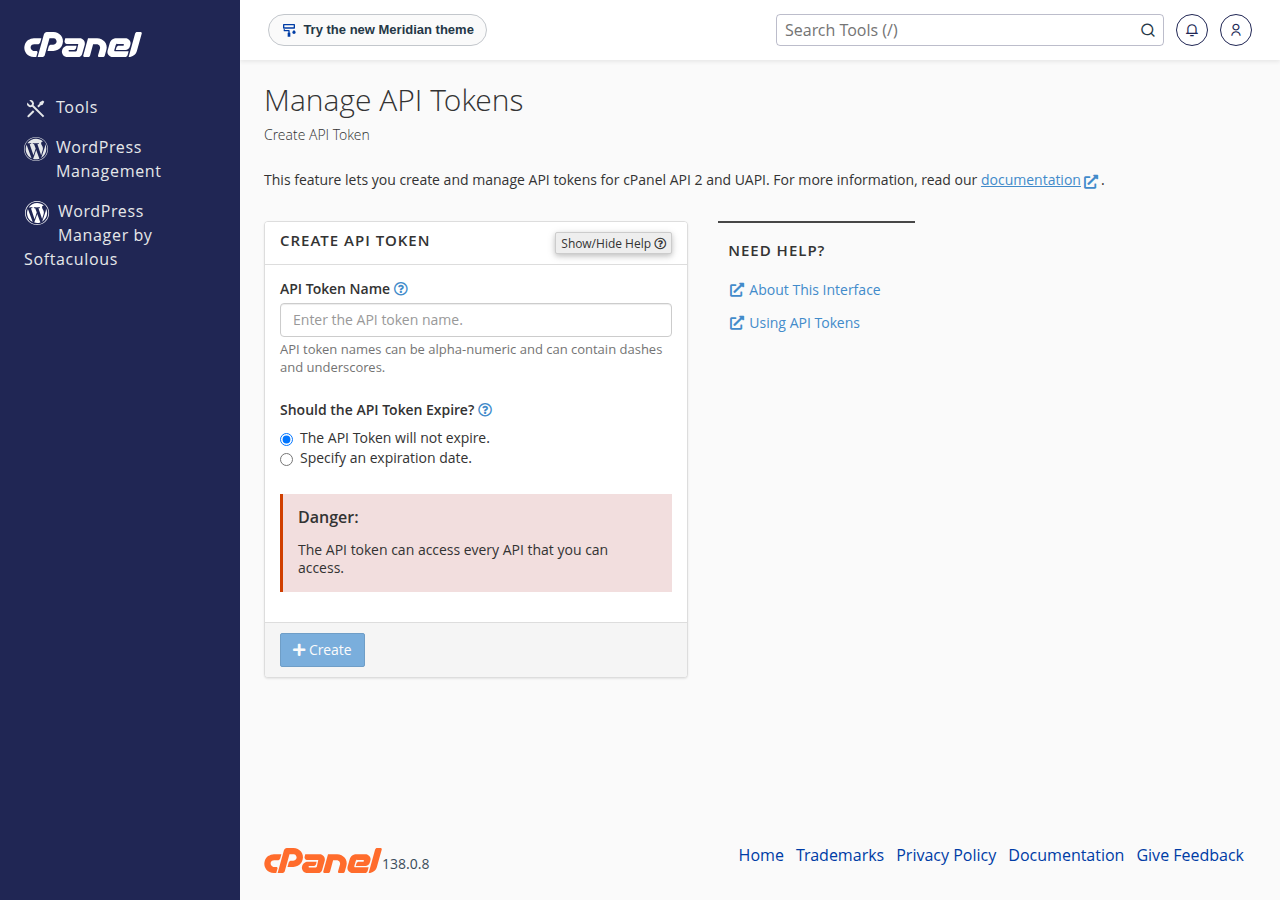
- Open Manage API Tokensin the Security section and create a token. Give it a name you will recognise, and set an expiry date if you only need it for a while.
- Copy the token straight away.cPanel shows it only once. Store it in a password manager.
- Call the APIfrom your own computer. Use the server name from the panel URL on your hosting service's Access tab in the client area.
export CPANEL_TOKEN="paste-the-token-here"
curl -s -H "Authorization: cpanel USERNAME:$CPANEL_TOKEN" \
  "https://SERVER-HOSTNAME:2083/execute/Email/list_pops"
The reply is JSON. A worked example with a script is in manually testing the cPanel API.
Anyone with your username and token can read and change your email, files and databases without your password or two-factor code. Never paste a token into a ticket, a chat, a screenshot or a repository. Delete tokens you no longer use from the same page. Repeated failed calls count as failed logins and can get your IP address blocked, so if a call fails twice, stop and check the token.
WHM and its API (port 2087) are for server administrators and aren't available to shared hosting accounts, so examples that send Authorization: whm … won't work with a cPanel token.
3. App Platform deploy tokens
A deploy token uploads your code to one App Platform app from your computer or a CI pipeline.
- Create it in your app's Access › Deploy Tokens tab and choose an expiry: never, 30, 60 or 90 days, or 1 year.
- It is shown once, together with a ready-to-run
curlcommand that already contains your app's deploy address. Copy that command rather than typing the address yourself. - Each token works for one app only, and you can hold up to 5 per app. The list shows when each was created, last used and expires.
- In CI, store the token as a secret variable, never in a file in your repository.
The full walk-through, including the error messages, is in Deploying with a deploy token.
4. Connecting an AI assistant
You can let Claude, ChatGPT or another assistant that supports remote MCP servers read your domains, services, invoices and tickets. There is no token to copy: in ChatGPT you add the DOMAIN INDIA plugin, in Claude and other MCP clients you add https://domainindia.com/mcp; then you sign in to Domain India and choose the permissions on a consent screen. The connection uses OAuth 2.0 with PKCE, access keys last one hour, and a connection unused for 30 days lapses.
No permission exists for payments, transfer codes, nameserver or contact changes, passwords or cancellations. You can see and disconnect every connected app on the Connected apps page. Details are in Connecting your account to an AI assistant.
5. Rules for every token
# .env (never committed)
CPANEL_TOKEN=paste-the-token-here

# .gitignore
.env
*.key
If you are designing authentication for your own API, Navigating the evolution of API authentication compares API keys, OAuth 2.0, JWT and mutual TLS, and environment variables and secrets management covers storage.
6. Troubleshooting
| Symptom | Likely cause | What to do |
|---|---|---|
| 401 or "Access denied" from cPanel | Wrong username or token, the token expired or was deleted, or the header says whm | Check each part of cpanel USERNAME:TOKEN |
| Timeout on port 2083 | Your network blocks the port, or your IP was blocked after failed attempts | Try from another connection, then see the IP block guide below |
| "Invalid or expired deploy token" | Wrong, expired or revoked token, or the placeholder is still in the command | Create a new token and copy the command from the tab again |
| Token looks right but fails | A space or line break was copied with it | Paste it into a plain text editor and copy it again |
| The assistant says it is not allowed | The permission was not ticked when you connected | Check Connected apps, then disconnect and connect again |
If you think your IP address is blocked, see I can't reach my server: have I been blocked?.
7. Where Domain India fits
Manage API Tokens is in every Domain India cPanel account; on 19 September 2026, cPanel Starter was ₹125 a month and cPanel Growth ₹200 a month. App Platform plans are ₹100 (Starter), ₹250 (Developer) and ₹500 (Pro) a month. All are Domain India list prices, excluding 18% GST. A self-managed VPS gives you root access to run your own API and identity setup.
- 512 MB RAM per app
- 1 vCPU
- 5 GB NVMe SSD
- PostgreSQL Database
Prices on the cards exclude 18% GST.
Does Domain India have a public API for domains and billing?
The client area does not issue general-purpose API keys. You can automate your cPanel account with cPanel API tokens, deploy App Platform apps with deploy tokens, and let an AI assistant read your account through an OAuth connection at https://domainindia.com/mcp.
Where do I create a cPanel API token?
In cPanel, open Manage API Tokens in the Security section and create a token. It is shown only once, so copy it to a password manager straight away.
What header does the cPanel API expect?
Authorization: cpanel USERNAME:TOKEN, sent over HTTPS to port 2083 of your cPanel server. A header starting with whm is for WHM, which shared hosting accounts can't use.
I lost my token. Can support show it to me again?
No. cPanel API tokens and App Platform deploy tokens are shown only once when created. Delete or revoke the lost token and create a new one.
Can a connected AI assistant pay invoices or move my domain?
No. There is no permission for payments, transfer codes, nameserver or contact changes, passwords or cancellations, so no assistant can be granted them.
Is it safe to send a token to support in a ticket?
No. Never share a token in a ticket, chat or email. Support does not need it; if one has been shared, revoke it and create a new one.
Ready to automate? Open cPanel from your hosting list to create an API token, set up a deploy token for your App Platform apps, or review your connected apps. Questions? Open a support ticket or use the 24/7 live chat.
Every cPanel account includes API tokens for UAPI, free SSL and weekly backups.
See cPanel hosting plans