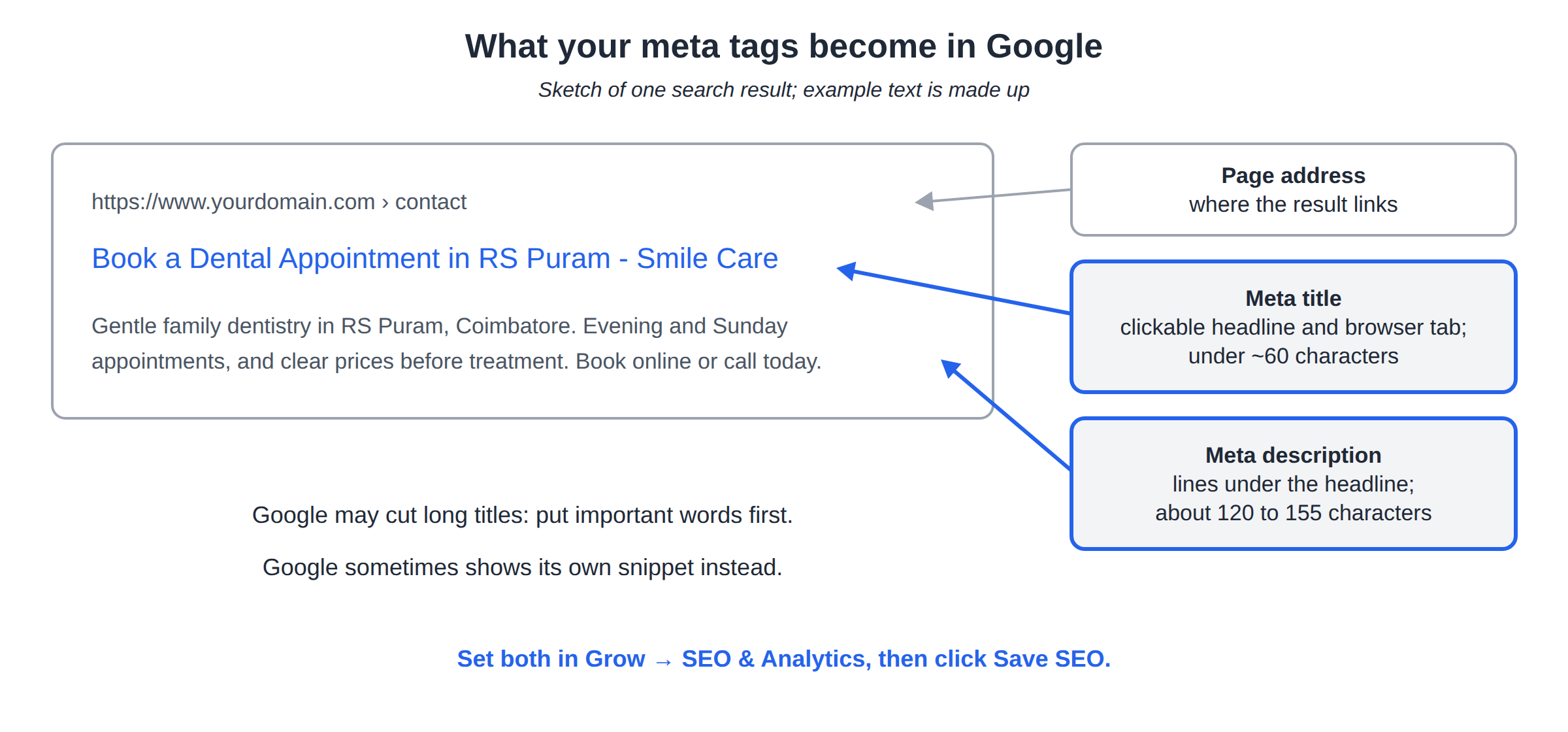
Meta tags are the short pieces of text that search engines and social apps show for your pages: the blue headline in Google, the two lines under it, and the preview card when someone shares your link on WhatsApp or Facebook. In the AI Website Builder you write two of them yourself, and the rest are generated from them. This guide shows where to set them and how to write ones that get clicks.
Open the editor's Grow tab and go to SEO & Analytics. Set a site-wide Page title and Meta description, then a title and description for each page under Per-page SEO, and click Save SEO. Keep titles under about 60 characters and descriptions around 120 to 155. Social sharing tags are generated for you from the same text.
1. The tags that matter
| Tag | Where people see it | Who writes it |
|---|---|---|
| Meta title | The clickable headline in Google, and the browser tab | You, or the AI |
| Meta description | The one or two lines under the headline in Google | You, or the AI |
| Social tags (Open Graph and Twitter card) | The preview card when your link is shared | Generated from your title, description and a page image |
| Canonical link | Not visible; tells Google the main address of a page | Generated |
On a published builder site we checked, the social tags used the page's title and description, and the hero photo as the picture. So a good title, description and hero photo give you a good share preview too.
Old-style "meta keywords" don't help with Google any more, so don't spend time on them.
2. Where to set them
- Open the editor.Go to AI Website Builder in the client area and open your site.
- Open Grow → SEO & Analytics.
- Site-wide defaults.Fill in Page title and Meta description. Any page without its own tags uses these.
- Per-page tags.Under Per-page SEO, choose a page and fill in its title and description. Leave a field blank to fall back to the site-wide default.
- Save.Click Save SEO. Both sets are saved together.
If you'd rather start from a draft, click Generate title & description with AI, or Generate this page's SEO with AI for one page. Always read what the AI writes and correct any detail that isn't true for your business.
3. Writing a good meta title
A simple formula works for most small businesses:
What you offer + where - Business name
| Page | Example title |
|---|---|
| Home | Family Dental Clinic in Coimbatore, Open Sundays - Smile Care |
| About | About Smile Care: 12 Dentists Since 2010 |
| Services | Teeth Cleaning, Braces and Implants in Coimbatore - Smile Care |
| Contact | Book a Dental Appointment in RS Puram - Smile Care |
Only use numbers and claims that are true for you. The examples above are made up.
- Put the important words first. Google may cut long titles.
- Keep it under about 60 characters.
- Make each page's title different. Duplicate titles compete with each other.
- Write for people. No keyword stuffing and no ALL CAPS.
4. Writing a good meta description
Google doesn't rank pages by description, but a clear one makes people click. A useful pattern:
What the page offers. What makes you different. What to do next.
For example: "Gentle family dentistry in RS Puram, Coimbatore. Evening and Sunday appointments, and clear prices before treatment. Book online or call today."
- Aim for about 120 to 155 characters.
- Match the page. A description that promises something the page doesn't have makes visitors leave.
- Include your place name for local searches.
- Write a fresh one for each page.
Google sometimes shows its own snippet instead of your description. That's normal; a good description still gives it the best text to choose from.
5. Share previews on WhatsApp, Facebook and LinkedIn
The builder generates the social tags, so you don't type them separately. To improve your share preview:
- write a clear title and description (sections 3 and 4);
- use a strong, relevant hero photo, because it is used as the preview picture;
- after changing them, republish your site so the new tags are live.
Social apps cache previews. If an old preview still shows, use the platform's own tool to refresh it, such as Facebook's Sharing Debugger or LinkedIn's Post Inspector.
6. Check your tags
- In your browser: open your published page, right-click and choose View Page Source, and look for the
titleandmeta name="description"lines. - In Google Search Console: see which searches show your pages and how often people click. Connect it from the same SEO panel; see How to configure SEO settings.
7. Where Domain India fits
The SEO panel, with site-wide and per-page tags, is part of every paid AI Website Builder plan; the live pricing card lists "SEO & Google Analytics" on Starter. Tags reach Google only once your site is published on a paid plan.
- 1 website
- Publish on your own domain + free SSL
- AI creates your website
- AI chat editor
Frequently asked questions
Where do I add meta tags in the AI Website Builder?
In the editor's Grow tab, under SEO & Analytics. Set the site-wide Page title and Meta description, then per-page ones under Per-page SEO, and click Save SEO.
How long should a meta title be?
Keep it under about 60 characters, with the most important words first, so Google can show it in full.
How long should a meta description be?
About 120 to 155 characters. Say what the page offers, what makes you different and what to do next.
Do I need to set Open Graph tags for Facebook and WhatsApp?
No. The builder generates social sharing tags from your title, description and a page image. A good hero photo gives you a good preview.
Can the AI write my meta tags?
Yes. Use Generate title & description with AI, or Generate this page's SEO with AI for a single page. Check the result before saving.
Why does Google show different text from my description?
Google sometimes writes its own snippet from your page to match the search. A clear, accurate description still gives it the best text to use.
Ready to write yours? Open AI Website Builder and go to the Grow tab. Questions? Open a ticket or use our 24/7 live chat.
Titles, descriptions and share previews for every page, with AI drafts to start from.
See AI builder plans