A VPS can serve a busy website or application quickly on modest hardware, but only if each layer of the stack does its job: the web server, PHP or the app runtime, caching, the database and the network in front of it. Every tool in this guide is free and open source. It applies to your own VPS or server with root access; on shared hosting the server stack is managed for you and can't be changed.
Measure before you tune. For most VPS sites the winning free stack is nginx (alone or in front of Apache), PHP-FPM with OPcache, a page cache, Redis or Valkey as an object cache, a well-sized MariaDB, MySQL or PostgreSQL, compression, and a CDN such as Cloudflare. Add Varnish, load balancers or search engines only when a measurement shows you need them.
1. Measure first
Tuning without numbers usually moves the bottleneck rather than removing it. Before changing anything, find out whether you are short of CPU, memory, disk or database time.
- Live view:
htopfor CPU and memory per process,iostat -x 5(from thesysstatpackage) for disk waits,free -hto check that the server isn't swapping. - Web side: the web server's access log with request times, and your browser's developer tools or Lighthouse for front-end weight.
- Database side: the slow query log. See diagnosing and fixing slow MySQL queries or PostgreSQL performance tuning.
- Over time: Netdata for a zero-setup dashboard, or Prometheus with Grafana; see production observability with Prometheus, Grafana and Loki.
2. The free stack at a glance
| Layer | Start with | Add later, if measured |
|---|---|---|
| Web server and proxy | nginx, or nginx in front of Apache for .htaccess sites | Varnish for cacheable pages; HAProxy or nginx for load balancing |
| PHP runtime | PHP-FPM with OPcache | FrankenPHP, RoadRunner or Swoole for long-running PHP apps |
| Page cache | nginx FastCGI cache, or a WordPress cache plugin | Varnish |
| Object cache | Redis or Valkey | Memcached for simple key-value caching |
| Database | MariaDB or MySQL, or PostgreSQL | ProxySQL or PgBouncer for connection pooling |
| Search | The database's own full-text search | Meilisearch, Typesense or OpenSearch |
| Delivery | gzip or Brotli, modern image formats | A CDN such as Cloudflare |
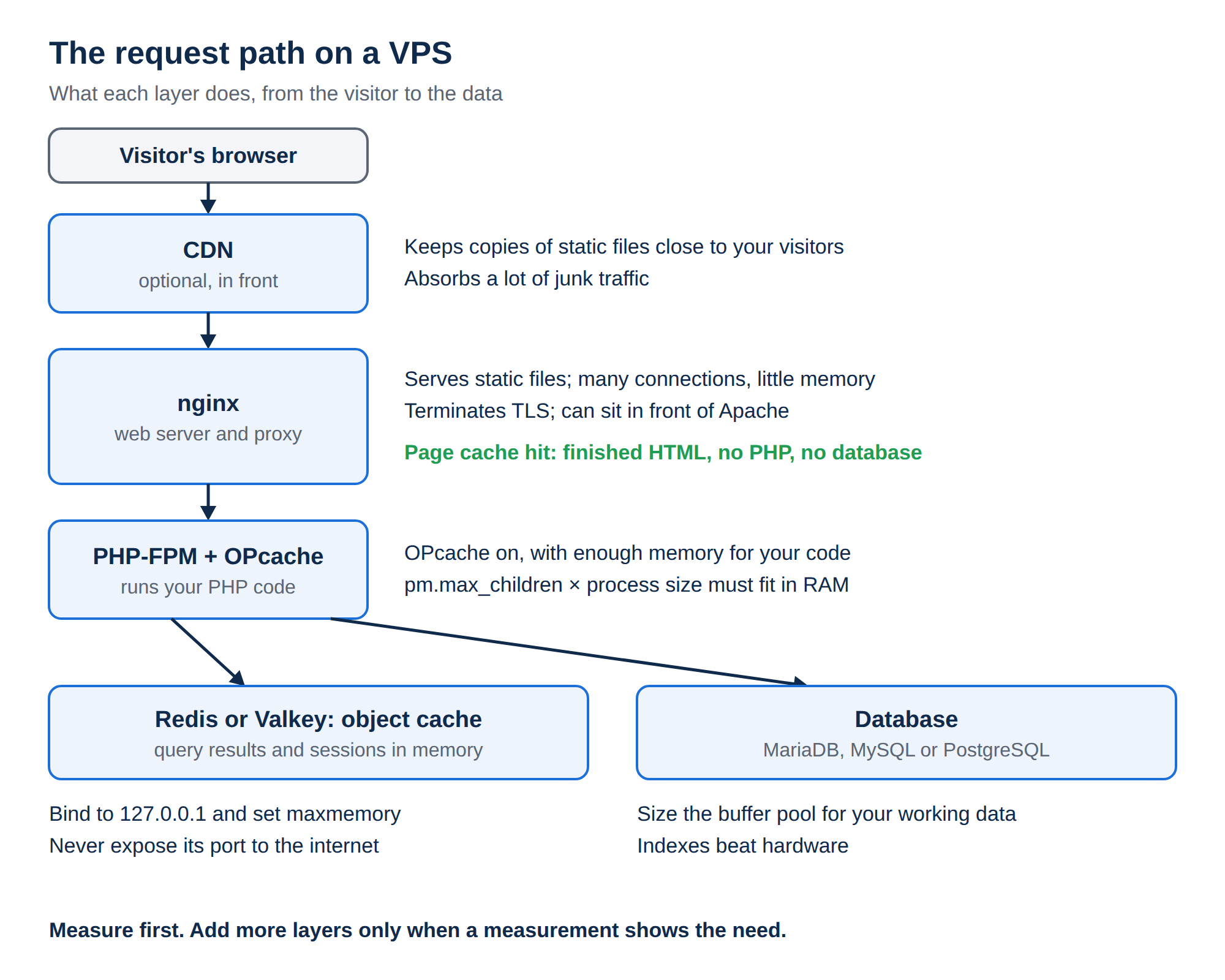
3. Web server and reverse proxy
nginx serves static files and handles many concurrent connections with little memory, which makes it the default choice on a VPS. If your applications rely on .htaccess files, keep Apache for them and put nginx in front to serve static files and terminate TLS. OpenLiteSpeed, which comes with CyberPanel, is another free option with its own cache.
Varnish is powerful for pages that many anonymous visitors see, but it adds a layer to configure and it does not speak HTTPS itself. Try the nginx FastCGI cache first.
4. PHP and application runtimes
Run PHP through PHP-FPM, never as an Apache module, and make sure OPcache is on with enough memory for your code (opcache.memory_consumption). Size the FPM pool to your RAM: pm.max_children multiplied by the average PHP process size should fit in memory with room left for the database. Use a PHP version that still receives security updates; check the list on php.net rather than an old tutorial.
For frameworks such as Laravel, application servers like FrankenPHP, RoadRunner or Swoole keep the app loaded between requests and can be much faster, but your code must be safe to run in a long-lived process.
5. Caching: pages and objects
A page cache serves finished HTML without running PHP or touching the database, which is the biggest single win for a content site. On WordPress, a plugin such as WP Super Cache or W3 Total Cache does this; on nginx, the FastCGI cache does it for any PHP app.
An object cache keeps query results and sessions in memory. Redis is the usual choice; Valkey is a fully open-source fork of Redis that works with the same clients. Bind it to 127.0.0.1 or a private network, set maxmemory with an eviction policy, and never expose its port to the internet.
For the full picture, including cache invalidation, read building high-performance applications with advanced caching.
6. The database
- MariaDB or MySQL: give InnoDB a buffer pool large enough to hold your working data (
innodb_buffer_pool_size), often around half the RAM on a server that also runs the web stack. MySQL 8 no longer has a query cache, so cache results in Redis or Valkey instead. - PostgreSQL: tune
shared_buffersandwork_mem, keep autovacuum running, and put PgBouncer in front if your app opens many short connections. - ProxySQL pools connections and routes reads to replicas for MySQL and MariaDB; it is useful when you have replicas, not before.
- Indexes beat hardware. One missing index can cost more than any setting.
What about MongoDB? It is a document database rather than a relational one. It suits flexible, JSON-shaped data at scale, while MariaDB, MySQL or PostgreSQL remain the better fit for WordPress, e-commerce, accounting and most SaaS apps. Pick the database for your data model, not for speed alone.
7. Compression, images and the CDN
Turn on gzip for text responses, and Brotli if your nginx build includes the module. Serve images as WebP or AVIF at the size they are displayed, and minify CSS and JavaScript in your build step. A CDN keeps copies of static files close to your visitors and absorbs a lot of junk traffic; Cloudflare's free plan is a common start. See the complete Cloudflare setup guide.
8. Security that doesn't slow you down
- Firewall and brute-force protection: nftables or firewalld, with Fail2ban or CrowdSec. ConfigServer stopped developing CSF in 2025, so prefer these on a new server.
- Web application firewall: ModSecurity with the OWASP Core Rule Set, or Coraza. Start in detection mode, then enforce.
- TLS: free certificates from Let's Encrypt, renewed automatically.
More hardening steps are in essential security and optimization tips for your VPS.
9. Running this on a Domain India VPS
Domain India VPS plans use KVM virtualization with full root access and NVMe storage, and they are self-managed: every step in this guide is yours to carry out. At checkout you can choose no control panel, CyberPanel, Webuzo or DirectAdmin; cPanel is not offered on a VPS. The VPS servers are in Germany, so a CDN is worth adding if most of your visitors are in India. On 19 September 2026, Domain India list prices started at ₹553 a month for VPS Starter, excluding 18% GST.
- 1 vCPU
- 2 GB DDR4 RAM
- 64 GB NVMe SSD Storage
- 2 TB Monthly Bandwidth
On Domain India shared hosting the stack is already tuned for you: compression is on, OPcache is on (on DirectAdmin, for every PHP version except 8.3), and there is no Redis on any shared plan. If your site needs Redis, a custom nginx configuration or its own database tuning, that is the point to move to a VPS. If the site is slow on shared hosting, start with my website is slow.
What is the best free software stack for a fast VPS?
For most sites: nginx, alone or in front of Apache, PHP-FPM with OPcache, a page cache, Redis or Valkey for object caching, a well-sized MariaDB, MySQL or PostgreSQL, gzip or Brotli compression, and a CDN. Measure before adding anything more.
Should I use Redis or Memcached?
Redis, or its open-source fork Valkey, is the usual choice because it supports richer data types and persistence. Memcached is fine for simple key-value caching. Either one must listen only on localhost or a private network.
Does MySQL still have a query cache?
No. MySQL 8 removed the query cache. Cache query results in your application with Redis or Valkey instead, and fix slow queries with indexes.
Is a Domain India VPS managed?
No. Domain India VPS plans are self-managed with full root access. You install, tune, secure and update the software yourself.
Can I install Redis on Domain India shared hosting?
No. There is no Redis on any Domain India shared hosting plan. Use a VPS if your application needs Redis.
Ready to build a faster stack? Compare VPS plans, read choosing the best control panel for your VPS, or open a support ticket if you have a question before ordering.
KVM virtualization, full root access and NVMe storage, with your choice of Linux and an optional control panel.
See VPS plans