Cross-Site Request Forgery (CSRF) tricks a logged-in user's browser into sending a request your site did not intend to accept. The fixes are well known, but the right one depends on your stack: plain PHP, Laravel, Express or a single-page app with an API. This guide explains each defence, when SameSite cookies are enough and when they are not, and how to test your own app.
If your app authenticates with cookies, every state-changing request needs a check the attacker can't forge: a synchronizer token in the form (PHP, Laravel's @csrf), a signed double-submit cookie (Express with csrf-csrf), or a strict Origin / Fetch Metadata check. Set session cookies to SameSite=Lax or Strict as an extra layer, never as the only one. APIs that use Authorization: Bearer tokens instead of cookies are not exposed to CSRF.
1. How a CSRF attack works
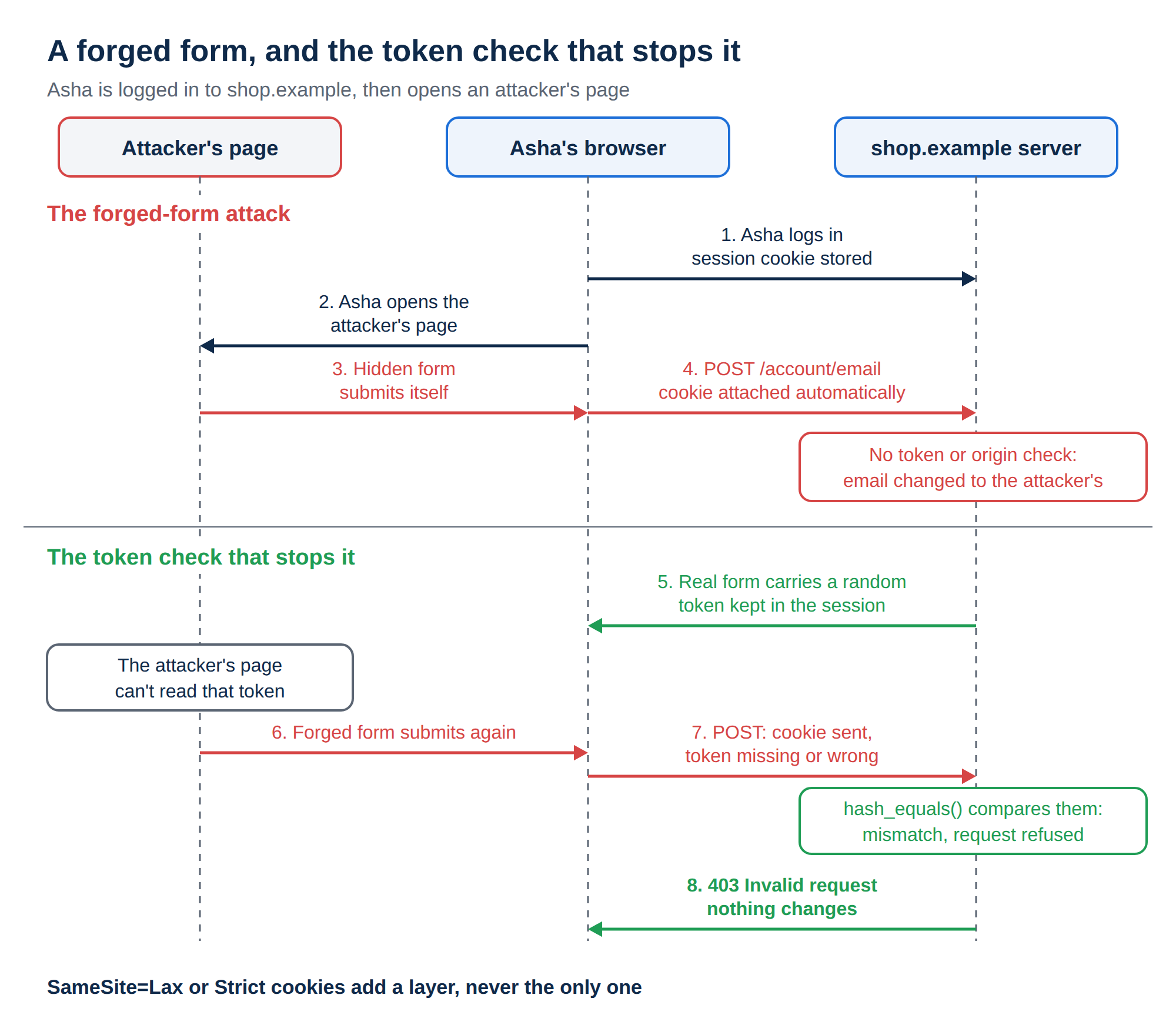
Browsers attach cookies to requests automatically. Suppose Asha is logged in to shop.example, and then visits a malicious page containing:
<form action="https://shop.example/account/email" method="POST" id="f">
  <input type="hidden" name="email" value="[email protected]">
</form>
<script>document.getElementById('f').submit();</script>
If her browser sends the session cookie with that POST, and the shop does not check where the request came from, her account email changes and the attacker can reset her password. The attacker never sees the cookie; they only need the browser to send it.
OWASP now files CSRF (CWE-352) under Broken Access Control. It matters for any action that changes state: payments, profile or email changes, admin actions, even logout.
2. Defence one: the synchronizer token
The server creates a random token, stores it in the session and puts it in every form. On submit, it compares the two and rejects a mismatch. An attacker's page can't read the token, so it can't forge a valid request.
Plain PHP:
<?php
session_start();
if (empty($_SESSION['csrf'])) {
    $_SESSION['csrf'] = bin2hex(random_bytes(32));
}
?>
<form method="post" action="/account/email">
  <input type="hidden" name="csrf" value="<?= htmlspecialchars($_SESSION['csrf']) ?>">
  <input name="email" type="email">
  <button>Save</button>
</form><?php
session_start();
$sent = $_POST['csrf'] ?? '';
if (!is_string($sent) || !hash_equals($_SESSION['csrf'] ?? '', $sent)) {
http_response_code(403);
exit('Invalid request');
}
// ... safe to processUse hash_equals, which compares in constant time, and regenerate the session ID with session_regenerate_id(true) at login. For a longer PHP walkthrough, see Understanding and Implementing CSRF Tokens in PHP Forms.
Laravel protects every route in the web middleware group automatically. Add @csrf inside each Blade form. For JavaScript requests, add a csrf-token meta tag holding {{ csrf_token() }} to your layout and send its value as the X-CSRF-TOKEN header; Axios also picks up Laravel's XSRF-TOKEN cookie on its own. In Laravel 11 and later the middleware is ValidateCsrfToken, and any exclusions are declared in bootstrap/app.php with validateCsrfTokens(except: [...]). Keep that list short, and review it.
3. Defence two: the signed double-submit cookie
For stateless servers, the server sets a random value in a cookie and the client echoes it back in a header or form field. An attacker's page can't read your cookies, so it can't copy the value.
Use the signed variant, where the token is tied to the user's session with an HMAC. A plain, unsigned double-submit cookie can be defeated by anyone who can set a cookie on your domain, for example from a compromised subdomain.
Express: the old csurf package was deprecated in 2022; don't use it. A maintained replacement is csrf-csrf:
npm install csrf-csrf cookie-parserimport express from 'express';
import cookieParser from 'cookie-parser';
import { doubleCsrf } from 'csrf-csrf';
const app = express();
app.use(cookieParser());
app.use(express.urlencoded({ extended: false }));
const { generateCsrfToken, doubleCsrfProtection } = doubleCsrf({
getSecret: () => process.env.CSRF_SECRET,
getSessionIdentifier: (req) => req.session.id, // requires your session middleware
cookieName: '__Host-csrf',
cookieOptions: { sameSite: 'strict', secure: true, httpOnly: true },
});
app.get('/account', (req, res) => {
res.render('account', { csrfToken: generateCsrfToken(req, res) });
});
app.post('/account/email', doubleCsrfProtection, (req, res) => { /* ... */ });Option and function names have changed between major versions of csrf-csrf, so check its README for the version you install.
4. Defence three: SameSite cookies
The SameSite attribute controls whether a cookie is sent with cross-site requests:
| Value | Sent on cross-site requests? | Use it for |
|---|---|---|
| Strict | Never | Admin panels and high-risk apps; users arriving from a link must log in again |
| Lax | Only on top-level GET navigations | A sensible default for session cookies |
| None | Always, and it requires Secure | Only when you truly need cross-site cookies, such as an embedded widget |
Chrome and Edge treat a cookie with no SameSite attribute as Lax; other browsers do not all do the same. So set it explicitly.
PHP: PHP leaves SameSite unset unless you configure it. Set it before session_start():
session_set_cookie_params([
    'secure' => true, 'httponly' => true, 'samesite' => 'Lax',
]);
session_start();
Laravel: config/session.php defaults to same_site => 'lax'; set secure => true in production.
Express: in express-session, use cookie: { secure: true, httpOnly: true, sameSite: 'lax' }.
Lax still allows cross-site GET navigations, so any action on GET stays exposed. Sibling subdomains count as the same site, so a compromised subdomain can still send your cookies. Keep tokens or origin checks on every state-changing request.
5. Defence four: Origin and Fetch Metadata checks
Modern browsers send headers that say where a request came from. Rejecting cross-site state changes on the server is simple and cheap:
app.use((req, res, next) => {
  if (['GET', 'HEAD', 'OPTIONS'].includes(req.method)) return next();
  const site = req.get('Sec-Fetch-Site');
  if (site && site !== 'same-origin' && site !== 'none') {
    return res.status(403).send('Cross-site request blocked');
  }
  const origin = req.get('Origin');
  if (!site && origin && origin !== 'https://shop.example') {
    return res.status(403).send('Bad origin');
  }
  next();
});
For JSON APIs, also accept only Content-Type: application/json and keep CORS limited to your own origins, never * with credentials. A plain HTML form can't send JSON, and a cross-origin script can't set that content type without a CORS preflight your server refuses.
6. Which defence fits your app
| App type | Main defence | Add |
|---|---|---|
| Server-rendered PHP | Synchronizer token | SameSite=Lax, Origin check |
| Laravel | Built-in CSRF middleware and @csrf | Short exception list |
| Express with templates | csrf-csrf (signed double-submit) | SameSite, Fetch Metadata |
| SPA with a cookie-session API | Double-submit header or Origin check | SameSite=Strict, JSON-only |
| API with Bearer tokens | Not needed for CSRF | Protect the token from XSS |
Next.js Server Actions compare the Origin and Host headers for you, but ordinary API routes need their own checks.
7. Test your defences
- Replay without a token.Log in, copy your session cookie, then send the form with
curlbut without the token field. You should get a 403. - Edit and resend in DevTools.In the Network tab, change or remove the token and resend the request. It must fail.
- Try a cross-site form.Host the attack form from section 1 on another domain and submit it while logged in.
- Automate it.OWASP ZAP and Burp Suite flag forms without tokens. Add integration tests that expect a 403 when the token is missing.
Also check for state changes on GET, tokens in URLs (they leak through logs and the Referer header), and unprotected upload or logout routes.
8. Running this on Domain India
- WordPress uses nonces (
wp_nonce_field,check_admin_referer) for its own forms. Custom plugins must call them too. - PHP on cPanel and DirectAdmin hosting: the synchronizer pattern above works as written. Set
samesiteyourself, as shown in section 4. - Laravel on shared hosting: Composer isn't pre-installed, so build locally with
vendor/included and upload it, or runcomposer.pharover jailed SSH. - Express: run it on the App Platform, where Node.js is detected automatically, on your own VPS, or with cPanel's Setup Node.js App tool (choose Node.js 22 or 24).
- Server-side protection: on cPanel servers, Imunify360's web application firewall blocks many known attack patterns. It does not replace CSRF tokens in your code.
Pair CSRF protection with XSS prevention, because an XSS hole can read any token on the page. See Preventing XSS in PHP and Node.js and Security Headers Explained.
Do I need CSRF protection if my API uses JWTs in the Authorization header?
No. Browsers don't add Authorization headers automatically, so a forged cross-site request carries no credentials. If you store the JWT in a cookie, the cookie is sent automatically and you do need CSRF protection.
Can SameSite cookies replace CSRF tokens?
Not on their own. SameSite=Lax still allows cross-site GET navigations, sibling subdomains count as the same site, and browsers differ in their defaults. Use SameSite as an extra layer alongside tokens or origin checks.
What should I use instead of csurf in Express?
csurf was deprecated in 2022. Use a maintained package such as csrf-csrf, which implements a signed double-submit cookie, or add a Fetch Metadata and Origin check to every state-changing route.
Does Laravel protect against CSRF by default?
Yes, for routes in the web middleware group. Add @csrf to Blade forms and send the X-CSRF-TOKEN header on JavaScript requests. Routes in routes/api.php use token authentication and are not covered by the CSRF middleware.
What is the difference between CSRF and XSS?
CSRF makes a user's browser send a request they didn't intend. XSS runs an attacker's script inside your site. XSS is worse, because a script on your page can read CSRF tokens, so fix XSS as well.
How often should CSRF tokens be rotated?
At least once per session, and after login. Regenerate the session ID when a user logs in, so no token from before login stays valid.
Do mobile apps need CSRF tokens?
Usually not. Mobile apps typically send a Bearer token in a header rather than relying on browser cookies. If a mobile app uses a cookie session through a web view, treat it like a browser.
Ready to deploy your app? Compare the App Platform, cPanel hosting and VPS plans, or read the OWASP Top 10 guide.
Deploy Node.js apps without managing a server, with free SSL and your own domain.
See the App Platform